
How an Event Enters a Cocoa Application
How an Event Enters a Cocoa Application
An event is a low-level record of a user action that is usually routed to the application in which the action occurred. A typical event in OS X originates when the user manipulates an input device attached to a computer system, such as a keyboard, mouse, or tablet stylus. When the user presses a key or clicks a button or moves a stylus, the device detects the action and initiates a transfer of data to the device driver associated with it. Through the I/O Kit, the device driver creates a low-level event, puts it in the window server's event queue, and notifies the window server. The window server dispatches the event to the appropriate run-loop port of the target process. From there the event is forwarded to the event-handling mechanism appropriate to the application environment. Figure 1-1 depicts this event-delivery system.
Figure 1-1 The event stream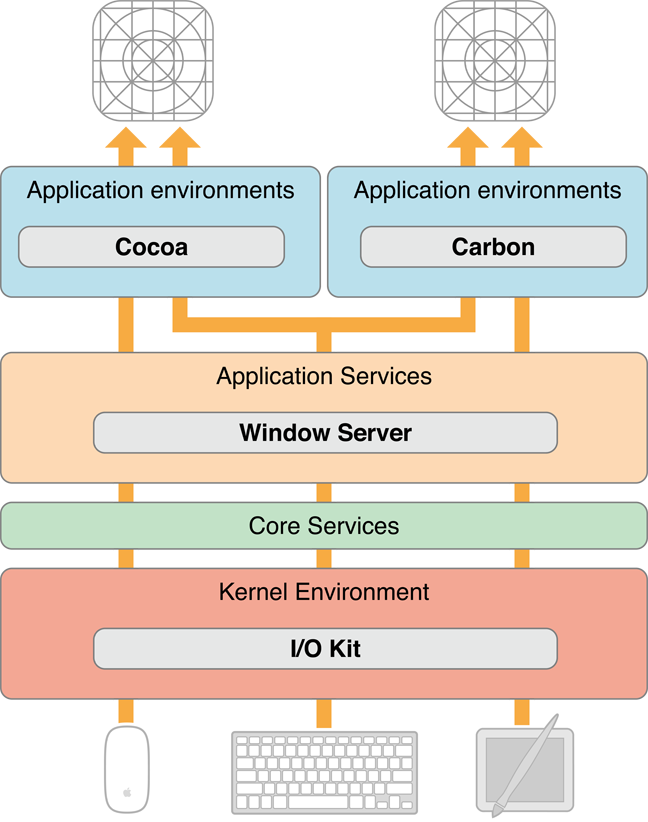
Note: Applications normally receive events from the keyboard and mouse only when they are in the foreground (that is, active). Although applications running in the background do not normally receive key and mouse events, low-level mechanisms called event taps make it possible for a background application to receive events and act upon them.
Before it dispatches an event to an application, the window server processes it in various ways; it time-stamps it, annotates it with the associated window and process port, and possibly performs other tasks as well. As an example, consider what happens when a user presses a key. The device driver translates the raw scan code into a virtual key code which it then passes off (along with other information about the key-press) to the window server in an event record. The window server has a translation facility that converts the virtual key code into a Unicode character.
In OS X, events are delivered as an asynchronous stream. This event stream proceeds “upward” (in an architectural sense) through the various levels of the system—the hardware to the window server to the Event Manager—until each event reaches its final destination: an application. As it passes through each subsystem, an event may change structure but it still identifies a specific user action.
Note: Lower levels of the system trap and handle some events early in the event stream. These events are never routed to a Cocoa application. These events are generated by reserved keys or key combinations, such as the power and media-eject keys.
Every application has a mechanism specific to its environment for receiving events from the window server. For a Cocoa application, that mechanism is called the main event loop. A run loop, which in Cocoa is an NSRunLoop object, enables a process to receive input from various sources. By default, every thread in OS X has its own run loop, and the run loop of the main thread of a Cocoa application is called the main event loop. What especially distinguishes the main event loop is an input source called the event source, which is constructed when the global NSApplication object (NSApp) is initialized. The event source consists of a port for receiving events from the window server and a FIFO queue—the event queue—for holding those events until the application can process them, as shown in Figure 1-2.
Figure 1-2 The main event loop, with event source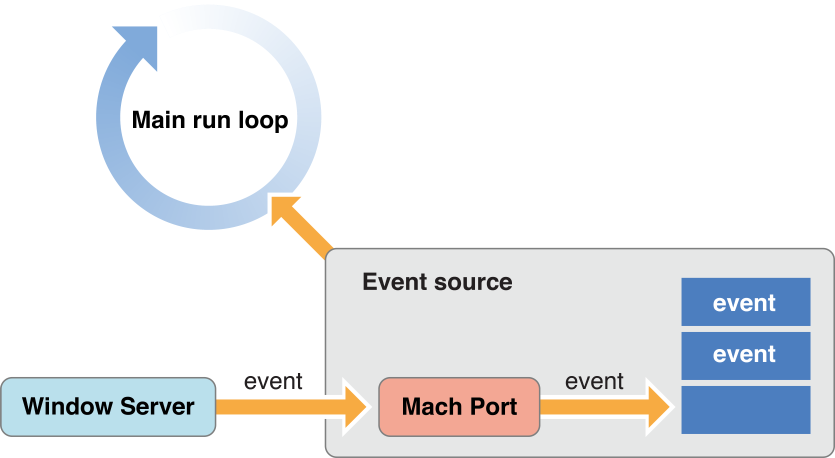
A Cocoa application is event driven: It fetches an event from the queue, dispatches it to an appropriate object, and, after the event is handled, fetches the next event. With some exceptions (such as modal event loops) an application continues in this pattern until the user quits it. The following section, Event Dispatch, describes how an application fetches and dispatches events.
Events delivered via the event source are not the only kinds of events that enter Cocoa applications. An application can also respond to Apple events, high-level interprocess events typically sent by other processes such as the Finder and Launch Services. For example, when users double-click an application icon to open the application or double-click a document to open the document, an Apple event is sent to the target application. An application also fetches Apple events from the queue but it does not convert them into NSEvent objects. Instead an Apple event is handled directly by an event handler. When an application launches, it automatically registers several event handlers for this purpose. For more on Apple events and event handlers, see Apple Events Programming Guide.
Event Dispatch
In the main event loop, the application object (NSApp) continuously gets the next (topmost) event in the event queue, converts it to an NSEvent object, and dispatches it toward its final destination. It performs this fetching of events by invoking the nextEventMatchingMask:untilDate:inMode:dequeue:method in a closed loop. When there are no events in the event queue, this method blocks, resuming only when there are more events to process.
After fetching and converting an event, NSApp performs the first stage of event dispatching in the sendEvent: method. In most cases NSApp merely forwards the event to the window in which the user action occurred by invoking the sendEvent: method of that NSWindow object. The window object then dispatches most events to the NSView object associated with the user action in an NSResponder message such as mouseDown: or keyDown:. An event message includes as its sole argument an NSEvent object describing the event.
The object receiving an event message differs slightly by type of event. For mouse and tablet events, the NSWindow object dispatches the event to the view over which the user pressed the mouse or stylus button. It dispatches most key events to the first responder of the key window. Figure 1-3 and Figure 1-4illustrate these different general delivery paths. The destination view may decide not to handle the event, instead passing it up the responder chain (see The Responder Chain).
Figure 1-3 Path of a mouse event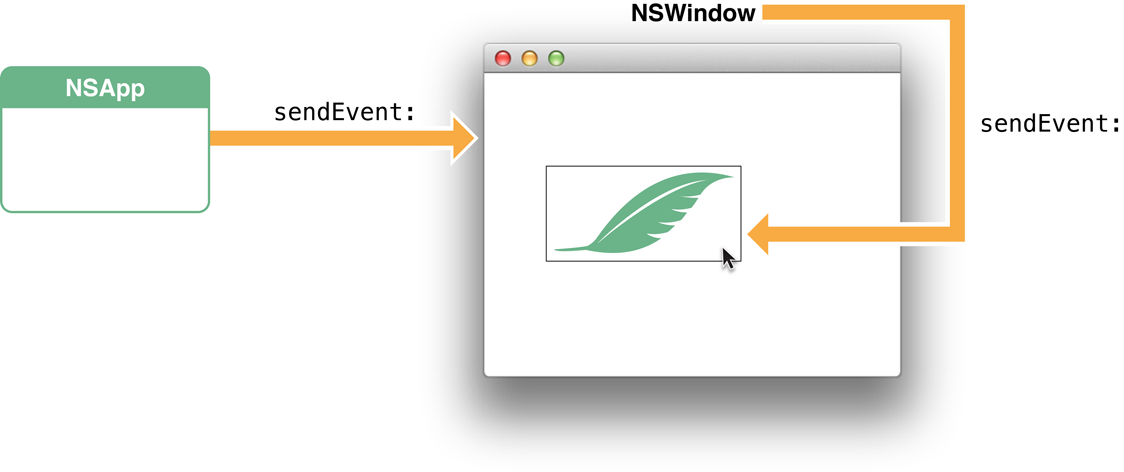 Figure 1-4 Path of a key event (character to insert)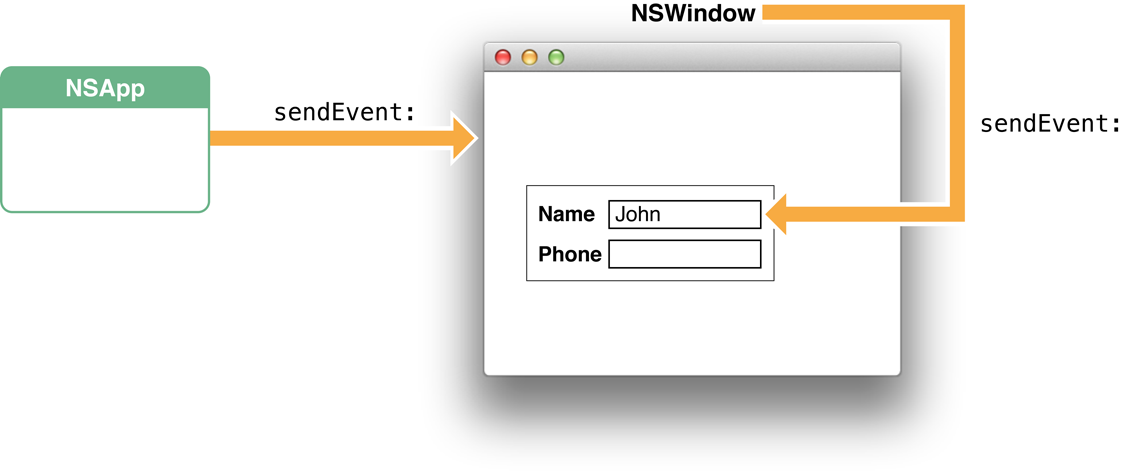
In the preceding paragraph you might have noticed the use of qualifiers such as “in most cases” and “usually.“ The delivery of an event (and especially a key event) in Cocoa can take many different paths depending on the particular kind of event. Some events, many of which are defined by the Application Kit (type NSAppKitDefined), have to do with actions controlled by a window or the application object itself. Examples of these events are those related to activating, deactivating, hiding, and showing the application. NSApp filters out these events early in its dispatch routine and handles them itself.
The following sections describe the different paths of the events that can reach your view objects. For detailed information on these event types, read Event Objects and Types.
https://developer.apple.com/library/content/documentation/Cocoa/Conceptual/EventOverview/EventArchitecture/EventArchitecture.html
How an Event Enters a Cocoa Application的更多相关文章
- 深入浅出 Cocoa 之 Core Data(3)- 使用绑定
深入浅出 Cocoa 之 Core Data(3)- 使用绑定 罗朝辉(http://blog.csdn.net/kesalin) CC 许可,转载请注明出处 前面讲解了 Core Data 的框架, ...
- Main event loop
https://developer.apple.com/library/archive/documentation/General/Conceptual/Devpedia-CocoaApp/MainE ...
- Cocoa深入学习:NSOperationQueue、NSRunLoop和线程安全 (转)
目前在 iOS 和 OS X 中有两套先进的同步 API 可供我们使用:NSOperation 和 GCD .其中 GCD 是基于 C 的底层的 API ,而 NSOperation 则是 GCD 实 ...
- Event List 2
The list of events can be found in src/switch_event.c in a char array called EVENT_NAMES and is summ ...
- Event List
Created by John Boteler on 2015.01.16 Go to start of metadata About The current up-to-date list of ...
- [BTS] Faulting application name: BTSNTSvc.exe, version: 3.9.469.0, time stamp: 0x4c547e09
Log Name: ApplicationSource: Application ErrorDate: 8/22/2013 1:28:35 AMEvent ID: 1000Task Category: ...
- 《苹果开发之Cocoa编程》挑战1 创建委托 练习
<苹果开发之Cocoa编程>第4版 P87 新建一个单窗口应用程序,设置某对象为窗口的委托,当用户调整窗口尺寸时,确保窗口高度为宽度的2倍. 需要实现的委托方法为:-(NSSize)win ...
- Cocoa深入学习:NSOperationQueue、NSRunLoop和线程安全
http://blog.cnbluebox.com/blog/2014/07/01/cocoashen-ru-xue-xi-nsoperationqueuehe-nsoperationyuan-li- ...
- Cocoa包管理器之Carthage详解及CocoaPods中心化+Carthage的二进制化
上篇博客详细的聊了CocoaPods的相关内容,今天我们就来介绍另一个Cocoa的包管理器Carthage.在上家公司用Swift开发工程时,用的就是Carthage.Carthage诞生于14年11 ...
随机推荐
- 10件5G能实现,但4G不能做的事情
10件5G能实现,但4G不能做的事情 从三星Galaxy S10 5G手机到OnePlus 7 Pro 5G手机以及更高版本,首批5G手机现已上市.5G网络时代的开启是从小范围内,如果你居住在可以使用 ...
- bzoj 1192: [HNOI2006]鬼谷子的钱袋 思维_二进制
十分巧妙的一道题. 考虑当前凑出$[1,i/2)$,那么再有一个 $i/2$,就可以凑出 [i/2+1,i). 注意,这里的 $i$ 都是 2 的 $k$ 次幂. 于是,我们只要找到 $i$ 使得 2 ...
- 路飞学城Python-Day80
36-模板语法之继承 Django模版引擎中最强大也是最复杂的部分就是模版继承了.模版继承可以让您创建一个基本的“骨架”模版,它包含您站点中的全部元素,并且可以定义能够被子模版覆盖的 blocks . ...
- mysql笔记1------基础
1.简介 (这两个结构就是ER模型)
- 修改默认input(file)的样式
以上是默认的 <input type="file" > 但是丑爆了啊同志们~~长久以来都是调用大神的代码,今天我也小试牛刀,做出了如下效果: 这样还是能接受的样子啦~ ...
- [noip2011]计算系数+二项式定理证明
大水题,二项式定理即可(忘得差不多了) 对于一个二项式,\((a+b)^n\)的结果为 \(\sum_{k=0}^{k<=n}C_{n}^{k}a^{n-k}b^k\) 证明: 由数学归纳法,当 ...
- 学习redis遇到的问题
1. pipeline为什么批量执行速度会变快? 答:是因为在tcp连接中减少了交互往返的时间,因为每次执行还要返回响应值,并且是一条执行完成之后才会执行下一条,但是批量执行只需要一次往返,所以节省了 ...
- ❝ Windows系统的FTP上传下载脚本 ❞
运行环境:windows 脚本功能:从目标系统下载数据库备份文件*.dmp 执行方法:windows任务计划定时调用文件ftp.bat 文件1:ftp.bat echo 开始备份日期: >> ...
- HDU 1757
简单的矩阵构造题,参看我前几篇的谈到的矩阵的构造法. #include <iostream> #include <cstdio> #include <cstring> ...
- js代码从页面移植到文件里失效或js代码改动后不起作用的解决的方法
近期在做关于站点的项目,总是发生这种问题 写的javascript代码在页面上没有问题,可是将js代码移植到.js的文件里,在页面上进行调用,总是出现失效等错误 另外改动后的js代码,又一次刷新网页仍 ...