
WPF 为资源字典 添加事件响应的后台类
前言,有许多同学在写WPF程序时在资源字典里加入了其它控件,但又想写事件来控制这个控件,但是资源字典没有CS文件,不像窗体XAML还有一个后台的CS文件,怎么办呢?
在工作时也遇到了这个问题,现在把它分享出来
比如说我们现在要写一个TabControl控件,在TabItem中有一个关闭按钮或其它按钮,这个按钮要能响应某个事件。

现在开始写资源字典里的 TabItem的样式,代码如下
  <Style x:Key="TIStyle" TargetType="{x:Type TabItem}">

        <Setter  Property="Template">

            <Setter.Value>

                <ControlTemplate TargetType="{x:Type TabItem}">

                    <Border x:Name="layout" BorderBrush="Gray" BorderThickness="1,1,1,0" Background="{TemplateBinding Background}"

                                CornerRadius="3" Margin="2,0,2,0">

                        <Grid Height="20">

                            <Grid.ColumnDefinitions>

                                <ColumnDefinition/>

                                <ColumnDefinition Width="25"/>

                            </Grid.ColumnDefinitions>

                            <TextBlock  TextAlignment="Center" Text="{TemplateBinding Header}" Grid.Column="0" Margin="4,0,3,0"

                            VerticalAlignment="Center"    HorizontalAlignment="Center"/>

                            <Button Content="X" Grid.Column="1"  Height="8" Width="8" Margin="4,1,3,2"

                            Tag="{TemplateBinding Header}" Click="Button_Click"

                            Background="{x:Null}" BorderBrush="{x:Null}" VerticalAlignment="Center">

                                <Button.Template>

                                    <ControlTemplate >

                                        <Grid>

                                            <Rectangle>

                                                <Rectangle.Fill>

                                                    <VisualBrush>

                                                        <VisualBrush.Visual>

                                                            <Path x:Name="btnPath"

                                                        Data="M0 0L10 10M0 10L10 0" Stroke="Gray"

                                                        StrokeThickness="1"/>

                                                        </VisualBrush.Visual>

                                                    </VisualBrush>

                                                </Rectangle.Fill>

                                            </Rectangle>

                                        </Grid>

                                        <ControlTemplate.Triggers>

                                            <Trigger Property="IsMouseOver" Value="True">

                                                <Setter TargetName="btnPath" Property="Stroke" Value="Red"/>

                                            </Trigger>

                                        </ControlTemplate.Triggers>

                                    </ControlTemplate>

                                </Button.Template>

                            </Button>

                        </Grid>

                    </Border>

                    <ControlTemplate.Triggers>

                        <Trigger Property="IsSelected" Value="True">

                            <Setter Property="Background" Value="White"/>

                            <Setter TargetName="layout" Property="Margin" Value="2,0,2,-1.5"/>

                        </Trigger>

                        <Trigger Property="IsSelected" Value="false">

                            <Setter Property="Background" Value="LightBlue"/>

                        </Trigger>

                    </ControlTemplate.Triggers>

                </ControlTemplate>

            </Setter.Value>

        </Setter>

    </Style>
然后为资源字典建一个后台类DicEvent.cs
  public  partial class DicEvent : ResourceDictionary

    {

       public void Button_Click(object sender, RoutedEventArgs e)

       {

           //省去处理,如果显示,表明调用成功。

           MessageBox.Show("你成功了!");

       }

    }
在资源字典里,添加对后台类的引用

主窗口里调用:
<Window x:Class="WpfDicButton.MainWindow"

        xmlns="http://schemas.microsoft.com/winfx/2006/xaml/presentation"

        xmlns:x="http://schemas.microsoft.com/winfx/2006/xaml"

        Title="MainWindow" Height="350" Width="525">

    <Grid>

        <TabControl>

            <TabItem Header="第一" Height=" 30" Style="{DynamicResource ResourceKey=TIStyle}"></TabItem>

        </TabControl>

    </Grid>

</Window>
记住APP文件里加入资源字典
  <Application.Resources>

        <ResourceDictionary>

            <ResourceDictionary.MergedDictionaries>

                <ResourceDictionary Source="TabControlDictionary.xaml" />

            </ResourceDictionary.MergedDictionaries>

        </ResourceDictionary>

    </Application.Resources>
测试,小功告成
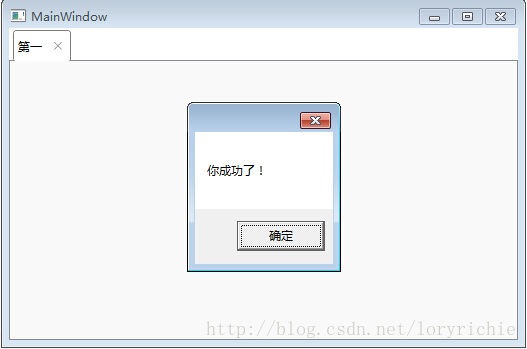
奉上DEMO 下载地址
WPF 为资源字典 添加事件响应的后台类的更多相关文章
- WPF之资源字典zz
最近在看wpf相关东西,虽然有过两年的wpf方面的开发经验,但是当时开发的时候,许多东西一知半解,至今都是模模糊糊,框架基本是别人搭建,自己也就照着模板写写,现在许多东西慢慢的理解了,回顾以前的若干记 ...
- WPF合并资源字典
1.合并多个外部资源字典成为本地字典 示例代码 <Page.Resources> <ResourceDictionary> <ResourceDictionary.Mer ...
- WPF使用资源字典组织资源
转载:http://blog.163.com/wangzhenguo2005@126/blog/static/371405262010111413321728/ 首先在解决方案资源管理器中添加 ...
- wpf 切换资源字典的2中方式
var _1200RDUri = new Uri(String.Format(@"/aa;Component/Themes/1200Theme.xaml"), UriKind.Re ...
- WPF 遍历资源字典中的控件
object obItem=this.FindResource("canvasdt"); if (obItem is System.Windows.DataTemplate) { ...
- (转载)资源字典(Pro WPF 学习)
原地址:http://www.cnblogs.com/yxhq/archive/2012/07/09/2582508.html 1.创建资源字典 下面是一个资源字典(AppBrushes.xaml), ...
- WPF资源字典
如果相同的资源可用于不同的应用程序,把资源放在一个资源字典中就比较有效. 新建一个资源字典文件Dictionary1.xaml <ResourceDictionary xmlns="h ...
- WPF 界面实现多语言支持 中英文切换 动态加载资源字典
1.使用资源字典,首先新建两个字典文件en-us.xaml.zh-cn.xaml.定义中英文的字符串在这里面[注意:添加xmlns:s="clr-namespace:System;assem ...
- WPF(MVVM) 利用资源字典实现中英文动态切换
1.首先新建两个字典文件en-us.xaml.zh-cn.xaml.定义中英文的字符串在这里面. 2.将两个资源字典添加到App.xaml中,这里注意下,因为两个字典中有同样字符,如果没有动态更改,默 ...
随机推荐
- 百度echart--Uncaught Error: Component series.wordCloud not exists. Load it first.
百度echart--Uncaught Error: Component series.wordCloud not exists. Load it first. 一.总结 一句话总结:关注报的错.可以通 ...
- 安装绿色版mysql小记(5.7.11)
平时使用oracle,感觉太耗我电脑内存了,实在不想用oracle做平时练习了,那就只装一个客户端,工作用..平时自己试试mysql吧..mysql的安装真麻烦,真不是傻瓜式安装就能用,稍微配置不对就 ...
- BZOJ1415 聪聪与可可 - 期望dp
传送门 题目大意: 一张无向图上有一只猫和一只老鼠,猫先走,鼠后走.猫每次会向与其相邻的并且距离老鼠最近的点移动(若距离相等去编号较小的),如果移动一步后还没吃到老鼠,还可以再移动一步(算在一个时间内 ...
- Linux中vim编辑器莫名下方出现H的问题
在使用vim编辑文件的时候,不知道自己是按了哪个快捷键,导致了,每次编辑文件时,下方命令行出现数字+H的格式命令,使得整个文件没法编辑,强制退出后进入不能解决问题,各种文件的编辑都不行,找不出原因,最 ...
- 西方教育骗局,终于明白精英和普通人的残酷差别!(该校流传着一个数字——4。即“4小时睡眠、4杯咖啡、GPA4.0”——要想获得满分为4分的成绩,每天只睡4个小时,困了就喝4大杯咖啡)
2018-02-14 00:00英国/私立学校 你不知道的是:西方教育通过一个宽松的过程,偷偷完成了社会分层. 1 “中国学生真是太苦了!”我的同学李女士总是发出这样的感慨. 李女士是我中学同学,在一 ...
- oracle表空间查询维护命令大全之中的一个(数据表空间)史上最全
表空间是数据库的逻辑划分,一个表空间仅仅能属于一个数据库. 全部的数据库对象都存放在建立指定的表空间中.但主要存放的是表, 所以称作表空间.在oracle 数据库中至少存在一个表空间.即S ...
- 【t003】string
Time Limit: 1 second Memory Limit: 50 MB [问题描述] 设有字符串X,我们称在X的头尾及中间插入任意多个空格后构成的新字符串为X的扩展串,如字符串X为" ...
- POJ 3904(容斥原理)
Sky Code Time Limit: 1000MS Memory Limit: 65536K Total Submissions: 1750 Accepted: 545 Descripti ...
- linux tesseract识别名片
用tesseract识别名片,无任何训练 数字,字母识别的准确率比较高,没有错误,规范的汉字识别的还可以,比如名片背面,正面的就错误比较多了: 没有任何训练,识别的还算可以了:我们主要要的电话和QQ ...
- Net锁
Net分布式锁的实现 序言 我晚上有在公司多呆会儿的习惯,所以很多晚上我都是最后一个离开公司的.当然也有一些同事,跟我一样喜欢在公司多搞会儿.这篇文章就要从,去年年末一个多搞会的晚上说起,那是一个夜黑 ...