
WPF 为资源字典 添加事件响应的后台类
前言,有许多同学在写WPF程序时在资源字典里加入了其它控件,但又想写事件来控制这个控件,但是资源字典没有CS文件,不像窗体XAML还有一个后台的CS文件,怎么办呢?
在工作时也遇到了这个问题,现在把它分享出来
比如说我们现在要写一个TabControl控件,在TabItem中有一个关闭按钮或其它按钮,这个按钮要能响应某个事件。

现在开始写资源字典里的 TabItem的样式,代码如下
  <Style x:Key="TIStyle" TargetType="{x:Type TabItem}">

        <Setter  Property="Template">

            <Setter.Value>

                <ControlTemplate TargetType="{x:Type TabItem}">

                    <Border x:Name="layout" BorderBrush="Gray" BorderThickness="1,1,1,0" Background="{TemplateBinding Background}"

                                CornerRadius="3" Margin="2,0,2,0">

                        <Grid Height="20">

                            <Grid.ColumnDefinitions>

                                <ColumnDefinition/>

                                <ColumnDefinition Width="25"/>

                            </Grid.ColumnDefinitions>

                            <TextBlock  TextAlignment="Center" Text="{TemplateBinding Header}" Grid.Column="0" Margin="4,0,3,0"

                            VerticalAlignment="Center"    HorizontalAlignment="Center"/>

                            <Button Content="X" Grid.Column="1"  Height="8" Width="8" Margin="4,1,3,2"

                            Tag="{TemplateBinding Header}" Click="Button_Click"

                            Background="{x:Null}" BorderBrush="{x:Null}" VerticalAlignment="Center">

                                <Button.Template>

                                    <ControlTemplate >

                                        <Grid>

                                            <Rectangle>

                                                <Rectangle.Fill>

                                                    <VisualBrush>

                                                        <VisualBrush.Visual>

                                                            <Path x:Name="btnPath"

                                                        Data="M0 0L10 10M0 10L10 0" Stroke="Gray"

                                                        StrokeThickness="1"/>

                                                        </VisualBrush.Visual>

                                                    </VisualBrush>

                                                </Rectangle.Fill>

                                            </Rectangle>

                                        </Grid>

                                        <ControlTemplate.Triggers>

                                            <Trigger Property="IsMouseOver" Value="True">

                                                <Setter TargetName="btnPath" Property="Stroke" Value="Red"/>

                                            </Trigger>

                                        </ControlTemplate.Triggers>

                                    </ControlTemplate>

                                </Button.Template>

                            </Button>

                        </Grid>

                    </Border>

                    <ControlTemplate.Triggers>

                        <Trigger Property="IsSelected" Value="True">

                            <Setter Property="Background" Value="White"/>

                            <Setter TargetName="layout" Property="Margin" Value="2,0,2,-1.5"/>

                        </Trigger>

                        <Trigger Property="IsSelected" Value="false">

                            <Setter Property="Background" Value="LightBlue"/>

                        </Trigger>

                    </ControlTemplate.Triggers>

                </ControlTemplate>

            </Setter.Value>

        </Setter>

    </Style>
然后为资源字典建一个后台类DicEvent.cs
  public  partial class DicEvent : ResourceDictionary

    {

       public void Button_Click(object sender, RoutedEventArgs e)

       {

           //省去处理,如果显示,表明调用成功。

           MessageBox.Show("你成功了!");

       }

    }
在资源字典里,添加对后台类的引用

主窗口里调用:
<Window x:Class="WpfDicButton.MainWindow"

        xmlns="http://schemas.microsoft.com/winfx/2006/xaml/presentation"

        xmlns:x="http://schemas.microsoft.com/winfx/2006/xaml"

        Title="MainWindow" Height="350" Width="525">

    <Grid>

        <TabControl>

            <TabItem Header="第一" Height=" 30" Style="{DynamicResource ResourceKey=TIStyle}"></TabItem>

        </TabControl>

    </Grid>

</Window>
记住APP文件里加入资源字典
  <Application.Resources>

        <ResourceDictionary>

            <ResourceDictionary.MergedDictionaries>

                <ResourceDictionary Source="TabControlDictionary.xaml" />

            </ResourceDictionary.MergedDictionaries>

        </ResourceDictionary>

    </Application.Resources>
测试,小功告成
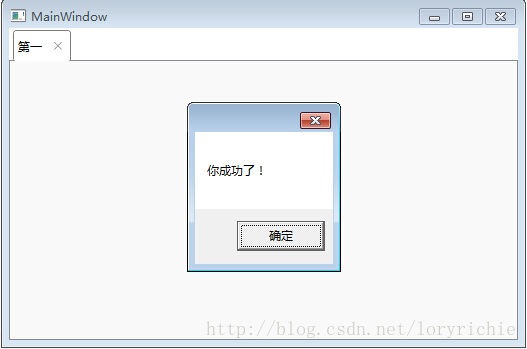
奉上DEMO 下载地址
WPF 为资源字典 添加事件响应的后台类的更多相关文章
- WPF之资源字典zz
最近在看wpf相关东西,虽然有过两年的wpf方面的开发经验,但是当时开发的时候,许多东西一知半解,至今都是模模糊糊,框架基本是别人搭建,自己也就照着模板写写,现在许多东西慢慢的理解了,回顾以前的若干记 ...
- WPF合并资源字典
1.合并多个外部资源字典成为本地字典 示例代码 <Page.Resources> <ResourceDictionary> <ResourceDictionary.Mer ...
- WPF使用资源字典组织资源
转载:http://blog.163.com/wangzhenguo2005@126/blog/static/371405262010111413321728/ 首先在解决方案资源管理器中添加 ...
- wpf 切换资源字典的2中方式
var _1200RDUri = new Uri(String.Format(@"/aa;Component/Themes/1200Theme.xaml"), UriKind.Re ...
- WPF 遍历资源字典中的控件
object obItem=this.FindResource("canvasdt"); if (obItem is System.Windows.DataTemplate) { ...
- (转载)资源字典(Pro WPF 学习)
原地址:http://www.cnblogs.com/yxhq/archive/2012/07/09/2582508.html 1.创建资源字典 下面是一个资源字典(AppBrushes.xaml), ...
- WPF资源字典
如果相同的资源可用于不同的应用程序,把资源放在一个资源字典中就比较有效. 新建一个资源字典文件Dictionary1.xaml <ResourceDictionary xmlns="h ...
- WPF 界面实现多语言支持 中英文切换 动态加载资源字典
1.使用资源字典,首先新建两个字典文件en-us.xaml.zh-cn.xaml.定义中英文的字符串在这里面[注意:添加xmlns:s="clr-namespace:System;assem ...
- WPF(MVVM) 利用资源字典实现中英文动态切换
1.首先新建两个字典文件en-us.xaml.zh-cn.xaml.定义中英文的字符串在这里面. 2.将两个资源字典添加到App.xaml中,这里注意下,因为两个字典中有同样字符,如果没有动态更改,默 ...
随机推荐
- 以Graphicslayer为管理组来管理Element.
转自原文 以Graphicslayer为管理组来管理Element. 前言 在AE开发过程中,我们经常使用Element(元素).它的出现让地图与用户之间的交互增加了不少的效果.在地图上,可以通过各种 ...
- Android 三种方式实现自定义圆形进度条ProgressBar
一.通过动画实现 定义res/anim/loading.xml如下: <?xml version="1.0" encoding="UTF-8"?> ...
- Objective-C编码规范[译]
原文链接 : The official raywenderlich.com Objective-C style guide 原文作者 : raywenderlich.com Team 译文出自 : r ...
- AJAX简介(转)
AJAX全称为“Asynchronous JavaScript and XML”(异步JavaScript和XML),是一种创建交互式网页应用的网页开发技术.它使用:使用XHTML+CSS来表示信息: ...
- 病毒软件,导致DNS失效的解决办法
问题症状,DNS失效了,ping域名总是失败. 问题回顾:几个周之前,某群友在群里上传了一个病毒软件,我想去测验下,最后果然中毒.前几天,把软件卸载了,上周末解决了删除最后一款软件导致无法上网的问题. ...
- 【BZOJ 1016】[JSOI2008]最小生成树计数(搜索+克鲁斯卡尔)
[题目链接]:http://www.lydsy.com/JudgeOnline/problem.php?id=1016 [题意] [题解] /* 两个最小生成树T和T'; 它们各个边权的边的数目肯定是 ...
- FreeBSD 5.0中强制访问控制机制的使用与源代码分析【转】
本文主要讲述FreeBSD 5.0操作系统中新增的重要安全机制,即强制访问控制机制(MAC)的使用与源代码分析,主要包括强制访问控制框架及多级安全(MLS)策略两部分内容.这一部分讲述要将MAC框架与 ...
- win7 64位系统下进入debug
win7 64位无法直接通过命名行输入debug命令的方式进入到debug,好在我们可是使用一个工具DOSbox来进入debug.操作步骤如下:1.下载DOSbox进行安装.下载地址:点击打开链接.如 ...
- 在JScript中使用正则表达式
作者:朱金灿 来源:http://blog.csdn.net/clever101 不废话了,直接用代码说明吧: main(); function main() { try { // 运用正则表达式进行 ...
- OpenCV实现马赛克和毛玻璃滤镜效果
一.马赛克效果 马赛克的实现原理是把图像上某个像素点一定范围邻域内的所有点用邻域内随机选取的一个像素点的颜色代替,这样可以模糊细节,但是可以保留大体的轮廓. 以下OpenCV程序实现马赛克效果,通过鼠 ...