
记录--Vue3+TS(uniapp)手撸一个聊天页面
这里给大家分享我在网上总结出来的一些知识,希望对大家有所帮助

Vue3+TS(uniapp)手撸一个聊天页面
前言
最近在自己的小程序中做了一个智能客服,API使用的是云厂商的API,然后聊天页面...嗯,找了一下关于UniApp(vite/ts)版本的好像不多,有一个官方的但其中的其他代码太多了,去看懂再删除那些对我无用的代码不如自己手撸一个,先看效果:
好,下面开始介绍如何一步一步实现
重难点调研
1. 如何编写气泡

可以发现一般的气泡是有个“小箭头”,一般是指向用户的头像,所以这里我们的初步思路就是通过before与after伪类来放置这个小三角形,这个小三角形通过隐藏border的其余三边来实现。
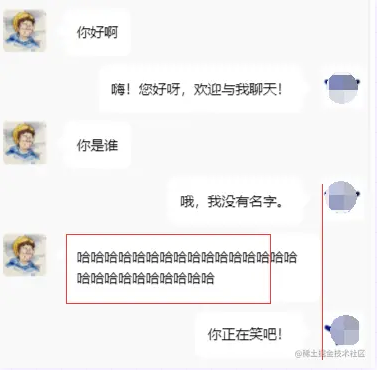
然后其中一个细节就是聊天气泡的最大宽度不超过对方的头像,超过就换行。这个简单,设置一个max-width: cacl(100vw - XX)就可以了
2. 如何编写输入框
考虑到用户可能输入多行文字,这里使用的是<textarea>标签,点开微信发个消息试试,发现它是自适应的,这里去调研了解了一下,发现小程序自带组件有这个实现,好,那直接用:

然后我们继续注意到发送按钮与输入框的底线保持水平,这个flex里有对应属性可以实现,跳过...
3.如何实现滚动条始终居于底部
当聊天消息较多时,我们发现我们继续输入消息,页面并没有更新(滚动)。打开微信聊天框一看,当消息过多时,你发一条消息,页面就自动滚动到了最新的消息,这又是怎实现的呢?
继续调研,发现小程序自带的<scroll-view>标签中有个属性scroll-into-view可以自动跳转:
<scroll-view scroll-y="true" :scroll-into-view="`msg${messages.length-1}`" :scroll-with-animation="true">

	<view class="msg-list" :id="`msg${index}`" v-for="(msg, index) in messages" :key="msg.time">

		<view class="msg-item">

		略

		</view>

	</view>

</scroll-view>
概述
简单分析下来好像一点都不难,如下是我的文件列表,话不多说,开始撸代码!
chat

├─ chat.vue

├─ leftBubble.vue

└─ rightBubble.vue
左气泡模块
左气泡模块就是刚刚分析的那一部分,然后增加一点点细节,如下:
<template>

	<view class="left-bubble-container">

		<view class="left">

			<image :src="props.avatarUrl"></image>

		</view>

		<view class="right">

			<view class="bubble">

				<text>{{ props.message }}</text>

			</view>

		</view>

	</view>

</template>

<script setup lang="ts">

import { userDefaultData } from "@/const";

interface propsI {

	message: string;

	avatarUrl: string;

}

const props = withDefaults(defineProps<propsI>(), {

	avatarUrl: userDefaultData.avatarUrl,

});

</script>

<style lang="scss" scoped>

.left-bubble-container {

  margin: 10px 0;

	display: flex;

	.left {

		image {

			height: 50px;

			width: 50px;

			border-radius: 5px;

		}

	}

}

.bubble {

	max-width: calc(100vw - 160px);

	min-height: 25px;

	border-radius: 10px;

	background-color: #ffffff;

	position: relative;

	margin-left: 20px;

	padding: 15px;

	text {

		height: 25px;

		line-height: 25px;

	}

}

.bubble::before {

	position: absolute;

	top: 15px;

	left: -20px;

	content: "";

	width: 0;

	height: 0;

	border-right: 10px solid #ffffff;

	border-bottom: 10px solid transparent;

	border-left: 10px solid transparent;

	border-top: 10px solid transparent;

}

</style>
右气泡模块
右气泡模块我们需要将三角形放在右边,这个好实现。然后这整个气泡我们需要让它处于水平居右,所以这里我使用了:
display: flex;

direction: rtl;
这个属性,但使用的过程中发现气泡中的内容(符号与文字)会出现翻转,“遇事不决,再加一层”,所以我们在内容节点外再套一层:
<span style="direction: ltr; unicode-bidi: bidi-override">

	<text>{{ props.message }}</text>

</span>
然后继续增加一点点细节:
<template>

	<view class="left-bubble-container">

		<view class="right">

			<image :src="props.avatarUrl"></image>

		</view>

		<view class="left">

			<view class="bubble">

				<span style="direction: ltr; unicode-bidi: bidi-override">

					<text>{{ props.message }}</text>

				</span>

			</view>

		</view>

	</view>

</template>

<script setup lang="ts">

import { userDefaultData } from "@/const";

interface propsI {

	message: string;

	avatarUrl: string;

}

const props = withDefaults(defineProps<propsI>(), {

	avatarUrl: userDefaultData.avatarUrl,

});

</script>

<style lang="scss" scoped>

.left-bubble-container {

	display: flex;

	direction: rtl;

	margin: 10px 0;

	.right {

		image {

			height: 50px;

			width: 50px;

			border-radius: 5px;

		}

	}

}

.bubble {

	max-width: calc(100vw - 160px);

	min-height: 25px;

	border-radius: 10px;

	background-color: #ffffff;

	position: relative;

	margin-right: 20px;

	padding: 15px;

	text-align: left;

	text {

		height: 25px;

		line-height: 25px;

	}

}

.bubble::after {

	position: absolute;

	top: 15px;

	right: -20px;

	content: "";

	width: 0;

	height: 0;

	border-right: 10px solid transparent;

	border-bottom: 10px solid transparent;

	border-left: 10px solid #ffffff;

	border-top: 10px solid transparent;

}

</style>
输入模块
没啥说的,需要注意的是:Button记得防抖
<view class="bottom-input">

	<view class="textarea-container">

		<textarea

			auto-height

			fixed="true"

			confirm-type="send"

			v-model="input"

			@confirm="submit"

		/>

	</view>

	<button

		style="

			width: 70px;

			height: 40px;

			line-height: 34px;

			margin: 0 10px;

			background-color: #ffffff;

			border: 3px solid #0256ff;

			color: #0256ff;

		"

		@click="submit"

>

		发送

	</button>

整体
1)考虑如何存储消息
这里仅考虑内存中如何存储,不考虑本地存储,后续思考中会聊到。
export interface messagesI {

  left: boolean;

  text: string;

  time: number;

}
如上是消息列表中的一项,为了区分是渲染到左气泡还是右气泡,这里用left来区分了一下;
const messages: Ref<messagesI[]> = ref([]);
2)如何推荐消息
这边我封装的服务端接口是这样的:
mutation chat{

  customerChat(talk: "你好啊"){

  	knowledge

    text

    recommend

  }

}
recommend是用户可能输入了错误的消息,这里是预测用户的输入字符串,所以我们需要在得到这个字符串后直接显示,然后用户可以一键通过这条消息回复:
function submit(){

	// 略...

	const finalMsg = receive?.knowledge || receive?.text || "你是否想问: " + receive?.recommend;

	// 略...

	if (receive?.recommend) {

		input.value = receive?.recommend;

	} else {

		input.value = "";

	}

}
如上,得益于Vue框架,这里实现起来也非常简单,当用户提交之后,如果有推荐的消息,就直接修改input.value从而修改输入框的文字;如果没有就直接清空方便下一次输入。
接下来继续增加一点点细节(chat.vue文件)
<template>

	<view class="chat-container">

		<view class="msg-container">

			<!-- https://github.com/wepyjs/wepy-wechat-demo/issues/7 -->

			<scroll-view scroll-y="true" :scroll-into-view="`msg${messages.length-1}`" :scroll-with-animation="true">

				<view class="msg-list" :id="`msg${index}`" v-for="(msg, index) in messages" :key="msg.time">

					<view class="msg-item">

						<left-bubble v-if="msg.left" :message="msg.text" :avatar-url="meStore.user?.avatarUrl"></left-bubble>

						<right-bubble v-else :message="msg.text" :avatar-url="logoUrl"></right-bubble>

					</view>

				</view>

			</scroll-view>

		</view>

		<view class="bottom-input">

			<view class="textarea-container">

				<textarea

					auto-height

					fixed="true"

					confirm-type="send"

					v-model="input"

					@confirm="submit"

				/>

			</view>

			<button

				style="

					width: 70px;

					height: 40px;

					line-height: 34px;

					margin: 0 10px;

					background-color: #ffffff;

					border: 3px solid #0256ff;

					color: #0256ff;

				"

				@click="submit"

			>

				发送

			</button>

		</view>

	</view>

</template>

<script setup lang="ts">

import { ref, type Ref } from "vue";

import leftBubble from "./leftBubble.vue";

import rightBubble from "./rightBubble.vue";

import type { messagesI } from "./chat.interface";

import { chatGQL } from "@/graphql/me.graphql";

import { useMutation } from "villus";

import { logoUrl } from "@/const";

import { useMeStore } from "@/stores/me.store";

const meStore = useMeStore();

const messages: Ref<messagesI[]> = ref([]);

const input = ref("");

async function submit() {

	if (input.value === "") return;

	messages.value.push({

		left: true,

		text: input.value,

		time: new Date().getTime(),

	});

	const { execute } = useMutation(chatGQL);

	const { error, data } = await execute({ talk: input.value })

	if (error) {

		uni.showToast({

			title: `加载错误`,

			icon: "error",

			duration: 3000,

		});

		throw new Error(`加载错误: ${error}`);

	}

	const receive = data?.customerChat;

	const finalMsg = receive?.knowledge || receive?.text || "你是否想问: " + receive?.recommend;

	messages.value.push({

		left: false,

		text: finalMsg,

		time: new Date().getTime(),

	});

	if (receive?.recommend) {

		input.value = receive?.recommend;

	} else {

		input.value = "";

	}

}

</script>

<style lang="scss" scoped>

.chat-container {

	.msg-container {

		padding: 20px 5px 100px 5px;

		height: calc(100vh - 120px);

		scroll-view {

			height: 100%;

		}

	}

	.bottom-input {

		display: flex;

		align-items: flex-end;

		position: fixed;

		bottom: 0px;

		background-color: #fbfbfb;

		padding: 20px;

		box-shadow: 0px -10px 30px #eeeeee;

		.textarea-container {

			background-color: #ffffff;

			padding: 10px;

			textarea {

				width: calc(100vw - 146px);

				background-color: #ffffff;

			}

		}

	}

}

</style>
思考
如何保存到本地,然后每次加载最新消息,然后向上滚动进行懒加载?
我这里没有实现该功能,毕竟只是一个客服,前端没必要保存消息记录到本地如Localstorage。
这里抛砖引玉,想到了一个最基础的数据结构--链表,用Localstorage-key/value的形式来实现消息队列在本地的多段存储:

当然,有效性有待验证,这里仅仅属于一些想法
最后
然后,我撸了小半天的页面,准备给朋友看看来着,他告诉我微信小程序自带一个客服系统,只需要让button的open-type属性等于contract;
本文转载于:
https://juejin.cn/post/7224059698911641658
如果对您有所帮助,欢迎您点个关注,我会定时更新技术文档,大家一起讨论学习,一起进步。

记录--Vue3+TS(uniapp)手撸一个聊天页面的更多相关文章
- 使用Java Socket手撸一个http服务器
原文连接:使用Java Socket手撸一个http服务器 作为一个java后端,提供http服务可以说是基本技能之一了,但是你真的了解http协议么?你知道知道如何手撸一个http服务器么?tomc ...
- 手撸一个SpringBoot-Starter
1. 简介 通过了解SpringBoot的原理后,我们可以手撸一个spring-boot-starter来加深理解. 1.1 什么是starter spring官网解释 starters是一组方便的依 ...
- Golang:手撸一个支持六种级别的日志库
Golang标准日志库提供的日志输出方法有Print.Fatal.Panic等,没有常见的Debug.Info.Error等日志级别,用起来不太顺手.这篇文章就来手撸一个自己的日志库,可以记录不同级别 ...
- 【手撸一个ORM】MyOrm的使用说明
[手撸一个ORM]第一步.约定和实体描述 [手撸一个ORM]第二步.封装实体描述和实体属性描述 [手撸一个ORM]第三步.SQL语句构造器和SqlParameter封装 [手撸一个ORM]第四步.Ex ...
- 第二篇-用Flutter手撸一个抖音国内版,看看有多炫
前言 继上一篇使用Flutter开发的抖音国际版 后再次撸一个国内版抖音,大部分功能已完成,主要是Flutter开发APP速度很爽, 先看下图 项目主要结构介绍 这次主要的改动在api.dart 及 ...
- 通过 Netty、ZooKeeper 手撸一个 RPC 服务
说明 项目链接 微服务框架都包括什么? 如何实现 RPC 远程调用? 开源 RPC 框架 限定语言 跨语言 RPC 框架 本地 Docker 搭建 ZooKeeper 下载镜像 启动容器 查看容器日志 ...
- C#基于Mongo的官方驱动手撸一个Super简易版MongoDB-ORM框架
C#基于Mongo的官方驱动手撸一个简易版MongoDB-ORM框架 如题,在GitHub上找了一圈想找一个MongoDB的的ORM框架,未偿所愿,就去翻了翻官网(https://docs.mongo ...
- 手撸一个springsecurity,了解一下security原理
手撸一个springsecurity,了解一下security原理 转载自:www.javaman.cn 手撸一个springsecurity,了解一下security原理 今天手撸一个简易版本的sp ...
- 五分钟,手撸一个Spring容器!
大家好,我是老三,Spring是我们最常用的开源框架,经过多年发展,Spring已经发展成枝繁叶茂的大树,让我们难以窥其全貌. 这节,我们回归Spring的本质,五分钟手撸一个Spring容器,揭开S ...
- 以鶸ice为例,手撸一个解释器(一)明确目标
代码地址 # HelloWorld.ice print("hello, world") 前言(废话) 其实从开始学习编译原理到现在已经有快半年的时间了,但是其间常常不能坚持看下去龙 ...
随机推荐
- 在Windows上使用.NET部署到Docker 《让孩子们走出大坑》
折腾Docker 有几天了,整别的都没这个糟心.目前已经顺利部署运行起来了.顺便给大家分享下处理在Windows上使用.NET部署到Docker的相关问题解决方法. 1. Docker无法安装问题 ...
- 剑指Offer07 重建二叉树
剑指 Offer 07. 重建二叉树 前置概念: 前序:访问根节点,先序遍历左子树,先序遍历右子树: 中序:中序遍历左子树,访问根节点,中序遍历右子树: 后序:后序遍历左子树,后序遍历右子树,访问根节 ...
- Java线上代码热修复的一些积累
工具:Arthas 参考文章: https://blog.csdn.net/Admire_an/article/details/99768393 https://www.cnkirito.moe/ar ...
- Sunnyui画曲线溢出错误
之前用sunnyui做展示数据库数据曲线的时候.偶然会报溢出错误,也不报错错误在哪,就是直接程序都跑不动了. 后面发现 设置曲线上下限的时候,当上下限一样的时候就会导致溢出错误.sunnyui的曲线也 ...
- spring boot+layui分页实战
项目用了layui,做了个简单的图书搜索页,分享出来. 喜欢的朋友给点个赞!!! 实现效果 开发步骤 1.前端页面和JS <!DOCTYPE html> <html xmlns=&q ...
- Java网络编程之使用URL类
Lesson: Working with URLs 使用URLs 整理自Oracle官方文档. URL is the acronym for Uniform Resource Locator. URL ...
- 骨牌铺方格 SDUT
状态转移方程:dp[i] = dp[i - 1] + dp[i - 2]. 当前行,可能是由上一行转移过来的,那么当前行就只能横着铺,所以方案数是dp[i - 1]. 当前行,可能是由i-2行转移过来 ...
- 走进Kaggle的未知领域:性别和年龄推断算法解析
1.环境设置: 此环节将加载实现笔记本无缝功能的基本模块,包括NumPy.Pandas和TensorFlow等库.此外,它还建立了关键的环境常数,如图像尺寸和学习率,这对后续分析和模型训练至关重要 ...
- python中partial用法
应用 典型的,函数在执行时,要带上所有必要的参数进行调用.然后,有时参数可以在函数被调用之前提前获知.这种情况下,一个函数有一个或多个参数预先就能用上,以便函数能用更少的参数进行调用. 示例pyqt5 ...
- JS中Date和时间戳转换
<html xmlns="http://www.w3.org/1999/xhtml"> <head> <meta http-equiv="C ...