
Angular 学习笔记 (Angular 12 get started)
Angular 12 视乎比以往更稳定了.
这里记入一般的 get started 结构和做法.
第 1 步, 创建项目.
ng new project --create-application=false
默认会自动创建 app, 先关掉它.
第 2 步, 装 eslint 和 prettier
早期 ng 是用 tslint 的, 后来废弃了, 现在改用 eslint
https://github.com/angular-eslint/angular-eslint 这个是第三方的,但是做的很好一下.
ng add @angular-eslint/schematics

ng config cli.defaultCollection @angular-eslint/schematics
然后就安装 Prettier - Code formatter vscode 插件
https://marketplace.visualstudio.com/items?itemName=esbenp.prettier-vscode
setup vs code setting
"editor.defaultFormatter": "esbenp.prettier-vscode",

"prettier.singleQuote": true,

"editor.formatOnSave": true,

"eslint.options": {

  "extensions": [".ts", ".html"]

},

"eslint.validate": [

  "javascript",

  "typescript",

  "html"

],

"editor.codeActionsOnSave": {

    "source.fixAll.tslint": true,

    "source.fixAll.eslint": true

},

"editor.detectIndentation": false,
然后安装 prettier
yarn add prettier --dev
要让 prettier 和 eslint 一起工作. 我们需要安装一些 prettier 的 plugin
yarn add eslint-plugin-prettier eslint-config-prettier --dev
然后就创建 app
ng g app control-panel --routing --style=scss --prefix=cp
每一个 app 或 lib 都会自带 .eslintrc.json, 尽量不要使用全局的, best practice 是每一个 app 或 lib 独立管理 (虽然会有重复的设置啦, 但是不多啦)
由于我使用 eslint standard config 所以我要装
yarn add eslint-config-standard eslint-plugin-import eslint-plugin-node eslint-plugin-promise --dev
这个是最终版本的 eslintrc.json, 所以我没有使用 root eslintrc.json 然后我使用了 eslint standard config, 然后我没有 e2e, 其它的都是安装官网配置的了.
{

  "root": true,

  // "extends": "../../.eslintrc.json", // we don't have root file, so use root: true instead

  "ignorePatterns": [

    "!**/*"

  ],

  "overrides": [{

      "files": [

        "*.ts"

      ],

      "extends": [

        "standard",

        "plugin:@angular-eslint/recommended",

        "plugin:@angular-eslint/template/process-inline-templates",

        "plugin:prettier/recommended"

      ],

      "plugins": [

        "@typescript-eslint"

      ],

      "parserOptions": {

        "project": [

          "projects/control-panel/tsconfig.app.json",

          "projects/control-panel/tsconfig.spec.json"

          // "projects/control-panel/e2e/tsconfig.json" // we don't have e2e now

        ],

        "createDefaultProgram": true

      },

      "rules": {

        "space-before-function-paren": "off",

        "no-multiple-empty-lines": "off",

        "no-new": "off",

        "no-extend-native": "off",

        "prettier/prettier": ["error", {

          "singleQuote": true,

          "endOfLine": "auto" // refer: https://stackoverflow.com/questions/53516594/why-do-i-keep-getting-delete-cr-prettier-prettier

        }],

        "@angular-eslint/directive-selector": [

          "error",

          {

            "type": "attribute",

            "prefix": "cp",

            "style": "camelCase"

          }

        ],

        "@angular-eslint/component-selector": [

          "error",

          {

            "type": "element",

            "prefix": "cp",

            "style": "kebab-case"

          }

        ]

      }

    },

    {

      "files": [

        "*.html"

      ],

      "extends": ["plugin:@angular-eslint/template/recommended"],

      "rules": {}

    },

    {

      "files": ["*.html"],

      "excludedFiles": ["*inline-template-*.component.html"],

      "extends": ["plugin:prettier/recommended"],

      "rules": {

        "prettier/prettier": ["error", {

          "parser": "angular"

        }]

      }

    }

  ]

}
第 3 步 安装 library
ng g lib stooges --prefix=s
通常一个 project 里面会有好几个 app, shared code 就可以做一个 library 来管理, 以后要发布也比较容易.
由于我没有要做成发布的版本,所以我需要修改一下 ts config
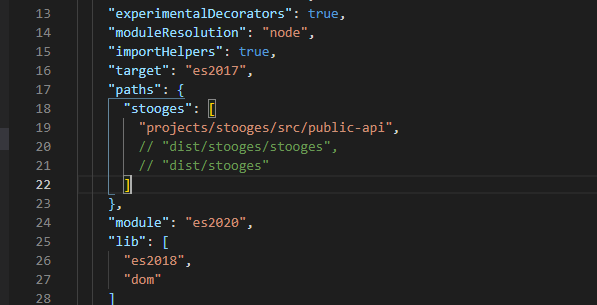
第 4 步 安装 tailwind css 和 stylelint
tailwind 火, 无论如何都是要跟风一下的啦.
yarn add tailwindcss postcss autoprefixer stylelint stylelint-scss stylelint-config-recommended stylelint-prettier stylelint-config-prettier --dev
tailwind.config.js
module.exports = {

  purge: {

    enabled: true,

    content: ['./projects/*/src/**/*.html'],

  },

  darkMode: false, // or 'media' or 'class'

  theme: {

    extend: {},

  },

  variants: {

    extend: {},

  },

  plugins: [],

};
stylelint.config.js
module.exports = {

  extends: ['stylelint-config-recommended', 'stylelint-prettier/recommended'],

  plugins: ['stylelint-scss'],

  rules: {

    'at-rule-no-unknown': null,

    'scss/at-rule-no-unknown': [

      true,

      {

        ignoreAtRules: [

          'tailwind',

          'apply',

          'variants',

          'responsive',

          'screen',

        ],

      },

    ],

    'declaration-block-trailing-semicolon': null,

    'no-descending-specificity': null,

    'prettier/prettier': [

      true,

      {

        endOfLine: 'auto', // refer: https://stackoverflow.com/questions/53516594/why-do-i-keep-getting-delete-cr-prettier-prettier

      },

    ],

  },

};
vs code setting
"css.validate": false,

"scss.validate": false,

"stylelint.enable": true,
到这里我们就有了一个 project 通常会用到的结构了.
Angular 学习笔记 (Angular 12 get started)的更多相关文章
- Angular 学习笔记 (Angular 9 & ivy)
refer : https://blog.angularindepth.com/all-you-need-to-know-about-ivy-the-new-angular-engine-9cde47 ...
- angular学习笔记-angular中怎么获取dom元素
步骤分解: 第一步:给要获取的元素一个ng-model变量,并且绑定事件啦! <div class="home" ng-model="dirName" n ...
- angular学习笔记(三十一)-$location(2)
之前已经介绍了$location服务的基本用法:angular学习笔记(三十一)-$location(1). 这篇是上一篇的进阶,介绍$location的配置,兼容各版本浏览器,等. *注意,这里介绍 ...
- angular学习笔记(三十一)-$location(1)
本篇介绍angular中的$location服务的基本用法,下一篇介绍它的复杂的用法. $location服务的主要作用是用于获取当前url以及改变当前的url,并且存入历史记录. 一. 获取url的 ...
- angular学习笔记(三十)-指令(10)-require和controller
本篇介绍指令的最后两个属性,require和controller 当一个指令需要和父元素指令进行通信的时候,它们就会用到这两个属性,什么意思还是要看栗子: html: <outer‐direct ...
- angular学习笔记(三十)-指令(7)-compile和link(2)
继续上一篇:angular学习笔记(三十)-指令(7)-compile和link(1) 上一篇讲了compile函数的基本概念,接下来详细讲解compile和link的执行顺序. 看一段三个指令嵌套的 ...
- angular学习笔记(三十)-指令(7)-compile和link(1)
这篇主要讲解指令中的compile,以及它和link的微妙的关系. link函数在之前已经讲过了,而compile函数,它和link函数是不能共存的,如果定义了compile属性又定义link属性,那 ...
- angular学习笔记(三十)-指令(6)-transclude()方法(又称linker()方法)-模拟ng-repeat指令
在angular学习笔记(三十)-指令(4)-transclude文章的末尾提到了,如果在指令中需要反复使用被嵌套的那一坨,需要使用transclude()方法. 在angular学习笔记(三十)-指 ...
- angular学习笔记(三十)-指令(5)-link
这篇主要介绍angular指令中的link属性: link:function(scope,iEle,iAttrs,ctrl,linker){ .... } link属性值为一个函数,这个函数有五个参数 ...
- angular学习笔记(三十)-指令(2)-restrice,replace,template
本篇主要讲解指令中的 restrict属性, replace属性, template属性 这三个属性 一. restrict: 字符串.定义指令在视图中的使用方式,一共有四种使用方式: 1. 元素: ...
随机推荐
- 解决方案 | vbnet的msgbox 窗口最前置,topmost属性设置
For that you can use the TopMost Property of MsgBox (Number 262144) MsgBox("Hello there", ...
- 原创软件 | 系统服务工具箱原创软件(587KB)--基于aardio开发的第一个程序
1 系统服务工具箱简介 该软件是我使用aardio开发的第一个程序,它集成了多个系统常用的快捷键,无需记住各种命令就能快捷使用cmd管理员.计算机管理.控制面板.组策略.注册表.服务.任务管理.卸载程 ...
- CGI、FastCGI和PHP-FPM区别和关系详解
在搭建 LAMP/LNMP 服务器时,会经常遇到 PHP-FPM.FastCGI和CGI 这几个概念.如果对它们一知半解,很难搭建出高性能的服务器.接下来我们就以图形方式,解释这些概念之间的关系. 1 ...
- CF1359A 题解
洛谷链接&CF 链接 题目简述 共有 \(T\) 组数据. 对于每组数据给出 \(n,m,k\),表示 \(k\) 名玩家打牌,共 \(n\) 张牌,\(m\) 张王,保证 \(k \mid ...
- ArcGIS for Android入门(Java):初体验
准备工作 开发工具:Android Studio 环境:jdk 11 (首次接触安卓开发,可能有的地方不太对,还请给位大佬多多指点) 项目搭建 打开Android Studio,点击New Proje ...
- 2023年人工智能发展现状报告:State of AI Report 2023
链接: https://www.stateof.ai/ ================================ Now in its sixth year, the State of AI ...
- vue&element项目实战
1.背景 百度脑图链接:http://naotu.baidu.com/file/26ee2d8db38ad67e9905ae065bb0445e?token=e538157034f38f0d 1.1. ...
- vue之事件监听v-on
1.背景 2.简单使用 2.1.做一个简单的点击计数器 <!DOCTYPE html> <html lang="en" xmlns:v-on="http ...
- Java学习笔记2--JDK的安装和配置
一.进入oracle官网,下载jdk oracle官网:Oracle | Cloud Applications and Cloud Platform ps:不同的浏览器,可能进入oracle官网,会只 ...
- 神经网络之卷积篇:详解卷积步长(Strided convolutions)
详解卷积步长 卷积中的步幅是另一个构建卷积神经网络的基本操作,让向展示一个例子. 如果想用3×3的过滤器卷积这个7×7的图像,和之前不同的是,把步幅设置成了2.还和之前一样取左上方的3×3区域的元素的 ...