
073 HBASE的读写以及client API
一:读写思想
1.系统表
hbase:namespace
存储hbase中所有的namespace的信息
hbase:meta
rowkey:hbase中所有表的region的名称
column:regioninfo:region的名称,region的范围
server:该region在哪台regionserver上
2.读写流程
tbname,rowkey -> region -> regionserver -> store -> storefile
但是这些都是加载过meta表之后,然后meta表如何寻找?
3.读的流程
-》根据表名和rowkey找到对应的region
-》zookeeper中存储了meta表的region信息
-》从meta表中获取相应的region的信息
-》找到对应的regionserver
-》查找对应的region
-》读memstore
-》storefile
4.写的流程
-》根据表名和rowkey找到对应的region
-》zookeeper中存储了meta表的region信息
-》从meta表中获取相应的region的信息
-》找到对应的regionserver
-》正常情况
-》WAL(write ahead log预写日志),一个regionserver维护一个hlog
-》memstore (达到一定大小,flush到磁盘)
-》当多个storefile达到一定大小以后,会进行compact,合并成一个storefile
-》当单个storefile达到一定大小以后,会进行split操作,等分割region
5.注意点
关于版本的合并和删除是在compact阶段完成的。hbase只负责数据的增加存储
hmaster短暂的不参与实际的读写
二:HBase Client API 的书写
1.添加依赖

2.添加配置文件
core-site.xml
hdfs-site.xml
hbase-site.xml
log4j.properties
regionservers
3.get的书写

4.put的书写

5.delete的书写

注意全部删除:

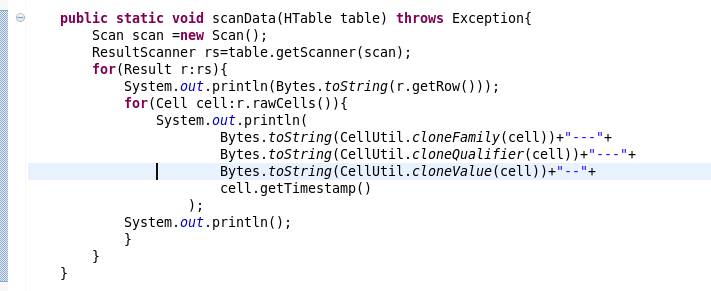
6.scan的书写
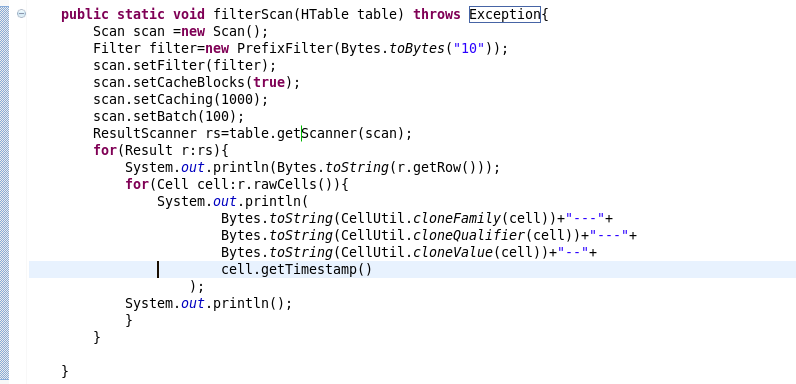
7.过滤条件的scan的书写
三:复制源代码
 package com.beifeng.bigdat;

 import java.io.IOException;

 import org.apache.hadoop.conf.Configuration;

 import org.apache.hadoop.hbase.Cell;

 import org.apache.hadoop.hbase.CellUtil;

 import org.apache.hadoop.hbase.HBaseConfiguration;

 import org.apache.hadoop.hbase.client.Delete;

 import org.apache.hadoop.hbase.client.Get;

 import org.apache.hadoop.hbase.client.HTable;

 import org.apache.hadoop.hbase.client.Put;

 import org.apache.hadoop.hbase.client.Result;

 import org.apache.hadoop.hbase.client.ResultScanner;

 import org.apache.hadoop.hbase.client.Scan;

 import org.apache.hadoop.hbase.filter.Filter;

 import org.apache.hadoop.hbase.filter.PrefixFilter;

 import org.apache.hadoop.hbase.util.Bytes;

 public class HbaseClientTest {

     public static HTable getTable(String name) throws Exception{

         Configuration conf=HBaseConfiguration.create();

         HTable table=new HTable(conf,name);

         return table;

     }

     public static void getData(HTable table) throws Exception{

         Get get=new Get(Bytes.toBytes("103"));

         get.addFamily(Bytes.toBytes("info"));

         Result rs=table.get(get);

         for(Cell cell:rs.rawCells()){

             System.out.println(

                     Bytes.toString(CellUtil.cloneFamily(cell))+"--"+

                     Bytes.toString(CellUtil.cloneQualifier(cell))+"---"+

                     Bytes.toString(CellUtil.cloneValue(cell))+"----"+

                     cell.getTimestamp()

                     );

             System.out.println("----------------------------------------------");

         }

     }

     public static void putData(HTable table) throws Exception{

         Put put=new Put(Bytes.toBytes("103"));

         put.add(Bytes.toBytes("info"),

                 Bytes.toBytes("name"),

                 Bytes.toBytes("zhaoliu"));

         table.put(put);

         getData(table);

     }

     public static void deleteData(HTable table) throws Exception{

         Delete delete =new Delete(Bytes.toBytes("103"));

         delete.deleteColumns(Bytes.toBytes("info"), Bytes.toBytes("name"));

         table.delete(delete);

         getData(table);

     }

     public static void scanData(HTable table) throws Exception{

         Scan scan =new Scan();

         ResultScanner rs=table.getScanner(scan);

         for(Result r:rs){

             System.out.println(Bytes.toString(r.getRow()));

             for(Cell cell:r.rawCells()){

                 System.out.println(

                         Bytes.toString(CellUtil.cloneFamily(cell))+"---"+

                         Bytes.toString(CellUtil.cloneQualifier(cell))+"---"+

                         Bytes.toString(CellUtil.cloneValue(cell))+"--"+

                         cell.getTimestamp()

                     );

             System.out.println();

             }

         }

     }

     public static void filterScan(HTable table) throws Exception{

         Scan scan =new Scan();

         Filter filter=new PrefixFilter(Bytes.toBytes("10"));

         scan.setFilter(filter);

         scan.setCacheBlocks(true);

         scan.setCaching(1000);

         scan.setBatch(100);

         ResultScanner rs=table.getScanner(scan);

         for(Result r:rs){

             System.out.println(Bytes.toString(r.getRow()));

             for(Cell cell:r.rawCells()){

                 System.out.println(

                         Bytes.toString(CellUtil.cloneFamily(cell))+"---"+

                         Bytes.toString(CellUtil.cloneQualifier(cell))+"---"+

                         Bytes.toString(CellUtil.cloneValue(cell))+"--"+

                         cell.getTimestamp()

                     );

             System.out.println();

             }

         }

     }

     public static void main(String[] args) throws Exception {

         HTable table=getTable("nstest1:tb1");

         //getData(table);

         //putData(table);

         //deleteData(table);

         //scanData(table);

         filterScan(table);

     }

 }
073 HBASE的读写以及client API的更多相关文章
- HBASE的读写以及client API
一:读写思想 1.系统表 hbase:namespace 存储hbase中所有的namespace的信息 hbase:meta rowkey:hbase中所有表的region的名称 column:re ...
- HBase 二次开发 java api和demo
1. 试用thrift python/java以及hbase client api.结论例如以下: 1.1 thrift的安装和公布繁琐.可能会遇到未知的错误,且hbase.thrift的版本 ...
- hbase的读写过程
hbase的读写过程: hbase的架构: Hbase真实数据hbase真实数据存储在hdfs上,通过配置文件的hbase.rootdir属性可知,文件在/user/hbase/下hdfs dfs - ...
- Hbase的读写流程
HBase读写流程 1.HBase读数据流程 HRegionServer保存着meta表以及表数据,要访问表数据,首先Client先去访问zookeeper,从zookeeper里面获取meta表所在 ...
- HBase 数据读写流程
HBase 数据读写流程 2016-10-18 杜亦舒 读数据 HBase的表是按行拆分为一个个 region 块儿,这些块儿被放置在各个 regionserver 中 假设现在想在用户表中获取 ro ...
- ecshop /api/client/api.php、/api/client/includes/lib_api.php SQL Injection Vul
catalog . 漏洞描述 . 漏洞触发条件 . 漏洞影响范围 . 漏洞代码分析 . 防御方法 . 攻防思考 1. 漏洞描述 ECShop存在一个盲注漏洞,问题存在于/api/client/api. ...
- Memcached Java Client API详解
针对Memcached官方网站提供的java_memcached-release_2.0.1版本进行阅读分析,Memcached Java客户端lib库主要提供的调用类是SockIOPool和MemC ...
- Jersey(1.19.1) - Client API, Uniform Interface Constraint
The Jersey client API is a high-level Java based API for interoperating with RESTful Web services. I ...
- Jersey(1.19.1) - Client API, Ease of use and reusing JAX-RS artifacts
Since a resource is represented as a Java type it makes it easy to configure, pass around and inject ...
随机推荐
- Redis 主从 keepalived高可用 实现 VIP 自动漂移
Redis 多主写多从度 配置启动OK :直接配 keepalived 相关配置: redis 默认路径 :/usr/local/redis keepalived 默认路径 :/etc/keepal ...
- luogu P2502 [HAOI2006]旅行
传送门 边数只有5000,可以考虑\(O(m^2)\)算法,即把所有边按边权升序排序,然后依次枚举每条边\(i\),从这条边开始依次加边,加到起点和终点在一个连通块为止.这个过程可以用并查集维护.那么 ...
- JQuery 的Bind()事件
刚开始我们先看一下它的定义: .bind( eventType [, eventData], handler(eventObject)) .Bind()方法的主要功能是在向它绑定的对象上面提供一些事件 ...
- 【vim】删除标记内部的文字 di[标记]
当我开始使用 Vim 时,一件我总是想很方便做的事情是如何轻松的删除方括号或圆括号里的内容.转到开始的标记,然后使用下面的语法: di[标记] 比如,把光标放在开始的圆括号上,使用下面的命令来删除圆括 ...
- windows系统中hosts文件位置
C:\Windows\System32\drivers\etc\hosts 10.0.0.213 mr1.bic.zte.com 10.0.0.2 mr2.bic.zte.com 10.0.0.102 ...
- memcmp与strncmp函数【转】
c中strncmp与memcmp的区别 函数:int memcmp (const void *a1, const void *a2, size_t size) 函数memcmp用于比较字 ...
- mac安装mysql8.0的错误
在MySQL 8.0中,caching_sha2_password是默认的身份验证插件,而不是mysql_native_password.有关此更改对服务器操作的影响以及服务器与客户端和连接器的兼容性 ...
- vi与vim
vi 的使用 基本上 vi 共分为三种模式,分别是『一般模式』.『编辑模式』与『指令列命令模式』. 这三种模式的作用分别是: 一般模式:以 vi 打开一个档案就直接进入一般模式了(这是默认的模式).在 ...
- art 校准时设备端操作
(1)准备所需文件art.ko 和 nart.out (2)配置设备的IP地址(例如:192.168.2.122),使之能与本地PC通信 (3)上传文件到设备 cd /tmp tftp -g -r ...
- 转载:JAVA序列化与反序列化 (作者:YSOcean)
原文:https://www.cnblogs.com/ysocean/p/6870069.html File 类的介绍:http://www.cnblogs.com/ysocean/p/6851878 ...