
Azure WebJob-Custom Schedule for Azure Web Job Timer Triggers
如果想实现Azure Schedule WebJob,有两种方法:
1. 配置CRON Expression,网上有在线CRON配置工具,根据业务需要配置即可
注意:Azure的CRON Expression结构是{second} {minute} {hour} {day} {month} {day-of-week},没有最后的Year。有些在线工具会多一个Year的匹配,这样的Expression放到Azure上是无效的
有关Azure的CRON说明,参考官方说明:CRON Expression
2. 通过写代码自定义Schedule时间,具体参见博文Custom Schedule for Azure Web Job Timer Triggers
一. 查看Schedule WebJob的trigger信息
在浏览器按如下格式输入:https://{sitename}.scm.azurewebsites.net/api/triggeredwebjobs/{jobname}
获取到如下返回值信息:
{

    name: "jobName",

    runCommand: "...\run.cmd",

    type: "triggered",

    url: "http://.../triggeredwebjobs/jobName",

    history_url: "http://.../triggeredwebjobs/jobName/history",

    extra_info_url: "http://.../",

    scheduler_logs_url: "https://.../vfs/data/jobs/triggered/jobName/job_scheduler.log",

    settings: { },

    using_sdk: false,

    latest_run:

      {

        id: "20131103120400",

        status: "Success",

        start_time: "2013-11-08T02:56:00.000000Z",

        end_time: "2013-11-08T02:57:00.000000Z",

        duration: "00:01:00",

        output_url: "http://.../vfs/data/jobs/triggered/jobName/20131103120400/output_20131103120400.log",

        error_url: "http://.../vfs/data/jobs/triggered/jobName/20131103120400/error_20131103120400.log",

        url: "http://.../triggeredwebjobs/jobName/history/20131103120400",

        trigger: "Schedule - 0 0 0 * * *"

      }

}
history_url可以得到runs的history信息
latest_run告知了最近一次的执行信息
trigger告诉了Schedule的CRON是哪一个
二. 修改Schedule
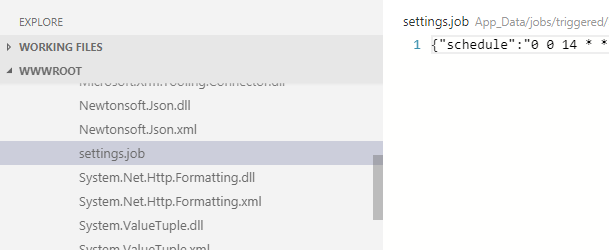
Schedule不管是通过VS配置的,还是通过Azure WebJob新建的时候配置的,如果涉及到修改,需要找到settings.job文件修改:
在App Service Editor中找到对应Job的配置
Azure WebJob-Custom Schedule for Azure Web Job Timer Triggers的更多相关文章
- 使用Azure WebJob的一点心得
Azure WebApp Service 是非常适合中小型项目的云服务. 从我实际使用的感受来看, 有如下几个优点: 1 部署方便, 可以从VS一键发布 2 缩放方便, scale in / scal ...
- Windows Azure Cloud Service (11) PaaS之Web Role, Worker Role(上)
<Windows Azure Platform 系列文章目录> 本文是对Windows Azure Platform (六) Windows Azure应用程序运行环境内容的补充. 我们知 ...
- 在Azure Cloud Service中部署Java Web App(1)
Microsoft Azure是一个开放的,灵活的云平台,除了对自家的.Net平台有良好的支持外,对于各种开源的软件,语言,工具,框架都有着良好的支持,比如Java,Php,Python等等,你可以使 ...
- Azure Terraform(三)部署 Web 应用程序
一,引言 上一节关于 Terraform 的文章讲到 Terraform 使用到的一些语法,以及通过演示使用 Terraform 在Azure 上部署资源组,极大的方便了基础设施实施人员,也提高了基础 ...
- [Windows Azure] Enabling Diagnostics in Windows Azure
Enabling Diagnostics in Windows Azure Windows Azure Diagnostics enables you to collect diagnostic da ...
- Azure Queue Storage 基本用法 -- Azure Storage 之 Queue
Azure Storage 是微软 Azure 云提供的云端存储解决方案,当前支持的存储类型有 Blob.Queue.File 和 Table. 笔者在<Azure File Storage 基 ...
- Azure File Storage 基本用法 -- Azure Storage 之 File
Azure Storage 是微软 Azure 云提供的云端存储解决方案,当前支持的存储类型有 Blob.Queue.File 和 Table. 笔者在<Azure Blob Storage 基 ...
- Windows Azure Cloud Service (42) 使用Azure In-Role Cache缓存(1)Co-located Role
<Windows Azure Platform 系列文章目录> Update 2016-01-12 https://azure.microsoft.com/zh-cn/documentat ...
- Windows Azure Cloud Service (43) 使用Azure In-Role Cache缓存(2)Dedicated Role
<Windows Azure Platform 系列文章目录> Update 2016-01-12 https://azure.microsoft.com/zh-cn/documentat ...
随机推荐
- 数据库索引使用数据结构及算法, 及MySQL不同引擎索引实现
摘要 本文以MySQL数据库为研究对象,讨论与数据库索引相关的一些话题.特别需要说明的是,MySQL支持诸多存储引擎,而各种存储引擎对索引的支持也各不相同,因此MySQL数据库支持多种索引类型,如BT ...
- [SQL]LeetCode180. 连续出现的数字 | Consecutive Numbers
SQL架构: Create table If Not Exists Logs (Id int, Num int) Truncate table Logs insert into Logs (Id, N ...
- [Swift]LeetCode441. 排列硬币 | Arranging Coins
You have a total of n coins that you want to form in a staircase shape, where every k-th row must ha ...
- [Swift]LeetCode560. 和为K的子数组 | Subarray Sum Equals K
Given an array of integers and an integer k, you need to find the total number of continuous subarra ...
- [Swift]LeetCode744. 寻找比目标字母大的最小字母 | Find Smallest Letter Greater Than Target
Given a list of sorted characters letterscontaining only lowercase letters, and given a target lette ...
- [Swift]LeetCode824. 山羊拉丁文 | Goat Latin
A sentence S is given, composed of words separated by spaces. Each word consists of lowercase and up ...
- Saiku设置展示table数据不隐藏空的行数据信息(二十六)
Saiku设置展示table数据不隐藏空的行数据信息 saiku有个 非空的字段 按钮,点击这个后,会自动的把空的行数据信息给隐藏掉,这里我们来设置一下让其行数据不隐藏,为空的就为空. 主要更改两个文 ...
- 微信小程序开发小结
1.点击按钮分享功能: 使用Button组件,设置open-type="share",然后在js文件的onShareAppMessage方法中设置如下: onShareAppMes ...
- 甘果移动老甘:移动互联网变迁中的App和小程序
2018 年 10 月13 日,由又拍云和知晓云联合主办的 Open Talk 丨2018 小程序开发者沙龙系列活动广州站拉开帷幕,甘果移动的 CEO 路文杰(老甘)在沙龙上做了<移动互联网变迁 ...
- 如何学习SpringCloud?(SpringCloud模板)
前言 对于SpringCloud来说(下面简称SC),现在网上已经有很多教程写的非常详细,因为SC的组件特别多,虽然不是所有组件都需要用到,但是学习的时候我们都需要去学习和了解.所以我想如果再写把每一 ...