
QT串口助手(四):数据发送
作者:zzssdd2
E-mail:zzssdd2@foxmail.com
一、前言
开发环境:Qt5.12.10 + MinGW
实现的功能
- 串口数据的发送
- ascii字符与hex字符的相互转换
- 自动追加回车换行符(
\r\n) - 发送数据的统计与显示
- 发送清零
- 定时发送
涉及的知识点
QSerialPort类的使用- 数据格式的转换
QTimer类的使用- 控件
QPlainTextEdit、QCheckBox、QPushButton、QLabel的使用
二、功能实现
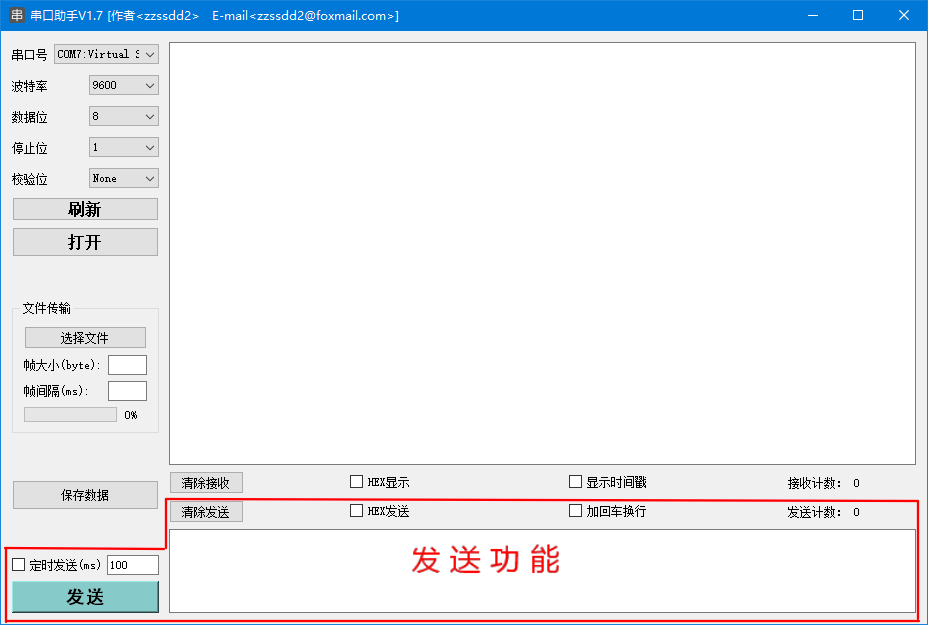
在《QT串口助手(三):数据接收》实现了接收模块的功能,本章讲解发送模块的各个功能。
2.1、字符判断
若勾选了HEX格式发送,那么需要对发送框的字符进行合法判断。这里使用到QPlainTextEdit的textChanged信号来监测发送框数据的改变,在槽函数中对数据进行判别:
/*发送文本框信号槽*/

connect(ui->Send_TextEdit, &QPlainTextEdit::textChanged, this, [=](){

    //获取发送框字符

    SendTextEditStr = ui->Send_TextEdit->document()->toPlainText();

    if (SendTextEditStr.isEmpty())

    {

        return;

    }

    //勾选hex发送则判断是否有非法hex字符

    if (ui->HexSend_checkBox->isChecked())

    {

        char ch;

        bool flag = false;

        uint32_t i, len;

        //去掉无用符号

        SendTextEditStr = SendTextEditStr.replace(' ',"");

        SendTextEditStr = SendTextEditStr.replace(',',"");

        SendTextEditStr = SendTextEditStr.replace('\r',"");

        SendTextEditStr = SendTextEditStr.replace('\n',"");

        SendTextEditStr = SendTextEditStr.replace('\t',"");

        SendTextEditStr = SendTextEditStr.replace("0x","");

        SendTextEditStr = SendTextEditStr.replace("0X","");

        //判断数据合法性

        for(i = 0, len = SendTextEditStr.length(); i < len; i++)

        {

            ch = SendTextEditStr.at(i).toLatin1();

            if (ch >= '0' && ch <= '9') {

                flag = false;

            } else if (ch >= 'a' && ch <= 'f') {

                flag = false;

            } else if (ch >= 'A' && ch <= 'F') {

                flag = false;

            } else {

                flag = true;

            }

        }

        if(flag) QMessageBox::warning(this,"警告","输入内容包含非法16进制字符");

    }

    //QString转QByteArray

    SendTextEditBa = SendTextEditStr.toUtf8();

});
[signal]void QPlainTextEdit::textChanged()This signal is emitted whenever the document's content changes; for example, when text is inserted or deleted, or when formatting is applied.
Note: Notifier signal for property plainText.
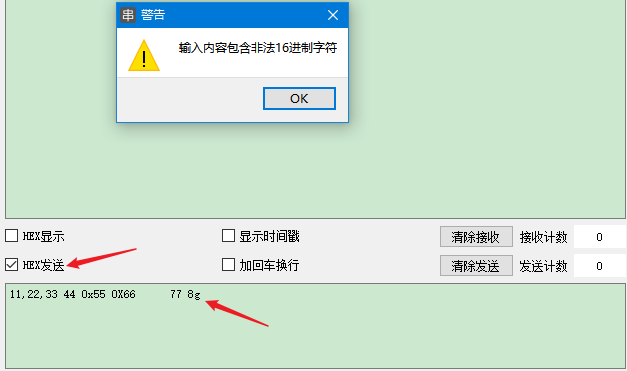
这样我们在进行输入时,如果包含非法字符就会有弹框提示(我这里对','、"0x"、"0X"等字符过滤是为了方便有时从代码中直接复制数组数据发送):
2.2、数据转换
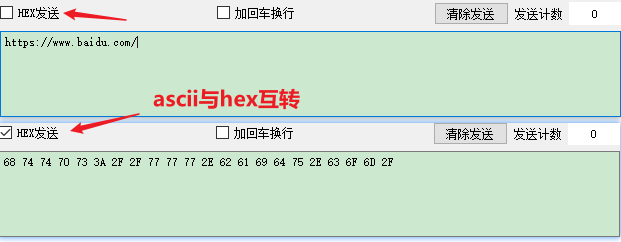
通过是否勾选HEX发送判断使用ascii格式还是hex格式发送数据,使用QCheckBox的stateChanged信号对勾选状态进行检测,然后在对应的槽函数中进行数据格式的转换。
/*HEX发送chexkBox信号槽*/

connect(ui->HexSend_checkBox,&QCheckBox::stateChanged,this,[=](int state){

    if (SendTextEditStr.isEmpty())

    {

        return;

    }

    //asccii与hex转换

    if (state == Qt::Checked)

    {

        //转换成QByteArray -> 转换成16进制数,按空格分开 -> 转换为大写

        SendTextEditBa = SendTextEditBa.toHex(' ').toUpper();

        ui->Send_TextEdit->document()->setPlainText(SendTextEditBa);

    }

    else

    {

        //从QByteArray转换为QString

        SendTextEditStr = SendTextEditBa.fromHex(SendTextEditBa);

        ui->Send_TextEdit->document()->setPlainText(SendTextEditStr);

    }

});
[signal]void QCheckBox::stateChanged(int state)This signal is emitted whenever the checkbox's state changes, i.e., whenever the user checks or unchecks it.
state contains the checkbox's new Qt::CheckState.
2.3、手动发送
当点击发送按钮时触发QPushButton的点击信号,在对应的槽函数中将发送框的数据按照选定格式发送出去,程序主体如下:
/*

    函   数:on_Send_Bt_clicked

    描   述:发送按键点击槽函数

    输   入:无

    输   出:无

*/

void Widget::on_Send_Bt_clicked()

{

    if (isSerialOpen != false)

    {

        /*将发送框数据发送*/

        SerialSendData(SendTextEditBa);

    }

    else

    {

        QMessageBox::information(this, "提示", "串口未打开");

    }

}
QpushButton继承自QAbstractButton。关于按键点击信号的描述:
[signal]void QAbstractButton::clicked(bool checked = false)This signal is emitted when the button is activated (i.e., pressed down then released while the mouse cursor is inside the button), when the shortcut key is typed, or when click() or animateClick() is called. Notably, this signal is not emitted if you call setDown(), setChecked() or toggle().
If the button is checkable, checked is true if the button is checked, or false if the button is unchecked.
/*

    函   数:SendData

    描   述:串口发送数据

    输   入:无

    输   出:无

*/

void Widget::SerialSendData(QByteArray baData)

{

    if (baData.isEmpty() != true)

    {

        /*是否加回车换行*/

        if (ui->AddNewLine_Box->isChecked())

        {

            baData.append("\r\n");

        }

        if (ui->HexSend_checkBox->isChecked())  // hex发送

        {

            /*获取hex格式的数据*/

            baData = baData.fromHex(baData);

            /*发送hex数据*/

            serial->write(baData);

            /*是否显示时间戳*/

            if (ui->TimeDisp_checkBox->isChecked())

            {

                QString strdata = baData.toHex(' ').trimmed().toUpper();

                ui->Receive_TextEdit->setTextColor(QColor("blue"));

                ui->Receive_TextEdit->append(QString("[%1]TX -> ").arg(QTime::currentTime().toString("HH:mm:ss:zzz")));

                ui->Receive_TextEdit->setTextColor(QColor("black"));

                ui->Receive_TextEdit->insertPlainText(strdata);

            }

        }

        else     //ascii发送

        {

            /*发送ascii数据*/

            serial->write(baData);

            /*是否显示时间戳*/

            if (ui->TimeDisp_checkBox->isChecked())

            {

                QString strdata = QString(baData);

                ui->Receive_TextEdit->setTextColor(QColor("red"));

                ui->Receive_TextEdit->append(QString("[%1]TX -> ").arg(QTime::currentTime().toString("HH:mm:ss:zzz")));

                ui->Receive_TextEdit->setTextColor(QColor("black"));

                ui->Receive_TextEdit->insertPlainText(strdata);

            }

        }

        //移动光标到末尾

        ui->Receive_TextEdit->moveCursor(QTextCursor::End);

        //更新发送计数

        serialDataTotalTxCnt += baData.length();

        ui->TxCnt_label->setText(QString::number(serialDataTotalTxCnt));

    }

    else

    {

        QMessageBox::warning(this, "警告", "数据为空");

    }

}
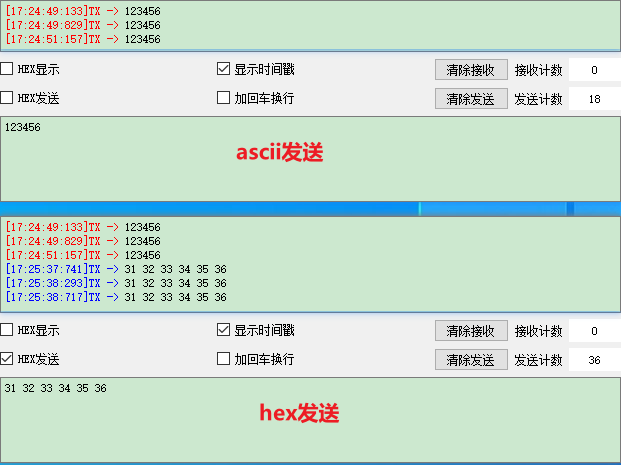
如果勾选了显示时间戳则在每次数据发送后将数据填充到接收框进行显示;代码中对发送的不同格式数据进行了不同颜色的标记;发送后对发送计数框进行更新。
QSerialPort继承自QIODevice,串口发送数据就是使用QIODevice类的write方法:
qint64 QIODevice::write(const QByteArray&byteArray)
This is an overloaded function.
Writes the content of byteArray to the device. Returns the number of bytes that were actually written, or -1 if an error occurred.
2.4、定时发送
使用QT中的定时器QTimer按照设定的时间对发送框数据进行自动发送。调用定时器的超时信号来触发槽函数中的发送操作:
/*定时发送定时器*/

TimerSend = new QTimer(this);

/*定时器超时信号槽*/

connect(TimerSend, &QTimer::timeout, this, [=](){

    SerialSendData(SendTextEditBa);

});
[signal]void QTimer::timeout()This signal is emitted when the timer times out.
Note: This is a private signal. It can be used in signal connections but cannot be emitted by the user.
当定时发送被勾选后,会触发QCheckBox的stateChanged信号来设定时间、开启定时器:
/*

    函   数:on_TimeSend_checkBox_stateChanged

    描   述:定时发送框勾选信号对应槽函数

    输   入:无

    输   出:无

*/

void Widget::on_TimeSend_checkBox_stateChanged(int arg1)

{

    int time;

    /*判断串口是否打开*/

    if (false == isSerialOpen)

    {

        if (ui->TimeSend_checkBox->isChecked())

        {

            QMessageBox::information(this, "提示", "串口未打开");

        }

        return;

    }

    /*判断是否有数据*/

    if (ui->Send_TextEdit->document()->isEmpty() == true)

    {

        if (ui->TimeSend_checkBox->isChecked())

        {

            QMessageBox::warning(this, "警告", "数据为空");

        }

        return;

    }

	/*判断勾选状态*/

    if (arg1 == Qt::Checked)

    {

        /*获取设定时间*/

        time = ui->TimeSend_lineEdit->text().toInt();

        if (time > 0) {

            TimerSend->start(time);

        } else {

            QMessageBox::warning(this, "警告", "时间必须大于0");

        }

        ui->TimeSend_lineEdit->setEnabled(false);

    }

    else

    {

        /*停止发送*/

        TimerSend->stop();

        ui->TimeSend_lineEdit->setEnabled(true);

    }

}
[slot]void QTimer::start(int msec)Starts or restarts the timer with a timeout interval of msec milliseconds.
If the timer is already running, it will be stopped and restarted.
If singleShot is true, the timer will be activated only once.
[slot]void QTimer::stop()Stops the timer.
三、总结
本章主要讲解数据的发送与格式转换。除了要知道各控件的信号槽应用之外,还应该对QT中数据类型的一些操作方法有所了解。比如上面的代码中使用到的一些QString、QByteArray的常用数据操作方法:QString::replace、QString::at、QString::toUtf8、QByteArray::toHex、QByteArray::fromHex等。
QT串口助手(四):数据发送的更多相关文章
- QT串口助手(三):数据接收
作者:zzssdd2 E-mail:zzssdd2@foxmail.com 一.前言 开发环境:Qt5.12.10 + MinGW 实现的功能 串口数据的接收 ascii字符形式显示与hex字符形式显 ...
- QT串口助手(五):文件操作
作者:zzssdd2 E-mail:zzssdd2@foxmail.com 一.前言 开发环境:Qt5.12.10 + MinGW 功能 文件的发送 数据的保存 知识点 QFile类的使用 QTime ...
- Qt串口通信接收数据不完整的解决方法
在使用串口接收数据时,当数据量大的时候会出现数据接收不完整的情况.因为串口数据获取函数readAll()由readyRead()信号触发,但readyRead()信号在串口读到起始标志时立即发送,并不 ...
- Qt串口通信接收数据不完整的解决方法(传输图片)
在使用串口接收数据时,当数据量大的时候会出现数据接收不完整的情况.因为串口数据获取函数readAll()由readyRead()信号触发,但readyRead()信号在串口读到起始标志时立即发送,并不 ...
- QT串口助手(二):参数配置
作者:zzssdd2 E-mail:zzssdd2@foxmail.com 一.前言 主要实现功能 串口参数的配置:波特率.数据位.停止位.校验位 本机串口设备的查询与添加显示 串口设备的手动更新与打 ...
- Qt 新手实战项目之手把手打造一个串口助手
一前景 很多时候我们在学习一门新的语言,一直在学习各种语法和记住各种关键字,很容易产生枯燥的情绪,感觉学习这些玩意儿不知道用在什么地方,心里很是苦恼,这不,我在这记录下我学习Qt的第一个的小项目-串口 ...
- Qt小项目之串口助手控制LED
Qt小项目之串口助手控制LED 前言 最近刚学了一点Qt开发上位机,尝试着做个小软件练练手.查找了很多资料,做了一个简单的串口助手,可以实现串口基本发送和接收功能,支持中文显示,还可以控制STM32开 ...
- Qt 串口通信之使用16进制发送数据的转换方式
Qt 串口通信之使用16进制发送数据的转换方式 一 概述 有时候在做上位机串口通讯时,经常需要将字符串转成16进制的形式作为发送,借此分析记录一下. 二 需求分析 //假设需要转换的字符:如下 QSt ...
- python3 Serial 串口助手的接收读取数据
其实网上已经有许多python语言书写的串口,但大部分都是python2写的,没有找到一个合适的python编写的串口助手,只能自己来写一个串口助手,由于我只需要串口能够接收读取数据就可以了,故而这个 ...
随机推荐
- .net core 和 WPF 开发升讯威在线客服与营销系统:(插曲)一次端口攻击行为的分析与应对
本系列文章详细介绍使用 .net core 和 WPF 开发 升讯威在线客服与营销系统 的过程.本产品已经成熟稳定并投入商用. 在线演示环境:https://kf.shengxunwei.com 注意 ...
- JDK下载地址 Oracle JDK下载 地址 (已解决)
现在JDK开始收费了 Oracle官方对JDK的管理也变得严格了,现在想要在官网下载jdk需要先注册Oracle账号,这倒是小事但是网页反应慢注册填写内容复杂导致很多人不想注册. 不过有的人提供了公开 ...
- Arduino IDE 开发ESP-01/ESP8266-01读取DHT11温度湿度传感器
引脚接线: DHT11---ESP8266-01 Singnal--IO2, GND----GND, VCC----VCC DHT11引脚说明: ESP8266-01/ESP8266-01S引脚说明: ...
- ES6中class的使用+继承
一.Class 介绍+基本语法(1).介绍通过class关键字,可以定义类.基本上,ES6 的class可以看作只是一个语法糖,它的绝大部分功能,ES5 都可以做到,新的class写法只是让对象原型的 ...
- java位运算符生产环境应用分析
在实际应用场景中 特别是 1,2,4,8,16 这种2的整数次幂的数字,因为具有非常典型的特点 首先是 1.2.4 这几位数了,因为他们的特点就是二进制只有一个为 1 的位,其他位都是 0,并同其他数 ...
- 盘点 Java 开发 2020 年发生的几件大事,你必须得知道!
2021 年了,在过去的一年 Java 软件开发行业都发生了哪些重大事件呢? 这篇栈长带大家回顾一下,其实在元旦的<滚蛋吧,2020>也略有介绍,这篇就更加详细的总结一下. 1.Java ...
- 3D动漫人物代码
<div id="page_end_html"> <script src="https://eqcn.ajz.miesnfu.com/wp-conten ...
- 记一次Goroutine与wg导致的问题
前言 今天发现了一个问题是之前一直没有注意到的,这里记一下 正文 Send Closed Chan 问题概述 代码逻辑是启动时启动多个 channel, channel1 获取数据监听数据处理后发送给 ...
- 服务器报错"您的主机中的软件中止了一个已建立的连接"
网上很多的说法都模棱两可,只是说和远程连接有关,这个说的太泛泛了. 我现在遇到的问题是java web出现的, 执行表单提交的时候出现该错误,原因是ajax和表单同时提交导致的, 相信很多朋友用了aj ...
- Hdfs手动执行Balance
问题发现: 经巡检,服务器中一台节点的hadoop磁盘占用过多,是其它节点的三倍,导致数据严重不均衡. 解决过程: 两种命令: hadoop的bin目录下,运行命令start-balancer.sh ...