
数据可视化基础专题(十一):Matplotlib 基础(三)常用图表(一)折线图、散点图、柱状图
1 折线图
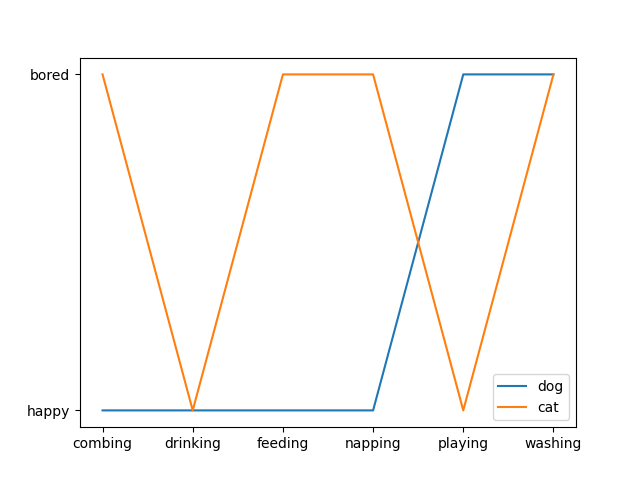
折线图主要用于表现随着时间的推移而产生的某种趋势。
cat = ["bored", "happy", "bored", "bored", "happy", "bored"]

dog = ["happy", "happy", "happy", "happy", "bored", "bored"]

activity = ["combing", "drinking", "feeding", "napping", "playing", "washing"]

fig, ax = plt.subplots()

ax.plot(activity, dog, label="dog")

ax.plot(activity, cat, label="cat")

ax.legend()

plt.show()
2.散点图
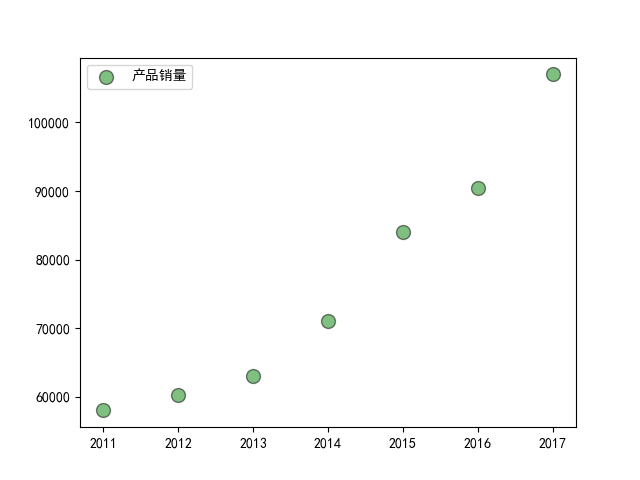
散点图经常用来表示数据之间的关系,使用的是 plt 库中的 scatter() 方法,还是先看下 scatter() 的语法,来自官方文档:
matplotlib.pyplot.scatter(x, y, s=None, c=None, marker=None, cmap=None, norm=None, vmin=None, vmax=None, alpha=None, linewidths=None, verts=<deprecated parameter>, edgecolors=None, *, plotnonfinite=False, data=None, **kwargs)
- s : 表示的是每个点的大小,如果只有一个数值的时候,则所有的点都是一样大的,也可以传入一个列表,这时候每个点的大小都不一样,散点图也就成了气泡图。
- c : 表示点的颜色,如果只有一种颜色的时候,则每个点的颜色都会相同,也可以使用列表定义不同的颜色
- linewidths : 表示每个散点的线宽
- edgecolors : 每个散点外轮廓的颜色
例子一:
import matplotlib.pyplot as plt

import numpy as np

# 处理中文乱码

plt.rcParams['font.sans-serif']=['SimHei']

x_data = np.array([2011,2012,2013,2014,2015,2016,2017])

y_data = np.array([58000,60200,63000,71000,84000,90500,107000])

plt.scatter(x_data, y_data, s = 100, c = 'green', marker='o', edgecolor='black', alpha=0.5, label = '产品销量')

plt.legend()

plt.savefig("scatter_demo.png")
例子二
import matplotlib.pyplot as plt

import numpy as np

# unit area ellipse

rx, ry = 3., 1.

area = rx * ry * np.pi

theta = np.arange(0, 2 * np.pi + 0.01, 0.1)

verts = np.column_stack([rx / area * np.cos(theta), ry / area * np.sin(theta)])

x, y, s, c = np.random.rand(4, 30)

s *= 10**2.

fig, ax = plt.subplots()

ax.scatter(x, y, s, c, marker=verts)

plt.show()

例子三
import matplotlib.pyplot as plt

import numpy as np

# Fixing random state for reproducibility

np.random.seed(19680801)

N = 100

r0 = 0.6

x = 0.9 * np.random.rand(N)

y = 0.9 * np.random.rand(N)

area = (20 * np.random.rand(N))**2  # 0 to 10 point radii

c = np.sqrt(area)

r = np.sqrt(x ** 2 + y ** 2)

area1 = np.ma.masked_where(r < r0, area)

area2 = np.ma.masked_where(r >= r0, area)

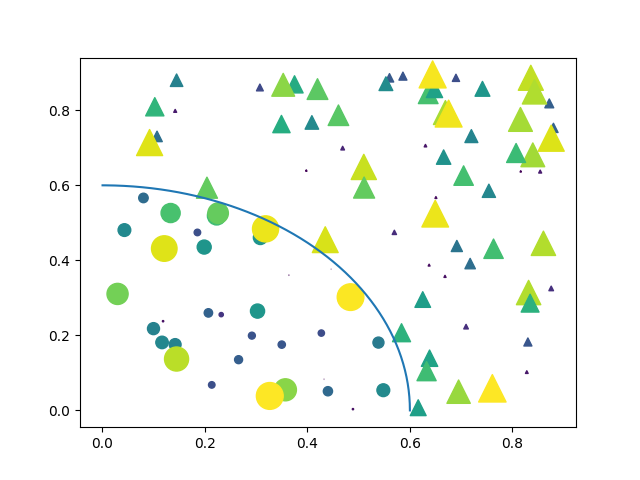
plt.scatter(x, y, s=area1, marker='^', c=c)

plt.scatter(x, y, s=area2, marker='o', c=c)

# Show the boundary between the regions:

theta = np.arange(0, np.pi / 2, 0.01)

plt.plot(r0 * np.cos(theta), r0 * np.sin(theta))

plt.show()
3.柱状图
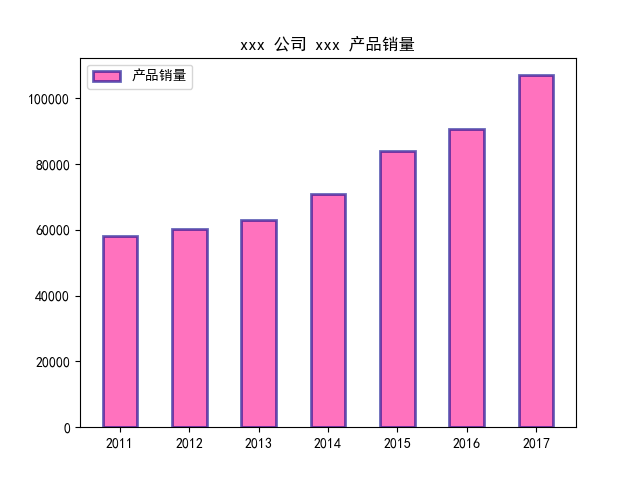
柱状图主要用于查看各分组数据的数量分布,以及各个分组数据之间的数量比较。
3.1 普通柱状图
matplotlib.pyplot.bar(left, height, width=0.8, bottom=None, hold=None, data=None, **kwargs)
| 参数 | 接收值 | 说明 | 默认值 |
|---|---|---|---|
| left | array | x 轴; | 无 |
| height | array | 柱形图的高度,也就是y轴的数值; | 无 |
| alpha | 数值 | 柱形图的颜色透明度 ; | 1 |
| width | 数值 | 柱形图的宽度; | 0.8 |
| color(facecolor) | string | 柱形图填充的颜色; | 随机色 |
| edgecolor | string | 图形边缘颜色 | None |
| label | string | 解释每个图像代表的含义 | 无 |
| linewidth(linewidths / lw) | 数值 | 边缘or线的宽度 | 1 |
import matplotlib.pyplot as plt

import numpy as np

# 处理中文乱码

plt.rcParams['font.sans-serif']=['SimHei']

x_data = np.array([2011,2012,2013,2014,2015,2016,2017])

y_data = np.array([58000,60200,63000,71000,84000,90500,107000])

y_data_1 = np.array([78000,80200,93000,101000,64000,70500,87000])

plt.title(label='xxx 公司 xxx 产品销量')

plt.bar(x_data, y_data, width=0.5, alpha=0.6, facecolor = 'deeppink', edgecolor = 'darkblue', lw=2, label='产品销量')

plt.legend()

plt.savefig("bar_demo_1.png")
3.2 并排柱状图
接下来是两个柱形图并列显示,这里调用的还是 bar() ,只不过需要调整的是柱子的位置:
import matplotlib

import matplotlib.pyplot as plt

import numpy as np

labels = ['G1', 'G2', 'G3', 'G4', 'G5']

men_means = [20, 34, 30, 35, 27]

women_means = [25, 32, 34, 20, 25]

x = np.arange(len(labels))  # the label locations

width = 0.35  # the width of the bars

fig, ax = plt.subplots()

rects1 = ax.bar(x - width/2, men_means, width, label='Men')

rects2 = ax.bar(x + width/2, women_means, width, label='Women')

# Add some text for labels, title and custom x-axis tick labels, etc.

ax.set_ylabel('Scores')

ax.set_title('Scores by group and gender')

ax.set_xticks(x)

ax.set_xticklabels(labels)

ax.legend()

def autolabel(rects):

    """Attach a text label above each bar in *rects*, displaying its height."""

    for rect in rects:

        height = rect.get_height()

        ax.annotate('{}'.format(height),

                    xy=(rect.get_x() + rect.get_width() / 2, height),

                    xytext=(0, 3),  # 3 points vertical offset

                    textcoords="offset points",

                    ha='center', va='bottom')

autolabel(rects1)

autolabel(rects2)

fig.tight_layout()

plt.show()
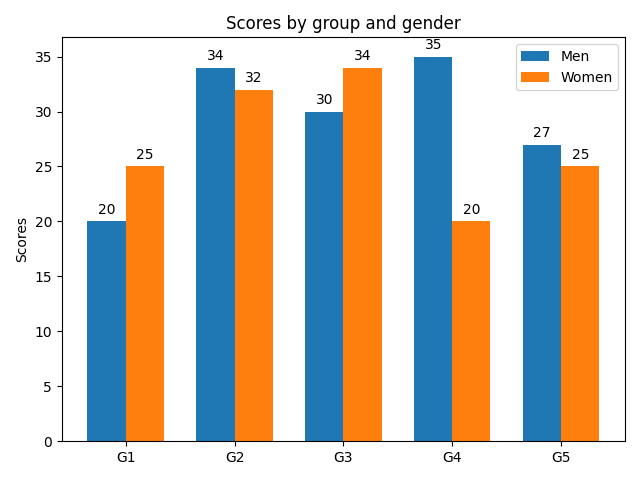
3.3 堆积柱状图
Note the parameters yerr used for error bars, and bottom to stack the women's bars on top of the men's bars.
import numpy as np

import matplotlib.pyplot as plt

labels = ['G1', 'G2', 'G3', 'G4', 'G5']

men_means = [20, 35, 30, 35, 27]

women_means = [25, 32, 34, 20, 25]

men_std = [2, 3, 4, 1, 2]

women_std = [3, 5, 2, 3, 3]

width = 0.35       # the width of the bars: can also be len(x) sequence

fig, ax = plt.subplots()

ax.bar(labels, men_means, width, yerr=men_std, label='Men')

ax.bar(labels, women_means, width, yerr=women_std, bottom=men_means,

       label='Women')

ax.set_ylabel('Scores')

ax.set_title('Scores by group and gender')

ax.legend()

plt.show()

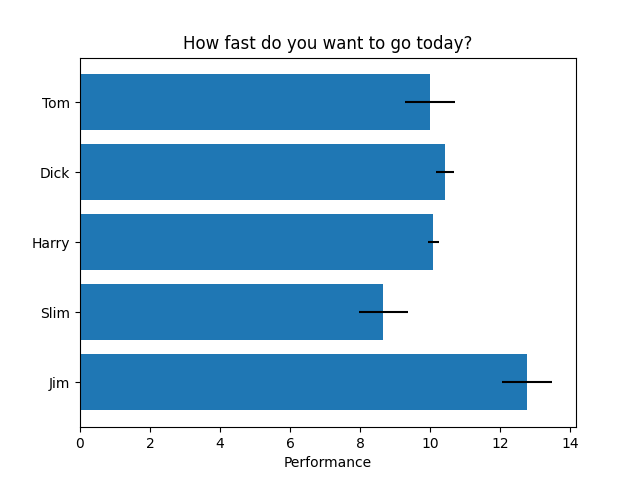
3.4 横向柱状图
import matplotlib.pyplot as plt

import numpy as np

# Fixing random state for reproducibility

np.random.seed(19680801)

plt.rcdefaults()

fig, ax = plt.subplots()

# Example data

people = ('Tom', 'Dick', 'Harry', 'Slim', 'Jim')

y_pos = np.arange(len(people))

performance = 3 + 10 * np.random.rand(len(people))

error = np.random.rand(len(people))

ax.barh(y_pos, performance, xerr=error, align='center')

ax.set_yticks(y_pos)

ax.set_yticklabels(people)

ax.invert_yaxis()  # labels read top-to-bottom

ax.set_xlabel('Performance')

ax.set_title('How fast do you want to go today?')

plt.show()
import matplotlib.pyplot as plt

import numpy as np # 处理中文乱码

plt.rcParams['font.sans-serif']=['SimHei']

x_data = np.array([2011,2012,2013,2014,2015,2016,2017])

y_data = np.array([58000,60200,63000,71000,84000,90500,107000])

y_data_1 = np.array([78000,80200,93000,101000,64000,70500,87000])

plt.title(label='xxx 公司 xxx 产品销量')

plt.bar(x_data, y_data, width=0.5, alpha=0.6, facecolor = 'deeppink', edgecolor = 'darkblue', lw=2, label='产品销量')

plt.legend()

plt.savefig("bar_demo_1.png")
import matplotlib.pyplot as plt import numpy as np # 处理中文乱码 plt.rcParams['font.sans-serif']=['SimHei'] x_data = np.array([2011,2012,2013,2014,2015,2016,2017]) y_data = np.array([58000,60200,63000,71000,84000,90500,107000]) y_data_1 = np.array([78000,80200,93000,101000,64000,70500,87000]) plt.title(label='xxx 公司 xxx 产品销量') plt.bar(x_data, y_data, width=0.5, alpha=0.6, facecolor = 'deeppink', edgecolor = 'darkblue', lw=2, label='产品销量') plt.legend() plt.savefig("bar_demo_1.png")
数据可视化基础专题(十一):Matplotlib 基础(三)常用图表(一)折线图、散点图、柱状图的更多相关文章
- 数据可视化:绘图库-Matplotlib
为什么要绘图? 一个图表数据的直观分析,下面先看一组北京和上海上午十一点到十二点的气温变化数据: 数据: 这里我用一段代码生成北京和上海的一个小时内每分钟的温度如下: import random co ...
- Qt数据可视化(散点图、折线图、柱状图、盒须图、饼状图、雷达图)开发实例
目录 散点图 折线图 柱状图 水平柱状图 水平堆叠图 水平百分比柱状图 盒须图 饼状图 雷达图 Qt散点图.折线图.柱状图.盒须图.饼状图.雷达图开发实例. 在开发过程中我们会使用多各种各样的图 ...
- echarts、higncharts折线图或柱状图显示数据为0的点
echarts.higncharts折线图或柱状图只需要后端传到前端一段json数据,接送数据的x轴与y周有对应数据,折线图或柱状图就会渲染出这数据. 比如,x轴表示美每天日期,y轴表示数量.他们的数 ...
- 安卓图表引擎AChartEngine(三) - 示例源码折线图、饼图和柱状图
折线图: package org.achartengine.chartdemo.demo.chart; import java.util.ArrayList; import java.util.Lis ...
- 数据可视化利器pyechart和matplotlib比较
python中用作数据可视化的工具有多种,其中matplotlib最为基础.故在工具选择上,图形美观之外,操作方便即上乘. 本文着重说明常见图表用基础版matplotlib和改良版pyecharts作 ...
- 数据可视化(一)-Matplotlib简易入门
本节的内容来源:https://www.dataquest.io/mission/10/plotting-basics 本节的数据来源:https://archive.ics.uci.edu/ml/d ...
- ajax实现highchart与数据库数据结合完整案例分析(三)---柱状折线图
作者原创,未经博主允许,不可转载 在前面分析和讲解了用java代码分别实现饼状图和折线图,在工作当中,也会遇到很多用ajax进行异步请求 实现highchart. 先展示一下实现的效果图: 用ajax ...
- Matplotlib中plot画点图和折线图
引入: import matplotlib.pyplot as plt 基本语法: plt.plot(x, y, format_string, **kwargs) x:x轴数据,列表或数组,可选 y: ...
- matplotlib库的基本使用与折线图
matplotlib:最流行的Python底层绘图库,主要做数据可视化图表,名字取材于MATLAB,模仿MATLAB构建 基本使用: x和y的长度必须一致 figure()方法用来设置图片大小 x,y ...
- 使用matplotlib绘图(一)之折线图
# 使用matplotlib绘制折线图 import matplotlib.pyplot as plt import numpy as np # 在一个图形中创建两条线 fig = plt.figur ...
随机推荐
- DedeCms 标签中channelartlist设置属性标签样式的方法
实现的效果如下: {dede:channelartlist typeid='6' row='3' currentstyle='current'} <li class='{dede:field.c ...
- Stones【中石油个人赛第十七场I】
Stones 题目链接(传送门) 来源:upc12899 题目描述 There are N stones arranged in a row. Every stone is painted white ...
- 面试:在面试中关于List(ArrayList、LinkedList)集合会怎么问呢?你该如何回答呢?
前言 在一开始基础面的时候,很多面试官可能会问List集合一些基础知识,比如: ArrayList默认大小是多少,是如何扩容的? ArrayList和LinkedList的底层数据结构是什么? Arr ...
- Shell总结02-shell变量、赋值与替换
变量 shell并不区分变量的类型,或者说变量都是弱类型的,本质上都是字符串,但是如果变量值中只含有数字,shell还是支持对其进行算术运算 赋值 常见的赋值操作符有=(在其前后没有空白符)和let ...
- LR字符串处理函数-lr_save_int
int lr_save_int(int value,const char * param_name); value:要分配给参数的整数值. param_name:参数的名称. lr_save_in ...
- .Net Core基础的健康检查
前言 健康检查能查看我们的应用程序当前是否是一个健康的运行状态.微软已经给我们提供了健康检查轮子,只需要简单的配置就能完成服务的状态检查.一起来实现一个最简单的健康检查吧. 开始 新建一个空的webA ...
- 使用vscode 开发go项目的最新姿势. go版本1.14.2
使用了go 1.14.2. 版本, 再也不用建src, pkg, bin 目录了, 以及再也不用强制配置GOPATH了 前提条件: 必须是 go mod 项目. 在工程目录下, 执行这样的命令生成 ...
- const变量的修改
int main(){ const char a[]="hello world"; char *aa=(char *)a; printf("\nthe a address ...
- HTML躬行记(1)——SVG
<svg>是矢量图的根元素,通过xmlns属性声明命名空间,从而告诉用户代理标记名称属于哪个XML方言.在下面的示例中,为<svg>元素声明了宽度和高度(默认以像素为单位),其 ...
- angular 接入 IdentityServer4
angular 接入 IdentityServer4 Intro 最近把活动室预约的项目做了一个升级,预约活动室需要登录才能预约,并用 IdentityServer4 做了一个统一的登录注册中心,这样 ...