
SpringCloud-使用熔断器防止服务雪崩-Ribbon和Feign方式(附代码下载)
场景
SpringCloud-服务注册与实现-Eureka创建服务注册中心(附源码下载):
https://blog.csdn.net/BADAO_LIUMANG_QIZHI/article/details/102535957
SpringCloud-服务注册与实现-Eureka创建服务提供者(附源码下载):
https://blog.csdn.net/BADAO_LIUMANG_QIZHI/article/details/102558004
SpringCloud-创建服务消费者-Ribbon方式(附代码下载):
https://blog.csdn.net/BADAO_LIUMANG_QIZHI/article/details/102558080
SpringCloud-创建服务消费者-Feign方式(附代码下载)::
https://blog.csdn.net/BADAO_LIUMANG_QIZHI/article/details/102595895
在上面已经实现服务注册中心、服务提供者和以Ribbon方式和Fign方式实现服务消费者的前提下,使用熔断器防止服务雪崩。
在微服务架构中,根据业务来拆分成一个个的服务,服务与服务之间可以通过 RPC 相互调用,在 Spring Cloud 中可以用 RestTemplate + Ribbon 和 Feign 来调用。为了保证其高可用,单个服务通常会集群部署。由于网络原因或者自身的原因,服务并不能保证 100% 可用,如果单个服务出现问题,调用这个服务就会出现线程阻塞,此时若有大量的请求涌入,Servlet 容器的线程资源会被消耗完毕,导致服务瘫痪。服务与服务之间的依赖性,故障会传播,会对整个微服务系统造成灾难性的严重后果,这就是服务故障的 “雪崩” 效应。
熔断器打开后,为了避免连锁故障,通过 fallback 方法可以直接返回一个固定值。
注:
博客:
https://blog.csdn.net/badao_liumang_qizhi
关注公众号
霸道的程序猿
获取编程相关电子书、教程推送与免费下载。
实现
Ribbon中使用熔断器
SpringCloud-创建服务消费者-Ribbon方式(附代码下载):
https://blog.csdn.net/BADAO_LIUMANG_QIZHI/article/details/102558080
在上面使用Ribbon实现创建服务消费者。
我们在pom.xml中加入hystrix的依赖:
<dependency>

    <groupId>org.springframework.cloud</groupId>

    <artifactId>spring-cloud-starter-netflix-hystrix</artifactId>

</dependency>
完整pom.xml
<?xml version="1.0" encoding="UTF-8"?>

<project xmlns="http://maven.apache.org/POM/4.0.0" xmlns:xsi="http://www.w3.org/2001/XMLSchema-instance"

         xsi:schemaLocation="http://maven.apache.org/POM/4.0.0 http://maven.apache.org/xsd/maven-4.0.0.xsd">

    <modelVersion>4.0.</modelVersion>

    <parent>

        <groupId>com.badao</groupId>

        <artifactId>hello-spring-cloud-dependencies</artifactId>

        <version>1.0.-SNAPSHOT</version>

        <relativePath>../hello-spring-cloud-dependencies/pom.xml</relativePath>

    </parent>

    <artifactId>hello-spring-cloud-web-admin-ribbon</artifactId>

    <packaging>jar</packaging>

    <name>hello-spring-cloud-web-admin-ribbon</name>

    <url>https://blog.csdn.net/badao_liumang_qizhi</url>

    <inceptionYear>-Now</inceptionYear>

    <dependencies>

        <!-- Spring Boot Begin -->

        <dependency>

            <groupId>org.springframework.boot</groupId>

            <artifactId>spring-boot-starter-web</artifactId>

        </dependency>

        <dependency>

            <groupId>org.springframework.boot</groupId>

            <artifactId>spring-boot-starter-tomcat</artifactId>

        </dependency>

        <dependency>

            <groupId>org.springframework.boot</groupId>

            <artifactId>spring-boot-starter-thymeleaf</artifactId>

        </dependency>

        <dependency>

            <groupId>org.springframework.boot</groupId>

            <artifactId>spring-boot-starter-actuator</artifactId>

        </dependency>

        <dependency>

            <groupId>org.springframework.boot</groupId>

            <artifactId>spring-boot-starter-test</artifactId>

            <scope>test</scope>

        </dependency>

        <!-- Spring Boot End -->

        <!-- Spring Cloud Begin -->

        <dependency>

            <groupId>org.springframework.cloud</groupId>

            <artifactId>spring-cloud-starter-netflix-eureka-server</artifactId>

        </dependency>

        <dependency>

            <groupId>org.springframework.cloud</groupId>

            <artifactId>spring-cloud-starter-netflix-ribbon</artifactId>

        </dependency>

        <dependency>

            <groupId>org.springframework.cloud</groupId>

            <artifactId>spring-cloud-starter-netflix-hystrix</artifactId>

        </dependency>

        <!-- Spring Cloud End -->

        <!-- 解决 thymeleaf 模板引擎一定要执行严格的 html5 格式校验问题 -->

        <dependency>

            <groupId>net.sourceforge.nekohtml</groupId>

            <artifactId>nekohtml</artifactId>

        </dependency>

    </dependencies>

    <build>

        <plugins>

            <plugin>

                <groupId>org.springframework.boot</groupId>

                <artifactId>spring-boot-maven-plugin</artifactId>

                <configuration>

                    <mainClass>com.funtl.hello.spring.cloud.web.admin.ribbon.WebAdminRibbonApplication</mainClass>

                </configuration>

            </plugin>

        </plugins>

    </build>

</project>
然后在应用启动类Application中增加@EnableHystrix注解
package com.badao.hello.spring.cloud.web.admin.ribbon;

import org.springframework.boot.SpringApplication;

import org.springframework.boot.autoconfigure.SpringBootApplication;

import org.springframework.cloud.client.discovery.EnableDiscoveryClient;

@SpringBootApplication

@EnableDiscoveryClient

@EnableHystrix

public class WebAdminRibbonApplication {

    public static void main(String[] args) {

        SpringApplication.run(WebAdminRibbonApplication.class, args);

    }

}
然后在Service中添加@HystrixCommand注解
在 Ribbon 调用方法上增加 @HystrixCommand 注解并指定 fallbackMethod
熔断方法。
package com.badao.hello.spring.cloud.web.admin.ribbon.service;

import org.springframework.beans.factory.annotation.Autowired;

import org.springframework.stereotype.Service;

import org.springframework.web.client.RestTemplate;

@Service

public class AdminService {

    @Autowired

    private RestTemplate restTemplate;

    @HystrixCommand(fallbackMethod = "hiError")

    public String sayHi(String message) {

        return restTemplate.getForObject("http://hello-spring-cloud-service-admin/hi?message=" + message, String.class);

    }

    public String hiError(String message) {

        return "Hi,your message is :\"" + message + "\" but request error.";

    }

}
测试熔断器
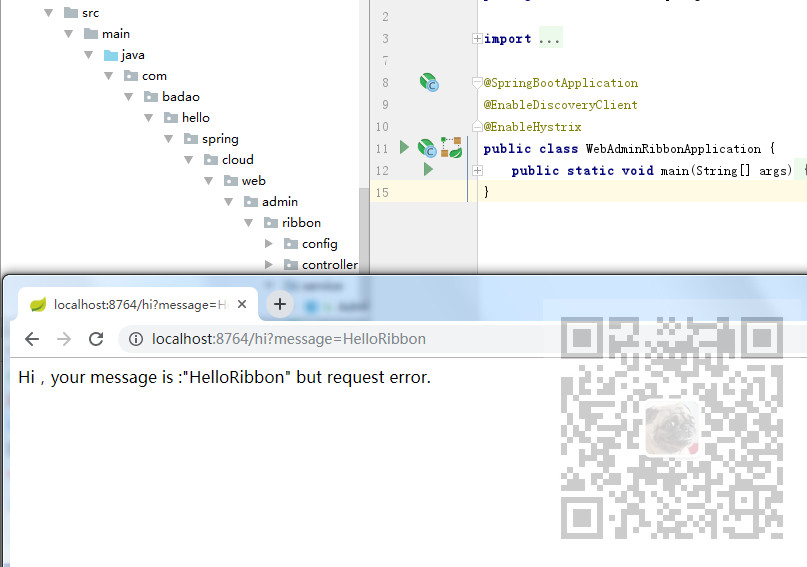
为了测试熔断器效果,我们将服务提供者关闭,此时再次请求:
http://localhost:8764/hi?message=HelloRibbon
Feign中使用熔断器
Feign自带熔断器,所以不用添加依赖,只需要在配置文件中配置打开。
feign:

  hystrix:

    enabled: true

完整配置文件:
spring:

  application:

    name: hello-spring-cloud-web-admin-feign

  thymeleaf:

    cache: false

    mode: LEGACYHTML5

    encoding: UTF-

    servlet:

      content-type: text/html

server:

  port:

eureka:

  client:

    serviceUrl:

      defaultZone: http://localhost:8761/eureka/

feign:

  hystrix:

    enabled: true
然后再Service中增加fallback指定类
package com.badao.hello.spring.cloud.web.feign.service;

import org.springframework.cloud.openfeign.FeignClient;

import org.springframework.web.bind.annotation.RequestMapping;

import org.springframework.web.bind.annotation.RequestMethod;

import org.springframework.web.bind.annotation.RequestParam;

@FeignClient(value = "hello-spring-cloud-service-admin", fallback = AdminServiceHystrix.class)

public interface AdminService {

    @RequestMapping(value = "hi", method = RequestMethod.GET)

    public String sayHi(@RequestParam(value = "message") String message);

}
此时再service包下创建熔断器并实现对应的Feign接口
package com.badao.hello.spring.cloud.web.feign.service;

import org.springframework.stereotype.Component;

@Component

public class AdminServiceHystrix implements AdminService {

    @Override

    public String sayHi(String message) {

        return "Hi,your message is :\"" + message + "\" but request error.";

    }

}
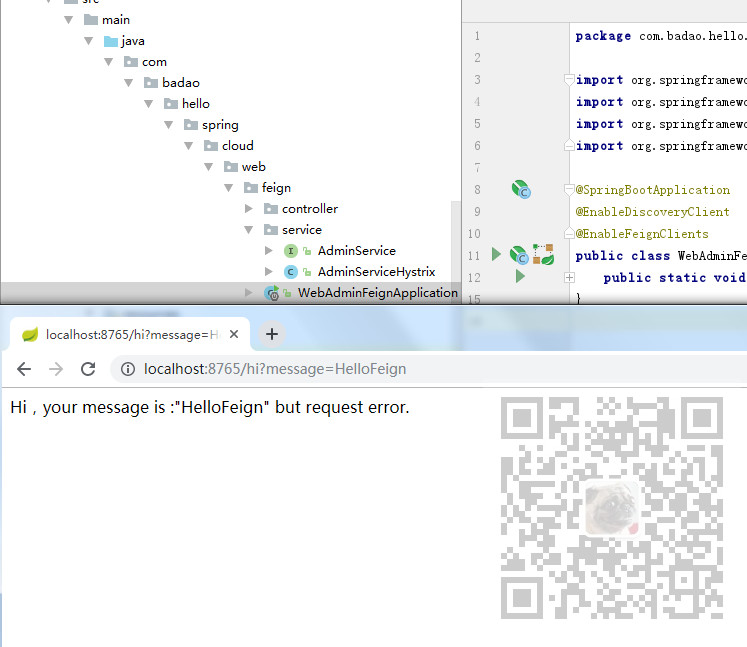
然后将服务提供者关闭,再次请求:
http://localhost:8765/hi?message=HelloFeign
代码下载
https://download.csdn.net/download/badao_liumang_qizhi/11871136
SpringCloud-使用熔断器防止服务雪崩-Ribbon和Feign方式(附代码下载)的更多相关文章
- SpringCloud-创建服务消费者-Feign方式(附代码下载)
场景 SpringCloud-服务注册与实现-Eureka创建服务注册中心(附源码下载): https://blog.csdn.net/BADAO_LIUMANG_QIZHI/article/deta ...
- SpringCloud-创建服务消费者-Ribbon方式(附代码下载)
场景 SpringCloud-服务注册与实现-Eureka创建服务注册中心(附源码下载): https://blog.csdn.net/BADAO_LIUMANG_QIZHI/article/deta ...
- Dubbo搭建HelloWorld-搭建服务提供者与服务消费者并完成远程调用(附代码下载)
场景 Dubbo简介与基本概念: https://blog.csdn.net/BADAO_LIUMANG_QIZHI/article/details/103555224 Dubbo环境搭建-ZooKe ...
- 从实例一步一步入门学习SpringCloud的Eureka、Ribbon、Feign、熔断器、Zuul的简单使用(附代码下载)
场景 SpringCloud -创建统一的依赖管理: https://blog.csdn.net/BADAO_LIUMANG_QIZHI/article/details/102530574 Sprin ...
- SpringCloud基础概念学习笔记(Eureka、Ribbon、Feign、Zuul)
SpringCloud基础概念学习笔记(Eureka.Ribbon.Feign.Zuul) SpringCloud入门 参考: https://springcloud.cc/spring-cloud- ...
- spring cloud 微服务调用--ribbon和feign调用
这里介绍ribbon和feign调用两种通信服务调用方式,同时介绍如何引入第三方服务调用.案例包括了ribbon负载均衡和hystrix熔断--服务降级的处理,以及feign声明式服务调用.例子包括s ...
- 微服务之服务注册与发现--Eureka(附代码)
该贴为入门贴,看完可快速知道服务注册与发现是什么?怎么用?至于深入的内容不在此篇文章所述之内,请自行百度. 内容来自:https://blog.csdn.net/nanbiebao6522/artic ...
- SpringCloud微服务基础 Eureka、Feign、Ribbon、Zuul、Hystrix、配置中心的基础使用
1.单点系统架构 传统项目架构 传统项目分为三层架构,将业务逻辑层.数据库访问层.控制层放入在一个项目中. 优点:适合于个人或者小团队开发,不适合大团队开发. 分布式项目架构 根据业务需求进行拆分成N ...
- springcloud微服务实战:Eureka+Zuul+Feign/Ribbon+Hystrix Turbine+SpringConfig+sleuth+zipkin
相信现在已经有很多小伙伴已经或者准备使用springcloud微服务了,接下来为大家搭建一个微服务框架,后期可以自己进行扩展.会提供一个小案例: 服务提供者和服务消费者 ,消费者会调用提供者的服务,新 ...
随机推荐
- day 17 re模块 正则表达式
import re 引用re模块 查找 finall:匹配所有,每一项都是列表中的一个元素 search:只匹配从左到右的第一个,得到的不是直接的结果而是一个变量,通过group方法获取结果,没 ...
- C语言基础——进制转换 / 数据表示
第一部分:进制转换 二进制:由0~1构成,逢2进1 八进制:由0~7构成,逢8进1 十六进制:由0~9.A~F构成,逢16进1 两个基本概念 基数:n进制基数为n 123.4 = 1*10^2 + 2 ...
- 03_Matplotlib的基本使用
python利用Matplotlib.pyplot库绘制不同的图形,但是在显示中文时存在部分问题,一般在导入库后,添加如下代码: # 设置中文正常显示 plt.rcParams['font.sans- ...
- DVWA学习之SQL注入
DVWA学习之SQL注入 环境工具 dvwa 1.9 phpstudy firefox burpsuite 实验步骤 一.设置安全级别为LOW 1. 登录DVWA,并将安全级别设置为LOW 2. 进入 ...
- 国内开源C# WPF控件库Panuon.UI.Silver推荐
国内优秀的WPF开源控件库,Panuon.UI的优化版本.一个漂亮的.使用样式与附加属性的WPF UI控件库,值得向大家推荐使用与学习. 今天站长(Dotnet9,站长网址:https://dotne ...
- Django简介以及MVC模式
一.简介 Django,是当前Python世界里最负盛名且成熟的网络框架.最初用来制作在线新闻的Web站点. Django是一个基于python的web重量级框架 重指的是为发开者考虑的多 采用了MV ...
- SpringBoot实现登录
1.使用Spring Initializer快速创建Spring Boot项目 1.1 IDEA:使用 Spring Initializer快速创建项目 IDE都支持使用Spring的项目创建向导快速 ...
- oralce迁移Mysql问题总结
最近从oracle数据库迁移到Mysql, 总结了一些不兼容和需要注意的地方,持久层用的Mybatis 1 guid尽量用代码生成 现象:sys_guid() mysql报错,mysql对应的为UU ...
- vue 中使用 watch 的各种问题
报错: Method "watch" has type "object" in the component definition. Did you refere ...
- 使用vuecli3发布npm包
一.使用vuecli3创建项目 vue create svgicon 二.修改目录,开发组件前的准备 把src目录改为examples作为查看组件的演示目录,新建packages目录作为组件编写的目录 ...