
使用CXF实现WebService
一、首先创建一个maven项目,引入相应的jar包
<?xml version="1.0" encoding="UTF-8"?>

<project xmlns="http://maven.apache.org/POM/4.0.0"

         xmlns:xsi="http://www.w3.org/2001/XMLSchema-instance"

         xsi:schemaLocation="http://maven.apache.org/POM/4.0.0 http://maven.apache.org/xsd/maven-4.0.0.xsd">

    <modelVersion>4.0.0</modelVersion>

    <groupId>xw</groupId>

    <artifactId>xw</artifactId>

    <version>1.0-SNAPSHOT</version>

    <properties>

        <cxf.version>2.2.3</cxf.version>

    </properties>

    <dependencies>

    <!-- CXF Dependencies -->

    <dependency>

        <groupId>org.apache.cxf</groupId>

        <artifactId>cxf-rt-frontend-jaxws</artifactId>

        <version>${cxf.version}</version>

    </dependency>

    <dependency>

        <groupId>org.apache.cxf</groupId>

        <artifactId>cxf-rt-transports-http</artifactId>

        <version>${cxf.version}</version>

    </dependency>

    <!-- Jetty is needed if you're are not using the CXFServlet -->

    <dependency>

        <groupId>org.apache.cxf</groupId>

        <artifactId>cxf-rt-transports-http-jetty</artifactId>

        <version>${cxf.version}</version>

    </dependency>

    </dependencies>

    <build>

        <finalName>spirngMVC</finalName>

        <plugins>

            <!-- 编码和编译和JDK版本 -->

            <plugin>

                <groupId>org.apache.maven.plugins</groupId>

                <artifactId>maven-compiler-plugin</artifactId>

                <version>2.3.2</version>

                <configuration>

                    <source>1.8</source>

                    <target>1.8</target>

                    <encoding>utf8</encoding>

                </configuration>

            </plugin>

        </plugins>

    </build>

</project>
二、服务端
1、公开Web服务的接口IHelloService
@WebService

public interface IHelloService {

    Customer selectMaxIdCustomer(Customer c1,Customer c2);

    Customer selectLongNameCustomer(Customer c1,Customer c2);

}
使用@WebService注解表示公开为Web服务,使用这个注解的接口将公开所有的方法,如果你想屏蔽某个方法,可以使用方法注解@WebMethod(exclude = true)设置为true表示屏蔽该方法。
2、实现类HelloServiceImpl
public class HelloServiceImpl implements IHelloService {

    @Override

    public Customer selectMaxIdCustomer(Customer c1, Customer c2) {

        if(c1.getId() >= c2.getId() ){

            return c1;

        }else{

            return c2;

        }

    }

    @Override

    public Customer selectLongNameCustomer(Customer c1, Customer c2) {

        if(c1.getName().length() >= c2.getName().length() ){

            return c1;

        }else{

            return c2;

        }

    }

}
实现了Web服务的具体功能。
3、Customer类
@XmlRootElement(name = "Customer")

public class Customer {

    private long id;

    private String name;

    public long getId() {

        return id;

    }

    public void setId(long id) {

        this.id = id;

    }

    public String getName() {

        return name;

    }

    public void setName(String name) {

        this.name = name;

    }

}
这个类是公开为Web服务的接口中的参数类型和返回值,因此你需要使用@XmlRootElement(name = "Customer")注解告诉CXF如何在XML和Java Object之间处理。
4、发布Web服务
public class ServerSimple {

    public static void main(String[] args) throws Exception{

        Endpoint.publish("http://localhost:8080/helloWorld", new HelloServiceImpl());

    }

}
使用CXF自带的Jetty运行服务端,设置URL和服务类就行
三、查看WSDL
访问http://localhost:8080/helloWorld?wsdl地址可以看到很长的XML,就是WSDL,如果看到WSDL就代表Web服务发布成功了
This XML file does not appear to have any style information associated with it. The document tree is shown below.

<wsdl:definitions xmlns:ns1="http://schemas.xmlsoap.org/soap/http" xmlns:soap="http://schemas.xmlsoap.org/wsdl/soap/" xmlns:tns="http://cxf/" xmlns:wsdl="http://schemas.xmlsoap.org/wsdl/" xmlns:xsd="http://www.w3.org/2001/XMLSchema" name="HelloServiceImplService" targetNamespace="http://cxf/">

<wsdl:types>

<xs:schema xmlns:tns="http://cxf/" xmlns:xs="http://www.w3.org/2001/XMLSchema" elementFormDefault="unqualified" targetNamespace="http://cxf/" version="1.0">

<xs:element name="Customer" type="tns:customer"/>

<xs:element name="selectLongNameCustomer" type="tns:selectLongNameCustomer"/>

<xs:element name="selectLongNameCustomerResponse" type="tns:selectLongNameCustomerResponse"/>

<xs:element name="selectMaxIdCustomer" type="tns:selectMaxIdCustomer"/>

<xs:element name="selectMaxIdCustomerResponse" type="tns:selectMaxIdCustomerResponse"/>

<xs:complexType name="selectLongNameCustomer">

<xs:sequence>

<xs:element minOccurs="0" name="arg0" type="tns:customer"/>

<xs:element minOccurs="0" name="arg1" type="tns:customer"/>

</xs:sequence>

</xs:complexType>

<xs:complexType name="customer">

<xs:sequence>

<xs:element name="id" type="xs:long"/>

<xs:element minOccurs="0" name="name" type="xs:string"/>

</xs:sequence>

</xs:complexType>

<xs:complexType name="selectLongNameCustomerResponse">

<xs:sequence>

<xs:element minOccurs="0" name="return" type="tns:customer"/>

</xs:sequence>

</xs:complexType>

<xs:complexType name="selectMaxIdCustomer">

<xs:sequence>

<xs:element minOccurs="0" name="arg0" type="tns:customer"/>

<xs:element minOccurs="0" name="arg1" type="tns:customer"/>

</xs:sequence>

</xs:complexType>

<xs:complexType name="selectMaxIdCustomerResponse">

<xs:sequence>

<xs:element minOccurs="0" name="return" type="tns:customer"/>

</xs:sequence>

</xs:complexType>

</xs:schema>

</wsdl:types>

<wsdl:message name="selectLongNameCustomer">

<wsdl:part element="tns:selectLongNameCustomer" name="parameters"></wsdl:part>

</wsdl:message>

<wsdl:message name="selectLongNameCustomerResponse">

<wsdl:part element="tns:selectLongNameCustomerResponse" name="parameters"></wsdl:part>

</wsdl:message>

<wsdl:message name="selectMaxIdCustomer">

<wsdl:part element="tns:selectMaxIdCustomer" name="parameters"></wsdl:part>

</wsdl:message>

<wsdl:message name="selectMaxIdCustomerResponse">

<wsdl:part element="tns:selectMaxIdCustomerResponse" name="parameters"></wsdl:part>

</wsdl:message>

<wsdl:portType name="IHelloService">

<wsdl:operation name="selectLongNameCustomer">

<wsdl:input message="tns:selectLongNameCustomer" name="selectLongNameCustomer"></wsdl:input>

<wsdl:output message="tns:selectLongNameCustomerResponse" name="selectLongNameCustomerResponse"></wsdl:output>

</wsdl:operation>

<wsdl:operation name="selectMaxIdCustomer">

<wsdl:input message="tns:selectMaxIdCustomer" name="selectMaxIdCustomer"></wsdl:input>

<wsdl:output message="tns:selectMaxIdCustomerResponse" name="selectMaxIdCustomerResponse"></wsdl:output>

</wsdl:operation>

</wsdl:portType>

<wsdl:binding name="HelloServiceImplServiceSoapBinding" type="tns:IHelloService">

<soap:binding style="document" transport="http://schemas.xmlsoap.org/soap/http"/>

<wsdl:operation name="selectLongNameCustomer">

<soap:operation soapAction="" style="document"/>

<wsdl:input name="selectLongNameCustomer">

<soap:body use="literal"/>

</wsdl:input>

<wsdl:output name="selectLongNameCustomerResponse">

<soap:body use="literal"/>

</wsdl:output>

</wsdl:operation>

<wsdl:operation name="selectMaxIdCustomer">

<soap:operation soapAction="" style="document"/>

<wsdl:input name="selectMaxIdCustomer">

<soap:body use="literal"/>

</wsdl:input>

<wsdl:output name="selectMaxIdCustomerResponse">

<soap:body use="literal"/>

</wsdl:output>

</wsdl:operation>

</wsdl:binding>

<wsdl:service name="HelloServiceImplService">

<wsdl:port binding="tns:HelloServiceImplServiceSoapBinding" name="HelloServiceImplPort">

<soap:address location="http://localhost:8080/helloWorld"/>

</wsdl:port>

</wsdl:service>

</wsdl:definitions>
四、WSDL的构成
一个 WSDL 文档的主要结构是类似这样的:
<definitions>

<types>

  data type definitions........

</types>

<message>

  definition of the data being communicated....

</message>

<portType>

  set of operations......

</portType>

<binding>

  protocol and data format specification....

</binding>

</definitions>
- <wsdl:definitions>是WSDL的根元素,需要关注的元素有name="HelloServiceImplService",属性值为公开的Web服务的实现类+Service,targetNamespace="http://cxf/"指定目标名称空间,还有xmlns:tns="http://cxf/"的属性值就是targetNamespace的属性值,默认使用实现类的包名的反缀,所以其实我该贴一张目录就显而易见了

- <wsdl:types>通过<xs:element>定义Web Service使用的数据类型,<xs:element name="Customer" type="tns:customer"/>其中name是这个复杂类型的JAXB注解的name属性值,type是tns:+JAXB注解的name属性值全小写形式,再往下会看到XXX元素和XXXResponse元素,其中XXX是方法名称,是对方法参数的封装,XXXResponse是对返回值的封装。</xs:complexType>将对XXX和XXXResponse指定封装的内容
- </wsdl:message>将输入参数和响应结果、受检查的异常信息包装为消息
- </wsdl:portType>描述了 web service、可被执行的操作,以及相关的消息。</wsdl:input></wsdl:output>指定输入和输出
- </wsdl:binding>每个端口定义消息格式和协议细节
- 最后的</wsdl:service>name属性指定服务的名称,</wsdl:port>的name指定port名称,<soap:address location="http://localhost:8080/helloWorld"/>指定Web服务的地址
五、客户端
具体代码:
public final class Client {

    public static void main(String[] args) throws Exception{

        JaxWsProxyFactoryBean factory = new  JaxWsProxyFactoryBean ();

        factory.setAddress("http://localhost:8080/helloWorld");

        factory.setServiceClass(IHelloService.class);

        IHelloService o = (IHelloService) factory.create();

        Customer c1 = new Customer();

        c1.setId(1);

        c1.setName("A");

        Customer c2= new Customer();

        c1.setId(2);

        c1.setName("AC");

        System.out.println(o.selectMaxIdCustomer(c1,c2).getName());

    }

}
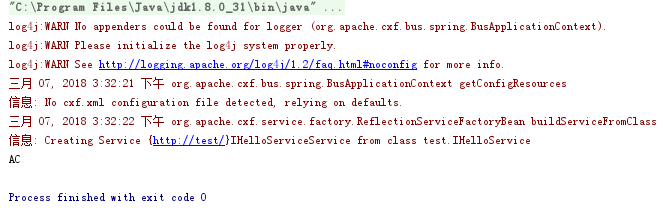
使用JaxWsProxyFactoryBean客户端代理工厂调用Web服务,输出:
使用CXF实现WebService的更多相关文章
- 使用CXF发布WebService
这里普及一下WebService和cxf的知识.关于webservice和cxf: WebService.各种提供服务的组件 .企业总线.通讯总线(ESB)CXF:是一个SOA框架,Axi ...
- CXF发布webService服务以及客户端调用
这篇随笔内容是CXF发布webService服务以及客户端调用的方法 CXF是什么? 开发工作之前需要下载CXF和安装 下载地址:http://cxf.apache.org 安装过程: <1&g ...
- 3.使用CXF开发webService
CXF 简介 关于 Apache CXF Apache CXF = Celtix + XFire,Apache CXF 的前身叫 Apache CeltiXfire,现在已经正式更名为 Apache ...
- Apache CXF实现WebService入门教程(附完整源码)
Apache CXF实现WebService非常简单实用,只需要几步就可以实现一个简单的web service. 首先我们需要新建一个maven项目,在pom中添加依赖和jetty作为测试的web s ...
- struts1+spring+myeclipse +cxf 开发webservice以及普通java应用调用webservice的实例
Cxf + Spring+ myeclipse+ cxf 进行 Webservice服务端开发 使用Cxf开发webservice的服务端项目结构 Spring配置文件applicationCont ...
- 使用cxf开发webservice应用时抛出异常
在使用cxf开发webservice应用时,报出了类似下面的错误 JAXB: [javax.xml.bind.UnmarshalException: unexpected element (uri:& ...
- cxf构建webservice的两种方式
一.简介 对于基于soap传输协议的webservice有两种开发模式,代码优先和契约优先的模式.代码优先的模式是通过编写服务器端的代码,使用代码生成wsdl:契约优先模式首先编写wsdl,再通过ws ...
- CXF之webservice
使用 CXF 做 webservice 简单例子 Apache CXF 是一个开放源代码框架,提供了用于方便地构建和开发 Web 服务的可靠基础架构.它允许创建高性能和可扩展的服务,您可以将这 ...
- [置顶] 利用CXF发布webService的小demo
其实webService的发布不仅仅只有xfire,今天,给大家介绍一下用CXF发布一个webService的小demo,CXF也是我做webService用的第一个框架... 先将相关的jar引进来 ...
- 【转】构建基于CXF的WebService服务
构建基于CXF的WebService服务 Apache CXF = Celtix+ XFire,开始叫 Apache CeltiXfire,后来更名为 Apache CXF 了,以下简称为 CXF.C ...
随机推荐
- Class(类)和 继承
ES6的class可以看作只是一个语法糖,它的绝大部分功能,ES5都可以做到,新的class写法只是让对象原型的写法更加清晰.更像面向对象编程的语法而已. //定义类 class Point { co ...
- Greenplum高可用真的高吗?
目录 1. 问题描述 2. 解决方案 @ 1. 问题描述 在项目中使用了Greenplum做分析型数据库,Greenplum自身已经提供了高可用方案,Master节点提供Sdanby备用节点,Segm ...
- [HNOI2011]数学作业 题解
这道题看着挺难然而其实看破了也挺容易的.首先N极其的大,几乎要炸掉long long ,所以O(n)的算法一定是扑街了,身为一个脑残志坚的OIer,怎能不想到矩阵快速幂优化呢? 有趣的是这道题矩阵有很 ...
- [USACO09OCT]Invasion of the Milkweed】乳草的侵占-C++
Farmer John一直努力让他的草地充满鲜美多汁的而又健康的牧草.可惜天不从人愿,他在植物大战人类中败下阵来.邪恶的乳草已经在他的农场的西北部份占领了一片立足之地. 草地像往常一样,被分割成一个高 ...
- Web前端三大框架_vue源码笔记
一.VUE 1.1 MVVM VUE也是基于MVVM模式实现的.特点就是数据双向绑定 在MVVM模式中,分成三个部分: M 模型 model V 视图 view VM 视图-模型 view-model ...
- 6.2.初识Flutter应用之路由管理
路由管理 路由(Route)在移动开发中通常指页面(Page),这跟web开发中单页应用的Route概念意义是相同的,Route在Android中通常指一个Activity,在iOS中指一个ViewC ...
- [leetcode] 96 Unique Binary Search Trees (Medium)
原题 字母题 思路: 一开始妹有一点思路,去查了二叉查找树,发现有个叫做卡特兰数的东西. 1.求可行的二叉查找树的数量,只要满足中序遍历有序. 2.以一个结点为根的可行二叉树数量就是左右子树可行二叉树 ...
- Codeforces 1144 E. Median String
原题链接:https://codeforces.com/problemset/problem/1144/E tag:字符串模拟,大整数. 题意:给定两个字符串,求字典序中间串. 思路:可以把这个题当做 ...
- 【iOS】更换证书遇到的问题
今天给一个项目换证书的时候遇到了这个问题: Code Sign error: Provisioning profile does not match bundle identifier: The pr ...
- poj 1205 :Water Treatment Plants (DP+高精度)
题意:有n个城市,它们由一个污水处理系统连接着,每个城市可以选择 1.将左边城市过来的污水和右边城市过来的污水连同本身的污水排到河里 >V< 2.将左边来的污水连同自己的污水排到右边 ...