
C++随机马赛克图程序
效果:
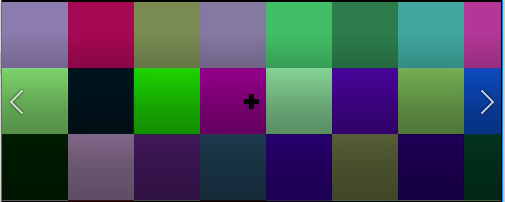
或者灰度,cell大小可调
代码:
#include <opencv2\opencv.hpp>

#include <Windows.h>

struct parameters

{

	parameters()

	{

		size=cv::Size(640,480);

		fps=25;

		nF=50;

		save="";

		crossSize= cv::Size(15, 5);

		crossColor = 0;

		show=true;

		seed=cv::getTickCount();

		color=false;

		cellSize = cv::Size(5, 5);

	}

	cv::Size		size;

	int				fps;

	int				nF;

	std::string		save;

	cv::Size		crossSize;

	uchar			crossColor;

	bool			show;

	int64			seed;

	bool			color;

	cv::Size		cellSize;

	void setParas(

		cv::Size		_size,

		int				_fps,

		int				_nF,

		std::string		_save,

		cv::Size		_crossSize,

		uchar			_crossColor,

		bool			_show,

		int64			_seed,

		bool			_color,

		cv::Size		_cellSize)

	{

		size		= _size			   ;

		fps			= _fps			   ;

		nF			= _nF			   ;

		save		= _save			   ;

		crossSize	= _crossSize	   ;

		crossColor = _crossColor       ;

		show		= _show			   ;

		seed		= _seed			   ;

		color		= _color		   ;

		cellSize	= _cellSize			;

	}

	void showParas()

	{

		std::cout << "size: " << size << std::endl;

		std::cout << "fps: " << fps << std::endl;

		std::cout << "nF: " << nF << std::endl;

		std::cout << "save: " << save << std::endl;

		std::cout << "crossSize: " << crossSize << std::endl;

		std::cout << "crossColor: " << crossColor << std::endl;

		std::cout << "show: " << (show? "TRUE" : "FALSE") << std::endl;

		std::cout << "seed: " << seed << std::endl;

		std::cout << "color: " << color << std::endl;

		std::cout << "cellSize: " << cellSize << std::endl;

	}

};

void help()

{

	std::cout << "* -help : .\n"

		<< "    randomVideo.exe -help   |  to see how to use. \n"

		<< "    randomVideo.exe -size=(640,580)   |  to set video size. \n"

		<< "    randomVideo.exe -fps=25   |  to set video fps(default is 25). \n"

		<< "    randomVideo.exe -nF=50   |  to set number of frames. "

		<< "If fps is 25, 50 nF means the video will last 2 seconds (50/25). \n"

		<< "    randomVideo.exe -save=example1   |  "

		<< "to set video name, only *.avi support, "

		<< "you do not need input \".avi\". "

		<< "If empty, the default name is local-system-time.avi, your previous files are safe. \n"

		<< "    randomVideo.exe -crossSize=(15,5)   |  "

		<< "to set the size of cross."

		<< " (height, width) you can see the showing window. \n"

		<< "    randomVideo.exe -crossColor=0   |  Recommd not to set it. "

		<< "If = 0, black(default); if = 255, white.\n\n"

		<< "    randomVideo.exe -show=TRUE   |  Recommd to be TRUE. "

		<<"If FALSE, the window to show the video is stopped. \n"

		<< "    randomVideo.exe -seed=15   |  Recommd not to set it. "

		<<"If empty, the local time will be used, then,"

		<<" you will get different video each time. \n\n"

		<< "    { NEW } randomVideo.exe -color=TRUE   |  If FALSE, the video is gray. \n"

		<< "    { NEW } randomVideo.exe -cellSize=(2,3)   |  To control the size of pixel size. "

		<< "If cellSize=(2,3), the image width will be seperated into 2 parts, "

		<< "the image height will be seperated into 3 parts. In defalut mode pixel size as 1 will be used!"

		<< "In order to get exact pixel size, you need to calculate it by yourself. \n\n"

		<< "example:\n"

		<< "    randomVideo.exe -size=(640,580) -fps=25 -nF=50 -crossSize=(15,5) -color=1 -cellSize=(5,5)\n"

		<< "  The other parameters using default is fine. \n"

		<< std::endl;

}

void getParas(int argn, char** argv, parameters & _parameters)

{

	if (argn <= 1)

	{

		std::cout << "Using default parameter to generate video.\n"

			<< "How to use? Please check the usage by input \" randomVideo.exe -help\" \n"

			<< std::endl;

		help();

		exit(0);

	}

	else

	{

		std::map<std::string, std::string> table;

		for (int i = 1; i<argn; ++i)

		{

			std::string sub(argv[i]);

			std::string name = sub.substr(1, sub.find("=")-1);

			table.insert({name, sub.substr(sub.find("=")+1, sub.length()-sub.find("=")-1)});

		}

		if (table.count("help") == 1)

		{

			help();

			exit(0);

		}

		if (table.count("size") == 1)

		{

			cv::Size _size(atoi(table["size"].substr(1, table["size"].find(",")-1).c_str()),

				atoi(table["size"].substr(

					table["size"].find(",")+1, table["size"].length()-table["size"].find(",")-2

				).c_str()));

			_parameters.size = _size;

		}

		else

			_parameters.size = cv::Size(640, 480);

		if (table.count("crossSize") == 1)

		{

			cv::Size _crossSize(atoi(table["crossSize"].substr(1, table["crossSize"].find(",") - 1).c_str()),

				atoi(table["crossSize"].substr(

					table["crossSize"].find(",") + 1, table["crossSize"].length() - table["crossSize"].find(",") - 2

				).c_str()));

			_parameters.crossSize = _crossSize;

		}

		else

			_parameters.crossSize = cv::Size(15, 5);

		if (table.count("crossColor") == 1)

			_parameters.crossColor = atoi(table["crossColor"].c_str());

		else

			_parameters.crossColor = 0;

		if (table.count("fps") == 1)

			_parameters.fps = atoi(table["fps"].c_str());

		else

			_parameters.fps = 25;

		if (table.count("nF") == 1)

			_parameters.nF = atoi(table["nF"].c_str());

		else

			_parameters.nF = 50;

		if (table.count("save") == 1)

			_parameters.save = table["save"] + ".avi";

		else

		{

			SYSTEMTIME sys;

			GetLocalTime(&sys);

			char fname[100] = {};

			sprintf_s(fname, 100, "%4d-%02d-%02d_%02d_%02d_%02d.avi", \

				sys.wYear, sys.wMonth, sys.wDay, sys.wHour, sys.wMinute, sys.wSecond);

			_parameters.save = fname;

		}

		if (table.count("show") == 1)

			_parameters.show = (table["show"] == "TRUE");

		else

			_parameters.show = true;

		if (table.count("seed") == 1)

			_parameters.seed = atoi(table["seed"].c_str());

		else

		{

			SYSTEMTIME sys;

			GetLocalTime(&sys);

			_parameters.seed = sys.wYear + sys.wMonth + sys.wDay + sys.wHour + sys.wMinute + sys.wSecond;

		}

		/*if (table.count("color") == 1)

		{

			cv::Scalar _color(

				atoi(table["color"].substr(1, table["color"].find(",") - 1).c_str()),

				atoi(table["color"].substr(table["color"].find(",") + 1,

										   table["color"].find_last_of(",") - table["color"].find(",") - 2).c_str()),

				atoi(table["color"].substr(table["color"].find_last_of(",") + 1,

										   table["color"].find_last_of(")") - table["color"].find_last_of(",") - 1).c_str()));

			_parameters.color = _color;

		}

		else

			_parameters.size = cv::Size(640, 480);*/

		if (table.count("color") == 1)

			_parameters.color = (table["color"] == "TRUE");

		else

			_parameters.color = true;

		if (table.count("cellSize") == 1)

		{

			cv::Size _cellSize(atoi(table["cellSize"].substr(1, table["cellSize"].find(",") - 1).c_str()),

				atoi(table["cellSize"].substr(

					table["cellSize"].find(",") + 1, table["cellSize"].length() - table["cellSize"].find(",") - 2

				).c_str()));

			_parameters.cellSize = _cellSize;

		}

		else

			_parameters.cellSize = cv::Size(2, 2);

	}

	_parameters.showParas();

}

void randMatrix(cv::Mat & img, int64 seed, cv::Size cell=cv::Size(0,0))

{

	cv::RNG rng(seed);

	if (cell == cv::Size(0, 0) || cell.width > img.cols || cell.height > img.rows)

	{

		for (size_t j = 0; j < img.rows; ++j)

		{

			uchar* pdata = img.ptr<uchar>(j);

			for (size_t i = 0; i < img.cols; ++i)

			{

				pdata[i] = rng.uniform(0, 255);

			}

		}

	}

	else

	{

		size_t stepX =  img.cols / cell.width;

		size_t stepY =  img.rows / cell.height;

		for (size_t j = 0; j < img.rows; j+=stepY)

		{

			size_t lastY(j + stepY);

			if (lastY >= img.rows)

				lastY = img.rows - 1;

			for (size_t i = 0; i < img.cols; i += stepX)

			{

				size_t lastX(i+stepX);

				if (lastX >= img.cols)

					lastX = img.cols - 1;

				img.rowRange(j, lastY).colRange(i, lastX).setTo(rng.uniform(0,255));

			}

		}

	}

}

void addCross(cv::Mat & img, cv::Size cSzie, cv::Scalar scalar)

{

	int x_center = (img.cols - 1) / 2, y_center = (img.rows - 1) / 2;

	cv::Point

		P1_tl(x_center - (cSzie.width - 1) / 2, y_center - (cSzie.height - 1) / 2),

		P1_bd(x_center + (cSzie.width - 1) / 2, y_center + (cSzie.height - 1) / 2),

		P2_tl(x_center - (cSzie.height - 1) / 2, y_center - (cSzie.width - 1) / 2),

		P2_bd(x_center + (cSzie.height - 1) / 2, y_center + (cSzie.width - 1) / 2);

	cv::rectangle(img, P1_tl, P1_bd, scalar, -1);

	cv::rectangle(img, P2_tl, P2_bd, scalar, -1);

}

int main(int argn, char** argv)

{

	parameters _pa;

	getParas(argn, argv, _pa);

	cv::VideoWriter writer(_pa.save, CV_FOURCC('M', 'J','P','G'),

		double(_pa.fps), _pa.size);

	cv::Mat frame0 = cv::Mat::zeros(_pa.size, CV_8UC1);

	cv::Mat frame1 = cv::Mat::zeros(_pa.size, CV_8UC1);

	cv::Mat frame2 = cv::Mat::zeros(_pa.size, CV_8UC1);

	for (int i=0; i<_pa.nF; ++i)

	{

		randMatrix(frame0, _pa.seed + i, _pa.cellSize);

		addCross(frame0, _pa.crossSize, _pa.crossColor);

		randMatrix(frame1, 0.3*(_pa.seed + i), _pa.cellSize);

		addCross(frame1, _pa.crossSize, _pa.crossColor);

		randMatrix(frame2, 0.7*(_pa.seed + i), _pa.cellSize);

		addCross(frame2, _pa.crossSize, _pa.crossColor);

		cv::Mat f3;

		if(_pa.color)

			cv::merge(std::vector<cv::Mat>{frame0,frame1,frame2}, f3);

		else

			cv::merge(std::vector<cv::Mat>{frame0, frame0, frame0}, f3);

		writer << f3;

		if (_pa.show)

			cv::imshow("video", f3);

		cv::waitKey(10);

	}

	return 0;

}
使用说明:
见help()
C++随机马赛克图程序的更多相关文章
- 开源免费跨平台opengl opencv webgl gtk blender, opengl贴图程序
三维图形的这是opengl的强项,大型3D游戏都会把它作为首选.图像处理,是opencv的锁定的目标,大多都是C的api,也有少部分是C++的,工业图像表现,图像识别,都会考虑opencv的.webg ...
- 300道随机四则运算小程序(java编写)
这是由Java编写的300道随机四则运算小程序, 运算数范围为0~100(不包括100),运算结果保留两位小数. 程序代码: import java.util.*; class Yunsuan{ pu ...
- R in action读书笔记(15)第十一章 中级绘图 之二 折线图 相关图 马赛克图
第十一章 中级绘图 本节用到的函数有: plot legend corrgram mosaic 11.2折线图 如果将散点图上的点从左往右连接起来,那么就会得到一个折线图. 创建散点图和折线图: &g ...
- python数据可视化(一)——绘制随机漫步图
数据可视化指的是通过可视化表示来探索数据,它与数据挖掘紧密相关. python有一系列的可视化和分析工具,最流行的工具之一是matplotlib,它是一个数学绘图库. 实现绘制随机漫步图 利用ra ...
- js实现刷新页面出现随机背景图
直接上代码: <script> var bodyBgs = []; bodyBgs[0] = "IMG/01.jpg"; ...
- java实现课堂随机点名小程序
通过jdbc连接数据库实现读取学生花名册进行随机点名! ~jdbc连接mysql数据库 || 注释部分代码可通过读取.txt文档实现显示学生信息 ~通过点击开始按钮实现界面中间标签不断更新学生信息 ...
- 随机点名小程序--- -JAVA版本
话不多少,直接上代码 一个能够直接运行的随机点名的小程序,一个界面化的小程序.望广大网友多多支持! 1.创建一个随机点名的类 public class ProcessRandomName { JFra ...
- Matplotlib 随机漫步图
import matplotlib.pyplot as plt from random import choice class Randomwalk(): def __init__(self,num_ ...
- Winform 随机抽奖小程序
效果图: 主要代码: Form1.cs using System; using System.Drawing; using System.IO; using System.Runtime.Intero ...
随机推荐
- jQuery中的文档处理(五)
1. append(content|fn), 向每个匹配的元素内部追加内容 在内部结尾添加. 参数说明: content:String, Element, jQuery,要追加到目标中的内容 func ...
- <String> 179 ,6, 168
179. Largest Number 冒泡排序,每一轮都把最小的数字选出放在最后. class Solution { public String largestNumber(int[] nums) ...
- 正睿暑期培训day1考试
链接 A 理解一下题意,然后玩几组样例就能发现,实际上就是\(k\)个\(i\)等价于\(1\)个\(i-1\).所以就类似于\(k\)进制进行进位,如果最后\(0\)位上不是\(0\),那么就存在划 ...
- 【ECNU3542】神奇的魔术(二分交互题)
点此看题面 大致题意: 有一个\(1\sim 2^n\)的排列,\(n\le7\),每次交互告诉你有几个位置上的数是正确的,让你在\(1000\)轮以内猜出每个位置上的数. 二分 显然,我们可以通过二 ...
- xLua 学习
xLua https://github.com/Tencent/xLua 文档 https://tencent.github.io/xLua/public/v1/guide/index.html FA ...
- scss和sass最大的区别
重新接触了一下sass语法,在vscode的用的easysass插件.ctrl+S就可以自动编译成css文件.需要自己配置生成css路径 遇到的一个坑就是sass官网几乎全是写的sass,示例中全部是 ...
- webrtc笔记(5): 基于kurento media server的多人视频聊天示例
这是kurento tutorial中的一个例子(groupCall),用于多人音视频通话,效果如下: 登录界面: 聊天界面: 运行方法: 1.本地用docker把kurento server跑起来 ...
- k8s云集群混搭模式落地分享
在 <k8s云集群混搭模式,可能帮你节省50%以上的服务成本>一文中,介绍了使用k8s + 虚拟节点混合集群的方式,为负载具有时间段波峰.波谷交替规律的业务节约成本,提高服务伸缩效率的部署 ...
- zlib压缩相关
相关原理 deflate(RFC1951):一种压缩算法,使用LZ77和哈弗曼进行编码: zlib(RFC1950):一种格式,是对deflate进行了简单的封装,他也是一个实现库(delphi中有z ...
- Qt 编译配置相关总结
MinGW 与 MSVC 编译的区别 我们可以从 Qt 下载页面看到两种版本编译器,如下图: 我们来对比一下这两个编译器的区别: MSVC 是指微软的 VC 编译器. MinGW 是 Minimali ...