
ASP.NET WEB API的服务托管(Self-HOST)
如果我们想对外发布RESTful API,可以基于ASP.NET来构建Restful APIs,但需要部署IIS吗?答案是不必。你可以把它托管到一个Windows Service。具体如何把WEB API自托管到Windows Service可以参考这一文章:Self-Host a Web API (HttpSelfHostServer) (C#). 基本上照着一步步做就行了。例子里是基于Windows Console Application,同样可以Self-Host到Windows Service.
问题在于如何把Controllers从Windows Service分离?可以使用autoFac,本文具体从这展开。
使用autoFac分离Controllers
autoFac是一个.NET IoC容器框架,这里我们用来分离Controllers,也就是说,我们把MVC的控制器Controllers放到独立的一个工程(Project),然后在Windows Service里面自托管(Self-Host)RESTful APIs。部署的时候只要部署windows service即可,不需要IIS,外部一样可以调用我们的RESTful APIs. 需要做的就是: 1. 引用autoFac 2. 注册Controllers 3. 设置DependencyResolver。好,我们新建一个project,类型是类库dll。添加引用:System.Web.Http;添加一个Controller:
using System;

using System.Net;

using System.Net.Http;

using System.Web.Http;

using Newtonsoft.Json;

namespace myCompany

{

    public class GroupController : ApiController, IGroupController

    {

        public HttpResponseMessage Update(HttpRequestMessage request)

        {

            Model model = null;

            var body = "";

            var valid = true;

            var result = new response { success = true, message = "" };

            HttpResponseMessage response;

            try

            {

                body = request.Content.ReadAsStringAsync().Result;

                /*

                 * According to the content type (text / json / xml), deserialize the request body

                 */

                model = Deserialize(body,

                    ModelUtility.GetMediaType(request.Content.Headers.ContentType.ToString()));

                if (model == null)

                    valid = false;

            }

            catch (Exception e)

            {

                valid = false;

            }

            if (!valid)

            {

                response = BuildFailureResponse(string.Format(

                    "Failure during parsing the request [{0}]", body));

            }

            else

            {

                 response = Request.CreateResponse<response>(HttpStatusCode.OK, result);

            }

            return response;

        }

        private static Model Deserialize(string data, MediaTypes type)

        {

            switch (type)

            {

                case MediaTypes.HTML:

                    break;

                case MediaTypes.JSON:

                    return JsonConvert.DeserializeObject<Model>(data);

                case MediaTypes.TEXT:

                    return new Model

                    {

                        name = ModelUtility.ParseText(data, "name"),

                        status = ModelUtility.ParseText(data, "status")

                    };

                case MediaTypes.XML:

                    return Utility.XmlSerilizer.Deserialize<Model>(data);

                case MediaTypes.UNKNOWN:

                    break;

                default:

                    break;

            }

            return null;

        }

        private HttpResponseMessage BuildFailureResponse(string message)

        {

            var result = new response { success = false, message = message };

            return Request.CreateResponse<response>(HttpStatusCode.BadRequest, result);

        }

    }

}
上面那个控制器可以处理RESTful API涉及group的请求。具体下面再谈。
回到我们已经创建Self-Host的Windows Service项目,里面添加引用Autofac.dll和Autofac.Integration.WebApi.dll。此外,可能还需要一些引用,我这里的列表如下:
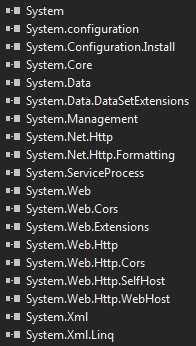
然后在Windows Service项目里面添加一个类,内容如下:
using System.Reflection;

using System.Web.Http;

using Autofac;

using Autofac.Integration.WebApi;

namespace myCompany

{

    public class AutofacWebAPI

    {

        public static void Initialize(HttpConfiguration config)

        {

            config.DependencyResolver = new AutofacWebApiDependencyResolver(

                RegisterServices(new ContainerBuilder())

            );

        }

        private static IContainer RegisterServices(ContainerBuilder builder)

        {

            builder.RegisterAssemblyTypes(Assembly.GetExecutingAssembly()).PropertiesAutowired();

            builder.RegisterType<GroupController>().As<IGroupController>();

            return builder.Build();

        }

    }

}
主要就是用来aufoFac初始化和注册类型。然后在Windows service里面调用:
 public partial class Service : ServiceBase

 {

        private HttpSelfHostServer _server;

        private readonly HttpSelfHostConfiguration _config;

        public Service()

        {

            InitializeComponent();

            _config = new HttpSelfHostConfiguration(_serviceAddress);

            _config.Routes.MapHttpRoute("DefaultApi",

                "notifications/{controller}/{id}",

                new { id = RouteParameter.Optional });

        }

        protected override void OnStart(string[] args)

        {

	 /* Start self-host Web API */

                AutofacWebAPI.Initialize(GlobalConfiguration.Configuration);

                _server = new HttpSelfHostServer(_config);

                _server.OpenAsync();

       }

 }
就这么简单。此外,你还可以用其他的DependencyResolver方式,具体参考autoFac官方文档:https://code.google.com/p/autofac/wiki/WebApiIntegration
最后如何测试呢?
HTTP POST http://localhost:8080/notifications/group/update
post body (text/plain): name=abc&status=CANCELLED
post body (application/json): "{\"name\":\"abc\",\"status\":\"CANCELLED\"}";
post body (application/xml):
@"<myc:root xmlns:myc=""http://api.abc.com/Platform/1.0"">
<myc:name>abc</myc:name>
<myc:status>CANCELLED</myc:status>
</myc:root>";
看不懂的,可看代码。支持text/json/xml多种参数格式。RESTful API测试可以用Chrome插件:Postman REST Client。
ASP.NET WEB API的服务托管(Self-HOST)的更多相关文章
- ASP.NET Web API的消息处理管道: Self Host下的消息处理管道[上篇]
ASP.NET Web API的消息处理管道: Self Host下的消息处理管道[上篇] ASP.NET Web API服务端框架核心是一个独立于具体寄宿环境的消息处理管道,它不关心请求消息来源于何 ...
- ASP.NET Web API消息处理管道:Self Host下的消息处理管道[下篇]
ASP.NET Web API消息处理管道:Self Host下的消息处理管道[下篇] 我们知道ASP.NET Web API借助于HttpSelfHostServer以Self Host模式寄宿于当 ...
- asp.net web api的自托管模式HttpSelfHostServer可以以控制台程序或windows服务程序为宿主,不单单依赖于IIS web服务器
Self-Hosting ASP.NET Web API http://theshravan.net/self-hosting-asp-net-web-api/ http://www.piotrwal ...
- 支持续传功能的ASP.NET WEB API文件下载服务
先把原文地址放上来,随后翻译
- 使用ASP.NET web API创建REST服务(二)
Creating a REST service using ASP.NET Web API A service that is created based upon the architecture ...
- MVC项目实践,在三层架构下实现SportsStore-09,ASP.NET MVC调用ASP.NET Web API的查询服务
ASP.NET Web API和WCF都体现了REST软件架构风格.在REST中,把一切数据视为资源,所以也是一种面向资源的架构风格.所有的资源都可以通过URI来唯一标识,通过对资源的HTTP操作(G ...
- 使用ASP.NET web API创建REST服务(三)
本文档来源于:http://www.cnblogs.com/madyina/p/3390773.html Creating a REST service using ASP.NET Web API A ...
- ASP.NET Web API中的Routing(路由)
[译]Routing in ASP.NET Web API 单击此处查看原文 本文阐述了ASP.NET Web API是如何将HTTP requests路由到controllers的. 如果你对ASP ...
- 使用ASP.NET Web Api构建基于REST风格的服务实战系列教程【开篇】【持续更新中。。。】
最近发现web api很火,园内也有各种大神已经在研究,本人在asp.net官网上看到一个系列教程,原文地址:http://bitoftech.net/2013/11/25/detailed-tuto ...
随机推荐
- Java异常与异常处理简单使用
异常就是程序运行过程中阻止当前方法或作用域继续执行的问题: 任何程序都不能保证完全正常运行,当发生异常时,需要我们去处理异常,特别是一些比较重要的场景,异常处理的逻辑也会比较复杂,比如:给用户提示.保 ...
- 4.python函数基础
一.函数 1.函数简介 函数是组织好的,可重复使用的,用来实现单一,或相关联功能的代码段. 函数能提高应用的模块性,和代码的重复利用率.你已经知道Python提供了许多内建函数,比如print().但 ...
- Codeforces 417 C
Football Time Limit: 1000MS Memory Limit: 262144KB 64bit IO Format: %I64d & %I64u Submit Sta ...
- iftop安装
安装方法1.编译安装 如果采用编译安装可以到iftop官网下载最新的源码包. 安装前需要已经安装好基本的编译所需的环境,比如make.gcc.autoconf等.安装iftop还需要安装libpcap ...
- Solr学习笔记(一)
最近准备为一个产品做一个站内的搜索引擎,是一个java产品.由于原来做过Lucene.net,所以自然而然的就想到了使用Lucene.在复习Lucene的过程中发现了Solr这个和Lucene绑定在一 ...
- Android适配器之ArrayAdapter、SimpleAdapter和BaseAdapter的简单用法与有用代码片段(转)
摘自:http://blog.csdn.net/shakespeare001/article/details/7926783 Adapter是连接后端数据和前端显示的适配器接口,是数据Data和UI( ...
- HDU 4343 贪心
D - Interval queryTime Limit: 1.5 Sec Memory Limit: 256 MB Description This is a very simple questio ...
- Codeforces Round #Pi (Div. 2) A. Lineland Mail 水
A. Lineland MailTime Limit: 2 Sec Memory Limit: 256 MB 题目连接 http://codeforces.com/contest/567/proble ...
- loj 1168(Tarjan应用)
题目链接:http://acm.hust.edu.cn/vjudge/problem/viewProblem.action?id=26882 思路:一开始把题意理解错了,还以为是简单路径,然后仔细一看 ...
- 如何重启Cloudera Manager?
为什么重启: 突然发现ClouderaManager的webui访问不了了…… 我使用netstat看了一下我的webui监听端口,发现尼玛N多CLOSE_WAIT,网上查了一下是Socket关闭有问 ...