
vmware vcenter appliance dhcp 改为 静态IP导致web service认证失败
参考 http://www.davidhill.co/2012/09/failed-to-connect-to-vmware-lookup-service/
Failed to connect to VMware lookup service
<UPDATE>This also resolves the issue with vCenter 5.5</UPDATE>
I have been re-building my lab yesterday with all the latest vCloud suite 5.1 GA bits, and received the error ” Failed to connect to VMware Lookup Service “.
Failed to connect to VMware lookup service
After deploying and configuring the vCenter Virtual Appliance, when I was trying to login to the vSphere web client, I kept receiving the error ” Failed to connect to VMware Lookup Service https://[hostname]:7444/lookupservice/sdk – SSL certificate verification failed. ” and could not login.

This issue occurs if you have changed the hostname or IP address of the vCenter Virtual Appliance. The certificate that was created on initial configuration is no longer valid. To resolve this issue, follow the steps below:
- Login into vCenter VA Configuration https://[hostname]:5480
- Select the Admin tab
- Click Toggle certificate setting, you will see Certificate regeneration enabled change to Yes.
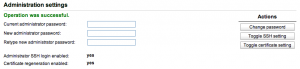
- Re-boot the Virtual Appliance
vmware vcenter appliance dhcp 改为 静态IP导致web service认证失败的更多相关文章
- 企业环境下如何把ubuntu的dhcp改为静态IP
静态ip不能连接外网 因为老的虚拟机有ubuntu桌面 以及一些磁盘的问题, 想 迁移 自己的虚拟机,连带着把ip也迁移,(公司有些界面是 通过我的虚拟机ip访问的.) 编辑 root@ubuntu: ...
- VMware中安装CentOS7网络配置静态IP地址,常用配置和工具安装
VMware中安装CentOS7网络配置静态IP地址,常用配置和工具安装在阿里云开源镜像地址下载镜像Index of /centos/7.2.1511/isos/x86_64/http://mirro ...
- VMware虚拟机安装Centos7后设置静态ip
VMware虚拟机安装Centos7后设置静态ip 1. 先设置虚拟机的网络,打开虚拟网络编辑器: 2. 选择Vm8 234都要勾选 3. 打开NAT设置,看到123,待会要用. 4. 打开虚拟机服务 ...
- 一些VMware vCenter Appliance的默认用户名和密码
一些VMware vCenter Appliance的默认用户名和密码 2014-03-30 17:30:03 flowershade_21 阅读数 13367更多 分类专栏: vmware VM ...
- 在VMware中使用Nat方式设置静态IP, 宿主机可以 ssh
坑很多: 麻痹, 主要还是要先 防火墙关掉,永久关掉. seliux 也永久关掉. 临时关闭防火墙:systemctl stop firewalld 开机不启动: systemctl di ...
- 安装vmware vCenter Appliance
vcenter appliance是一个vmware配置好的基于suse系统的vcenter的all in one式的虚拟机,比安装基于windows的vcenter服务省事多了,所以我选择部署vCe ...
- Vmware安装Centos NAT方式设置静态IP
[Vmware中在搭建集群环境等,DHCP自动获取IP方式不方便,为了固定IP减少频繁更改配置信息,建议使用静态IP来配置,网络连接主要有三种方式 1.nat 2.桥接,3主机模式 ,在这里主要介NA ...
- VMware虚拟机 安装centos7并设置静态ip 连接外网
首先下载VMware虚拟机:http://xzc.197746.com/VMware-Workstation-12.5.9.zip 然后下载centos7镜像:http://vault.centos. ...
- 虚拟机(VMWare)NAT 模式,配置静态IP上网的问题
问题描述: 感觉问题解决了回过头来想就很简单,但是没解决就怎么也找不到问题,知识储备捉襟见肘.针对这个问题我好长时间才弄好,各种找资料,也证明本人筛选有用博客的能力比较低,先让我哭会去…… 在虚拟的实 ...
随机推荐
- hdoj-1233-还是畅通工程
题目:hdoj-1233 题解: 本题是典型的最小生成树问题,给出的是无向图,这里使用的方法是Prim最小生成树算法. Reference Prim算法参照:最小生成树-Prim算法和Kruskal算 ...
- 拦截webview调用系统浏览器打开链接
给WebView设置自定义的WebViewClient即可 webview.setWebViewClient(new WebViewClient(){ @Override public boolean ...
- 详解在bash脚本中如何获取自身路径
DIR="$( cd "$( dirname "${BASH_SOURCE[0]}" )" && pwd )" 这是stac ...
- TCP协议中的三次握手和四次挥手(图解)(转载http://blog.csdn.net/whuslei/article/details/6667471)
建立TCP需要三次握手才能建立,而断开连接则需要四次握手.整个过程如下图所示: 先来看看如何建立连接的 首先Client端发送连接请求报文,Server段接受连接后回复ACK报文,并为这次连接分配资源 ...
- 如何用Apache TCPMon来截获SOAP消息
在WebService服务器和客户机之间会传递SOAP消息,有时我们需要得到这些消息以便调试,而Apache的TCPMon可以帮助我们做到这一点. TCPMon的下载地址在http://ws.apa ...
- javaWeb中struts开发——helloworld
1.新建一个web项目 2.选中project,右键,选择MyElcipse,选择add struts capab...添加struts支持,然后自己命名包 3.Struts在建立jsp时,标签要到 ...
- 创建数据库指定路径sql
create database stuDB on primary -- 默认就属于primary文件组,可省略(/*--数据文件的具体描述--*/ name='stuDB_data', - ...
- ADO.NET中主要对象
ADO.NET是什么? ADO.NET是.Net平台提供和数据库交互的类库集,我们可以通过它对SQLSERVER,XML,Oracle等这样的数据源进行访问. 应用程序可以使用ADO.NET链接到数据 ...
- Fiddler-005-获取 Cookie 信息
随着网络安全(例如:登录安全等)要求的不断提升,越来越多的登录应用在登录时添加了验证码登录,而验证码生成算法也在不断的进化,因而对含登录态的自动化测试脚本运行造成了一定程度的困扰,目前解决此种问题的方 ...
- 我的工具箱之Putty
这是类似于SecureCrt的终端仿真软件,个人感觉比SecureCrt差一点. 下载地址是:http://pan.baidu.com/s/1sko0GrF SecureCrt网址在我的工具箱之Sec ...