
使用 WPF 实现所见即所得HTML编辑器
Introduction
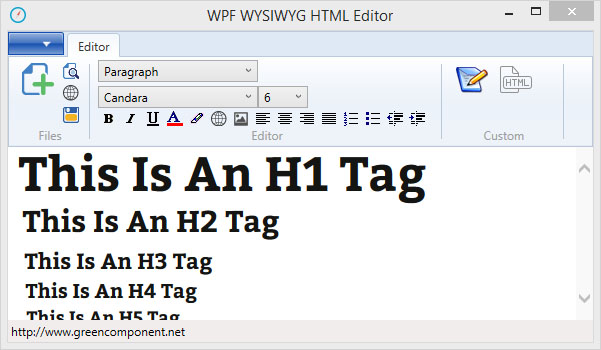
In this tip, you will learn the use of WPF webbrowser control and the use of the library mhtml for editing. This simple example will also help you understand how the toolbar works in WPF.
Background
In the development of a WPF application, I needed to edit HTML documents. After extensive research on already existing solutions in WPF without finding my happiness, I finally decided to write my own HTML editor.
After analyzing Winform solutions, I found that Microsoft made significant changes in the WPF Webbrowser.
It is always possible to use WPF WindowsFormsHost, but you lose the benefits of WPF.
In the WPF version of the webbrowser, there is no more IsWebBrowserContextMenuEnabled,ActiveXInstance.
Ownership document has also been changed, the Winform version contains a document of typeSystem.Windows.Forms.HtmlDocument with lots of interesting methods such as PointToClient andGetElementFromPoint.
In WPF webrowser, the document is a document object and you need to cast it to mshtml.HtmlDocumenttype.
The mshtml library is a very powerful library that offers great possibilities for editing and analyzing an HTML document.
The official documentation is very well stocked.
https://msdn.microsoft.com/en-us/library/aa753630%28v=vs.85%29.aspx
WPF Interface
The benefits of WPF technology are numerous and has the potential to create many advanced interfaces.
A future article will be devoted to Ribbon Toolbar in WPF.
Editing the HTML
To edit a document using Microsoft.mshtml library, it’s necessary to reference it in the project.
using mshtml;

public void newDocument()

{

    webBrowser.NavigateToString(Properties.Resources.New);

    doc = webBrowser.Document as HTMLDocument;

    doc.designMode = "On";

}
Formatting the HTML
To change the heading of a selection, there are several ways to proceed.
This method uses FormatBlock webbrowser control.
public static void RibbonComboboxFormat(ComboBox RibbonComboboxFormat)

{

    string ID = ((Items)(RibbonComboboxFormat.SelectedItem)).Value;

    webBrowser.doc = webBrowser.webBrowser.Document as HTMLDocument;

    if (webBrowser.doc != null)

    {

        webBrowser.doc.execCommand("FormatBlock", false, ID);

    }

}
Another solution is to use the library mshtml.
mshtml.IHTMLDocument2 doc;

doc = webBrowser1.Document.DomDocument as mshtml.IHTMLDocument2;

mshtml.IHTMLTxtRange r = doc.selection.createRange() as mshtml.IHTMLTxtRange;

mshtml.IHTMLElement parent = r.parentElement();

mshtml.IHTMLElement heading = doc.createElement("<h2>");

r.pasteHTML(heading.outerHTML);
With the Appendchild webbrowser method, you can add elements such as tables or any other HTML too.
HtmlElement tableElem = webBrowser1.Document.CreateElement("TABLE");

webBrowser1.Document.Body.AppendChild(tableElem);
To format the text, you can proceed in several different ways, either by using the webbrowser or the mshtml library.
In this example, I chose to use commands in the webbrowser.
public static void InsertOrderedList(HTMLDocument doc)

{

    if (doc != null)

    {

        doc.execCommand("InsertOrderedList", false, null);

    }

}
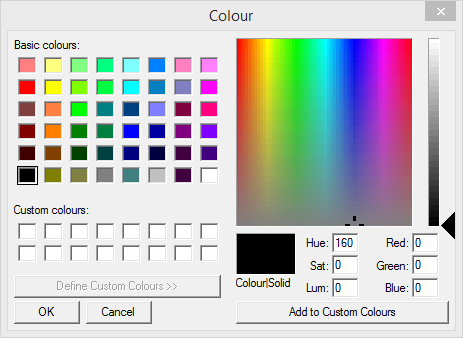
Color Dialogbox in WPF
The dialog box Winform is incompatible with WPF.
WPF uses System.Windows.Media.Color and System.Windows.Media.Brush while Winform usesSystem.Drawing.Color.
The workaround is to made color transfer from the four channels individually.
public static System.Windows.Media.Color Pick()

{

    System.Windows.Media.Color col = new System.Windows.Media.Color();

    using (System.Windows.Forms.ColorDialog colorDialog = new System.Windows.Forms.ColorDialog())

    {

        colorDialog.AllowFullOpen = true;

        colorDialog.FullOpen = true;

        System.Windows.Forms.DialogResult result = colorDialog.ShowDialog();

        if (result == System.Windows.Forms.DialogResult.OK)

        {

            col.A = colorDialog.Color.A;

            col.B = colorDialog.Color.B;

            col.G = colorDialog.Color.G;

            col.R = colorDialog.Color.R;

        }

    }

    return col;

}
Supress the Script Error Message
For pages containing scripts, the webbrowser may generate errors, in the Winform version of the webbrowser, there is a ScriptErrorsSuppressed property that has unfortunately disappeared in the WPF webbrowser.
// Property in the Winform version.

webBrowser.ScriptErrorsSuppressed = true;
It is necessary to implement this functionality in WPF webbrowser.
using System.Reflection;

public static void HideScriptErrors(WebBrowser wb, bool Hide)

{

    FieldInfo FieldInfoComWebBrowser = typeof(WebBrowser).GetField

    ("_axIWebBrowser2", BindingFlags.Instance | BindingFlags.NonPublic);

    if (FieldInfoComWebBrowser == null)

    {

    return;

    }

    object ComWebBrowser = FieldInfoComWebBrowser.GetValue(wb);

    if (ComWebBrowser == null)

    {

        return;

    }

    ComWebBrowser.GetType().InvokeMember("Silent",

    BindingFlags.SetProperty, null, ComWebBrowser, new object[] { Hide });

}
使用 WPF 实现所见即所得HTML编辑器的更多相关文章
- 使用所见即所得文本编辑器编辑文本存入数据库后通过ajax获取服务器json_encode的数据到前台,文本内容上边的html标签不解析
使用所见即所得文本编辑器编辑文本存入数据库后通过ajax获取服务器json_encode的数据到前台,文本内容上边的html标签不解析 因为我在前台使用了jquery的text()方法,而不是html ...
- WPF中嵌入Office编辑器(支持Word、Excel、PPT、Visio等)
现在有一个项目,需要使用wpf做一个简单的客户端,用来生成word.excel.ppt.visio等文档,这就需要能够在wpf中嵌入office的编辑器,并对office文档进行编辑. 在网上搜索了一 ...
- [译] 通过 contentEditable 属性创建一个所见即所得的编辑器(富文本编辑器)
译者注 这只是一篇入门教程,介绍了一些基础知识,仅供参考,切不可因此觉得富文本编辑器很简单. 创建富文本编辑器是一个非常复杂的工程,需要考虑到方方面面,也有很多坑(请参考原文第一条评论). 为免误导大 ...
- GNU TeXmacs 1.99.8 发布,所见即所得科学编辑器(看看老实的GUI)
GNU TeXmacs 1.99.8 已发布,这是一个支持各种数学公式的所见即所得编辑器,可以用来编辑文本.图形.数学.交互内容,它的界面非常友好,并且内置高质量的排版引擎. 更新内容: bug 修复 ...
- 学习使用Wpf开源的文本编辑器—smithhtmleditor
前言 本文主要介绍使用Wpf文本编辑器--smithhtmleditor. 编辑器使用 首先新建一个项目WpfEditor. 然后到Codeplex下载smithhtmleditor. 下载地址:ht ...
- NanUI for Winform 使用示例【第二集】——做一个所见即所得的Markdown编辑器
经过了这一个多星期的调整与修复,NanUI for .NET Winform的稳定版已经发布.应广大群友的要求,现已将NanUI的全部代码开源. GitHub: https://github.com/ ...
- ContentTools – 所见即所得(WYSIWYG)编辑器
Content Tools是一个用于构建所见即所得编辑器(WYSIWYG)的 JavaScript 库.ContentTools 所见即所得的编辑器只需要几个简单的步骤就可以加入到任何的 HTML 页 ...
- 22个所见即所得在线 Web 编辑器
前言: 关于编辑器,适合的才是最好的,接下来,我会写一些关于日志编辑器的文章,今天就写写,可能内容会比较多. --------------------------------------------- ...
- 可视化HTML编辑器
[荐] 可视化HTML编辑器 CKEditor CKEditor是新一代的FCKeditor,是一个重新开发的版本.CKEditor是全球最优秀的网页在线文字编辑器之一,因其惊人的性能与可扩展性而广泛 ...
随机推荐
- dsp下基于双循环缓冲队列的视频采集和显示记录
对最近在设计的视频采集和显示缓冲机制做一个记录,以便以后使用. 视频采集和显示缓冲机制,其实是参考了Linux下v4L2的驱动机制,其采用输入多缓冲frame,输出多缓冲的切换机制.简单的就是ping ...
- Visual Studio 2008中FormatX源代码格式化插件
原地址:http://www.cr173.com/html/15492_1.html 我总是对组里的兄弟代码规范性近乎完美的要求,举个简单的例子: 1. 每个方法必须有注释,方法参数详细说明 2. ...
- _tcscat在Debug和Release根据问题
背景: 因此,例如,在下面的代码段,作用是得到的路径当前程序(C:\work\A.exe),然后"A.exe"拆除,组装的"C:\work\inject.dll" ...
- JavaScript 中创建对象的方法(读书笔记思维导图)
面向对象(Object-Oriented, OO)的语言有一个标志,那就是它们都有类的概念,而通过类可以创建任意多个具有相同属性和方法的对象.而 ECMAScript 中没有类的概念,所以我们可以使用 ...
- android greenDao SQLite数据库操作使用的工具
关于如何建立类生成一个演示project.今天介绍如何使用. 这是ExampleDaoGeneratorproject代码,做了一些改动 /* * Copyright (C) 2011 Markus ...
- RSD和wlwmanifest是什么
今天小博发现header.php文件里<?php wp_head(); ?>显示有以下的两句代码,因为小博的网站打开速度实在太慢了,换空间怕麻烦,那就只有优化代码了. <link r ...
- 关于CodeReview(java)(转)
关于codereview,在平时的开发中,经常忽略的环节,参照目前介绍写好代码的几本书和之前掉进的坑,做了一个总结,分享出来. 为什么要做 通过review规避一些代码层面的问题 提升可读性,方便后续 ...
- 全面剖析Redis Cluster原理和应用 (转)
1.Redis Cluster总览 1.1 设计原则和初衷 在官方文档Cluster Spec中,作者详细介绍了Redis集群为什么要设计成现在的样子.最核心的目标有三个: 性能:这是Redis赖以生 ...
- HDU 3830 Checkers
意甲冠军: 有三件 所有其他棋子可以跳 不能分开的两个跳跃 当被问及状态u为了国家v最低短跳转 思路: 对于一个状态三个棋子的位置能够设为 x y z (小到大) 仅仅有当y-x=z-y的时候 ...
- WPF界面设计技巧(10)-样式的继承
原文:WPF界面设计技巧(10)-样式的继承 PS:现在我的MailMail完工了,进入内测阶段了,终于可以腾出手来写写教程了哈,关于MailMail的介绍及内测程序索取:http://www.cnb ...