
docker-harbor私有仓库使用笔记
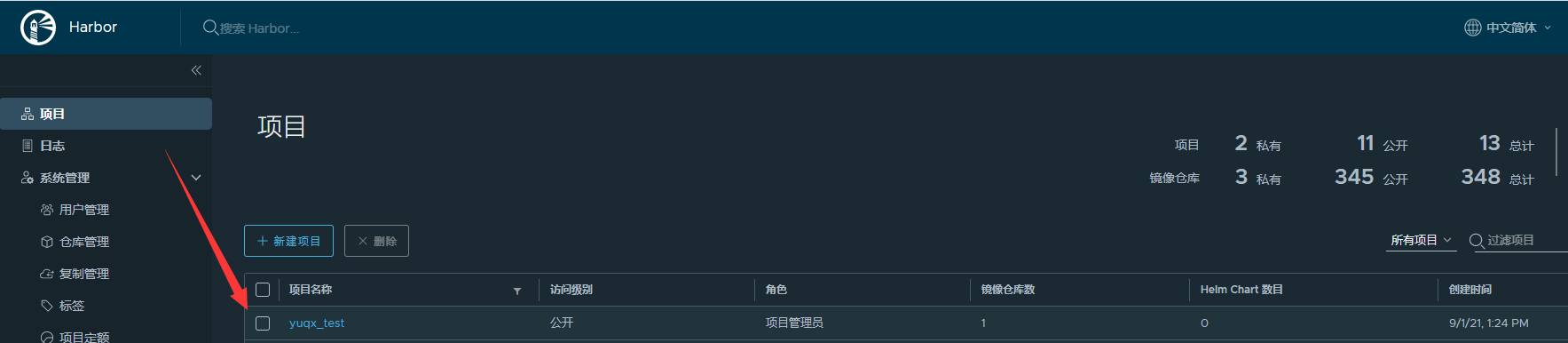
1. 登录harbor管理页面,创建项目,比如yuqx_test
2. admin登录,此处免密登录,正常情况下会输入账号密码
[root@k8s-rancher2 ~]# docker login 1.1.1.1:2021

Authenticating with existing credentials...

WARNING! Your password will be stored unencrypted in /root/.docker/config.json.

Configure a credential helper to remove this warning. See

https://docs.docker.com/engine/reference/commandline/login/#credentials-store

Login Succeeded

[root@k8s-rancher2 ~]#
3. 查看本地镜像列表
[root@k8s-rancher2 ~]# docker images

REPOSITORY                                                                    TAG                     IMAGE ID       CREATED         SIZE

1.1.1.1:2021/yuqx/php-fpm                                                     7.4.20                  c7588980b561   9 days ago      937MB

redis                                                                         6.2.5                   ddcca4b8a6f0   2 weeks ago     105MB

nginx                                                                         latest                  dd34e67e3371   2 weeks ago     133MB

mariadb                                                                       10.6.4                  45eaeedf03de   3 weeks ago     409MB

php                                                                           fpm-alpine              1daa2d1ff198   3 weeks ago     83.8MB
4. 给镜像打tag
[root@k8s-rancher2 ~]# docker tag redis:6.2.5 1.1.1.1:2021/yuqx_test/redis:6.2.5

[root@k8s-rancher2 ~]# docker images

REPOSITORY                                                                    TAG                     IMAGE ID       CREATED         SIZE

1.1.1.1:2021/yuqx/php-fpm                                                     7.4.20                  c7588980b561   9 days ago      937MB

1.1.1.1:2021/yuqx_test/redis                                                  6.2.5                   ddcca4b8a6f0   2 weeks ago     105MB

redis                                                                         6.2.5                   ddcca4b8a6f0   2 weeks ago     105MB

nginx                                                                         latest                  dd34e67e3371   2 weeks ago     133MB

mariadb                                                                       10.6.4                  45eaeedf03de   3 weeks ago     409MB

php                                                                           fpm-alpine              1daa2d1ff198   3 weeks ago     83.8MB

rancher/rancher-agent                                                         v2.5.9                  ebd5d4b8d7aa   6 weeks ago     536MB
5. push到远程仓库
[root@k8s-rancher2 ~]# docker push 1.1.1.1:2021/yuqx_test/redis:6.2.5

The push refers to repository [1.1.1.1:2021/yuqx_test/redis]

0083597d42d1: Pushed

992463b68327: Pushed

4be6d4460d36: Pushed

ec92e47b7c52: Pushed

b6fc243eaea7: Pushed

f68ef921efae: Pushed

6.2.5: digest: sha256:eda375fa1d5b3c1b9c81a591bd4bc9934a2f45b346d36ef1aeafcf36212835d2 size: 1574

[root@k8s-rancher2 ~]#
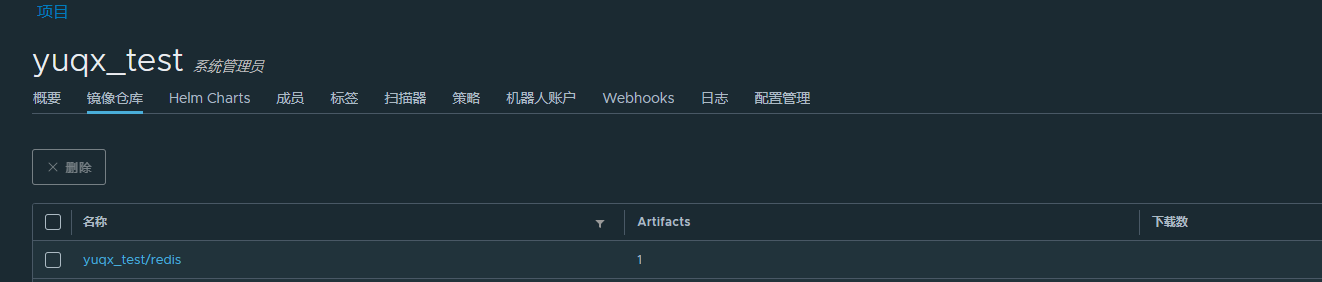
6. 上传成功后,打开harbor管理页即可看见刚刚上传的redis镜像。(可在成员里添加项目的用户)

7. 退出登录
[root@k8s-rancher2 ~]# docker logout 1.1.1.1:2021
Removing login credentials for 1.1.1.1:2021
[root@k8s-rancher2 ~]#
8. pull远程仓库镜像
[root@k8s-rancher3 ~]# docker login 1.1.1.1:2021
Authenticating with existing credentials...
WARNING! Your password will be stored unencrypted in /root/.docker/config.json.
Configure a credential helper to remove this warning. See
https://docs.docker.com/engine/reference/commandline/login/#credentials-store
Login Succeeded
[root@k8s-rancher3 ~]# docker pull 1.1.1.1:2021/yuqx_test/redis:6.2.5
6.2.5: Pulling from yuqx_test/redis
e1acddbe380c: Pull complete
a31098369fcc: Pull complete
4a49b0eba86d: Pull complete
fddf1399efac: Pull complete
5c6658b59b72: Pull complete
0b88638a5b77: Pull complete
Digest: sha256:eda375fa1d5b3c1b9c81a591bd4bc9934a2f45b346d36ef1aeafcf36212835d2
Status: Downloaded newer image for 1.1.1.1:2021/yuqx_test/redis:6.2.5
1.1.1.1:2021/yuqx_test/redis:6.2.5
[root@k8s-rancher3 ~]#
[root@k8s-rancher3 ~]# docker images

REPOSITORY                                                      TAG                     IMAGE ID       CREATED         SIZE

1.1.1.1:2021/yuqx_test/redis                                    6.2.5                   ddcca4b8a6f0   2 weeks ago     105MB

apache/flink                                                    1.13.2-scala_2.11       6046a5b9482c   3 weeks ago     632MB
[root@k8s-rancher3 ~]# docker logout 1.1.1.1:2021

Removing login credentials for 1.1.1.1:2021

[root@k8s-rancher3 ~]#
完毕。
常见问题:docker login
[root@web-dev1 yuqx]# docker login 1.1.1.1:2021

Username: admin

Password:

Error response from daemon: Get "https://1.1.1.1:2021/v2/": http: server gave HTTP response to HTTPS client
解决:daemon.json 加入insecure-registries配置,然后重启docker
[root@web-dev1 yuqx]# vim /etc/docker/daemon.json
  1 {

  2     "registry-mirrors": ["https://dockerhub.azk8s.cn","https://hub-mirror.c.163.com"],

  3     "exec-opts": ["native.cgroupdriver=cgroupfs"],

  4     "log-driver": "json-file",

  5     "log-opts": {"max-size": "10m","max-file": "10"},

  6     "insecure-registries":["1.1.1.1:2021"]

  7 }
[root@web-dev1 yuqx]# systemctl restart docker
[root@web-dev1 yuqx]# docker login 1.1.1.1:2021

Username: admin

Password:

WARNING! Your password will be stored unencrypted in /root/.docker/config.json.

Configure a credential helper to remove this warning. See

https://docs.docker.com/engine/reference/commandline/login/#credentials-store

Login Succeeded
docker-harbor私有仓库使用笔记的更多相关文章
- Docker Harbor私有仓库部署与管理 (超详细配图)
Docker Harbor私有仓库部署与管理 1.Harbor 介绍 2.Harbor部署 3.Harbor管理 1.Harbor 介绍: 什么是 Harbor ? Harbor 是 VMware 公 ...
- Docker以http访问Harbor私有仓库(一)
1 说明 前文Centos7搭建Harbor私有仓库(一)我们成功搭建Harbor,本篇我们主要配置Docker以http方式访问私有仓库 2 Docker配置 2.1 Mac系统 2.1.1 配置D ...
- Docker以https访问Harbor私有仓库(二)
1 说明 前文Centos7搭建Harbor私有仓库(二)中,我们以https方式搭建了Harbor,本篇我们主要配置Docker以https方式访问Harbor私有仓库 2 Docker配置 2.1 ...
- 在jenkins中使用shell命令推送当前主机上的docker镜像到远程的Harbor私有仓库
1.jenkins主机上的docker配置 先在Jenkins主机的docke上配置上Harbor私有仓库地址 cat /etc/docker/daemon.json { "insecure ...
- 菜鸟系列docker——搭建私有仓库harbor(6)
docker 搭建私有仓库harbor 1. 准备条件 安装docker sudo yum update sudo yum install -y yum-utils device-mapper-per ...
- Harbor私有仓库中如何彻底删除镜像释放存储空间?
简介: Harbor私有仓库运行一段时间后,仓库中存有大量镜像,会占用太多的存储空间.直接通过Harbor界面删除相关镜像,并不会自动删除存储中的文件和镜像.需要停止Harbor服务,执行垃圾回收命令 ...
- 创建Harbor私有仓库
前提 1.安装docker服务 参考:https://blog.csdn.net/weixin_36522099/article/details/108861134 老名字:docker.docker ...
- 配置 Containerd 在 harbor 私有仓库拉取镜像
官方文档地址:https://github.com/containerd/cri/blob/master/docs/registry.md 严格来说,这个具体可分为两部分 1.在k8s中使用Conta ...
- 搭建harbor私有仓库
2-1.项目说明 Harbor是一个用于存储和分发Docker镜像的企业级Registry服务器,由VMware开源,其通过添加一些企业必需的功能特性,例如安全.标识和管理等,扩展了开源 Docke ...
- Python Docker 查看私有仓库镜像【转】
文章来源:python Docker 查看私有仓库镜像 pip 安装: # 首先安装epel扩展源: yum -y install epel-release # 更新完成之后,就可安装pip: yum ...
随机推荐
- D. 旅游景点 Tourist Attractions 状压DP
题目描述 FGD想从成都去上海旅游.在旅途中他希望经过一些城市并在那里欣赏风景,品尝风味小吃或者做其他的有趣的事情.经过这些城市的顺序不是完全随意的,比如说FGD 不希望在刚吃过一顿大餐之后立刻去下一 ...
- Python实现三次密码验证
需求:Python实现三次密码验证,每次验证结果需要提示,三次验证不通过需要单独提示 代码如下: user = '张无忌' password = '12345678' confirm_flag = F ...
- 三年Android开发快手、美团、支付宝连挂,怒刷1549页面试题字节上岸
刚开始面试的时候我真的是处处碰壁,面一家挂一家,面完之后怀疑自我,是不是自己真的太菜了找不到工作.工作本身就是双向选择,一家不行再换一家,总有合适的,千万不要因为别人的一句话就全盘否定自己,一定要自信 ...
- finalize() 方法——Java中垃圾回收提醒方法
finalize() Java 允许定义这样的方法,它在对象被垃圾收集器析构(回收)之前调用,这个方法叫做 finalize( ),它用来清除回收对象. 例如,你可以使用 finalize() 来确保 ...
- springboot+javafx所有依赖一起打包
执行顺序: 1.使用清理插件:maven-clean-plugin:2.5执行清理删除已有target目录(版本2.5): 2.使用资源插件:maven-resources-plugin:2.6执行 ...
- RationalRose使用
UML 概述 什么是 UML? Unified Modeling Language (UML)又称统一建模语言或标准建 模语言,是始于 1997 年一个 OMG 标准,它是一个支持模型化 和软件系统开 ...
- Send Excerpts from Jenkins Console Output as Email Contents
Sometimes we need to send some excerpts from Jenkins console output (job logs) as email, such as tes ...
- filter,interceptor,controllerAdvice,aspect,controller执行顺序
1.filter,这是java的过滤器,和框架无关的,是所有过滤组件中最外层的,从粒度来说是最大的. 配置方式,有直接实现Filter+@component,@Bean+@configuration( ...
- webpack 配置文件外置
转自:https://www.jianshu.com/p/377bfd2d9034 1.问题初衷 解决问题的初衷,源于vue项目中公共路径在打包之后一旦遇到整体的路径更改就需要再次build一下. 如 ...
- Windows提权小结
摸鱼的时候,想想内网这部分还有什么地方适合水一下,翻翻往期,开始填坑 总结一下Windows提权的部分,以后有时间再补一下Linux提权 这仍然是一篇思路总结类的随笔,具体细节内容不展开,也展开不了. ...