
Salesforce LWC学习(三十五) 使用 REST API实现不写Apex的批量创建/更新数据
本篇参考:
https://developer.mozilla.org/zh-CN/docs/Web/API/Fetch_API/Using_Fetch
salesforce零基础学习(一百零三)项目中的零碎知识点小总结(五)
https://jeremyliberman.com/2019/02/11/fetch-has-been-blocked-by-cors-policy.html
我们在学习LWC的时候,使用 wire adapter特别爽,比如 createRecord / updateRecord,按照指定的格式,在前端就可以直接将数据的创建更新等操作搞定了,lwc提供的wire adapter使用的是 User Interface API来实现。当然,人都是很贪婪的,当我们对这个功能使用起来特别爽的时候,也在疑惑为什么没有批量的创建和更新的 wire adapter,这样我们针对一些简单的数据结构,就不需要写apex class,这样也就不需要维护相关的test class,不需要考虑部署的时候漏资源等等。那么,针对批量数据的场景,是否有什么方式可以不需要apex,直接前台搞定吗?当然可以,我们可以通过调用标准的rest api接口去搞定。
ContactController.cls
public with sharing class ContactController {

    @AuraEnabled(cacheable=true)

    public static List<Contact> getContacts() {

        return [

            SELECT AccountId, Id, FirstName, LastName, Title, Phone, Email

            FROM Contact limit 10

        ];

    }

    @AuraEnabled

    public static string updateContacts(Object data) {

        List<Contact> contactsForUpdate = (List<Contact>) JSON.deserialize(

            JSON.serialize(data),

            List<Contact>.class

        );

        try {

            update contactsForUpdate;

            return 'Success: contacts updated successfully';

        }

        catch (Exception e) {

            return 'The following exception has occurred: ' + e.getMessage();

        }

    }

}
datatableUpdateExample.html
<template>

    <lightning-card title="Datatable Example" icon-name="custom:custom63">

        <div class="slds-m-around_medium">

            <template if:true={contact.data}>

                <lightning-datatable

                    key-field="Id"

                    data={contact.data}

                    columns={columns}

                    onsave={handleSave}

                    draft-values={draftValues}>

                </lightning-datatable>

            </template>

            <template if:true={contact.error}>

                <!-- handle Apex error -->

            </template>

        </div>

    </lightning-card>

</template>
datatableUpdateExample.js
import { LightningElement, wire, api } from 'lwc';

import getContacts from '@salesforce/apex/ContactController.getContacts';

import { refreshApex } from '@salesforce/apex';

import { ShowToastEvent } from 'lightning/platformShowToastEvent';

import updateContacts from '@salesforce/apex/ContactController.updateContacts';

const COLS = [

    { label: 'First Name', fieldName: 'FirstName', editable: true },

    { label: 'Last Name', fieldName: 'LastName', editable: true },

    { label: 'Title', fieldName: 'Title' },

    { label: 'Phone', fieldName: 'Phone', type: 'phone' },

    { label: 'Email', fieldName: 'Email', type: 'email' }

];

export default class DatatableUpdateExample extends LightningElement {

    columns = COLS;

    draftValues = [];

    @wire(getContacts)

    contact;

    async handleSave(event) {

        const updatedFields = event.detail.draftValues;

        await updateContacts({data: updatedFields})

        .then(result => {

            this.dispatchEvent(

                new ShowToastEvent({

                    title: 'Success',

                    message: 'Contact updated',

                    variant: 'success'

                })

            );

            // Display fresh data in the datatable

            refreshApex(this.contact).then(() => {

                this.draftValues = [];

            });

       }).catch(error => {

           console.log(JSON.stringify(error));

           if(error.body) {

               console.log(JSON.stringify(error.body));

           } else if(error.detail) {

               console.log(JSON.stringify(error.detail));

           }

           this.dispatchEvent(

                new ShowToastEvent({

                    title: 'Error updating or refreshing records',

                    //message: error.body.message,

                    variant: 'error'

                })

            );

        });

    }

}
结果展示:

点击以后
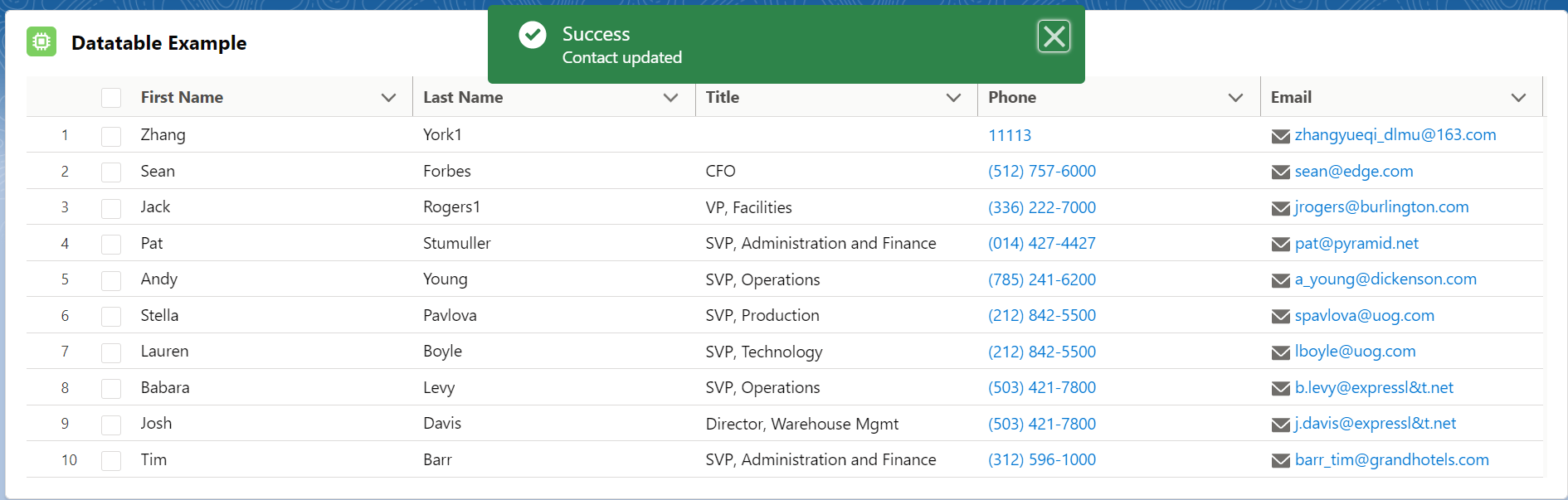
我们在上一篇讲述了标准的rest api,那OK,我们可以尝试不适用后台apex方式去搞定,而是在前台通过rest api去玩一下,说到做到,开弄。后台 apex增加获取session的方法
public with sharing class ContactController {

    @AuraEnabled(cacheable=true)

    public static String getSessionId() {

        return UserInfo.getSessionId();

    }

    @AuraEnabled(cacheable=true)

    public static List<Contact> getContacts() {

        return [

            SELECT AccountId, Id, FirstName, LastName, Title, Phone, Email

            FROM Contact limit 10

        ];

    }

}
前端 html / javascript也同样的改造一下
import { LightningElement, wire, api, track } from 'lwc';

import getContacts from '@salesforce/apex/ContactController.getContacts';

import { refreshApex } from '@salesforce/apex';

import { ShowToastEvent } from 'lightning/platformShowToastEvent';

import updateContacts from '@salesforce/apex/ContactController.updateContacts';

import getSessionId from '@salesforce/apex/ContactController.getSessionId';

const COLS = [

    { label: 'First Name', fieldName: 'FirstName', editable: true },

    { label: 'Last Name', fieldName: 'LastName', editable: true },

    { label: 'Title', fieldName: 'Title' },

    { label: 'Phone', fieldName: 'Phone', type: 'phone' },

    { label: 'Email', fieldName: 'Email', type: 'email' }

];

export default class DatatableUpdateExample extends LightningElement {

    columns = COLS;

    draftValues = [];

    @track isShowSpinner = false;

    @track sessionId;

    @wire(getContacts)

    contact;

    handleSave(event) {

        this.isShowSpinner = true;

        const updatedFields = event.detail.draftValues;

        updatedFields.forEach(item => {

            item.attributes = {"type" : "Contact"};

        });

        let requestBody = { "allOrNone": false, "records": updatedFields };

        console.log(JSON.stringify(updatedFields));

        getSessionId()

        .then(result => {

            this.sessionId = result;

            fetch('/services/data/v50.0/composite/sobjects/',

        {

            method: "PATCH",

            body: JSON.stringify(requestBody),

            headers: {

                    "Content-Type": "application/json",

                    "Authorization": "Bearer " + this.sessionId

                }

            }).then((response) => {

                //TODO 可以通过 status code判断是否有超时或者其他异常,如果是200,则不管更新成功失败,至少response回来

                console.log(response.status);

                return response.json(); // returning the response in the form of JSON

            })

            .then((jsonResponse) => {

                console.log('jsonResponse ===> '+JSON.stringify(jsonResponse));

                if(jsonResponse) {

                    jsonResponse.forEach(item => {

                        if(item.success) {

                            console.log(item.id + 'update success');

                        } else {

                            console.log(item.id + 'update failed');

                        }

                    })

                }

                refreshApex(this.contact).then(() => {

                    this.draftValues = [];

                });

                this.isShowSpinner = false;

            })

            .catch(error => {

                console.log('callout error ===> '+JSON.stringify(error));

                this.isShowSpinner = false;

            })

        })

        .catch(error => {

            //TODO

            console.log('callout error ===> '+JSON.stringify(error));

            this.isShowSpinner = false;

        })

    }

}
对应html
<template>

    <lightning-card title="Datatable Example" icon-name="custom:custom63">

        <div class="slds-m-around_medium">

            <template if:true={contact.data}>

                <lightning-datatable

                    key-field="Id"

                    data={contact.data}

                    columns={columns}

                    onsave={handleSave}

                    draft-values={draftValues}>

                </lightning-datatable>

            </template>

            <template if:true={contact.error}>

                <!-- handle Apex error -->

            </template>

        </div>

    </lightning-card>

    <template if:true={isShowSpinner}>

        <lightning-spinner alternative-text="Loading" size="medium"></lightning-spinner>

    </template>

</template>
运行展示:通过下图可以看到报错了CORS相关的错误,因为跨域进行了请求,这种情况的处理很单一也不麻烦,只需要 setup去配置相关的CORS以及CSP trust site肯定没有错

下图是配置的CSP 以及CORS
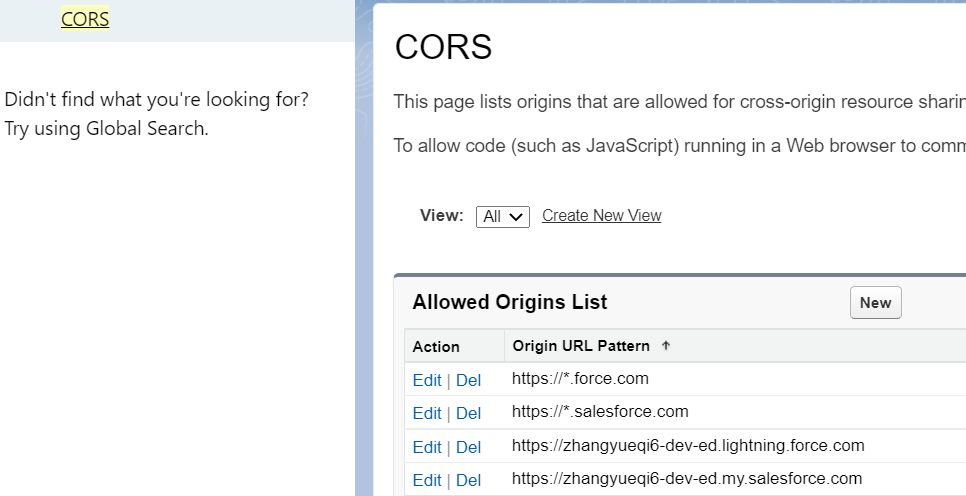
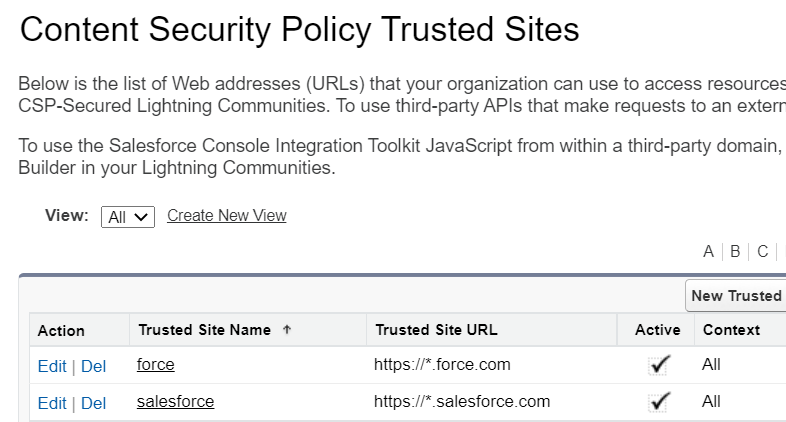
但是很遗憾的是,即使配置了这些内容,还是不可以。也征集了群里大神的各种建议意见,各种尝试扩充了 request header,发现还是不行。因为准备备考integration,所以也就暂时搁置了这个尝试。周末时间相对充裕,不太甘心的忽然想到了一个事情,不要只看 console的报错,查看一下network是否有什么有用的信息。
通过这个截图我们可以看出来,这个http 操作有三次的请求,第一次是跨域的检查,request method是option,感兴趣的可以自己查看

进行了错误的这次请求的展开,将 response内容展开,发现了问题
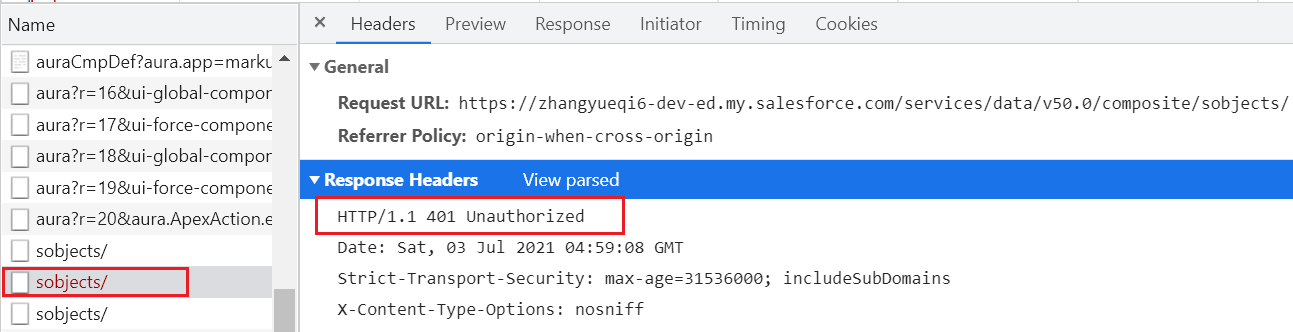
好家伙,尽管console报错是CORS,但是其实这个问题的rootcause是 请求返回的code是401未授权,打开 rest api 文档查看一下
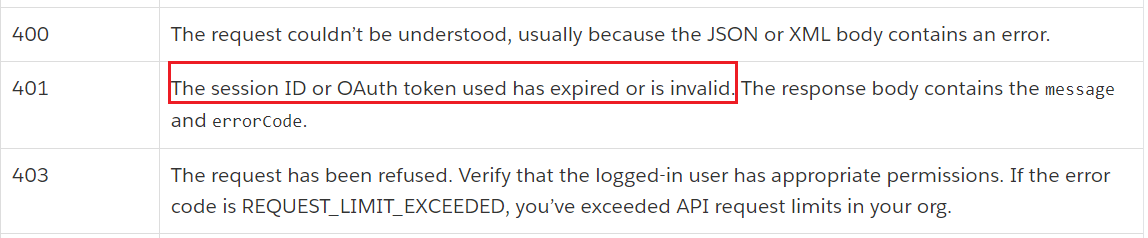
破案了,后台通过 UserInfo.getSessionId获取的session信息无法用于REST API的授权,这里就会有一个疑问,因为艾总发过来了一个VF的demo,是可以通过rest去调用的,难道是vf / lex哪里有区别,或者session有区别?
然后我就做了一个vf去打印一下session信息以及通过apex在lex展示session信息,发现visualforce page通过 GETSESSIONID或者 {!$Api.Session_ID}获取的session id信息和apexclass获取的session id不一致,并且 vf 获取的是可用的。OK,找到了解决方案以后,进行demo的bug fix。
GenerateSessionId.page
<apex:page contentType="application/json">

    {!$Api.Session_ID}

</apex:page>
ContactController: 只需要修改 getSessionId方法即可
@AuraEnabled(cacheable=true)

    public static String getSessionId() {

        return Page.GenerateSessionId.getContent().toString().trim();

    }
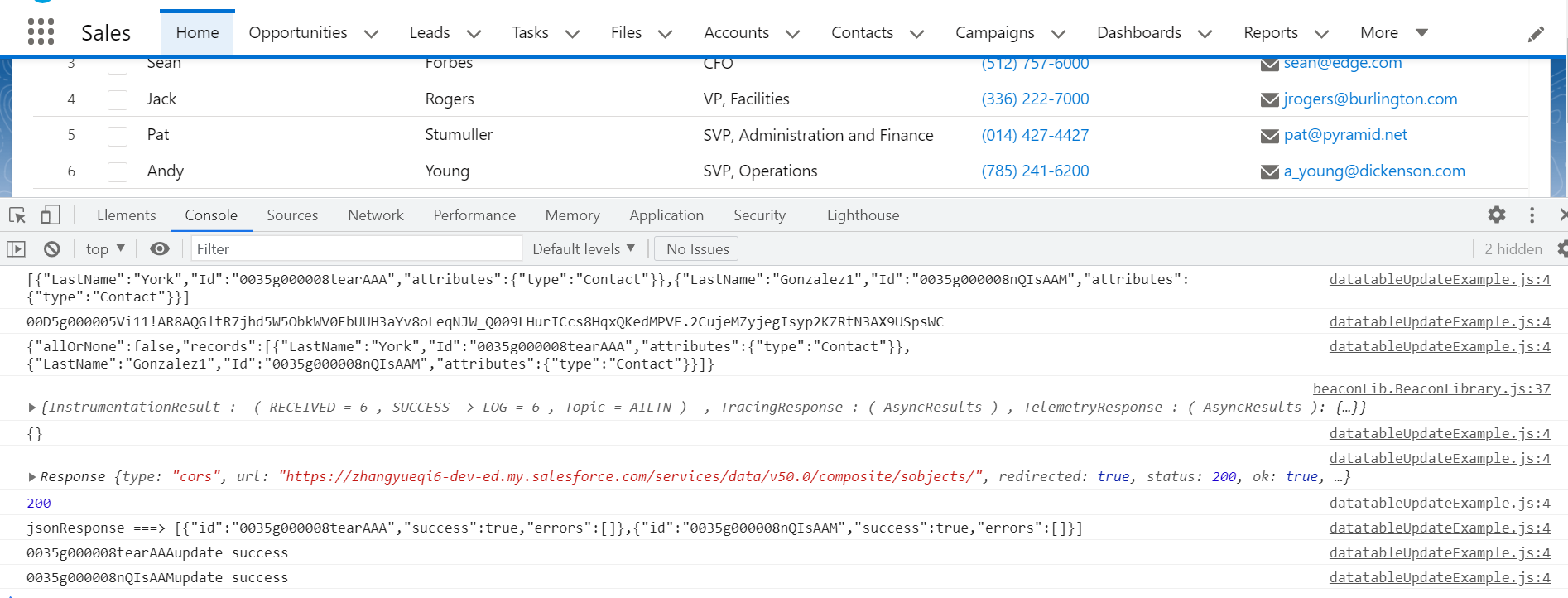
验证:搞定
总结:篇中只展示了一下通过 REST API去批量操作数据的可行性,仅作为一个简单的demo很多没有优化,异常处理,错误处理等等。而且对数据量也有要求,200以内。如果感兴趣的小伙伴欢迎自行去进行优化,希望以后有相关需求的小伙伴可以避免踩坑。篇中有错误的地方欢迎指出,有不懂欢迎留言。
Salesforce LWC学习(三十五) 使用 REST API实现不写Apex的批量创建/更新数据的更多相关文章
- Salesforce LWC学习(三十九) lwc下quick action的recordId的问题和解决方案
本篇参考: https://developer.salesforce.com/docs/component-library/bundle/force:hasRecordId/documentation ...
- Salesforce LWC学习(三十) lwc superbadge项目实现
本篇参考:https://trailhead.salesforce.com/content/learn/superbadges/superbadge_lwc_specialist 我们做lwc的学习时 ...
- Salesforce LWC学习(三十六) Quick Action 支持选择 LWC了
本篇参考: https://developer.salesforce.com/docs/component-library/documentation/en/lwc/lwc.use_quick_act ...
- Salesforce LWC学习(三十四) 如何更改标准组件的相关属性信息
本篇参考: https://www.cnblogs.com/zero-zyq/p/14548676.html https://www.lightningdesignsystem.com/platfor ...
- Salesforce LWC学习(三十八) lwc下如何更新超过1万的数据
背景: 今天项目组小伙伴问了一个问题,如果更新数据超过1万条的情况下,有什么好的方式来实现呢?我们都知道一个transaction只能做10000条DML数据操作,那客户的操作的数据就是超过10000 ...
- Salesforce LWC学习(二十五) Jest Test
本篇参看: https://trailhead.salesforce.com/content/learn/modules/test-lightning-web-components https://j ...
- Salesforce LWC学习(三十二)实现上传 Excel解析其内容
本篇参考:salesforce lightning零基础学习(十七) 实现上传 Excel解析其内容 上一篇我们写了aura方式上传excel解析其内容.lwc作为salesforce的新宠儿,逐渐的 ...
- Salesforce LWC学习(四十) dynamic interaction 浅入浅出
本篇参考: Configure a Component for Dynamic Interactions in the Lightning App Builder - Salesforce Light ...
- 微信小程序把玩(三十五)Video API
原文:微信小程序把玩(三十五)Video API 电脑端不能测试拍摄功能只能测试选择视频功能,好像只支持mp4格式,值得注意的是成功之后返回的临时文件路径是个列表tempFilePaths而不是tem ...
随机推荐
- [刷题] 3 Longest Substring Without Repeating Character
要求 在一个字符串中寻找没有重复字母的最长子串 举例 输入:abcabcbb 输出:abc 细节 字符集?字母?数字+字母?ASCII? 大小写是否敏感? 思路 滑动窗口 如果当前窗口没有重复字母,j ...
- Linux后台执行命令:&和nohup nohup和&后台运行,进程查看及终止
nohup和&后台运行,进程查看及终止 阅读目录 nohup和&后台运行,进程查看及终止 1.nohup 2.& 3.nohup和&的区别 &:是指在后台运 ...
- 使用U盘软碟通安装原版Windows10
https://zhuanlan.zhihu.com/p/171534675 使用U盘软碟通安装原版Windows10 一.准备:8G U盘一个,电脑装好UltraISO这个软件下载地址 二.Wind ...
- mysql8 安装配置教程
第一步 下载安装包 MySQL 是甲骨文(Oracle)公司产品,可以到官网上下载 MySQL: 官网下载地址:https://dev.mysql.com/downloads/mysql/ 如果嫌弃官 ...
- MyBatis 映射文件详解(六)
MyBatis 配置文件类型 MyBatis配置文件有两种类型,如下: 全局配置文件(如 mybatis-config.xml) Mapper XML 映射文件(如 UserMapper.xml) 上 ...
- .NET Core中插件式开发实现
前言: 之前在文章- AppDomain实现[插件式]开发 中介绍了在 .NET Framework 中,通过AppDomain实现动态加载和卸载程序集的效果. 但是.NET Core 仅支持单个默认 ...
- Python+Selenium自动化-模拟键盘操作
Python+Selenium自动化-模拟键盘操作 0.导入键盘类Keys() selenium中的Keys()类提供了大部分的键盘操作方法:通过send_keys()方法来模拟键盘上的按键. # ...
- NBU Rman异机恢复Oracle
前段时间一个亿级分区表,被分割成历史表和业务表,历史表中保留15天以外的数据,每天都会从业务表中的15天外的数据copy到历史表,并删除业务表15天外的数据,逻辑也很简单,但插入历史表的where 条 ...
- double类型数据有的时候null的判断
double不是Double,无法通过 == null来判断 如何进行double的null判断呢 double avg = avg.getValue() // 此时不会报错 // 通过如下进行判断 ...
- springboot 非端口模式启动
@SpringBootApplication @ComponentScan(basePackages = {"demo.test"}) public class ReportApp ...