
入门大数据---HiveCLI和Beeline命令行的基本使用
一、Hive CLI
1.1 Help
使用 hive -H 或者 hive --help 命令可以查看所有命令的帮助,显示如下:
usage: hive

 -d,--define <key=value>          Variable subsitution to apply to hive

                                  commands. e.g. -d A=B or --define A=B  --定义用户自定义变量

    --database <databasename>     Specify the database to use  -- 指定使用的数据库

 -e <quoted-query-string>         SQL from command line   -- 执行指定的 SQL

 -f <filename>                    SQL from files   --执行 SQL 脚本

 -H,--help                        Print help information  -- 打印帮助信息

    --hiveconf <property=value>   Use value for given property    --自定义配置

    --hivevar <key=value>         Variable subsitution to apply to hive  --自定义变量

                                  commands. e.g. --hivevar A=B

 -i <filename>                    Initialization SQL file  --在进入交互模式之前运行初始化脚本

 -S,--silent                      Silent mode in interactive shell    --静默模式

 -v,--verbose                     Verbose mode (echo executed SQL to the  console)  --详细模式
1.2 交互式命令行
直接使用 Hive 命令,不加任何参数,即可进入交互式命令行。
1.3 执行SQL命令
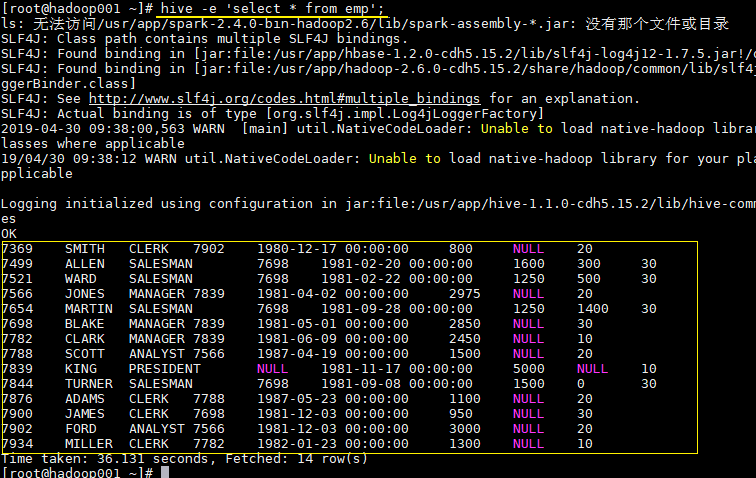
在不进入交互式命令行的情况下,可以使用 hive -e 执行 SQL 命令。
hive -e 'select * from emp';
1.4 执行SQL脚本
用于执行的 sql 脚本可以在本地文件系统,也可以在 HDFS 上。
# 本地文件系统

hive -f /usr/file/simple.sql;

# HDFS文件系统

hive -f hdfs://hadoop001:8020/tmp/simple.sql;
其中 simple.sql 内容如下:
select * from emp;
1.5 配置Hive变量
可以使用 --hiveconf 设置 Hive 运行时的变量。
hive -e 'select * from emp' \

--hiveconf hive.exec.scratchdir=/tmp/hive_scratch  \

--hiveconf mapred.reduce.tasks=4;
hive.exec.scratchdir:指定 HDFS 上目录位置,用于存储不同 map/reduce 阶段的执行计划和这些阶段的中间输出结果。
1.6 配置文件启动
使用 -i 可以在进入交互模式之前运行初始化脚本,相当于指定配置文件启动。
hive -i /usr/file/hive-init.conf;
其中 hive-init.conf 的内容如下:
set hive.exec.mode.local.auto = true;
hive.exec.mode.local.auto 默认值为 false,这里设置为 true ,代表开启本地模式。
1.7 用户自定义变量
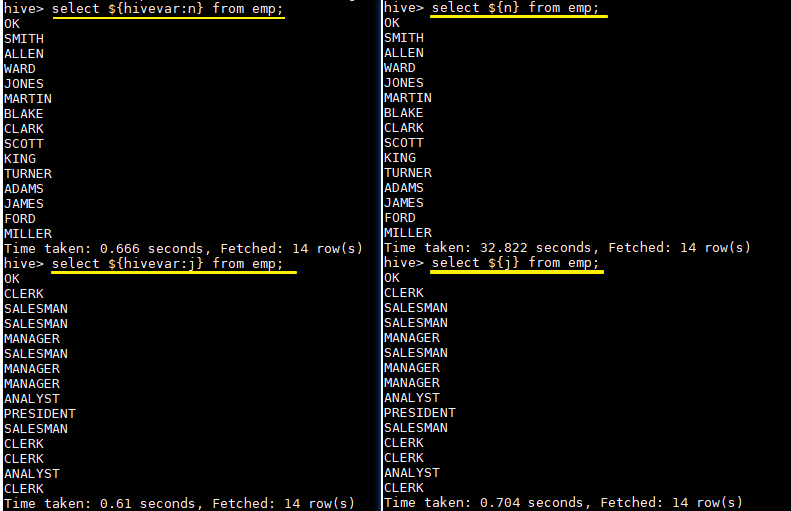
--define <key=value> 和 --hivevar <key=value> 在功能上是等价的,都是用来实现自定义变量,这里给出一个示例:
定义变量:
hive --define n=ename --hiveconf --hivevar j=job;
在查询中引用自定义变量:
# 以下两条语句等价

hive > select ${n} from emp;

hive >  select ${hivevar:n} from emp;

# 以下两条语句等价

hive > select ${j} from emp;

hive >  select ${hivevar:j} from emp;
结果如下:
二、Beeline
2.1 HiveServer2
Hive 内置了 HiveServer 和 HiveServer2 服务,两者都允许客户端使用多种编程语言进行连接,但是 HiveServer 不能处理多个客户端的并发请求,所以产生了 HiveServer2。
HiveServer2(HS2)允许远程客户端可以使用各种编程语言向 Hive 提交请求并检索结果,支持多客户端并发访问和身份验证。HS2 是由多个服务组成的单个进程,其包括基于 Thrift 的 Hive 服务(TCP 或 HTTP)和用于 Web UI 的 Jetty Web 服务器。
HiveServer2 拥有自己的 CLI(Beeline),Beeline 是一个基于 SQLLine 的 JDBC 客户端。由于 HiveServer2 是 Hive 开发维护的重点 (Hive0.15 后就不再支持 hiveserver),所以 Hive CLI 已经不推荐使用了,官方更加推荐使用 Beeline。
2.1 Beeline
Beeline 拥有更多可使用参数,可以使用 beeline --help 查看,完整参数如下:
Usage: java org.apache.hive.cli.beeline.BeeLine

   -u <database url>               the JDBC URL to connect to

   -r                              reconnect to last saved connect url (in conjunction with !save)

   -n <username>                   the username to connect as

   -p <password>                   the password to connect as

   -d <driver class>               the driver class to use

   -i <init file>                  script file for initialization

   -e <query>                      query that should be executed

   -f <exec file>                  script file that should be executed

   -w (or) --password-file <password file>  the password file to read password from

   --hiveconf property=value       Use value for given property

   --hivevar name=value            hive variable name and value

                                   This is Hive specific settings in which variables

                                   can be set at session level and referenced in Hive

                                   commands or queries.

   --property-file=<property-file> the file to read connection properties (url, driver, user, password) from

   --color=[true/false]            control whether color is used for display

   --showHeader=[true/false]       show column names in query results

   --headerInterval=ROWS;          the interval between which heades are displayed

   --fastConnect=[true/false]      skip building table/column list for tab-completion

   --autoCommit=[true/false]       enable/disable automatic transaction commit

   --verbose=[true/false]          show verbose error messages and debug info

   --showWarnings=[true/false]     display connection warnings

   --showNestedErrs=[true/false]   display nested errors

   --numberFormat=[pattern]        format numbers using DecimalFormat pattern

   --force=[true/false]            continue running script even after errors

   --maxWidth=MAXWIDTH             the maximum width of the terminal

   --maxColumnWidth=MAXCOLWIDTH    the maximum width to use when displaying columns

   --silent=[true/false]           be more silent

   --autosave=[true/false]         automatically save preferences

   --outputformat=[table/vertical/csv2/tsv2/dsv/csv/tsv]  format mode for result display

   --incrementalBufferRows=NUMROWS the number of rows to buffer when printing rows on stdout,

                                   defaults to 1000; only applicable if --incremental=true

                                   and --outputformat=table

   --truncateTable=[true/false]    truncate table column when it exceeds length

   --delimiterForDSV=DELIMITER     specify the delimiter for delimiter-separated values output format (default: |)

   --isolation=LEVEL               set the transaction isolation level

   --nullemptystring=[true/false]  set to true to get historic behavior of printing null as empty string

   --maxHistoryRows=MAXHISTORYROWS The maximum number of rows to store beeline history.

   --convertBinaryArrayToString=[true/false]    display binary column data as string or as byte array

   --help                          display this message
2.3 常用参数
在 Hive CLI 中支持的参数,Beeline 都支持,常用的参数如下。更多参数说明可以参见官方文档 Beeline Command Options
| 参数 | 说明 |
|---|---|
| -u <database URL> | 数据库地址 |
| -n <username> | 用户名 |
| -p <password> | 密码 |
| -d <driver class> | 驱动 (可选) |
| -e <query> | 执行 SQL 命令 |
| -f <file> | 执行 SQL 脚本 |
| -i (or)--init <file or files> | 在进入交互模式之前运行初始化脚本 |
| --property-file <file> | 指定配置文件 |
| --hiveconf property=value | 指定配置属性 |
| --hivevar name=value | 用户自定义属性,在会话级别有效 |
示例: 使用用户名和密码连接 Hive
$ beeline -u jdbc:hive2://localhost:10000 -n username -p password
三、Hive配置
可以通过三种方式对 Hive 的相关属性进行配置,分别介绍如下:
3.1 配置文件
方式一为使用配置文件,使用配置文件指定的配置是永久有效的。Hive 有以下三个可选的配置文件:
hive-site.xml :Hive 的主要配置文件;
hivemetastore-site.xml: 关于元数据的配置;
hiveserver2-site.xml:关于 HiveServer2 的配置。
示例如下,在 hive-site.xml 配置 hive.exec.scratchdir:
 <property>

    <name>hive.exec.scratchdir</name>

    <value>/tmp/mydir</value>

    <description>Scratch space for Hive jobs</description>

  </property>
3.2 hiveconf
方式二为在启动命令行 (Hive CLI / Beeline) 的时候使用 --hiveconf 指定配置,这种方式指定的配置作用于整个 Session。
hive --hiveconf hive.exec.scratchdir=/tmp/mydir
3.3 set
方式三为在交互式环境下 (Hive CLI / Beeline),使用 set 命令指定。这种设置的作用范围也是 Session 级别的,配置对于执行该命令后的所有命令生效。set 兼具设置参数和查看参数的功能。如下:
0: jdbc:hive2://hadoop001:10000> set hive.exec.scratchdir=/tmp/mydir;

No rows affected (0.025 seconds)

0: jdbc:hive2://hadoop001:10000> set hive.exec.scratchdir;

+----------------------------------+--+

|               set                |

+----------------------------------+--+

| hive.exec.scratchdir=/tmp/mydir  |

+----------------------------------+--+
3.4 配置优先级
配置的优先顺序如下 (由低到高):
hive-site.xml - >hivemetastore-site.xml- > hiveserver2-site.xml - > -- hiveconf- > set
3.5 配置参数
Hive 可选的配置参数非常多,在用到时查阅官方文档即可AdminManual Configuration
参考资料
入门大数据---HiveCLI和Beeline命令行的基本使用的更多相关文章
- 数据仓库之抽取数据:通过bcp命令行导入数据
原文:数据仓库之抽取数据:通过bcp命令行导入数据 在做数据仓库时,最重要的就是ETL的开发,而在ETL开发中的第一步,就是要从原OLTP系统中抽取数据到过渡区中,再对这个过渡区中的数据进行转换,最后 ...
- Hive 学习之路(三)—— Hive CLI和Beeline命令行的基本使用
一.Hive CLI 1.1 Help 使用hive -H或者 hive --help命令可以查看所有命令的帮助,显示如下: usage: hive -d,--define <key=value ...
- Hive 系列(三)—— Hive CLI 和 Beeline 命令行的基本使用
一.Hive CLI 1.1 Help 使用 hive -H 或者 hive --help 命令可以查看所有命令的帮助,显示如下: usage: hive -d,--define <key=va ...
- 入门大数据---Flink学习总括
第一节 初识 Flink 在数据激增的时代,催生出了一批计算框架.最早期比较流行的有MapReduce,然后有Spark,直到现在越来越多的公司采用Flink处理.Flink相对前两个框架真正做到了高 ...
- 入门大数据---安装ClouderaManager,CDH和Impala,Hue,oozie等服务
1.要求和支持的版本 (PS:我使用的环境,都用加粗标识了.) 1.1 支持的操作系统版本 操作系统 版本 RHEL/CentOS/OL with RHCK kernel 7.6, 7.5, 7.4, ...
- 入门大数据---Kafka的搭建与应用
前言 上一章介绍了Kafka是什么,这章就讲讲怎么搭建以及如何使用. 快速开始 Step 1:Download the code Download the 2.4.1 release and un-t ...
- Hive Beeline 命令行参数
[hadoop@hive ~]$ beeline --help[中文版] The Beeline CLI 支持以下命令行参数: Option Description --autoCommit=[tru ...
- 入门大数据---Spark_Streaming整合Flume
一.简介 Apache Flume 是一个分布式,高可用的数据收集系统,可以从不同的数据源收集数据,经过聚合后发送到分布式计算框架或者存储系统中.Spark Straming 提供了以下两种方式用于 ...
- 入门大数据---SparkSQL外部数据源
一.简介 1.1 多数据源支持 Spark 支持以下六个核心数据源,同时 Spark 社区还提供了多达上百种数据源的读取方式,能够满足绝大部分使用场景. CSV JSON Parquet ORC JD ...
随机推荐
- 跨域解决方案 - JSONP
目录 1. 定义 2. JSONP 解决跨域 3. 应用场景 4. 代码演示 1. 定义 在HTML 中, script 标签有两个个性质: script 标签可以不受同源策略的限制去访问服务器资源, ...
- Java实现 LeetCode 816 模糊坐标(暴力)
816. 模糊坐标 我们有一些二维坐标,如 "(1, 3)" 或 "(2, 0.5)",然后我们移除所有逗号,小数点和空格,得到一个字符串S.返回所有可能的原始 ...
- Java实现 蓝桥杯VIP 算法提高 11-2删除重复元素
算法提高 11-2删除重复元素 时间限制:10.0s 内存限制:256.0MB 问题描述 为库设计新函数DelPack,删除输入字符串中所有的重复元素.不连续的重复元素也要删除. 要求写成函数,函数内 ...
- java实现第七届蓝桥杯压缩变换
压缩变换 压缩变换 小明最近在研究压缩算法. 他知道,压缩的时候如果能够使得数值很小,就能通过熵编码得到较高的压缩比. 然而,要使数值很小是一个挑战. 最近,小明需要压缩一些正整数的序列,这些序列的特 ...
- (三)Host头攻击
01 漏洞描述 为了方便获取网站域名,开发人员一般依赖于请求包中的Host首部字段.例如,在php里用_SERVER["HTTP_HOST"].但是这个Host字段值是不可信赖的( ...
- LocalDateTime在项目中的使用(LocalDateTime对接前端通过时间戳互转、LocalDateTime对接数据库)
目录 1. 博客编写背景 2. LocalDateTime 前端交互 2.1 LocalDateTime 向前端写入时间戳 2.1.1 fastJson 默认的写入格式 2.1.2 更改 fastJs ...
- 大型Electron应用本地数据库技术选型
开发一个大型Electron的应用,或许需要在客户端存储大量的数据,比如聊天应用或邮件客户端 可选的客户端数据库方案看似很多,但一一对比下来,最优解只有一个 接下来我们就一起来经历一下这个技术选型的过 ...
- MATLAB实例:聚类网络连接图
MATLAB实例:聚类网络连接图 作者:凯鲁嘎吉 - 博客园 http://www.cnblogs.com/kailugaji/ 本文给出一个简单实例,先生成2维高斯数据,得到数据之后,用模糊C均值( ...
- 使用FFT进行频谱分析
import numpy as np import matplotlib.pyplot as plt from scipy.fftpack import fft fs=100 #采样频率 N=128 ...
- 记录一次vue 访问空白的排错
访问vue项目页面空白 场景 内网访问访问url很快就可以打开页面,外网访问一片浏览器端一片空白 排查思路 [x] 由于不熟悉vue 先看了nginx的配置,以为是nginx的配置导致的 [x] 百度 ...