
Android5.0新控件CardView的介绍和使用

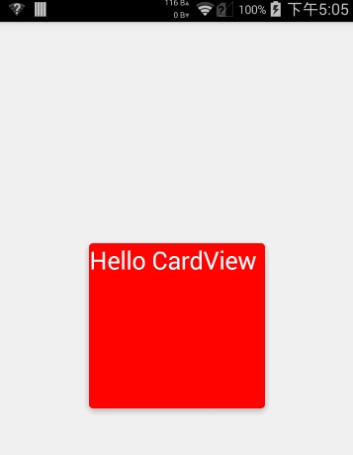
CardView也是5.0的新控件,这控件其实就是一个卡片啦,当然我们自己也完全可以定义这样一个卡片,从现在的微博等社App中可以看到各式各样的自定义卡片,所以这个控件意义不是很大。support中的view所以使用在布局里面的时候一下子看不到效果的,比较不好。CardView继承的是FrameLayout,所以摆放内部控件的时候需要注意一下啦。
建议:个人不是很建议用这个控件,因为我们完全可以自定义这样一个控件,这样既能在布局时直接看到效果又比较方便。
参数说明:
<resources>

    <declare-styleable name="CardView">

        <!-- Background color for CardView. -->

        <!-- 背景色 -->

        <attr name="cardBackgroundColor" format="color" />

        <!-- Corner radius for CardView. -->

        <!-- 边缘弧度数 -->

        <attr name="cardCornerRadius" format="dimension" />

        <!-- Elevation for CardView. -->

        <!-- 高度 -->

        <attr name="cardElevation" format="dimension" />

        <!-- Maximum Elevation for CardView. -->

        <!-- 最大高度 -->

        <attr name="cardMaxElevation" format="dimension" />

        <!-- Add padding in API v21+ as well to have the same measurements with previous versions. -->

        <!-- 设置内边距,v21+的版本和之前的版本仍旧具有一样的计算方式 -->

        <attr name="cardUseCompatPadding" format="boolean" />

        <!-- Add padding to CardView on v20 and before to prevent intersections between the Card content and rounded corners. -->

        <!-- 在v20和之前的版本中添加内边距,这个属性是为了防止卡片内容和边角的重叠 -->

        <attr name="cardPreventCornerOverlap" format="boolean" />

        <!-- 下面是卡片边界距离内部的距离-->

        <!-- Inner padding between the edges of the Card and children of the CardView. -->

        <attr name="contentPadding" format="dimension" />

        <!-- Inner padding between the left edge of the Card and children of the CardView. -->

        <attr name="contentPaddingLeft" format="dimension" />

        <!-- Inner padding between the right edge of the Card and children of the CardView. -->

        <attr name="contentPaddingRight" format="dimension" />

        <!-- Inner padding between the top edge of the Card and children of the CardView. -->

        <attr name="contentPaddingTop" format="dimension" />

        <!-- Inner padding between the bottom edge of the Card and children of the CardView. -->

        <attr name="contentPaddingBottom" format="dimension" />

    </declare-styleable>

</resources>
看完了参数,那么我们来看看布局文件中的用法。
<!-- A CardView that contains a TextView -->

<android.support.v7.widget.CardView xmlns:android="http://schemas.android.com/apk/res/android"

    xmlns:tools="http://schemas.android.com/tools"

    xmlns:app="http://schemas.android.com/apk/res-auto"

    android:id="@+id/card_view"

    android:layout_width="200dp"

    android:layout_height="200dp"

    android:layout_gravity="center"

    app:cardCornerRadius="4dp"

    app:cardBackgroundColor="#ff0000"

    app:cardElevation="5dp"

    app:cardMaxElevation="10dp"

    app:cardUseCompatPadding="true"

    app:cardPreventCornerOverlap="true">

    <TextView

        android:id="@+id/info_text"

        android:layout_width="match_parent"

        android:layout_height="match_parent"

        android:layout_gravity="center"

        android:textSize="25sp"

        android:textColor="#ffffff"

        android:text="Hello CardView"/>

</android.support.v7.widget.CardView>
这样我们就定义好了一个CardView了。本来这篇文章不需要给源码的,但因为有人的support-v7包中这个jar有点问题(比如我),所以还是放一个代码吧。
源码下载:http://download.csdn.net/detail/shark0017/8108835
参考自:
http://blog.csdn.net/a396901990/article/details/40187769
Android5.0新控件CardView的介绍和使用的更多相关文章
- Android5.0新控件RecyclerVIew的介绍和兼容使用的方法
第一部分 RecyclerVIew是一个可以替代listview和Gallery的有效空间而且在support-v7中有了低版本支持,具体使用方式还是规规矩矩的适配器加控件模式.我们先来看看官网的介绍 ...
- 一个Activity掌握Android5.0新控件 (转)
原文地址:http://blog.csdn.net/lavor_zl/article/details/51279386 谷歌在推出Android5.0的同时推出了一些新控件,Android5.0中最常 ...
- Android5.0新控件
谷歌在推出Android5.0的同时推出了一些新控件,Android5.0中最常用的新控件有下面5种. 1. CardView(卡片视图) CardView顾名思义是卡片视图,它继承FrameLay ...
- 一个Activity掌握Android4.0新控件 (转)
原文地址:http://blog.csdn.net/lavor_zl/article/details/51261380 谷歌在推出Android4.0的同时推出了一些新控件,Android4.0中最常 ...
- Android 5.0新控件——FloatingActionButton(悬浮按钮)
Android 5.0新控件--FloatingActionButton(悬浮按钮) FloatingActionButton是5.0以后的新控件,一个悬浮按钮,之所以叫做悬浮按钮,主要是因为自带阴影 ...
- 【Android】Anroid5.0+新控件---酷炫标题栏的简单学习
Android5.0+推出的新控件感觉特别酷,最近想模仿大神做个看图App出来,所以先把这些新控件用熟悉了. 新控件的介绍.使用等等网上相应的文章已经特别多了,题主也没那能力去写篇详解出来,本篇随笔记 ...
- Android 5.0新控件——TextInputLayout
Android 5.0(M)新控件--TextInputLayout 介绍之前,先直观的看一下效果 TextInputLayout其实是一个容器,他继承自LinearLayout,该容器是作用于Tex ...
- Android4.0新控件
谷歌在推出Android4.0的同时推出了一些新控件,Android4.0中最常用的新控件有下面5种. 1. Switch的使用 Switch顾名思义,就是开关的意思,有开和关两种状态. 当Swit ...
- 一个Activity掌握Design新控件 (转)
原文地址:http://blog.csdn.net/lavor_zl/article/details/51295364 谷歌在推出Android5.0的同时推出了全新的设计Material Desig ...
随机推荐
- YTU 3002: 出栈顺序(栈和队列)
3002: 出栈顺序(栈和队列) 时间限制: 1 Sec 内存限制: 128 MB 提交: 80 解决: 20 题目描述 给出一个入栈序列,和一个出栈序列,判断该出栈序列是否正确. 输入 输入包含 ...
- Unix下五种IO模型
http://blog.chinaunix.net/uid-25324849-id-247813.html 1. I/O模型 Unix下共有五种I/O模型 a. 阻塞I/O b. 非阻塞I/O c. ...
- HDU(2485),最小割最大流
题目链接:http://acm.split.hdu.edu.cn/showproblem.php?pid=2485 Destroying the bus stations Time Limit: 40 ...
- Reflection实现通用增删改
新增 /// <summary> /// 通用新增方法 /// </summary> /// <param name="arr">一行数据封装的 ...
- Android开发之获取本地视频和获取自拍视频
1.获取本地所有视频 public void getLoadMedia() { Cursor cursor = UILApplication.instance.getApplicationContex ...
- ContentProvider官方教程(4)ContentResolver权限
Content Provider Permissions A provider's application can specify permissions that other application ...
- address
http://www.chsi.com.cn/ 学历查询网 http://www.gzzk.cc/ 广州自考网
- jquery 获得星期几-根据当前日期判断是星期几
jquery 获得星期几 <script type="text/javascript"> var date = "07/17/2014"; / ...
- MySQL中别名的使用
MySQL中别名的使用 为数据列或者表达式起别名时,别名紧跟数据列,中间以空格隔开,或者用关键字as隔开. #为表达式起别名 使用as关键字隔开 as T_ID from teacher_table; ...
- Java多个数字求和输出
设计思想: 首先为了能够输入数字,先引入一个类import java.util.Scanner;因为是多个数字求和,所以为了方便声明一个数组double[] num;再声明一个变量int number ...