
Android5.0新控件CardView的介绍和使用

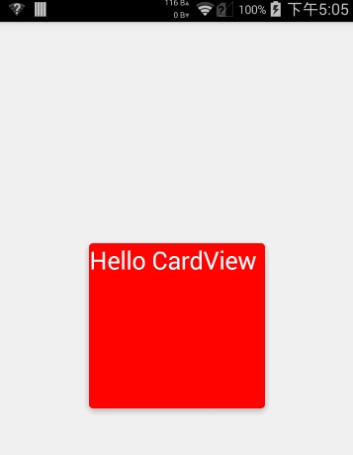
CardView也是5.0的新控件,这控件其实就是一个卡片啦,当然我们自己也完全可以定义这样一个卡片,从现在的微博等社App中可以看到各式各样的自定义卡片,所以这个控件意义不是很大。support中的view所以使用在布局里面的时候一下子看不到效果的,比较不好。CardView继承的是FrameLayout,所以摆放内部控件的时候需要注意一下啦。
建议:个人不是很建议用这个控件,因为我们完全可以自定义这样一个控件,这样既能在布局时直接看到效果又比较方便。
参数说明:
<resources>

    <declare-styleable name="CardView">

        <!-- Background color for CardView. -->

        <!-- 背景色 -->

        <attr name="cardBackgroundColor" format="color" />

        <!-- Corner radius for CardView. -->

        <!-- 边缘弧度数 -->

        <attr name="cardCornerRadius" format="dimension" />

        <!-- Elevation for CardView. -->

        <!-- 高度 -->

        <attr name="cardElevation" format="dimension" />

        <!-- Maximum Elevation for CardView. -->

        <!-- 最大高度 -->

        <attr name="cardMaxElevation" format="dimension" />

        <!-- Add padding in API v21+ as well to have the same measurements with previous versions. -->

        <!-- 设置内边距,v21+的版本和之前的版本仍旧具有一样的计算方式 -->

        <attr name="cardUseCompatPadding" format="boolean" />

        <!-- Add padding to CardView on v20 and before to prevent intersections between the Card content and rounded corners. -->

        <!-- 在v20和之前的版本中添加内边距,这个属性是为了防止卡片内容和边角的重叠 -->

        <attr name="cardPreventCornerOverlap" format="boolean" />

        <!-- 下面是卡片边界距离内部的距离-->

        <!-- Inner padding between the edges of the Card and children of the CardView. -->

        <attr name="contentPadding" format="dimension" />

        <!-- Inner padding between the left edge of the Card and children of the CardView. -->

        <attr name="contentPaddingLeft" format="dimension" />

        <!-- Inner padding between the right edge of the Card and children of the CardView. -->

        <attr name="contentPaddingRight" format="dimension" />

        <!-- Inner padding between the top edge of the Card and children of the CardView. -->

        <attr name="contentPaddingTop" format="dimension" />

        <!-- Inner padding between the bottom edge of the Card and children of the CardView. -->

        <attr name="contentPaddingBottom" format="dimension" />

    </declare-styleable>

</resources>
看完了参数,那么我们来看看布局文件中的用法。
<!-- A CardView that contains a TextView -->

<android.support.v7.widget.CardView xmlns:android="http://schemas.android.com/apk/res/android"

    xmlns:tools="http://schemas.android.com/tools"

    xmlns:app="http://schemas.android.com/apk/res-auto"

    android:id="@+id/card_view"

    android:layout_width="200dp"

    android:layout_height="200dp"

    android:layout_gravity="center"

    app:cardCornerRadius="4dp"

    app:cardBackgroundColor="#ff0000"

    app:cardElevation="5dp"

    app:cardMaxElevation="10dp"

    app:cardUseCompatPadding="true"

    app:cardPreventCornerOverlap="true">

    <TextView

        android:id="@+id/info_text"

        android:layout_width="match_parent"

        android:layout_height="match_parent"

        android:layout_gravity="center"

        android:textSize="25sp"

        android:textColor="#ffffff"

        android:text="Hello CardView"/>

</android.support.v7.widget.CardView>
这样我们就定义好了一个CardView了。本来这篇文章不需要给源码的,但因为有人的support-v7包中这个jar有点问题(比如我),所以还是放一个代码吧。
源码下载:http://download.csdn.net/detail/shark0017/8108835
参考自:
http://blog.csdn.net/a396901990/article/details/40187769
Android5.0新控件CardView的介绍和使用的更多相关文章
- Android5.0新控件RecyclerVIew的介绍和兼容使用的方法
第一部分 RecyclerVIew是一个可以替代listview和Gallery的有效空间而且在support-v7中有了低版本支持,具体使用方式还是规规矩矩的适配器加控件模式.我们先来看看官网的介绍 ...
- 一个Activity掌握Android5.0新控件 (转)
原文地址:http://blog.csdn.net/lavor_zl/article/details/51279386 谷歌在推出Android5.0的同时推出了一些新控件,Android5.0中最常 ...
- Android5.0新控件
谷歌在推出Android5.0的同时推出了一些新控件,Android5.0中最常用的新控件有下面5种. 1. CardView(卡片视图) CardView顾名思义是卡片视图,它继承FrameLay ...
- 一个Activity掌握Android4.0新控件 (转)
原文地址:http://blog.csdn.net/lavor_zl/article/details/51261380 谷歌在推出Android4.0的同时推出了一些新控件,Android4.0中最常 ...
- Android 5.0新控件——FloatingActionButton(悬浮按钮)
Android 5.0新控件--FloatingActionButton(悬浮按钮) FloatingActionButton是5.0以后的新控件,一个悬浮按钮,之所以叫做悬浮按钮,主要是因为自带阴影 ...
- 【Android】Anroid5.0+新控件---酷炫标题栏的简单学习
Android5.0+推出的新控件感觉特别酷,最近想模仿大神做个看图App出来,所以先把这些新控件用熟悉了. 新控件的介绍.使用等等网上相应的文章已经特别多了,题主也没那能力去写篇详解出来,本篇随笔记 ...
- Android 5.0新控件——TextInputLayout
Android 5.0(M)新控件--TextInputLayout 介绍之前,先直观的看一下效果 TextInputLayout其实是一个容器,他继承自LinearLayout,该容器是作用于Tex ...
- Android4.0新控件
谷歌在推出Android4.0的同时推出了一些新控件,Android4.0中最常用的新控件有下面5种. 1. Switch的使用 Switch顾名思义,就是开关的意思,有开和关两种状态. 当Swit ...
- 一个Activity掌握Design新控件 (转)
原文地址:http://blog.csdn.net/lavor_zl/article/details/51295364 谷歌在推出Android5.0的同时推出了全新的设计Material Desig ...
随机推荐
- Andorid 编程 系统环境安装
内网环境下安装: 1.配置源 :找到公司内部整理的源文件中的内容,将其内容拷贝到系统 源文件 中,并注释掉所有外网链接(如果公司支持内部环境配置,通常会有一个内部源文件) 2.安装jdk, ecli ...
- YTU 2344: 先序遍历二叉树
原文链接:https://www.dreamwings.cn/ytu2344/2603.html 2344: 先序遍历二叉树 时间限制: 1 Sec 内存限制: 128 MB 提交: 4 解决: ...
- poj1988 Cube Stacking
并查集的高效之处在于路径压缩和延迟更新. 在本题中需要额外维护子树的规模以及当前子树节点到跟的距离两个数组. 由于一个新的数必然是两棵树拼接而成,对于子树规模的更新直接相加即可, 对于节点到跟的距离: ...
- linux 文件操作命令
目录操作命令 命令格式 命令 [-选项] [-参数] ls -la /etc 有多个选项时可以合并 ls命令: -a (all) 显示所有文件,包括隐藏文件,那是用.开头的文件 为什么要隐藏(这是个系 ...
- Intellij IDEA svn的使用记录
这里的忽略一直灰色的,可以进入 这里的版本控制里进行忽略选择 或者 这里进行添加 这里有三个选择 按照顺序 1.忽略指定的文件 2.忽略文件夹下所有文件 3.忽略符合匹配规则的文件 到Commit C ...
- 2017年1月6日 星期五 --出埃及记 Exodus 21:32
2017年1月6日 星期五 --出埃及记 Exodus 21:32 If the bull gores a male or female slave, the owner must pay thirt ...
- JS中innerHTML 和innerText和value的区别
(1)innerHTML 和innerText和value的区别: innerHTML innerText是对非表单元素进行操作的. value是对表单元素进行操作的. (2)innerHTML 和i ...
- java写的web服务器
经常用Tomcat,不知道的以为Tomcat很牛,其实Tomcat就是用java写的,Tomcat对jsp的支持做的很好,那么今天我们用java来写一个web服务器 //首先得到一个server, S ...
- MUI 版本更新
MUI版本更新,一些js,css 就不写了. 一.app 端 1.APP html 代码 <li class="mui-table-view-cell"> <a ...
- 思考之一——PM(Project Manager)
摘自:http://blog.csdn.net/moreevan/article/details/6697806