
TabNavigator Container Example
<?xml version="1.0" encoding="utf-8"?>

<s:Application xmlns:fx="http://ns.adobe.com/mxml/2009"

               xmlns:s="library://ns.adobe.com/flex/spark"

               xmlns:mx="library://ns.adobe.com/flex/mx" minWidth="955" minHeight="600"

               >

    <s:Panel title="TabNavigator Container Example"

             width="75%" height="75%"

             horizontalCenter="0" verticalCenter="0">

        <s:VGroup left="10" right="10" top="10" bottom="10">

            <s:Label width="100%" color="blue"

                     text="Select the tabs to change the panel."/>

            <mx:TabNavigator id="tn"  width="100%" height="100%">

                <!-- Define each panel using a VBox container. -->

                <mx:VBox label="Panel 1">

                    <mx:Label text="TabNavigator container panel 1"/>

                </mx:VBox>

                <mx:VBox label="Panel 2">

                    <mx:Label text="TabNavigator container panel 2"/>

                </mx:VBox>

                <mx:VBox label="Panel 3">

                    <mx:Label text="TabNavigator container panel 3"/>

                </mx:VBox>

            </mx:TabNavigator>

            <s:Label width="100%" color="blue"

                     text="Programmatically select the panel using a Button control."/>

            <s:HGroup>

                <mx:Button label="Select Tab 1" click="tn.selectedIndex=0"/>

                <mx:Button label="Select Tab 2" click="tn.selectedIndex=1"/>

                <mx:Button label="Select Tab 3" click="tn.selectedIndex=2"/>

            </s:HGroup>

        </s:VGroup>

    </s:Panel>

</s:Application>

<?xml version="1.0" encoding="utf-8"?>

<s:Application xmlns:fx="http://ns.adobe.com/mxml/2009"

               xmlns:s="library://ns.adobe.com/flex/spark"

               xmlns:mx="library://ns.adobe.com/flex/mx" minWidth="955" minHeight="600"

               >

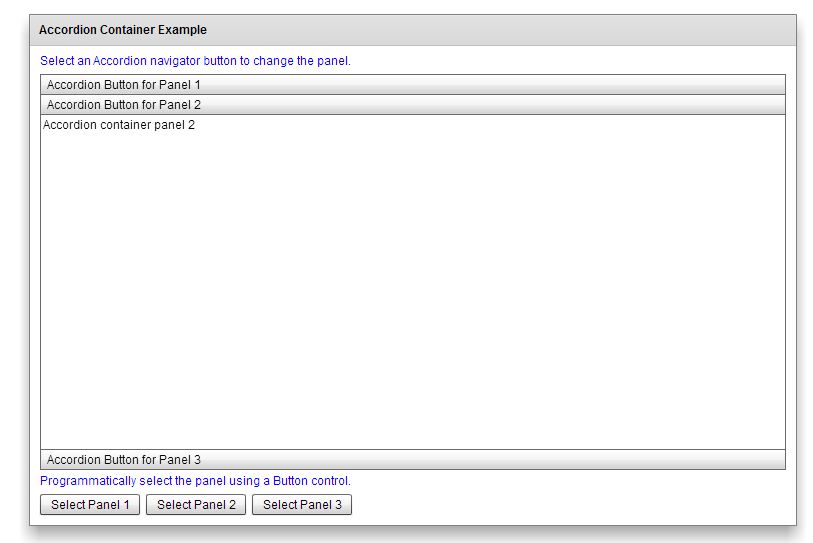
    <s:Panel title="Accordion Container Example"

             width="75%" height="75%"

             horizontalCenter="0" verticalCenter="0">

        <s:VGroup left="10" right="10" top="10" bottom="10">

            <s:Label width="100%" color="blue"

                     text="Select an Accordion navigator button to change the panel."/>

            <mx:Accordion id="accordion" width="100%" height="100%">

                <!-- Define each panel using a VBox container. -->

                <mx:VBox label="Accordion Button for Panel 1">

                    <mx:Label text="Accordion container panel 1"/>

                </mx:VBox>

                <mx:VBox label="Accordion Button for Panel 2">

                    <mx:Label text="Accordion container panel 2"/>

                </mx:VBox>

                <mx:VBox label="Accordion Button for Panel 3">

                    <mx:Label text="Accordion container panel 3"/>

                </mx:VBox>

            </mx:Accordion>

            <s:Label width="100%" color="blue"

                     text="Programmatically select the panel using a Button control."/>

            <s:HGroup>

                <s:Button label="Select Panel 1" click="accordion.selectedIndex=0;"/>

                <s:Button label="Select Panel 2" click="accordion.selectedIndex=1;"/>

                <s:Button label="Select Panel 3" click="accordion.selectedIndex=2;"/>

            </s:HGroup>

        </s:VGroup>

    </s:Panel>

</s:Application>
TabNavigator Container Example的更多相关文章
- react native 使用TabNavigator编写APP底部导航
第一步,下载依赖 npm install react-native-tab-navigator --save 第二步,引入 import TabNavigator from 'react-native ...
- React Native商城项目实战04 - 封装TabNavigator.Item的创建
1.Main.js /** * 主页面 */ import React, { Component } from 'react'; import { StyleSheet, Text, View, Im ...
- 在docker中运行ASP.NET Core Web API应用程序(附AWS Windows Server 2016 widt Container实战案例)
环境准备 1.亚马逊EC2 Windows Server 2016 with Container 2.Visual Studio 2015 Enterprise(Profresianal要装Updat ...
- .Container与.container_fluid区别
.Container与.container_fluid是bootstrap中的两种不同类型的外层容器,两者的区别是:.container 类用于固定宽度并支持响应式布局的容器..container-f ...
- View and Data API Tips: Constrain Viewer Within a div Container
By Daniel Du When working with View and Data API, you probably want to contain viewer into a <div ...
- [LeetCode] Container With Most Water 装最多水的容器
Given n non-negative integers a1, a2, ..., an, where each represents a point at coordinate (i, ai). ...
- 如何装最多的水? — leetcode 11. Container With Most Water
炎炎夏日,还是呆在空调房里切切题吧. Container With Most Water,题意其实有点噱头,简化下就是,给一个数组,恩,就叫 height 吧,从中任选两项 i 和 j(i <= ...
- Docker - command in docker container
1.查看Container 里面运行的进程 在运行容器以后,可以查看里面的进程: docker top <container_id> or <container_name> 2 ...
- 【leetcode】Container With Most Water
题目描述: Given n non-negative integers a1, a2, ..., an, where each represents a point at coordinate (i, ...
随机推荐
- 黄聪:JQUERY的datatables插件,Date range filter时间段筛选功能
需配合moment插件实现:http://momentjs.com/ 演示:http://live.datatables.net/zuciyawi/1/edit HTML代码 <!DOCTYPE ...
- django之中间件middleware
django 中的中间件(middleware),在django中,中间件其实就是一个类,在请求到来和结束后,django会根据自己的规则在合适的时机执行中间件中相应的方法. 在django项目的se ...
- AS3 内存基础
1:获取一个对象的字节数: var str:String="ddd啊"; var byte:ByteArray=new ByteArray(); byte.writeMultiBy ...
- Spring4.0之四:Meta Annotation(元注解)
Spring框架自2.0开始添加注解的支持,之后的每个版本都增加了更多的注解支持.注解为依赖注入,AOP(如事务)提供了更强大和简便的方式.这也导致你要是用一个相同的注解到许多不同的类中去.这篇文章介 ...
- vmware导出为ovf
鼠标单击要导出的虚拟机à文件-à导出为OVFà开始导出(耗时有点长) 导出过程 导出的文件格式为: 出现此报错请点击重试 虚拟就就导入了 导入后就可以使用了 vmware1 ...
- [UE4]制作缩略图
一.创建一个专门用来做缩略图的角色CameraCharacter,不需要实体模型. 二.Auto Possess Player设置为“Player 0” 三.重力比例改成0(这样在天上的时候就不会往下 ...
- dubbo协议下的单一长连接与多线程并发如何协同工作
上班的路上突然就冒出了这么个问题:既然在dubbo中描述消费者和提供者之间采用的是单一长连接,那么如果消费者端是高并发多线程模型的web应用,单一长连接如何解决多线程并发请求问题呢? 其实如果不太了解 ...
- KPPW2.7 漏洞利用--文件上传
KPPW2.7 漏洞利用----文件上传 文件上传导致任意代码执行 搭建环境 1,集成环境简单方便,如wamp,phpstudy.... 2,KPPW v2.7源码一份(文末有分享)放到WWW目录下面 ...
- aspnet-api-versioning
https://github.com/Microsoft/aspnet-api-versioning
- L1正则化
正则化项本质上是一种先验信息,整个最优化问题从贝叶斯观点来看是一种贝叶斯最大后验估计,其中正则化项对应后验估计中的先验信息,损失函数对应后验估计中的似然函数,两者的乘积即对应贝叶斯最大后验估计的形式, ...