
【hta版】获取AppStore上架后的应用版本号
之前写过一篇文章:获取AppStore上架后的应用版本号,那一篇文章使用node.js实现,存在的问题就是如果在没有安装node.js运行环境下是无法运行的,而且该程序依赖request模块,为了方便其它人也能使用,想到把它做成一个本地应用程序。然后想了一下,觉得最简单的就是使用hta文件(它的Ajax请求可跨域^_^)。
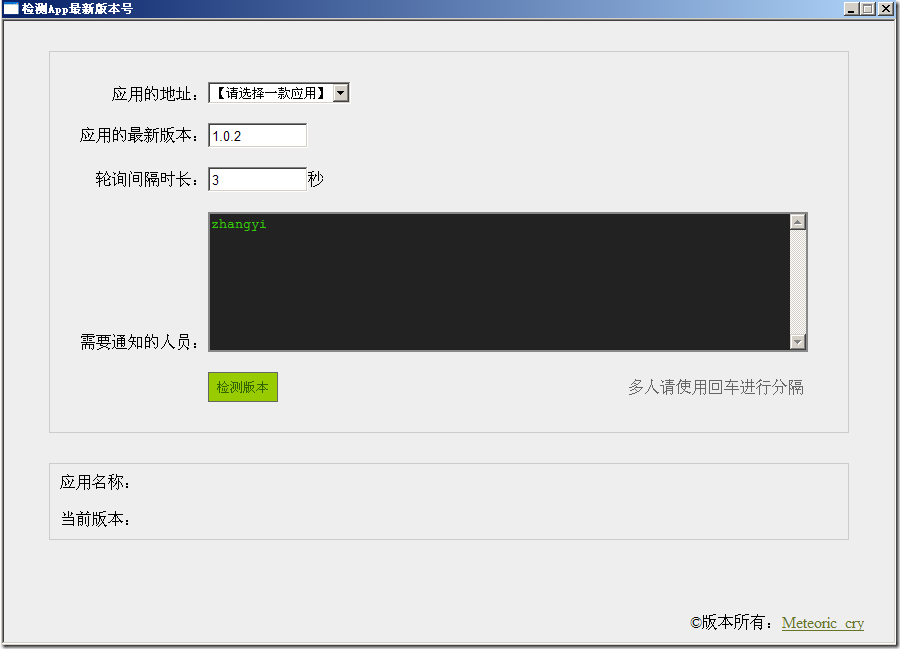
因为我们手游产品已经有三款了,所以“应用地址”那一栏,我使用了下拉框,其它组的成员只需要点击选中需要检测的应用,然后点击“检测版本”按钮,程序将开始运行。当匹配到版本为最新的版本时,登录OA系统,向需要获取版本更新信息的人员发送OA提醒。
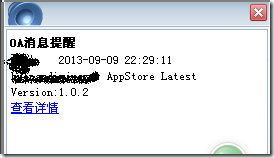
原理比较简单,代码也并不复杂。将源码本地另存为.hta后缀的文件,然后双击它就可以运行了。
<html>
<head>
<meta http-equiv="Content-Type" content="text/html; charset=utf-8" />
<title>检测App最新版本号</title>
<hta:application id="fetchFIle" applicationname="fetchFIle" singleinstance="yes" border="thin" scroll="no" maximizeButton="no">
<style type='text/css'>
h3 {border-left:3px solid 666; color:#666; text-indent:10px; margin:15px 0;}
textarea {border:2px solid #888; background-color:#222; font-family:'Courier New'; font-size:14px; color:#3c0;}
a {color:#657528;}
a:hover {background:#c8dc7b;} .exec-btn {border:1px solid #666; background-color:#9c0; color:#360; padding:5px 5px 3px 5px; margin-left:10px; width:70px; height:30px; vertical-align:middle; cursor:pointer; display:inline-block;} body {background-color:#eee; margin:0; padding:0; overflow:hidden; text-align:center;} #wrapper {width:800px; margin:30px auto; padding:30px; border:1px solid #ccc; text-align:left;}
.ipt {width:600px; height:25px; line-height:22px; vertical-align:middle; padding:0 2px;}
</style>
</head>
<body>
<div id="wrapper">
<p> 应用的地址:<select id='ipt_url'>
<option value="">【请选择一款应用】</option>
<option value="https://itunes.apple.com/cn/app/huang-di-jue-qi/id604615270?mt=8">【皇帝崛起】</option>
<option value="https://itunes.apple.com/cn/app/feng-liu-tian-zi/id670188672?mt=8">【风流天子】</option>
<option value="https://itunes.apple.com/cn/app/gong-ting-feng-yunhd/id543140000?mt=8">【宫廷风云】</option>
</select></p>
<p>应用的最新版本:<input type='text' class='ipt' value="1.0.2" style="width:100px;" id="ipt_ver"/></p>
<p> 轮询间隔时长:<input type='text' class='ipt' value='3' style='width:100px;' id='ipt_duration'/>秒</p>
<p>需要通知的人员:<textarea style='width:600px; height:140px;' id="ipt_uids">zhangyi</textarea></p>
<p style='padding-left:118px;'><button class='exec-btn' onclick="startCheck()" id='btn_check'>检测版本</button><span style='padding-left:350px;color:#666;'>多人请使用回车进行分隔</span></p>
</div> <div style='border:1px solid #ccc; width:800px; margin:30px auto; text-align:left; padding:10px;'>
<p>应用名称:<span id='app_name'></span></p>
<p>当前版本:<span id='curr_ver'></span></p>
</div> <div style='position:absolute; bottom:10px; right:30px;'>©版本所有:<a href="http://www.cnblogs.com/meteoric_cry" target='_blank'>Meteoric_cry</a></div> <script type="text/javascript">
String.prototype.trim = function(r){
return this.replace(r || /(^\s+)|(\s+$)/g, "");
} function getEl(id) {
return typeof id == 'string' ? document.getElementById(id) : id;
} var FWKAjax = function () {
return {
getXHR: function () {
var e = null;
try {
return (e = new XMLHttpRequest());
} catch (d) {
for (var c = 0, b = ["MSXML3", "MSXML2", "Microsoft"]; c < b.length; c++) {
try {
e = new ActiveXObject(b[c] + ".XMLHTTP");
break;
} catch (d) {}
}
}
return e;
},
request: function (b, c) {
var d = this.getXHR();
if (!d) {
throw new Error("cant't initialize xhr instance.");
}
var a = {};
a.method = (c.method || "get").toUpperCase();
a.asyn = true;
a.onSuccess = c.onSuccess || function () {};
a.onFailure = c.onFailure || function () {};
a.postData = c.postData || null;
d.open(a.method, b, a.asyn); if ("POST" == a.method) {
d.setRequestHeader("Content-Type","application/x-www-form-urlencoded");
} else {
d.setRequestHeader('If-Modified-Since', new Date(0).toGMTString());
d.setRequestHeader('Cache-Control', 'no-cache');
} d.onreadystatechange = function () {
if (d.readyState == 4) {
if (d.status == 0 || d.status == 200) {
a.onSuccess(d);
} else {
a.onFailure(d);
} d = null;
a = null;
}
}; d.send(a.postData);
}
};
}(); function startCheck() {
var url = getEl('ipt_url').value.trim()
var ver = getEl('ipt_ver').value.trim() if (!url) {
alert('请选择要检测的应用');
getEl('ipt_url').focus();
return false;
} if (!ver) {
alert('请输入要检测的应用版本号');
return false;
} var duration = getEl('ipt_duration').value * 1000 || 3 * 1000;
var uids = getEl('ipt_uids').value.trim().replace(/\r\n/g, ','); if (!uids) {
alert("请输入要通知的人员名单列表");
return ;
} var btnElem = getEl('btn_check');
btnElem.setAttribute("disabled", "disabled");
btnElem.innerHTML = "正在检测"; checkHandler(url, ver, duration, uids)
} function checkHandler(url, ver, duration, uids) {
FWKAjax.request(url + "&t=" + new Date().getTime(), {
'method' : 'get',
'onSuccess' : ajaxCallback,
'onFailure' : ajaxCallback,
'postData' : null
}); function ajaxCallback(xhr) {
var htmlContent = xhr.responseText;
xhr = null; if (/<h1>([^<]+)<\/h1>/.test(htmlContent)) {
var appName = RegExp["$1"];
getEl('app_name').innerHTML = appName;
} if (/\<li\><span class=\"label\">版本\: <\/span>([^<]+)\<\/li\>/.test(htmlContent)) {
var currVer = RegExp["$1"]; getEl('curr_ver').innerHTML = currVer; var appDomainName = url.split('/app/')[1].split('/')[0]; if (currVer == ver) {
sendOA_Notification(appDomainName, currVer, uids);
return ;
}
} setTimeout(function() {
checkHandler(url, ver, duration, uids)
}, duration);
}
} function sendOA_Notification(appName, currVer, uids) {
FWKAjax.request("http://oa.xx.net/logincheck.php?UNAME=xx1&PASSWORD=xx2", {
'method' : 'GET',
'onSuccess' : function(xhr) {
if (/location=\"general\"\;/.test(xhr.responseText)) {
sendMsg(appName, currVer, uids);
}
},
'onFailure' : null,
'postData' : null
});
} function sendMsg(appName, currVer, uids) { var data_str = "uid=" + uids + "&cont=[" + appName + "] AppStore Latest Version:" + currVer; FWKAjax.request("http://oa.xx.net/general/reservation/sendsmsapi.php", {
'method' : 'post',
'onSuccess' : function(xhr) {
alert("版本更新提醒已发送!"); var btnElem = getEl('btn_check');
btnElem.removeAttribute("disabled");
btnElem.innerHTML = "检测版本";
},
'onFailure' : null,
'postData' : data_str
});
} !(function() {
var winsize = {
winwidth: 900,
winheight: 650,
scrnwidth: screen.availWidth,
scrnheight: screen.availHeight
}; window.resizeTo(winsize.winwidth, winsize.winheight);
})(); window.onerror=function(a,b,c){
alert("检测脚本发生了以下异常:"+a+"\n所在行:"+c);
return true;
} </script> </body>
</html>
【hta版】获取AppStore上架后的应用版本号的更多相关文章
- 获取AppStore上架后的应用版本号
应用通过审核以后,由开发者设置应用上架,但何时能在appstore搜索到该应用,这个时间不等,有时候15分钟左右有时候2个多小时,以前就是隔一段时间打开网页然后刷新一下,或者搜索一下,查看版本号,操作 ...
- ios appstore 上架应用被拒绝原因
ios appstore 上架应用被拒绝原因 应用程序崩溃 界面布局有明显错误挂羊头卖狗头的应用包括未公开的或隐藏功能的使用私有API应用程序读取或写入数据超出其指定的容器区域以任何方式下载代码的应用 ...
- IT连创业系列:说说苹果商店AppStore上架App应用前后遇到的那些神坑
前言: IT连创业的这个系列,又隔空了一个多月了. 不知道为什么,最近写文的冲动感下降了很多,如果不是因为特别忙,大概就因为上了年纪的原因了. 群里关注我创业的朋友,一直都在问,啥时候有新的文章讲述创 ...
- SVN使用_获取某版本后改动的文件列表
本章将讲解如何通过svn命令获取某版本后改动的所有文件 一键操作,告别svn log的繁杂对比工作. 1:安装SVN命令行工具Subversion(不是TortoiseSVN) 下载Subversio ...
- 获取元素计算后的css样式封装
获取元素计算后的css样式封装: function getCss(obj,attribute) { if(obj.currentStyle) { return obj.currentStyle[att ...
- 使用curl获取Location:重定向后url
在php获取http头部信息上,php有个自带的函数get_headers(),我以前也是用这个的,听说效率在win上不咋地,再加上最近研究百度url无果,写了cURL获取重定向url的php代码来折 ...
- C# 上传RAR文件 解压 获取解压后的文件名称
此方法适用于C盘windows文件夹中有WinRAR.exe文件 if (fileExt.ToUpper() == ".RAR") { string zpath = Server. ...
- 获取X天后的日期
import java.util.Calendar; import java.util.Date; public class main { public static void main(String ...
- js时间比较,获取n天后(前)的日期
<html> <head> <meta http-equiv="Content-Type" content="textml; charset ...
随机推荐
- NET-知识点:C#中Equals和==比较
第一.相等性比较 其实这个问题的的本质就是C#的相等比较,相等比较可以分两类: 1.引用相等性,引用相等性指两个对象引用均引用同一基础对象. 2.值相等性,值相等性指两个对象包含相同的一个或多个值,其 ...
- hdu 5053 (2014上海网赛L题 求立方和)
题目大意:给你L到N的范围,要求你求这个范围内的所有整数的立方和. Sample Input2 //T1 32 5 Sample OutputCase #1: 36Case #2: 224 # inc ...
- xgboost 实践
xgboost 安装:xgboost:Scalable and Flexible Gradient Boosting github: eXtreme Gradient Boosting 中文教程:可 ...
- 【LOJ】#6437. 「PKUSC2018」PKUSC
题解 我们把这个多边形三角形剖分了,和统计多边形面积一样 每个三角形有个点是原点,把原点所对应的角度算出来,记为theta 对于一个点,相当于半径为这个点到原点的一个圆,圆弧上的弧度为theta的一部 ...
- Codeforces Round #380 Div.2 F - Financiers Game
F - Financiers Game 这种两人博弈一般都可以用两个dp写, 一个dp描述第一个人的最优态, 第二个dp描述第二个人的最优态,难点在于优化空间... 我感觉这个空间开得有点玄学.. d ...
- 阿里云 rds python sdk不支持python3处理
阿里云文档中心的python版本aliyun-python-sdk-rds不支持python3处理 问题:默认情况下文档中心的python版本只支持python2,不兼容python3版本 需要稍微修 ...
- 【翻译】checkbox的第三种状态
checkbox只有两种值:选中(checked)或未选中(unchecked).它可以有任何值,但是表单提交时checkbox的值只能是checked或unchecked.它的默认值是uncheck ...
- 使用 Python 在 Linux 上实现一键回归测试
从代码库迁出代码 —- pexpect 的使用 测试人员从代码库(例如 CVS )迁出代码的过程中,需要手动输入访问密码,而 Python 提供了 Pexpect 模块则能够将手动输入密码这一过程自动 ...
- 1038 一元三次方程求解 2001年NOIP全国联赛提高组
题目描述 Description 有形如:ax3+bx2+cx+d=0 这样的一个一元三次方程.给出该方程中各项的系数(a,b,c,d 均为实数),并约定该方程存在三个不同实根(根的范围在-100 ...
- iOS键盘类型最全
一.键盘风格 UIKit框架支持8种风格键盘. typedef enum { UIKeyboardTypeDefault, // 默认键盘:支持所有字符 UIKeyboa ...