
词云wordcloud入门示例
整体简介:
词云图,也叫文字云,是对文本中出现频率较高的“关键词”予以视觉化的展现,词云图过滤掉大量的低频低质的文本信息,使得浏览者只要一眼扫过文本就可领略文本的主旨。
基于Python的词云生成类库,很好用,而且功能强大。在做统计分析的时候有着很好的应用,比较推荐。
github:https://github.com/amueller/word_cloud
官方地址:https://amueller.github.io/word_cloud/
快速生成词云:
#导入所需库

from wordcloud import WordCloud

f = open(r'C:\Users\JluTIger\Desktop\texten.txt','r').read()

wordcloud = WordCloud(background_color="white",width=1000, height=860, margin=2).generate(f)

# width,height,margin可以设置图片属性

# generate 可以对全部文本进行自动分词,但是对中文支持不好

# 可以设置font_path参数来设置字体集

#background_color参数为设置背景颜色,默认颜色为黑色

import matplotlib.pyplot as plt

plt.imshow(wordcloud)

plt.axis("off")

plt.show()

wordcloud.to_file('test.png')

# 保存图片,但是在第三模块的例子中 图片大小将会按照 mask 保存
- 运行时遇到的问题:
报错:(unicode error) 'unicodeescape' codec can't decode bytes in position 2-3: truncated \UXXXXXXXX escap
- 原因及解决办法:
文档我是放在桌面里的,起初读取文档的命令是:f = open('C:\Users\JluTIger\Desktop\texten.txt','r').read()
一直报错:(unicode error) 'unicodeescape' codec can't decode bytes in position 2-3: truncated \UXXXXXXXX escape
后来发现,在Python中\是转义符,\u表示其后是UNICODE编码,因此\User在这里会报错,在字符串前面加个r表示就可以了
- 效果:
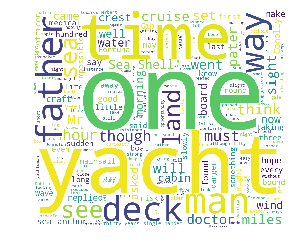
自定义字体颜色:
下段代码来自wordcloud官方的github。
#!/usr/bin/env python

"""

Colored by Group Example

========================

Generating a word cloud that assigns colors to words based on

a predefined mapping from colors to words

基于颜色到单次的映射,将颜色分配给单次,生成词云。

"""

from wordcloud import (WordCloud, get_single_color_func)

import matplotlib.pyplot as plt

class SimpleGroupedColorFunc(object):

    """Create a color function object which assigns EXACT colors

       to certain words based on the color to words mapping

       创建一个颜色函数对象,它根据颜色到单词的映射关系,为单词分配精准的颜色。

       Parameters

       参数

       ----------

       color_to_words : dict(str -> list(str))

         A dictionary that maps a color to the list of words.

       default_color : str

         Color that will be assigned to a word that's not a member

         of any value from color_to_words.

    """

    def __init__(self, color_to_words, default_color):

        self.word_to_color = {word: color

                              for (color, words) in color_to_words.items()

                              for word in words}

        self.default_color = default_color

    def __call__(self, word, **kwargs):

        return self.word_to_color.get(word, self.default_color)

class GroupedColorFunc(object):

    """Create a color function object which assigns DIFFERENT SHADES of

       specified colors to certain words based on the color to words mapping.

       Uses wordcloud.get_single_color_func

       Parameters

       ----------

       color_to_words : dict(str -> list(str))

         A dictionary that maps a color to the list of words.

       default_color : str

         Color that will be assigned to a word that's not a member

         of any value from color_to_words.

    """

    def __init__(self, color_to_words, default_color):

        self.color_func_to_words = [

            (get_single_color_func(color), set(words))

            for (color, words) in color_to_words.items()]

        self.default_color_func = get_single_color_func(default_color)

    def get_color_func(self, word):

        """Returns a single_color_func associated with the word"""

        try:

            color_func = next(

                color_func for (color_func, words) in self.color_func_to_words

                if word in words)

        except StopIteration:

            color_func = self.default_color_func

        return color_func

    def __call__(self, word, **kwargs):

        return self.get_color_func(word)(word, **kwargs)

#text是要分析的文本内容

text = """The Zen of Python, by Tim Peters

Beautiful is better than ugly.

Explicit is better than implicit.

Simple is better than complex.

Complex is better than complicated.

Flat is better than nested.

Sparse is better than dense.

Readability counts.

Special cases aren't special enough to break the rules.

Although practicality beats purity.

Errors should never pass silently.

Unless explicitly silenced.

In the face of ambiguity, refuse the temptation to guess.

There should be one-- and preferably only one --obvious way to do it.

Although that way may not be obvious at first unless you're Dutch.

Now is better than never.

Although never is often better than *right* now.

If the implementation is hard to explain, it's a bad idea.

If the implementation is easy to explain, it may be a good idea.

Namespaces are one honking great idea -- let's do more of those!"""

# Since the text is small collocations are turned off and text is lower-cased

wc = WordCloud(collocations=False).generate(text.lower())

# 自定义所有单词的颜色

color_to_words = {

    # words below will be colored with a green single color function

    '#00ff00': ['beautiful', 'explicit', 'simple', 'sparse',

                'readability', 'rules', 'practicality',

                'explicitly', 'one', 'now', 'easy', 'obvious', 'better'],

    # will be colored with a red single color function

    'red': ['ugly', 'implicit', 'complex', 'complicated', 'nested',

            'dense', 'special', 'errors', 'silently', 'ambiguity',

            'guess', 'hard']

}

# Words that are not in any of the color_to_words values

# will be colored with a grey single color function

#不属于上述设定的颜色词的词语会用灰色来着色

default_color = 'grey'

# Create a color function with single tone

# grouped_color_func = SimpleGroupedColorFunc(color_to_words, default_color)

# Create a color function with multiple tones

grouped_color_func = GroupedColorFunc(color_to_words, default_color)

# Apply our color function

# 如果你也可以将color_func的参数设置为图片,详细的说明请看 下一部分

wc.recolor(color_func=grouped_color_func)

# 画图

plt.figure()

plt.imshow(wc, interpolation="bilinear")

plt.axis("off")

plt.show()
- 效果:

利用背景图片生成词云,设置停用词词集:
该段代码主要来自于wordcloud的github,你同样可以在github下载该例子以及原图片与效果图。wordcloud会把背景图中白色区域去除,只在有色区域进行绘制。
#!/usr/bin/env python

"""

Image-colored wordcloud

=======================

You can color a word-cloud by using an image-based coloring strategy

implemented in ImageColorGenerator. It uses the average color of the region

occupied by the word in a source image. You can combine this with masking -

pure-white will be interpreted as 'don't occupy' by the WordCloud object when

passed as mask.

If you want white as a legal color, you can just pass a different image to

"mask", but make sure the image shapes line up.

"""

#导入必要的库

from os import path

from PIL import Image

import numpy as np

import matplotlib.pyplot as plt

from wordcloud import WordCloud, STOPWORDS, ImageColorGenerator

# Read the whole text.

text = open(r'C:\Users\JluTIger\Desktop\texten.txt').read()

# read the mask / color image taken from

# http://jirkavinse.deviantart.com/art/quot-Real-Life-quot-Alice-282261010

alice_coloring = np.array(Image.open(r"C:\Users\JluTIger\Desktop\alice.png"))

# 设置停用词

stopwords = set(STOPWORDS)

stopwords.add("said")

# 你可以通过 mask 参数 来设置词云形状

wc = WordCloud(background_color="white", max_words=2000, mask=alice_coloring,

               stopwords=stopwords, max_font_size=40, random_state=42)

# generate word cloud

wc.generate(text)

# create coloring from image

image_colors = ImageColorGenerator(alice_coloring)

# show

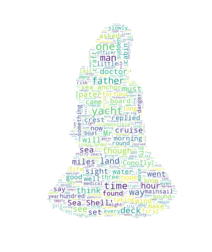
# 在只设置mask的情况下,你将会得到一个拥有图片形状的词云

plt.imshow(wc, interpolation="bilinear")

plt.axis("off")

plt.figure()

# recolor wordcloud and show

# we could also give color_func=image_colors directly in the constructor

# 我们还可以直接在构造函数中直接给颜色

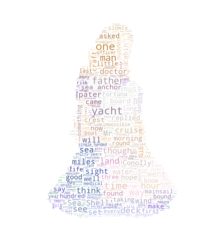
# 通过这种方式词云将会按照给定的图片颜色布局生成字体颜色策略

plt.imshow(wc.recolor(color_func=image_colors), interpolation="bilinear")

plt.axis("off")

plt.figure()

plt.imshow(alice_coloring, cmap=plt.cm.gray, interpolation="bilinear")

plt.axis("off")

plt.show()
- 请注意自己的路径设置
- 原图
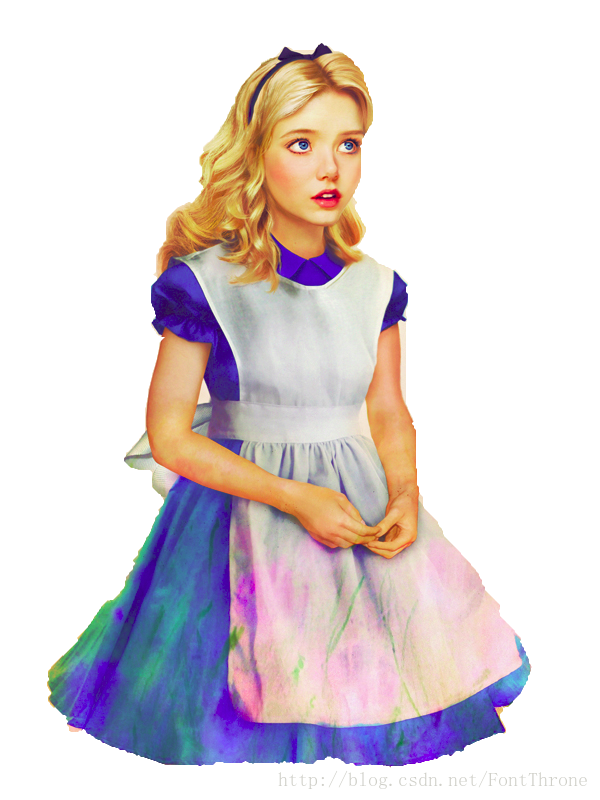
- 效果:
词云wordcloud入门示例的更多相关文章
- scrapy-redis爬取豆瓣电影短评,使用词云wordcloud展示
1.数据是使用scrapy-redis爬取的,存放在redis里面,爬取的是最近大热电影<海王> 2.使用了jieba中文分词解析库 3.使用了停用词stopwords,过滤掉一些无意义的 ...
- 词云wordcloud类介绍&python制作词云图&词云图乱码问题等小坑
词云图,大家一定见过,大数据时代大家经常见,我们今天就来用python的第三方库wordcloud,来制作一个大数据词云图,同时会降到这个过程中遇到的各种坑, 举个例子,下面是我从自己的微信上抓的微信 ...
- Python - 利用词云wordcloud,jieba和中国地图制作四大名著的热词图
热词图很酷炫,也非常适合热点事件,抓住重点,以图文结合的方式表现出来,很有冲击力.下面这段代码是制作热词图的,用到了以下技术: jieba,把文本分词 wordcloud,制作热图 chardet,辨 ...
- 词云-wordcloud
import jiebabook = "2015.txt"txt = open(book).read()ex = {'不是','就是','的话','1.1','docin','ww ...
- python抓取数据构建词云
1.词云图 词云图,也叫文字云,是对文本中出现频率较高的"关键词"予以视觉化的展现,词云图过滤掉大量的低频低质的文本信息,使得浏览者只要一眼扫过文本就可领略文本的主旨. 先看几个词 ...
- 已知词频生成词云图(数据库到生成词云)--generate_from_frequencies(WordCloud)
词云图是根据词出现的频率生成词云,词的字体大小表现了其频率大小. 写在前面: 用wc.generate(text)直接生成词频的方法使用很多,所以不再赘述. 但是对于根据generate_from_f ...
- 用Python生成词云
词云以词语为基本单元,根据词语在文本中出现的频率设计不同大小的形状以形成视觉上的不同效果,从而使读者只要“一瞥“即可领略文本的主旨.以下是一个词云的简单示例: import jieba from wo ...
- 如何用Python 制作词云-对1000首古诗做词云分析
公号:码农充电站pro 主页:https://codeshellme.github.io 今天来介绍一下如何使用 Python 制作词云. 词云又叫文字云,它可以统计文本中频率较高的词,并将这些词可视 ...
- 用Python玩转词云
第一步:引入相关的库包: #coding:utf-8 __author__ = 'Administrator' import jieba #分词包 import numpy #numpy计算包 imp ...
随机推荐
- Spring使用ajax异步上传文件
单文件上传 <!-- 创建文件选择框 --> 文件上传 :<input type="file" id="file" name="fi ...
- python基础学习(三)变量和类型
变量的作用:变量就是用来存储数据的. 变量的定义 在python中,变量在使用之前需要进行赋值,变量只有赋值后才能使用,如果变量没有赋值就使用会出现什么情况呢?如下图,使用之前变量未定义,会报错,如下 ...
- 前端数据可视化echarts.js
一.echarts.js的优势与总体情况 echarts.js作为国内的IT三巨头之一的百度的推出一款相对较为成功的开源项目,总体上来说有这样的一些优点 1.容易使用 echarts.js的官方文档比 ...
- CSS :root 测试
<!DOCTYPE html> <html> <head> <meta charset="utf-8"> <title> ...
- JS apply的巧妙用法以及扩展到Object.defineProperty的使用
Math.max 实现得到数组中最大的一项 var array = [1,2,3,4,5]; var max = Math.max.apply(null, array); console.log(ma ...
- BZOJ2946 [Poi2000]公共串(后缀自动机)
Description 给出几个由小写字母构成的单词,求它们最长的公共子串的长度. 任务: l 读入单词 l 计算最长公共子串的长度 l 输 ...
- centos 安装mysql Package: akonadi-mysql-1.9.2-4.el7.x86_64 (@anaconda)
wget http://repo.mysql.com/mysql-community-release-el7-5.noarch.rpm rpm -ivh mysql-community-release ...
- java读写properties工具代码
package test612; import java.io.File; import java.io.FileInputStream; import java.io.FileNotFoundExc ...
- RabbitMQ 消费消息
1, 创建一个 springboot 项目, 导入依赖(和生产者一致) 2, application.properties (基础配置和生产者一致, 消费者需要再额外配置一些) # rabbitmq ...
- SpringBoot集成Swagger接口管理工具
手写Api文档的几个痛点: 文档需要更新的时候,需要再次发送一份给前端,也就是文档更新交流不及时. 接口返回结果不明确 不能直接在线测试接口,通常需要使用工具,比如postman 接口文档太多,不好管 ...