
利用URLConnection http协议实现webservice接口功能(附HttpUtil.java)
URL的openConnection()方法将返回一个URLConnection对象,该对象表示应用程序和 URL 之间的通信链接。程序可以通过URLConnection实例向该URL发送请求、读取URL引用的资源。
验证身份证号码与姓名是否一致的接口:
http://132.228.156.103:9188/DataSync/CheckResult?SeqNo=1&ChannelID=1003&ID=41272xxxxx&Name=xxx
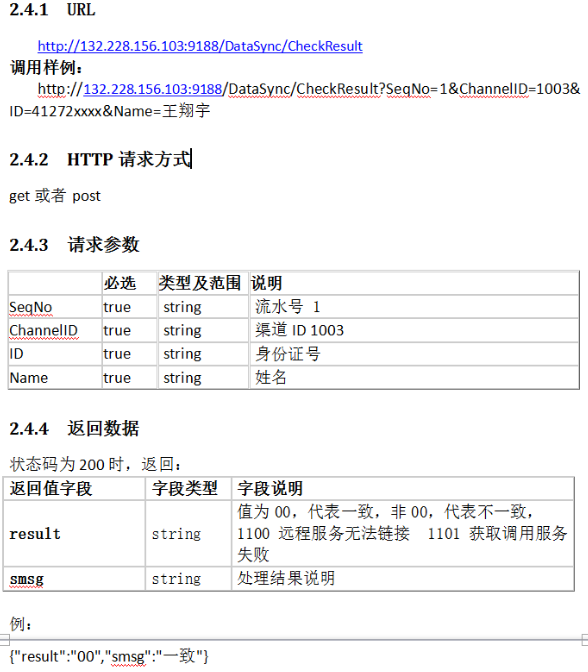
需求:
在用户填入身份证号时校验其准确性。
页面:
var id_number = $("#idNumber").val();

var user_name = $("#staffName").val();

$.ajax({

type:'POST',

url:contextPath + "/check/checkIdNumber.do",

data:{

id_number:id_number,

user_name:user_name

},

dataType:'json',

success:function(json){

if(json.result != "00"){

$.messager.alert('警告','姓名与身份证号码不一致,请核对!');

}else{

$.ajax({

type : 'POST',

url : contextPath + "/Staff/modifyIdNumber.do",

data : {

ID_NUMBER:id_number,

mobileNumber:$("#mobileNumber").val()

},

dataType : 'json',

success : function(json) {

if (json.status) {

msgShow('系统提示', '实名认证成功', 'info');

isSimplePwd = true;

$('#idNumberWindow').window('close');

}else{

msgShow('系统提示', json.info, 'warning');

}

}

});

}

}

});
控制层:
/**

 * 验证身份证号码与姓名是否一致

 * @param request

 * @param response

 * @throws IOException

 */

@RequestMapping("/checkIdNumber.do")

@ResponseBody

public void checkIdNumber(HttpServletRequest request, HttpServletResponse response) throws IOException{

String id_number = request.getParameter("id_number");

String user_name = request.getParameter("user_name");

Map<String, String> param = new HashMap<String, String>();

param.put("ID", id_number);

param.put("Name", user_name);

param.put("SeqNo", "1");//流水号

param.put("ChannelID", "1003");//渠道号

String result = HttpUtil.sendPost(Constants.DATA_SYNC, param, "utf-8");

JSONObject resObj = JSONObject.fromObject(result);

Map<String, Object> rs = new HashMap<String, Object>();

rs.put("result", resObj.get("result").toString());

rs.put("smsg", resObj.get("smsg").toString());

write(response, rs);

}
数据返回页面的另一种方式:(尤其是当返回结果是List集合时,不能使用write(response,rs))
BaseServletTool.sendParam(response, rs.toString());
服务层:
/**

     * POST请求,Map形式数据

     * @param url 请求地址

     * @param param 请求数据

     * @param charset 编码方式

     */

    public static String sendPost(String url, Map<String, String> param, String charset) {

        StringBuffer buffer = new StringBuffer();

        if (param != null && !param.isEmpty()) {

            for (Map.Entry<String, String> entry : param.entrySet()) {

                buffer.append(entry.getKey()).append("=").append(URLEncoder.encode(entry.getValue())).append("&");

            }

        }

        buffer.deleteCharAt(buffer.length() - 1);

        PrintWriter out = null;

        BufferedReader in = null;

        String result = "";

        try {

            URL realUrl = new URL(url);

            // 打开和URL之间的连接

            URLConnection conn = realUrl.openConnection();

            // 设置通用的请求属性

            conn.setRequestProperty("accept", "*/*");

            conn.setRequestProperty("connection", "Keep-Alive");

            conn.setRequestProperty("user-agent", "Mozilla/4.0 (compatible; MSIE 6.0; Windows NT 5.1;SV1)");

//设置鉴权属性

            //connection.setRequestProperty("X-Authorization", " Bearer " + String.valueOf(param.get("token")));

            // 发送POST请求必须设置如下两行

            conn.setDoOutput(true);

            conn.setDoInput(true);

            // 获取URLConnection对象对应的输出流

            out = new PrintWriter(conn.getOutputStream());

            // 发送请求参数

            out.print(buffer);

            // flush输出流的缓冲

            out.flush();

            // 定义BufferedReader输入流来读取URL的响应

            in = new BufferedReader(new InputStreamReader(conn.getInputStream(), charset));

            String line;

            while ((line = in.readLine()) != null) {

                result += line;

            }

        } catch (Exception e) {

            System.out.println("发送 POST 请求出现异常!" + e);

            e.printStackTrace();

        }

        // 使用finally块来关闭输出流、输入流

        finally {

            try {

                if (out != null) {

                    out.close();

                }

                if (in != null) {

                    in.close();

                }

            } catch (IOException ex) {

                ex.printStackTrace();

            }

        }

        return result;

    }

/**

     * TODO GET请求,字符串形式数据

     * @param url 请求地址

     * @param charset 编码方式

     *

     */

    public String sendGet(String url, Map<String, String> param, String charset) {

        String result = "";

        BufferedReader in = null;

        try {

            URL realUrl = new URL(url);

            // 打开和URL之间的连接

            URLConnection connection = realUrl.openConnection();

            // 设置通用的请求属性

            connection.setRequestProperty("accept", "*/*");

            connection.setRequestProperty("connection", "Keep-Alive");

            connection.setRequestProperty("user-agent", "Mozilla/4.0 (compatible; MSIE 6.0; Windows NT 5.1;SV1)");

            //设置鉴权属性

            connection.setRequestProperty("X-Authorization", " Bearer " + String.valueOf(param.get("token")));

            // 建立实际的连接

            connection.connect();

            // 定义 BufferedReader输入流来读取URL的响应

            in = new BufferedReader(new InputStreamReader(connection.getInputStream(), charset));

            String line;

            while ((line = in.readLine()) != null) {

                result += line;

            }

        } catch (Exception e) {

            System.out.println("发送GET请求出现异常!" + e);

            e.printStackTrace();

        }

        // 使用finally块来关闭输入流

        finally {

            try {

                if (in != null) {

                    in.close();

                }

            } catch (Exception e2) {

                e2.printStackTrace();

            }

        }

        return result;

    }
根据不同的请求方式选择sendPost()或sendGet()方法,如果需要鉴权,添加:
connection.setRequestProperty("X-Authorization", " Bearer " + String.valueOf(param.get("token")));
附HttpUtil.java
package com.system.tool;

import java.io.BufferedReader;

import java.io.IOException;

import java.io.InputStream;

import java.io.InputStreamReader;

import java.io.OutputStreamWriter;

import java.io.PrintWriter;

import java.net.HttpURLConnection;

import java.net.URL;

import java.net.URLConnection;

import java.net.URLEncoder;

import java.util.Iterator;

import java.util.Map;

import java.util.Map.Entry;

/**

 * 向指定服务器(外网)发送GET或POST请求工具类

 * @author wangxiangyu

 *

 */

public class HttpUtil {

    private static int connectTimeOut = 5000;

    private static int readTimeOut = 10000;

    private static String requestEncoding = "UTF-8";

    /**

     * GET请求,字符串形式数据

     * @param url 请求地址

     * @param charset 编码方式

     *

     */

    public static String sendGet(String url, String charset) {

        String result = "";

        BufferedReader in = null;

        try {

            URL realUrl = new URL(url);

            // 打开和URL之间的连接

            URLConnection connection = realUrl.openConnection();

            // 设置通用的请求属性

            connection.setRequestProperty("accept", "*/*");

            connection.setRequestProperty("connection", "Keep-Alive");

            connection.setRequestProperty("user-agent", "Mozilla/4.0 (compatible; MSIE 6.0; Windows NT 5.1;SV1)");

            //设置鉴权属性

            //connection.setRequestProperty("X-Authorization", " Bearer " + String.valueOf(param.get("token")));

            // 建立实际的连接

            connection.connect();

            // 定义 BufferedReader输入流来读取URL的响应

            in = new BufferedReader(new InputStreamReader(connection.getInputStream(), charset));

            String line;

            while ((line = in.readLine()) != null) {

                result += line;

            }

        } catch (Exception e) {

            System.out.println("发送GET请求出现异常!" + e);

            e.printStackTrace();

        }

        // 使用finally块来关闭输入流

        finally {

            try {

                if (in != null) {

                    in.close();

                }

            } catch (Exception e2) {

                e2.printStackTrace();

            }

        }

        return result;

    }

    /**

     * POST请求,字符串形式数据

     * @param url 请求地址

     * @param param 请求数据

     * @param charset 编码方式

     *

     */

    public static String sendPostUrl(String url, String param, String charset) {

        PrintWriter out = null;

        BufferedReader in = null;

        String result = "";

        try {

            URL realUrl = new URL(url);

            // 打开和URL之间的连接

            URLConnection conn = realUrl.openConnection();

            // 设置通用的请求属性

            conn.setRequestProperty("accept", "*/*");

            conn.setRequestProperty("connection", "Keep-Alive");

            conn.setRequestProperty("user-agent", "Mozilla/4.0 (compatible; MSIE 6.0; Windows NT 5.1;SV1)");

            // 发送POST请求必须设置如下两行

            conn.setDoOutput(true);

            conn.setDoInput(true);

            // 获取URLConnection对象对应的输出流

            out = new PrintWriter(conn.getOutputStream());

            // 发送请求参数

            out.print(param);

            // flush输出流的缓冲

            out.flush();

            // 定义BufferedReader输入流来读取URL的响应

            in = new BufferedReader(new InputStreamReader(conn.getInputStream(), charset));

            String line;

            while ((line = in.readLine()) != null) {

                result += line;

            }

        } catch (Exception e) {

            System.out.println("发送 POST 请求出现异常!" + e);

            e.printStackTrace();

        }

        // 使用finally块来关闭输出流、输入流

        finally {

            try {

                if (out != null) {

                    out.close();

                }

                if (in != null) {

                    in.close();

                }

            } catch (IOException ex) {

                ex.printStackTrace();

            }

        }

        return result;

    }

    /**

     * POST请求,Map形式数据

     * @param url 请求地址

     * @param param 请求数据

     * @param charset 编码方式

     */

    public static String sendPost(String url, Map<String, String> param, String charset) {

        StringBuffer buffer = new StringBuffer();

        if (param != null && !param.isEmpty()) {

            for (Map.Entry<String, String> entry : param.entrySet()) {

                buffer.append(entry.getKey()).append("=").append(URLEncoder.encode(entry.getValue())).append("&");

            }

        }

        buffer.deleteCharAt(buffer.length() - 1);

        PrintWriter out = null;

        BufferedReader in = null;

        String result = "";

        try {

            URL realUrl = new URL(url);

            // 打开和URL之间的连接

            URLConnection conn = realUrl.openConnection();

            // 设置通用的请求属性

            conn.setRequestProperty("accept", "*/*");

            conn.setRequestProperty("connection", "Keep-Alive");

            conn.setRequestProperty("user-agent", "Mozilla/4.0 (compatible; MSIE 6.0; Windows NT 5.1;SV1)");

            // 发送POST请求必须设置如下两行

            conn.setDoOutput(true);

            conn.setDoInput(true);

            // 获取URLConnection对象对应的输出流

            out = new PrintWriter(conn.getOutputStream());

            // 发送请求参数

            out.print(buffer);

            // flush输出流的缓冲

            out.flush();

            // 定义BufferedReader输入流来读取URL的响应

            in = new BufferedReader(new InputStreamReader(conn.getInputStream(), charset));

            String line;

            while ((line = in.readLine()) != null) {

                result += line;

            }

        } catch (Exception e) {

            System.out.println("发送 POST 请求出现异常!" + e);

            e.printStackTrace();

        }

        // 使用finally块来关闭输出流、输入流

        finally {

            try {

                if (out != null) {

                    out.close();

                }

                if (in != null) {

                    in.close();

                }

            } catch (IOException ex) {

                ex.printStackTrace();

            }

        }

        return result;

    }

    /**

     * POST请求,字符串形式数据

     * @param url 请求地址

     * @param param 请求数据

     */

    public static String sendPost(String url, Map<String,Object> param) {

        PrintWriter out = null;

        BufferedReader in = null;

        String result = "";

        try {

            URL realUrl = new URL(url);

            // 打开和URL之间的连接

            URLConnection conn = realUrl.openConnection();

            // 设置通用的请求属性

            conn.setRequestProperty("accept", "*/*");

            conn.setRequestProperty("Content-Type", "application/form-data");

            conn.setRequestProperty("Content-Length",  String.valueOf(JsonUtil.simpleMapToJsonStr(param).length()));

            conn.setRequestProperty("connection", "Keep-Alive");

            conn.setRequestProperty("user-agent", "Mozilla/4.0 (compatible; MSIE 6.0; Windows NT 5.1;SV1)");

            // 发送POST请求必须设置如下两行

            conn.setDoOutput(true);

            conn.setDoInput(true);

            // 获取URLConnection对象对应的输出流

            out = new PrintWriter(conn.getOutputStream());

            // 发送请求参数

            out.print(JsonUtil.simpleMapToJsonStr(param));

            // flush输出流的缓冲

            out.flush();

            // 定义BufferedReader输入流来读取URL的响应

            in = new BufferedReader(new InputStreamReader(conn.getInputStream(), "utf-8"));

            String line;

            while ((line = in.readLine()) != null) {

                result += line;

            }

            System.out.println("url>>>>>>>>:"+url);

            System.out.println("param>>>>>>>>:"+JsonUtil.simpleMapToJsonStr(param));

            System.out.println("result>>>>>>>>:"+result);

        } catch (Exception e) {

            System.out.println("发送 POST 请求出现异常!" + e);

            e.printStackTrace();

        }

        // 使用finally块来关闭输出流、输入流

        finally {

            try {

                if (out != null) {

                    out.close();

                }

                if (in != null) {

                    in.close();

                }

            } catch (IOException ex) {

                ex.printStackTrace();

            }

        }

        return result;

    }

    public static String doPost(String reqUrl, Map<String, String> parameters, String recvEncoding) {

        HttpURLConnection url_con = null;

        String responseContent = null;

        String vchartset = recvEncoding == "" ? HttpUtil.requestEncoding : recvEncoding;

        try {

            StringBuffer params = new StringBuffer();

            for (Iterator<?> iter = parameters.entrySet().iterator(); iter.hasNext();) {

                Entry<?, ?> element = (Entry<?, ?>) iter.next();

                params.append(element.getKey().toString());

                params.append("=");

                params.append(URLEncoder.encode(element.getValue().toString(), vchartset));

                params.append("&");

            }

            if (params.length() > 0) {

                params = params.deleteCharAt(params.length() - 1);

            }

            URL url = new URL(reqUrl);

            url_con = (HttpURLConnection) url.openConnection();

            url_con.setRequestMethod("POST");

            url_con.setConnectTimeout(HttpUtil.connectTimeOut);

            url_con.setReadTimeout(HttpUtil.readTimeOut);

            url_con.setDoOutput(true);

            byte[] b = params.toString().getBytes();

            url_con.getOutputStream().write(b, 0, b.length);

            url_con.getOutputStream().flush();

            url_con.getOutputStream().close();

            InputStream in = url_con.getInputStream();

            byte[] echo = new byte[10 * 1024];

            int len = in.read(echo);

            responseContent = (new String(echo, 0, len)).trim();

            int code = url_con.getResponseCode();

            if (code != 200) {

                responseContent = "ERROR" + code;

            }

        } catch (IOException e) {

            System.out.println("网络故障:" + e.toString());

        } finally {

            if (url_con != null) {

                url_con.disconnect();

            }

        }

        return responseContent;

    }

    public static String http(String url, Map<String, Object> params) {

        URL u = null;

        HttpURLConnection con = null;

        // 构建请求参数

        StringBuffer sb = new StringBuffer();

        if (params != null) {

            for (Entry<String, Object> e : params.entrySet()) {

                sb.append(e.getKey());

                sb.append("=");

                sb.append(e.getValue());

                sb.append("&");

            }

            sb.substring(0, sb.length() - 1);

        }

        System.out.println("send_url:" + url);

        System.out.println("send_data:" + sb.toString());

        // 尝试发送请求

        try {

            u = new URL(url);

            con = (HttpURLConnection) u.openConnection();

            //// POST 只能为大写,严格限制,post会不识别

            con.setRequestMethod("POST");

            con.setDoOutput(true);

            con.setDoInput(true);

            con.setUseCaches(false);

            con.setRequestProperty("Content-Type", "application/x-www-form-urlencoded");

            OutputStreamWriter osw = new OutputStreamWriter(con.getOutputStream(), "UTF-8");

            osw.write(JsonUtil.simpleMapToJsonStr(params));

            osw.flush();

            osw.close();

        } catch (Exception e) {

            e.printStackTrace();

        } finally {

            if (con != null) {

                con.disconnect();

            }

        }

        // 读取返回内容

        StringBuffer buffer = new StringBuffer();

        try {

            //一定要有返回值,否则无法把请求发送给server端。

            BufferedReader br = new BufferedReader(new InputStreamReader(con.getInputStream(), "UTF-8"));

            String temp;

            while ((temp = br.readLine()) != null) {

                buffer.append(temp);

                buffer.append("\n");

            }

        } catch (Exception e) {

            e.printStackTrace();

        }

        return buffer.toString();

    }

}
利用URLConnection http协议实现webservice接口功能(附HttpUtil.java)的更多相关文章
- spring集成cxf实现webservice接口功能
由于cxf的web项目已经集成了Spring,所以cxf的服务类都是在spring的配置文件中完成的.以下是步骤:第一步:建立一个web项目.第二步:准备所有jar包.将cxf_home\lib项目下 ...
- 利用MyEclipse开发一个调用webservice接口的程序
上一篇文章我们已经学习了如何使用Java 工具MyEclipse开发一个webservice接口,那么接口开发好了如何调用?接下来我们就来解决这个问题. 1:首先随便创建一个Java project选 ...
- Https Webservice接口的免证书调用
目录 前言 思路 方案 Axis调用 HttpClient调用 参考链接 前言 在调用https协议的Webservice接口时,如果没有做证书验证,一般会报javax.net.ssl.SSLHand ...
- Python的Web编程[2] -> WebService技术[0] -> 利用 Python 调用 WebService 接口
WebService技术 / WebService Technology 1 关于webservice / Constants WebService是一种跨编程语言和跨操作系统平台的远程调用技术. W ...
- 【JMeter4.0学习(三)】之SoapUI创建WebService接口模拟服务端以及JMeter对SOAP协议性能测试脚本开发
目录: 创建WebService接口模拟服务端 下载SoapUI 新建MathUtil.wsdl文件 创建一个SOAP项目 接口模拟服务端配置以及启动 JMeter对SOAP协议性能测试脚本开发 [阐 ...
- Java调用WebService接口实现发送手机短信验证码功能,java 手机验证码,WebService接口调用
近来由于项目需要,需要用到手机短信验证码的功能,其中最主要的是用到了第三方提供的短信平台接口WebService客户端接口,下面我把我在项目中用到的记录一下,以便给大家提供个思路,由于本人的文采有限, ...
- lr使用soap协议,来对webservice接口进行测试
实际项目中基于WSDL来测试WebService的情况并不多,WSDL并不是WebService测试的最佳选择. 最主要的原因还是因为WSDL文档过于复杂. 在案例(天气预报WebService服务) ...
- 通过iTop Webservice接口丰富OQL的功能
通过Python调用iTop的Webservice接口: #!/usr/bin/env python #coding: utf-8 import requests import json itopur ...
- 从xfire谈WebService接口化编程
前段时间有博友在看我的博文<WebService入门案例>后,发邮件问我关于WebService 接口在java中的开发,以及在实际生产环境中的应用.想想自己入职也有一段时间了,似乎也该总 ...
随机推荐
- Hadoop记录-HDFS配额Quota
设置文件数配额 hdfs dfsadmin -setQuota <N> <directory>...<directory> 例如:设置目录下的文件总数为1000个h ...
- ant design环境搭建过程中遇到的问题--Windows-dva-cli
基础的此处略去,nodejs和npm是前提. 1.官网介绍的是脚手架工具是antd-init,但是又建议真实项目中用dva-cli,所以博主就直接装的是dva-cli,这里主要是简单介绍下博主在Win ...
- HDU 1892(书架统计 二维树状数组)
题意是在二维平面上在一些位置上进行数据的增删改查操作,使用树状数组(了解树状数组点这里) 原来的树状数组在求区间和时是 sum( x, y ) = getsum( y ) - getsum( x - ...
- Ext.net获取选中行数据
两种方法 1.直接返回对象列表 <DirectEvents> <Click> <ExtraParams> <ext:Prameter Name="V ...
- ssh免密登录及去掉提示
A连B 1.生成公钥和私钥 ssh-keygen2.复制公钥到需要免密登录的服务器上 ssh-copy-id root@192.168.25.175 A连A 2.复制公钥到本机上 ssh-c ...
- sum() over (order by )
sum(x) over( partition by y ORDER BY z ) 分析 sum(x) over (partition by y order by z) 求安照y分区,然后按z排序,连续 ...
- Docker 创建容器 查看容器状态 - 三
Docker 创建容器 1.拉取镜像 默认是 docker.io 仓最新镜像 docker pull tomcat 2.运行一个服务容器 docker run -d -p 0.0.0.0:18080: ...
- Django之CRM项目Day3-客户展示及分页
1.展示客户 模板的查找顺序: 先找全局的templates--> 按照app的注册顺序找templates中的文件 使用admin添加数据: 创建超级用户 python manage.py ...
- 2017CCPC秦皇岛 A题Balloon Robot&&ZOJ3981【模拟】
题意: 一个机器人在长为M的圆形轨道上送气球,当机器人到达M号点的时候下一站会回到1号点,且全程不会停止运动.现在在长为M的轨道上有N个队伍,队伍会在某个时间做需要一个气球,机器人需要送过去.一共有P ...
- python日志1
import logging # logging.basicConfig(filename='app.log', # format='%(asctime)s - %(name)s - %(leveln ...