
第四篇——Struts2的引入多个配置文件
引入多个配置文件
在Struts2配置文件中使用include可引入多个配置文件。
项目实例
1.项目结构
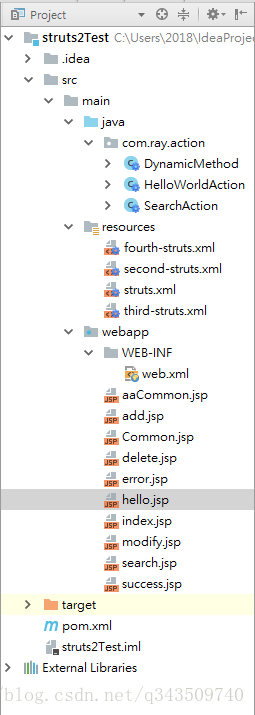
2、pom.xml
<project xmlns="http://maven.apache.org/POM/4.0.0" xmlns:xsi="http://www.w3.org/2001/XMLSchema-instance"
  xsi:schemaLocation="http://maven.apache.org/POM/4.0.0 http://maven.apache.org/maven-v4_0_0.xsd">
  <modelVersion>4.0.0</modelVersion>
  <groupId>com.ray</groupId>
  <artifactId>struts2Test</artifactId>
  <packaging>war</packaging>
  <version>1.0-SNAPSHOT</version>
  <name>struts2Test Maven Webapp</name>
  <url>http://maven.apache.org</url>

  <dependencies>

    <dependency>
      <groupId>junit</groupId>
      <artifactId>junit</artifactId>
      <version>3.8.1</version>
      <scope>test</scope>
    </dependency>

    <!-- https://mvnrepository.com/artifact/org.apache.struts/struts2-core -->
    <dependency>
      <groupId>org.apache.struts</groupId>
      <artifactId>struts2-core</artifactId>
      <version>2.5.16</version>
    </dependency>

  </dependencies>

  <build>
    <finalName>struts2Test</finalName>
  </build>

</project>
3、web.xml
<web-app xmlns="http://java.sun.com/xml/ns/javaee"
         xmlns:xsi="http://www.w3.org/2001/XMLSchema-instance"
         xsi:schemaLocation="http://java.sun.com/xml/ns/javaee
                      http://java.sun.com/xml/ns/javaee/web-app_3_0.xsd"
         version="3.0" metadata-complete="true">
  <display-name>Archetype Created Web Application</display-name>

  <!-- 过滤所有请求交给Struts2处理 -->
  <filter>
    <filter-name>struts2</filter-name>
    <filter-class>
      org.apache.struts2.dispatcher.filter.StrutsPrepareAndExecuteFilter
    </filter-class>
  </filter>

  <filter-mapping>
    <filter-name>struts2</filter-name>
    <url-pattern>/*</url-pattern>
  </filter-mapping>

</web-app>
4、HelloWorldAction.java
package com.ray.action;

import com.opensymphony.xwork2.ActionSupport;

/**
 * Created by Ray on 2018/3/26 0026.
 **/
public class HelloWorldAction extends ActionSupport {

    /**
    * @Author: Ray
    * @Date: 2018/3/26 0026
    * @Description: Struts2默认执行的方法
    * @Return: SUCCESS
    */
    @Override
    public String execute() throws Exception {
        return super.execute();
    }
}
5、fourth-struts.xml
<?xml version="1.0" encoding="UTF-8"?>

<!DOCTYPE struts PUBLIC
        "-//Apache Software Foundation//DTD Struts Configuration 2.5//EN"
        "http://struts.apache.org/dtds/struts-2.5.dtd">

<struts>

    <package name="hello" extends="struts-default" namespace="/">
        <action name="hello" class="com.ray.action.HelloWorldAction">
            <result>/hello.jsp</result>
        </action>
    </package>
</struts>
6、struts.xml
<?xml version="1.0" encoding="UTF-8"?>

<!DOCTYPE struts PUBLIC
        "-//Apache Software Foundation//DTD Struts Configuration 2.5//EN"
        "http://struts.apache.org/dtds/struts-2.5.dtd">

<struts>

    <package name="default" namespace="/" extends="struts-default">

        <action name="helloWorld" class="com.ray.action.HelloWorldAction">
            <result name="success">/success.jsp</result>
        </action>
    </package>

    <include file="second-struts.xml"/>
    <include file="third-struts.xml"/>
    <include file="fourth-struts.xml"/>
</struts>
7、hello.jsp
<%@ page language="java" import="java.util.*" pageEncoding="UTF-8" %>
<%
    String path = request.getContextPath();
    String basePath = request.getScheme() + "://" + request.getServerName() + ":" + request.getServerPort() + path + "/";
%>

<!DOCTYPE HTML PUBLIC "-//W3C//DTD HTML 4.01 Transitional//EN">
<html>
<head>
    <base href="<%=basePath%>">

    <title>指定多个配置文件测试</title>

    <meta http-equiv="pragma" content="no-cache">
    <meta http-equiv="cache-control" content="no-cache">
    <meta http-equiv="expires" content="0">
    <meta http-equiv="keywords" content="keyword1,keyword2,keyword3">
    <meta http-equiv="description" content="This is my page">
    <!--
	<link rel="stylesheet" type="text/css" href="styles.css">
	-->

</head>

<body>
    指定多个配置文件测试成功
</body>
</html>
8、页面效果
访问:http://localhost:8080/struts2Test/hello.action
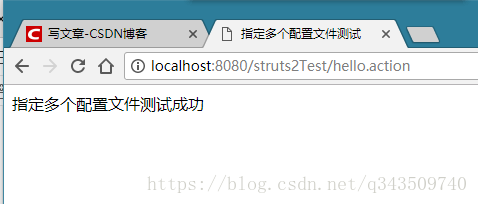
ok!
第四篇——Struts2的引入多个配置文件的更多相关文章
- 深入理解javascript作用域系列第四篇——块作用域
× 目录 [1]let [2]const [3]try 前面的话 尽管函数作用域是最常见的作用域单元,也是现行大多数javascript最普遍的设计方法,但其他类型的作用域单元也是存在的,并且通过使用 ...
- C++第四篇--重载_指针_引用
C++第四篇--重载_指针_引用 1. 基础知识 重载:函数名相同,根据参数不同(类型.数量.顺序不同)调用同名函数 指针和引用:引用就是别名,引用时必须初始化,引用你定义的变量. int a; in ...
- 深入理解javascript作用域系列第四篇
前面的话 尽管函数作用域是最常见的作用域单元,也是现行大多数javascript最普遍的设计方法,但其他类型的作用域单元也是存在的,并且通过使用其他类型的作用域单元甚至可以实现维护起来更加优秀.简洁的 ...
- 【block第四篇】实现
-------------------------------------------欢迎查看block连载博客[专栏]--------------------------------------[b ...
- SpringBoot第二十四篇:应用监控之Admin
作者:追梦1819 原文:https://www.cnblogs.com/yanfei1819/p/11457867.html 版权声明:本文为博主原创文章,转载请附上博文链接! 引言 前一章(S ...
- VueRouter爬坑第四篇-命名路由、编程式导航
VueRouter系列的文章示例编写时,项目是使用vue-cli脚手架搭建. 项目搭建的步骤和项目目录专门写了一篇文章:点击这里进行传送 后续VueRouter系列的文章的示例编写均基于该项目环境. ...
- Spring Cloud第十四篇 | Api网关Zuul
本文是Spring Cloud专栏的第十四篇文章,了解前十三篇文章内容有助于更好的理解本文: Spring Cloud第一篇 | Spring Cloud前言及其常用组件介绍概览 Spring C ...
- 从0开始搭建SQL Server AlwaysOn 第四篇(配置异地机房节点)
从0开始搭建SQL Server AlwaysOn 第四篇(配置异地机房节点) 第一篇http://www.cnblogs.com/lyhabc/p/4678330.html第二篇http://www ...
- 第四篇 Entity Framework Plus 之 Batch Operations
用 Entity Framework 进行 增,删,改.都是基于Model进行的,且Model都是有状态追踪的.这样Entity Framework才能正常增,删,改. 有时候,要根据某个字段,批量 ...
随机推荐
- ffmpeg CLI常用命令
使用-copy参数: CLI压缩视频时保持音频不变
- VSCode之快捷键和常用插件
前言 介绍一下我在VSCode中常用的一些快捷方式: ctrl+上下箭头 上下滚动页面 Ctrl+Shift+K 删除某一行 Alt+ ↑ / ↓ 移动某一行 Shift+Alt + ↓ / ↑ 复制 ...
- C# 移除Response Header,403调整返回为404Make IIS return a 404 status code instead of 403
Server Information Revealed For the benefit of those who land here through a google/bing search:: He ...
- react项目,build以后启动问题
用脚手架create-react-app创建的react项目,已经集成了webpack,只要运行命令:npm run build 项目就会编译成功,生成一个build文件夹,现在问题来了,如何启动这个 ...
- 在VS中为C/C++源代码文件生成对应的汇编代码文件(.asm)
以VS2017为例 然后重新生成工程,在工程目录中就会有对应的汇编代码文件.
- 全局解释器锁GIL
我们使用高并发,一次是创建1万个线程去修改一个数并打印结果看现象: from threading import Thread import os def func(args): global n n ...
- Promise及Async/Await
一.为什么有Async/Await? 我们都知道已经有了Promise的解决方案了,为什么还要ES7提出新的Async/Await标准呢? 答案其实也显而易见:Promise虽然跳出了异步嵌套的怪 ...
- windows Apache服务器简单配置虚拟域名(转载)
1.找到apache目录下的conf下的extra下的httpd-vhosts.conf虚拟主机配置文件 将下面的代码复制粘贴到最下面: #<VirtualHost *:80># ...
- 【登录异常解决】Ubuntu 输入正确的密码后重新返回到登陆界面
症状 Ubuntu 输入正确的密码后,黑屏一闪,重新返回到登陆界面. 原因一:主目录下的.Xauthority文件拥有者变成了root,从而以用户登陆的时候无法都取.Xauthority文件.说明:X ...
- Tomcat部署工程需注意的三点
Tomcat部署工程需注意: 1.如果该服务器是第一安装Tomcat,则各位大人应将该Tomcat的解压文件夹 backup 一份,已被不时之用.2.部署时应当注意修改Tomcat安装目录中conf文 ...