
Springboot 生成验证码
概述
详细
一、目录结构
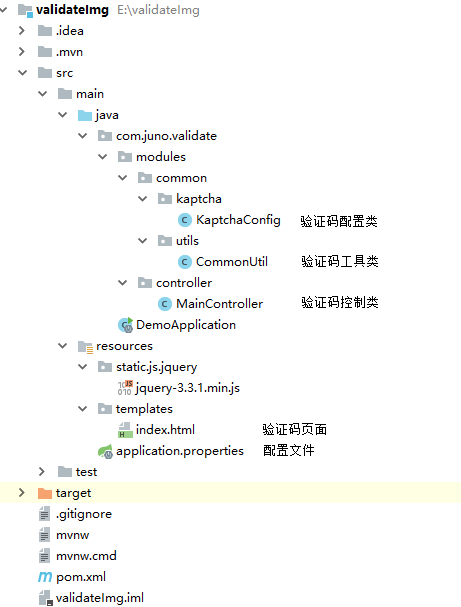
二、功能讲解
(1)验证码配置文件
打开KaptchaConfig.java
@Component

public class KaptchaConfig {

    @Bean

    public DefaultKaptcha getDefaultKaptcha() {

        com.google.code.kaptcha.impl.DefaultKaptcha defaultKaptcha = new com.google.code.kaptcha.impl.DefaultKaptcha();

        Properties properties = new Properties();

        // 图片边框

        properties.setProperty("kaptcha.border", "no");

        // 边框颜色

        properties.setProperty("kaptcha.border.color", "black");

        //边框厚度

        properties.setProperty("kaptcha.border.thickness", "1");

        // 图片宽

        properties.setProperty("kaptcha.image.width", "200");

        // 图片高

        properties.setProperty("kaptcha.image.height", "50");

        //图片实现类

        properties.setProperty("kaptcha.producer.impl", "com.google.code.kaptcha.impl.DefaultKaptcha");

        //文本实现类

        properties.setProperty("kaptcha.textproducer.impl", "com.google.code.kaptcha.text.impl.DefaultTextCreator");

        //文本集合,验证码值从此集合中获取

        properties.setProperty("kaptcha.textproducer.char.string", "01234567890");

        //验证码长度

        properties.setProperty("kaptcha.textproducer.char.length", "4");

        //字体

        properties.setProperty("kaptcha.textproducer.font.names", "宋体");

        //字体颜色

        properties.setProperty("kaptcha.textproducer.font.color", "black");

        //文字间隔

        properties.setProperty("kaptcha.textproducer.char.space", "5");

        //干扰实现类

        properties.setProperty("kaptcha.noise.impl", "com.google.code.kaptcha.impl.DefaultNoise");

        //干扰颜色

        properties.setProperty("kaptcha.noise.color", "blue");

        //干扰图片样式

        properties.setProperty("kaptcha.obscurificator.impl", "com.google.code.kaptcha.impl.WaterRipple");

        //背景实现类

        properties.setProperty("kaptcha.background.impl", "com.google.code.kaptcha.impl.DefaultBackground");

        //背景颜色渐变,结束颜色

        properties.setProperty("kaptcha.background.clear.to", "white");

        //文字渲染器

        properties.setProperty("kaptcha.word.impl", "com.google.code.kaptcha.text.impl.DefaultWordRenderer");

        Config config = new Config(properties);

        defaultKaptcha.setConfig(config);

        return defaultKaptcha;

    }

}
详细配置说明:https://blog.csdn.net/elephantboy/article/details/52795309
(2)生成验证码方法
打开CommonUtil.java,这是一个公共方法
public class CommonUtil {

    /**

     * 生成验证码图片

     * @param request 设置session

     * @param response 转成图片

     * @param captchaProducer 生成图片方法类

     * @param validateSessionKey session名称

     * @throws Exception

     */

    public static void validateCode(HttpServletRequest request, HttpServletResponse response, DefaultKaptcha captchaProducer, String validateSessionKey) throws Exception{

        // Set to expire far in the past.

        response.setDateHeader("Expires", 0);

        // Set standard HTTP/1.1 no-cache headers.

        response.setHeader("Cache-Control", "no-store, no-cache, must-revalidate");

        // Set IE extended HTTP/1.1 no-cache headers (use addHeader).

        response.addHeader("Cache-Control", "post-check=0, pre-check=0");

        // Set standard HTTP/1.0 no-cache header.

        response.setHeader("Pragma", "no-cache");

        // return a jpeg

        response.setContentType("image/jpeg");

        // create the text for the image

        String capText = captchaProducer.createText();

        // store the text in the session

        request.getSession().setAttribute(validateSessionKey, capText);

        // create the image with the text

        BufferedImage bi = captchaProducer.createImage(capText);

        ServletOutputStream out = response.getOutputStream();

        // write the data out

        ImageIO.write(bi, "jpg", out);

        try {

            out.flush();

        } finally {

            out.close();

        }

    }

}
(3)验证码控制类
打开MainController.java
@Controller

public class MainController {

    @Resource

    private DefaultKaptcha captchaProducer;

    @RequestMapping(value = {"/"})

    public String index() {

        return "/index";

    }

    /**

     * 登录验证码SessionKey

     */

    public static final String LOGIN_VALIDATE_CODE = "login_validate_code";

    /**

     * 登录验证码图片

     */

    @RequestMapping(value = {"/loginValidateCode"})

    public void loginValidateCode(HttpServletRequest request, HttpServletResponse response) throws Exception{

        CommonUtil.validateCode(request,response,captchaProducer,LOGIN_VALIDATE_CODE);

    }

    /**

     * 检查验证码是否正确

     */

    @RequestMapping("/checkLoginValidateCode")

    @ResponseBody

    public HashMap checkLoginValidateCode(HttpServletRequest request,@RequestParam("validateCode")String validateCode) {

        String loginValidateCode = request.getSession().getAttribute(LOGIN_VALIDATE_CODE).toString();

        HashMap<String,Object> map = new HashMap<String,Object>();

        if(loginValidateCode == null){

            map.put("status",null);//验证码过期

        }else if(loginValidateCode.equals(validateCode)){

            map.put("status",true);//验证码正确

        }else if(!loginValidateCode.equals(validateCode)){

            map.put("status",false);//验证码不正确

        }

        map.put("code",200);

        return map;

    }

}
(4)前端页面
<!DOCTYPE html>

<html lang="en">

<head>

    <meta http-equiv="Content-Type" content="text/html; charset=UTF-8" />

    <title>SpringBoot 生成验证码</title>

    <script type="text/javascript" src="/js/jquery/jquery-3.3.1.min.js"></script>

    <script type='text/javascript'>

        $(function () {

            $("#validateCode").keyup(function(){

                checkLoginValidateCode($(this).val());

            });

        });

        function uploadLoginValidateCode() {

            $("#loginValidateCode").attr("src","/loginValidateCode?random="+new Date().getMilliseconds());

        }

        function checkLoginValidateCode(validateCode) {

            var error = $("#validateCode").parent().next();

            if(validateCode != null && validateCode != ""){

                $.ajax({

                    type: "POST",

                    async:false,

                    url: "/checkLoginValidateCode?validateCode="+validateCode,

                    success : function(json) {

                        if(json != null && json.code == 200 && json.status != null) {

                            if (json.status == true) {

                                error.html("恭喜你验证码,正确!!!!!");

                            } else if(json.status == false){

                                error.html("验证码错误,请重新输入");

                            }else{

                                error.html("验证码过期,请重新输入");

                                uploadLoginValidateCode();

                            }

                        }

                        return false;

                    },

                    error:function(XMLHttpRequest,textStatus,errorThrown){

                        alert("服务器错误!状态码:"+XMLHttpRequest.status);

                        // 状态

 console.log(XMLHttpRequest.readyState);

                        // 错误信息

 console.log(textStatus);

                        return false;

                    }

                });

            }else{

                error.html("请输入验证码!");

            }

        }

    </script>

</head>

<body>

    验证码: <img id="loginValidateCode" height="40" width="150"  style="cursor: pointer;" src="/loginValidateCode" onclick="uploadLoginValidateCode();">

    <p>

        你输入的内容:<input type="text" id="validateCode" name="validateCode" />

    </p>

    <p style="color: red"></p>

</body>

</html>
三、运行
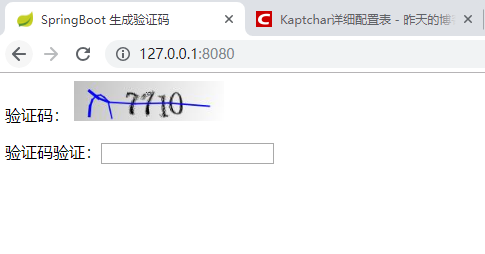
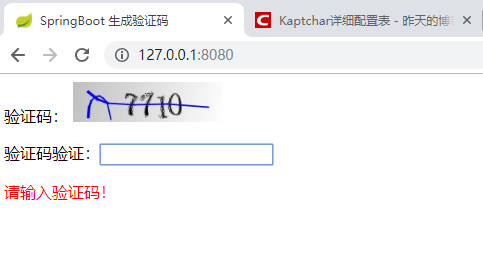
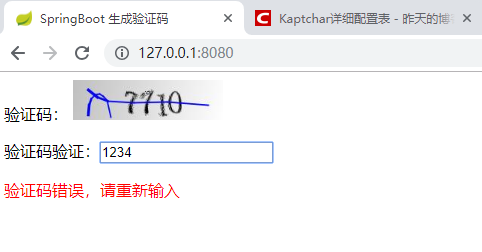
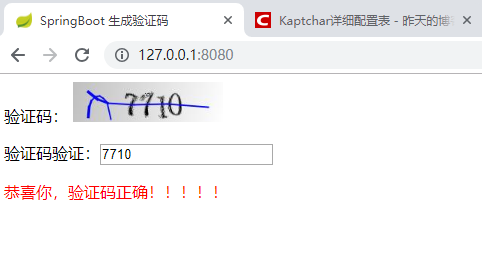
吐槽环节:百度的搜java 验证码,太坑爹了,各种各样复杂,非常不通用,还有一些不能运行的。忍不了忍不了,自己整合一个,最后找到google kaptcha 工具 vary good !!!
谢谢大家观看~
注:本文著作权归作者,由demo大师发表,拒绝转载,转载需要作者授权
Springboot 生成验证码的更多相关文章
- SpringBoot开发九-生成验证码
需求介绍-生成验证码 先生成随机字符串然后利用Kaptcha API生成验证图片 代码实现 先在pom.xml引入 <dependency> <groupId>com.gith ...
- Spring Boot快速集成kaptcha生成验证码
Kaptcha是一个非常实用的验证码生成工具,可以通过配置生成多样化的验证码,以图片的形式显示,从而无法进行复制粘贴:下面将详细介绍下Spring Boot快速集成kaptcha生成验证码的过程. 本 ...
- JAVA整合kaptcha生成验证码 (字母验证码和算术验证码)
引入maven <!--图片验证码--> <dependency> <groupId>com.github.penggle</groupId> < ...
- Springboot实现验证码登录
Springboot实现验证码登录 1.背景 本人近期正在完成毕业设计(旅游信息管理系统)的制作,采用的SpringBoot+Thymeleaf的模式.在登录网站时想要添加验证码验证,通过网上查找资料 ...
- 动态生成验证码———MVC版
上面有篇博客也是写的验证码,但那个是适用于asp.net网站的. 今天想在MVC中实现验证码功能,弄了好久,最后还是看博友文章解决的,感谢那位博友. 首先引入生成验证码帮助类. ValidateCod ...
- laravel 生成验证码的方法
在Laravel中有很多图片验证码的库可以使用,本篇介绍其中之一:gregwar/captcha,这个库比较简单,在Laravel中比较常用.下面我们就来介绍下使用细节: 首先, composer.j ...
- java web学习总结(九) -------------------通过Servlet生成验证码图片
一.BufferedImage类介绍 生成验证码图片主要用到了一个BufferedImage类,如下:
- android 生成验证码图片
(转自:http://blog.csdn.net/onlyonecoder/article/details/8231373) package com.nobeg.util; import java.u ...
- PHP 动态生成验证码
……机器人会在网站中搜寻允许他们插入广告的输入表单,在虚拟世界没有什么能阻挡它们胡作非为.这些机器人效率极高,完全不关心所攻击的表单的本来用途.它们唯一的目标就是用它们的垃圾广告覆盖你的内容,残忍地为 ...
随机推荐
- Node.js实现网络编程
http://www.cnblogs.com/myzhibie/p/4579122.html
- AspectJ(AOP)切面获取参数名称和参数
@Async @AfterReturning(value ="execution(public * com.zhx.recharge.service.RechargeService.buil ...
- Activity插件化解决方案
--摘自<android插件化开发指南> 1.宿主App加载插件中的类 2.最简单的插件化方案就是在宿主的androidmanifest.xml中申明插件中的四大组件 把插件dex合并到宿 ...
- Codeforces 1093D. Beautiful Graph【二分图染色】+【组合数】
<题目链接> 题目大意: 给你一个无向图(该无向图无自环,且无重边),现在要你给这个无向图的点加权,所加权值可以是1,2,3.给这些点加权之后,要使得任意边的两个端点权值之和为奇数,问总共 ...
- HDU 3342 Legal or Not (图是否有环)【拓扑排序】
<题目链接> 题目大意: 给你 0~n-1 这n个点,然后给出m个关系 ,u,v代表u->v的单向边,问你这m个关系中是否产生冲突. 解题分析: 不难发现,题目就是叫我们判断图中是否 ...
- Tomcat v9.0 Could not publish to the server. java.lang.IndexOutOfBoundsException
今天使用Tomcat启动一个java项目,出现报错: Could not publish to the server. java.lang.IndexOutOfBoundsException 众寻之下 ...
- MII接口简介
Standard MII总共使用了15根线,外加2根MDIO线,如果要扩展PHY芯片,这些线除了其中两根(应该是TXCLK和RXCLK)以外都是不可共用的:而Reduce Media Independ ...
- Xamarin Essentials教程磁力计Magnetometer
Xamarin Essentials教程磁力计Magnetometer 磁力计也叫地磁.磁感器,可用于测试磁场强度和方向.在手持设备中,通过磁力计可以计算设备的左右.前后倾斜角度,广泛应用于手机各 ...
- 把存储过程结果集SELECT INTO到临时表
把存储过程结果集SELECT INTO到临时表 在开发过程中,很多时候要把结果集存放到临时表中,常用的方法有两种. 一. SELECT INTO . 使用select into会自动生成临时表,不需要 ...
- 在Qt中调用Mupdf库进行pdf显示
2018.5.10 更新内存对齐说明 感谢知乎网友@孤独子狮 指出QImage处需要考虑内存对齐的问题.因为本人缺乏跨平台.图形库开发经验,所以在调试成功后就没有深入探究. 主要修改了QImage的构 ...