
[Debug] Diagnose a Slow Page Using Developer Tools
Your page is showing high CPU usage and spinning up your laptop fan, but nothing is visibly happening. What is it doing, and why is it so slow?
This lesson is a real-world performance diagnosis of this very page, right here on egghead. Two infinite (but hidden) animations were causing CPU usage to spike, and Chrome's Task Manager and Performance tools helped uncover the elements causing the problem. You'll see how to use the profiler to record a snapshot, and learn a trick for discovering animations running in the background.
There numbers of things you can do to detect a slow page
1. Check the CPU usage
2. Bring up the chrome dev tool, performance monitor, pretty much you can say above 10% CPU usage is high
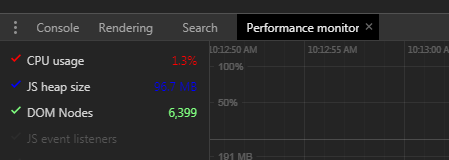
3. Record the Performance in dev tool to see any 'Layout' event, usually Layout event cause the DOM re-render, so we need to be carefully about this.
If there is such, check which element it is and try to solve the problem. For example, a hidden svg loading spinner, can cause the problem, we can set it to 'display: none', so it remove from the DOM
4. If there is any animation happens, we can do:
window.onanimationiteration = console.log
It will prints out when animation happens, so we can know that whether there is any unnecessary animation in the background.
[Debug] Diagnose a Slow Page Using Developer Tools的更多相关文章
- Can I prevent the Firefox developer tools network panel from clearing on page reload?
Can I prevent the Firefox developer tools network panel from clearing on page reload? I couldn't fin ...
- Developer tools
20. Developer tools Spring Boot includes an additional set of tools that can make the application de ...
- How to Build Office Developer Tools Projects with TFS Team Build 2012
Introduction Microsoft Visual Studio 2012 provides a new set of tools for developing apps for Office ...
- Chrome的开发者工具(Chrome Developer Tools)
Chrome的开发者工具(Chrome Developer Tools) 按F12 https://developer.chrome.com/devtools/index http://www.w3s ...
- 浏览器开发调试工具的秘密 - Secrets of the Browser Developer Tools
来源:GBin1.com 如果你是一个前端开发人员的话,正确的了解和使用浏览器开发工具是一个必须的技能. Secrets of the Browser Developer Tools是一个帮助大家了解 ...
- Chrome调试工具Developer Tools——前端必备神器
本文链接:https://blog.csdn.net/u012542647/article/details/79401485 今天要给大家介绍一个神器,就是谷歌浏览器(Chorme)自带的前端调试工具 ...
- Chrome Developer Tools:Network Panel说明
官方资料:Chrome Developer Tools: Network Panel 一.chrome Developer Tools:Network Panel 从网络面板中可以获取很多有用信息,如 ...
- eclipse中jsp文档无语法着色,安装Eclipse Java Web Developer Tools插件
一.安装Eclipse Java Web Developer Tools插件 1.eclipse菜单:help/install New Software,打开Available Software窗体: ...
- React Developer Tools 安装小提示
1,在google市场里边,安装React Developer Tools之后,发现是开启的,但是按下F12后,并没有发现react选项 2,后来通过查资料,发现必须是运行react项目的时候,才出现 ...
随机推荐
- Apache-commons.BeanUtils浅析
BeanUtils:通过反射控制JavaBean属性的实用方法. 1.cloneBean(Object) Object 克隆一个bean是基于可用属性的get和set方法,即 ...
- POJ2175:Evacuation Plan(消负圈)
Evacuation Plan Time Limit: 1000MSMemory Limit: 65536KTotal Submissions: 5665Accepted: 1481Special J ...
- ajax数据读取和绑定
如何进行ajax数据读取和绑定呢? 首先创建一个AJAX对象 实现数据绑定 实现隔行变色 编写表格排序的方法(实现按照年龄这一列进行排序) 通过文档碎片,把排序后的最新顺序,重新添加到tBody中(通 ...
- HDU1251统计难题---Trie Tree
map巧过 #include <stdio.h> #include <string.h> #include <map> #include <string> ...
- Topcoder SRM 605 div1 题解
日常打卡- Easy(250pts): 题目大意:你有n种汉堡包(统统吃掉-),每一种汉堡包有一个type值和一个taste值,你现在要吃掉若干个汉堡包,使得它们taste的总和*(不同的type值的 ...
- Java中同一个类中不同的synchronized方法是否可以并发执行?
答案是: 不可以,因为都是获取到对象本身的锁. 多个线程访问同一个类的synchronized方法时, 都是串行执行的 ! 就算有多个cpu也不例外 ! synchronized方法使用了类java的 ...
- DotNETCore 学习笔记 路由
Route ------------------------------------------constraint------------------------------------------ ...
- checkbox选中 解决兼容问题
jquery 1.9 checkbox 是否选中 if($("#chk_selectedall").prop('checked')) checkbox 选中 $("#ch ...
- (转)vim 常用快捷键 二
转自:http://www.cnblogs.com/wangkangluo1/archive/2012/04/12/2444952.html 键盘移动 (Move) 一切都从键盘的移动 k -> ...
- android hook 框架 libinject2 简介、编译、运行
Android so注入-libinject2 简介.编译.运行 Android so注入-libinject2 如何实现so注入 Android so注入-Libinject 如何实现so注入 A ...