
Unity EditorWindow 笔记
一:功能
1.实例化

 //设置插件在菜单栏的位置   和快捷键

    [MenuItem("YCC's Tools/模型更改/更改父物体和测量长度 %W")]

    //实例化窗体

    static void Init()

    {

        myTools window = (myTools)EditorWindow.GetWindow(typeof(myTools));

        window.titleContent.text = "更改父物体/测长";

        window.Show();

    }
2.选项卡制作
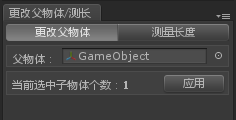
 //用GUI画出窗体的空间布局

    void OnGUI()

    {

        toolbarOption = GUILayout.Toolbar(toolbarOption, toolbarTexts);

        switch (toolbarOption)

        {

            case :

                fnChangeParent();

                break;

            case :

                fnLength();

                break;

        }

    }
3.多个物体更改模型父物体
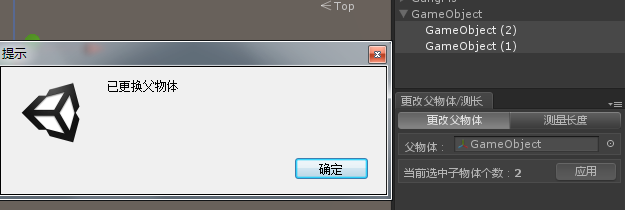
void fnChangeParent()

    {

        GUILayout.BeginHorizontal("box");

        GUILayout.Label("父物体:", EditorStyles.boldLabel);

        ObjParent = EditorGUILayout.ObjectField(ObjParent, typeof(Transform)) as Transform;

        GUILayout.EndHorizontal();

        GUILayout.BeginHorizontal("box");

        iChildCount = Selection.transforms.Length;//获取当前鼠标选中的物体个数

        if (Selection.transforms.Length > )

        {

            GUILayout.Label("当前选中子物体个数:"+iChildCount, EditorStyles.boldLabel);

            if (GUILayout.Button("应用"))

            {

                if (ObjParent != null)

                {

                    for (int i = ; i < iChildCount; i++)

                    {

                        if (Selection.transforms[i].parent != ObjParent)

                            Selection.transforms[i].parent = ObjParent;

                    }

                    EditorUtility.DisplayDialog("提示", "已更换父物体", "确定");//显示对话框 DisplayDialog (title : string, message : string, ok : string, cancel : string = "") : bool

                }

                else

                    this.ShowNotification(new GUIContent("当前没有父物体!"));//显示通知

            }

        }

        else

            GUILayout.Label("当前没有选中子物体" , EditorStyles.boldLabel);

        GUILayout.EndHorizontal();

    }
4.测量两个物体在场景中的距离
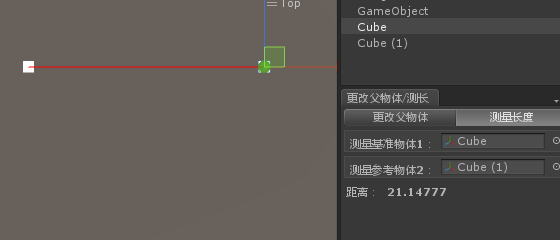
 void fnLength()

    {

        GUILayout.BeginHorizontal("box");

        GUILayout.Label("测量基准物体1:", EditorStyles.boldLabel);

        T1 = EditorGUILayout.ObjectField(T1, typeof(Transform)) as Transform;

        GUILayout.EndHorizontal();

        GUILayout.BeginHorizontal("box");

        GUILayout.Label("测量参考物体2:", EditorStyles.boldLabel);

        T2 = EditorGUILayout.ObjectField(T2, typeof(Transform)) as Transform;

        GUILayout.EndHorizontal();

        GUILayout.BeginHorizontal();

        if (T1 != null && T2 != null)

        {

            Debug.DrawLine(T1.position, T2.position, Color.red);

            //if (GUILayout.Button("查    寻"))

            //{

            fDistance = Vector3.Distance(T1.position, T2.position);

            //}

            GUILayout.Label("距离:", EditorStyles.boldLabel);

            EditorGUILayout.FloatField(fDistance, EditorStyles.boldLabel);

        }

        GUILayout.EndHorizontal();

    }
二:注意
1.重绘
 //在OnInspectorUpdate上调用重绘,因为它在窗口上较少重绘,就好象是OnGUI/Update

    void OnInspectorUpdate()

    {

        Repaint();//重绘

    }
2.错误
出现错误: Invalid editor window UnityEditor.FallbackEditorWindow 解决方法:Layout-> Revert Factory Settings
Unity EditorWindow 笔记的更多相关文章
- C#程序员整理的Unity 3D笔记(十):Unity3D的位移、旋转的3D数学模型
遇到一个想做的功能,但是实现不了,核心原因是因为对U3D的3D数学概念没有灵活吃透.故再次系统学习之—第三次学习3D数学. 本次,希望实现的功能很简单: 如在小地图中,希望可以动态画出Player当前 ...
- [Unity Shader笔记]渲染路径--Forward渲染路径
[Unity Shader笔记]渲染路径--Forward渲染路径 (2014-04-22 20:08:25) 转载▼ 标签: shader unity renderingpath forward 游 ...
- unity入门笔记
我于2010年4月1日硕士毕业加入完美时空, 至今5年整.刚刚从一家公司的微端(就是端游技术+页游思想, 具体点就是c++开发, directX渲染, 资源采取所需才会下载)项目的前端主程职位离职, ...
- [Unity菜鸟] 笔记2 —— 问题篇
记录在学习<Unity 3.x 游戏开发 经典教材>时遇到的各种问题与笔记 1. 初始不能降低Terrain的高度,需要到Terrain设置的第二个按钮中将Height从0调高 (注意:最 ...
- 微软企业库Unity学习笔记
本文主要介绍: 关于Unity container配置,注册映射关系.类型,单实例.已存在对象和指出一些container的基本配置,这只是我关于Unity的学习心得和笔记,希望能够大家多交流相互学习 ...
- unity, editorWindow lose data when enter play mode
我写了个editorWindow,其中有个成员变量m_x,在创建editorWindow的时候为m_x赋的值,而在editorWindow的OnGUI里把m_x显示出来. 当我开着这个editorWi ...
- unity, editorWindow update计时
对于editorWindow,Time.deltaTime不起作用,所以需用下面方法对update进行计时: public class myEditorWindow : EditorWindow{ p ...
- Unity EditorWindow知识记录
1.创建EditorWindow using UnityEditor; using UnityEngine; public class ZZEditorWindow : EditorWindow { ...
- Unity 黑暗之光 笔记 第三章
第三章 角色控制 1.创建游戏运行场景并导入素材资源 2.创建和管理标签 1 //const 表明这个是一个共有的不可变的变量 2 public const string ground = &qu ...
随机推荐
- 全面理解.htaccess语法中RewriteCond和RewriteRule意义
RewriteCond的语法 RewriteCond TestString CondPattern [Flags]其中的TestString是指一个文本格式的条件,例子中用的是环境变量名HTTP_HO ...
- Navicat Premium 未保存的SQL如何找回 ?
在使用 Navicat Premium 编辑SQL的过程中为防止程序意外崩溃,已经将编辑的SQL都已经备份. 备份存放目录地址:C:\Users\{登录用户名}\Documents\Navicat\M ...
- pyramid的第一个项目
1,安装pyramid --在次之前最好先安装python virtualenv --python virtualenv ---激活方式pyenv activate pip install pyram ...
- DES原理与实现
一 DES综述 DES是对称密码的一种,它使用56位秘钥对64位长分组进行加密.DES对每个分组的内容都会进行16轮迭代,每轮的操作相同但是对应不同的子秘钥.所有的子秘钥都是由主密钥推导而来. 64位 ...
- iOS 9 适配
一.iOS9 bitcode首先最大的问题就是坑货xcode7,xcode7默认是打开bitcode的,bitcode是苹果为了解决他自己以后的应用可以随意更换硬件的处理做的准备也就是arm指令集和x ...
- 从小白进阶ubuntu高手的必经之路—命令
精选的十二个ubuntu下的命令,熟记于心,则能甩掉ubuntu小白标签,高手的伟岸形象焕然生发.一.管理员权限绝大部分情况下,命令的行为须要被赋予管理员权限才能执行.命令 sudo 作用:赋予当前命 ...
- python中的__init__ 、__new__、__call__等内置函数的剖析
1.__new__(cls, *args, **kwargs) 创建对象时调用,返回当前对象的一个实例;注意:这里的第一个参数是cls即class本身2.__init__(self, *args, ...
- SQL Server 2008 用户SA登录失败(错误18456)之图文解决方法
SQL2008无法连接到.\SQLEXPRESS,用户'sa'登录失败(错误18456)图文解决方法 出现问题 : 标题: 连接到服务器 ------------------------------ ...
- [topcoder]ActivateGame
http://community.topcoder.com/stat?c=problem_statement&pm=10750&rd=14153 http://apps.topcode ...
- 最新ps cs6序列号 永久免费可用
一. 序列号 除非是从官方购买,从其它任何途径得到的序列号(包括网上流传的注册机生成的)都是不能通过联网验证的,必须使用破解补丁,或是通过修改hosts文件的方式来激活.因此,除了正版,不存在所谓的“ ...