
让Placeholder在IE中燥起来
网上有好多关于这方面解决兼容性问题的文章,很多招式,学会这一招,让你轻松搞定Placeholder的兼容性,叫我好人,拿走,不谢。。。。
placeholder属性是HTML5 中为input添加的。在input上提供一个占位符,文字形式展示输入字段预期值的提示信息(hint),该字段会在输入为空时显示。
如
<input type="text" id="Title" class="so-input-d w270" placeholder="请输入标题" />
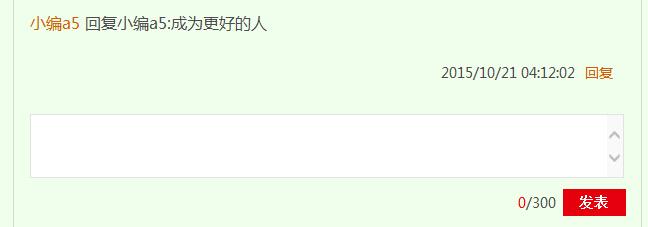
像下图用placeholder刚刚好,但是IE6 7 8 9 不支持呀,一篇空白!此时此刻心情肯定是日了狗!!!!!,搞web开发的一定要考虑兼容性,业界良心需要。。。。
使用前:
使用后:
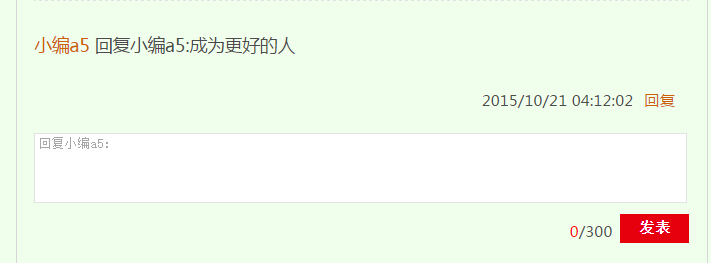
疗效不一般,使用之后萌萌哒。
目前浏览器的支持情况:
| 浏览器 | IE6/7/8/9 | IE10+ | Firefox | Chrome | Safari |
| 是否支持 | NO | YES | YES | YES | YES |
下面分享一个Js文件代码,简单粗暴的把问题解决了:
 (function ($) {

    $.fn.myPlaceholder = function (options) {

        var defaults = {

            pColor: "#acacac",

            pFont: "16px",

            posL: 8,

            zIndex: "99"

        },

        opts = $.extend(true, defaults, options);

        if ("placeholder" in document.createElement("input")) return;

        return this.each(function () {

            //$(this).parent().css("position", "relative");

            var isIE = $.browser.msie,

            version = $.browser.version;

            //不支持placeholder的浏览器

            var $this = $(this),

                msg = $this.attr("placeholder"),

                iH = $this.outerHeight(),

                iW = $this.outerWidth(),

                iX = $this.offset().left,

                iY = $this.offset().top,

                oInput = $("<label>", {

                    "text": msg,

                    "css": {

                        "position": "absolute",

                        "left": iX + "px",

                        "top": iY + "px",

                        "width": iW - opts.posL + "px",

                        "padding-left": opts.posL + "px",

                        "height": iH + "px",

                        "line-height": iH + "px",

                        "color": opts.pColor,

                        "font-size": opts.pFont,

                        "z-index": opts.zIndex,

                        "cursor": "text"

                    }

                }).insertBefore($this);

            //初始状态就有内容

            var value = $this.val();

            if (value.length > 0) {

                oInput.hide();

            };

            var myEvent;

            if (isIE && version < 9) {

                myEvent = "propertychange";

            } else {

                myEvent = "input";

            }

            $this.bind(myEvent, function () {

                var value = $(this).val();

                if (value.length > 0) {

                    oInput.hide();

                } else {

                    oInput.show();

                }

            });

            oInput.click(function () {

                $this.trigger("focus");

            });

        });

    }

})(jQuery);
这是用JQUERY插件化思想的解决的!
在页面或者操作的Js文件只用这样轻轻一搞:
$(function () {
$("#Title").myPlaceholder();
});
Placeholder兼容问题就解决了(文章标红的地方注意ID一致)!
抓紧有限的时间,燥起来!
让Placeholder在IE中燥起来的更多相关文章
- placeholder在IE8中兼容性问题解决
placeholder是HTML5中的一个属性,可以在文本框中设置placeholder属性来显示一些提示性的文字,但对IE10以下的浏览器不支持,下面方法可以让placeholder能够使用在IE1 ...
- 有关placeholder在ie9中的一点折腾
有关placeholder在ie9中的一点折腾. placeholder属性定义: placeholder 属性规定可描述输入字段预期值的简短的提示信息(比如:一个样本值或者预期格式的短描述). 问题 ...
- placeholder 解决UITextField中placeholder和text文本同时显示的问题
TextField都使用了placeholder属性,但在代码中又设置了text属性,因此ViewController会同时显示placeholder文本和text文本. 这个问题让我彻底崩溃.按道理 ...
- tf.placeholder类似函数中的形参
tf.placeholder(dtype, shape=None, name=None) 此函数可以理解为形参,用于定义过程,在执行的时候再赋具体的值 参数: dtype:数据类型.常用的是tf.fl ...
- ie8中使用placeholder
placeholder 是 html5 中的新属性,考虑到还有不少 ie8 的用户,所以找了一个 ie8 的 placeholder 的补丁,如下: <script type="tex ...
- cocos2dx 中使用的一些C++ 11 特性
0. placeholder 头文件:<functional> namespace: placeholder placeholder 就是一堆帮助bind占参数位置的东西,名字分别为 _ ...
- placeholder的兼容处理(jQuery下)
这是一个老问题,结合前辈们的经验,需要处理的问题有一下几个. 1.只有输入框(input/textarea)下的palaceholder属性存在的时候才需要处理这类兼容 2.处理好输入框上焦点和是焦点 ...
- DIV实现CSS 的placeholder效果
placeholder是HTML5中input的属性,但该属性并不支持除input以外的元素 但我们可以使用Css before选择器来实现完全相同的效果 <!DOCTYPE html> ...
- 兼容IE浏览器的placeholder【超不错】
jQuery EnPlaceholder plug (兼容IE浏览器的placeholder)使用 >>>>>>>>>>>>&g ...
随机推荐
- 【bzoj2049】[Sdoi2008]Cave 洞穴勘测 link-cut-tree
2016-05-30 11:04:51 学习了link-cut-tree 二中神犇封禹的讲义感觉讲的超级清晰易懂啊(没有的可以q窝 算是模板吧 #include<bits/stdc++.h&g ...
- BZOJ4519: [Cqoi2016]不同的最小割
Description 学过图论的同学都知道最小割的概念:对于一个图,某个对图中结点的划分将图中所有结点分成 两个部分,如果结点s,t不在同一个部分中,则称这个划分是关于s,t的割.对于带权图来说,将 ...
- javascrit2.0完全参考手册(第二版) 第2章第2节 语言特性
脚本执行顺序 js代码是按照它们在html中出现的顺序一行一行被解释的.这表明把函数定义和变量声明放到<head>中会很好.这保证了函数的代码和事件相关的处理程序不会立即执行. 大 ...
- css sprites介绍
一.CSS Sprites简介 通常被意译为“CSS图像拼合”或“CSS贴图定位”.CSS Sprites并不是一门新技术,目前它已经在网页开发中发展得较为成熟,CSS Sprites并不是什么金科玉 ...
- [LintCode] Toy Factory 玩具工厂
Factory is a design pattern in common usage. Please implement a ToyFactory which can generate proper ...
- Digital Imaging Processing 数字图像处理
8-Bit and 16-Bit Images 关于量化压缩与量化补偿 RGB Bayer Color分析 彩色CCD/CMOS的格式和计算机中的读取格式
- daterangepicker 日期范围插件自定义 可选 年份
minDate:'01/01/2012',maxDate:'01/01/2015' $("#txtPODate").daterangepicker({ singleDatePick ...
- Mysql的实时同步 - 双机互备
设置方法: 步一设 A 服务服 (192.168.1.43) 上用户为 backup, 123456 , 同步的数据库为test; B 服务服 (192.168.1.23) 上用户为 root, 12 ...
- mysql时间格式化,按时间段查询MYSQL语句
描述:有一个会员表,有个birthday字段,值为'YYYY-MM-DD'格式,现在要查询一个时间段内过生日的会员,比如'06-03'到'07-08'这个时间段内所有过生日的会员. SQL语句: Se ...
- .net Sql语句批量插入数据库数据
#region 使用SqlBulkCopy public static bool ExecuteTransactionScopeInsert(DataTable dt, int batchSize) ...