
CentOS 7 下编译安装lnmp之MySQL篇详解
一、安装环境
宿主机=> win7,虚拟机 centos => 系统版本:centos-release-7-5.1804.el7.centos.x86_64

二、MySQL下载
MySQL Community Server 5.5.62 下载: https://dev.mysql.com/downloads/mysql/
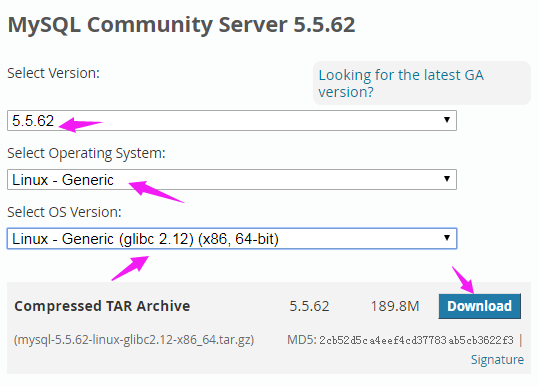
进入下载页面,复制链接地址
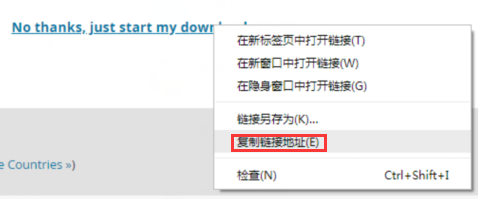
执行命令 wget https://dev.mysql.com/get/Downloads/MySQL-5.5/mysql-5.5.62-linux-glibc2.12-x86_64.tar.gz
将其下载到 /usr/local/src 目录
[root@bogon src]# wget https://dev.mysql.com/get/Downloads/MySQL-5.5/mysql-5.5.62-linux-glibc2.12-x86_64.tar.gz

--2018-12-18 03:52:54--  https://dev.mysql.com/get/Downloads/MySQL-5.5/mysql-5.5.62-linux-glibc2.12-x86_64.tar.gz

Resolving dev.mysql.com (dev.mysql.com)... 137.254.60.11

Connecting to dev.mysql.com (dev.mysql.com)|137.254.60.11|:443... connected.

HTTP request sent, awaiting response... 302 Found

Location: https://cdn.mysql.com//Downloads/MySQL-5.5/mysql-5.5.62-linux-glibc2.12-x86_64.tar.gz [following]

--2018-12-18 03:52:55--  https://cdn.mysql.com//Downloads/MySQL-5.5/mysql-5.5.62-linux-glibc2.12-x86_64.tar.gz

Resolving cdn.mysql.com (cdn.mysql.com)... 23.13.185.161

Connecting to cdn.mysql.com (cdn.mysql.com)|23.13.185.161|:443... connected.

HTTP request sent, awaiting response... 200 OK

Length: 198993245 (190M) [application/x-tar-gz]

Saving to: ‘mysql-5.5.62-linux-glibc2.12-x86_64.tar.gz’

100%[=========================================================>] 198,993,245 11.0MB/s   in 19s

2018-12-18 03:53:14 (10.1 MB/s) - ‘mysql-5.5.62-linux-glibc2.12-x86_64.tar.gz’ saved [198993245/198993245]
三、安装MySQL Community Server 5.5.62
1、解压 MySQL Community Server 5.5.62 并移动到 /usr/local 下重命名为 mysql
[root@bogon src]# tar -zxf mysql-5.5.-linux-glibc2.-x86_64.tar.gz

[root@bogon src]# mv mysql-5.5.-linux-glibc2.-x86_64 /usr/local/mysql

[root@bogon src]# ls /usr/local

etc  games  lib  lib64  libevent  libexec  memcached  mysql  nginx  php7  sbin  share  src
2、创建mysql用户组和mysql用户名并添加到mysql用户组
[root@bogon local]# groupadd mysql

[root@bogon local]# useradd -g mysql mysql
3、进入/usr/local/mysql目录修改拥有者为mysql用户(组)
[root@bogon mysql]# chown -R mysql:mysql ./

[root@bogon mysql]# ll

total

drwxr-xr-x.   mysql mysql   Dec  : bin

-rw-r--r--.   mysql mysql  Aug  : COPYING

drwxr-xr-x.   mysql mysql     Dec  : data

drwxr-xr-x.   mysql mysql     Dec  : docs

drwxr-xr-x.   mysql mysql   Dec  : include

-rw-r--r--.   mysql mysql    Aug  : INSTALL-BINARY

drwxr-xr-x.   mysql mysql   Dec  : lib

drwxr-xr-x.   mysql mysql     Dec  : man

drwxr-xr-x.  mysql mysql   Dec  : mysql-test

-rw-r--r--.   mysql mysql   Aug  : README

drwxr-xr-x.   mysql mysql     Dec  : scripts

drwxr-xr-x.  mysql mysql   Dec  : share

drwxr-xr-x.   mysql mysql   Dec  : sql-bench

drwxr-xr-x.   mysql mysql   Dec  : support-files
4、编辑 /etc/my.cnf ,加入以下内容
# 设置客户端

[mysql]

default-character-set=utf8

socket=/var/lib/mysql/mysql.sock

# 设置服务端

[mysqld]

skip-name-resolve

port =

socket=/var/lib/mysql/mysql.sock

# 设置mysql的安装目录

basedir=/usr/local/mysql

# 设置mysql数据库的数据的存放目录

datadir=/usr/local/mysql/data

# 允许最大连接数

max_connections=

# 服务端使用的字符集默认为8比特编码的latin1字符集

character-set-server=utf8

# 创建新表时将使用的默认存储引擎

default-storage-engine=INNODB

lower_case_table_names=

max_allowed_packet=16M
5、安装mysql
执行 ./scripts/mysql_install_db --user=mysql --basedir=/usr/local/mysql/ --datadir=/usr/local/mysql/data
[root@bogon mysql]# ./scripts/mysql_install_db --user=mysql --basedir=/usr/local/mysql/ --datadir=/usr/local/mysql/data

Installing MySQL system tables...

  :: [Note] Ignoring --secure-file-priv value as server is running with --bootstrap.

  :: [Note] /usr/local/mysql//bin/mysqld (mysqld 5.5.62) starting as process 2032 ...

OK

Filling help tables...

  :: [Note] Ignoring --secure-file-priv value as server is running with --bootstrap.

  :: [Note] /usr/local/mysql//bin/mysqld (mysqld 5.5.62) starting as process 2039 ...

OK

To start mysqld at boot time you have to copy

support-files/mysql.server to the right place for your system

PLEASE REMEMBER TO SET A PASSWORD FOR THE MySQL root USER !

To do so, start the server, then issue the following commands:

/usr/local/mysql//bin/mysqladmin -u root password 'new-password'

/usr/local/mysql//bin/mysqladmin -u root -h 218.28.144.38 password 'new-password'

Alternatively you can run:

/usr/local/mysql//bin/mysql_secure_installation

which will also give you the option of removing the test

databases and anonymous user created by default.  This is

strongly recommended for production servers.

See the manual for more instructions.

You can start the MySQL daemon with:

cd /usr/local/mysql/ ; /usr/local/mysql//bin/mysqld_safe &

You can test the MySQL daemon with mysql-test-run.pl

cd /usr/local/mysql//mysql-test ; perl mysql-test-run.pl

Please report any problems at http://bugs.mysql.com/
6、配置mysql
6.1 修改data拥有者和权限
[root@bogon mysql]# chown -R mysql:mysql data
[root@bogon mysql]# chmod 777 data
6.2 修改my.cnf权限
[root@bogon mysql]# chmod  /etc/my.cnf

[root@bogon mysql]# ll /etc/my.cnf

-rwxrwxrwx.  root root  Dec  : /etc/my.cnf
6.3 修改/var/lib/mysql拥有者为mysql用户(组)
[root@bogon ~]# chown -R mysql:mysql /var/lib/mysql
6.4 复制mysql.server到/etc/rc.d/init.d/并重命名为mysqld
[root@bogon mysql]# cp ./support-files/mysql.server /etc/rc.d/init.d/mysqld

[root@bogon mysql]# ls /etc/rc.d/init.d

functions  mysqld  netconsole  network  README
6.5 增加mysqld执行权限
[root@bogon mysql]# chmod +x /etc/rc.d/init.d/mysqld
6,6 将mysqld添加到自启动列表
[root@bogon mysql]# chkconfig --add mysqld
7、开启mysqld服务
[root@bogon mysql]# service mysqld start
8、配置PATH环境
[root@bogon mysql]# vi ~/.bash_profile
最后一行加入 export PATH=$PATH:/usr/local/mysql/bin
# .bash_profile

# Get the aliases and functions

if [ -f ~/.bashrc ]; then

        . ~/.bashrc

fi

# User specific environment and startup programs

PATH=$PATH:$HOME/bin

export PATH

export PATH=$PATH:/usr/local/mysql/bin
刷新文件
[root@bogon mysql]# source ~/.bash_profile
四、登陆mysql
[root@bogon mysql]# mysql -u root -p

Warning: World-writable config file '/etc/my.cnf' is ignored

Enter password:

Welcome to the MySQL monitor.  Commands end with ; or \g.

Your MySQL connection id is

Server version: 5.5. MySQL Community Server (GPL)

Copyright (c) , , Oracle and/or its affiliates. All rights reserved.

Oracle is a registered trademark of Oracle Corporation and/or its

affiliates. Other names may be trademarks of their respective

owners.

Type 'help;' or '\h' for help. Type '\c' to clear the current input statement.

mysql>
10、修改root密码
mysql> use mysql;

Database changed

mysql> update user set password=password('abc123456') where user='root' and host='localhost';

Query OK,  row affected (0.00 sec)

Rows matched:   Changed:   Warnings:

mysql> flush privileges;

Query OK,  rows affected (0.00 sec)
五、配置远程连接mysql
mysql> grant all privileges on *.* to 'root'@'%' identified by 'abc123456' with grant option;

Query OK,  rows affected (0.00 sec)

mysql> flush privileges;

Query OK,  rows affected (0.00 sec)
使用navicat远程连接mysql
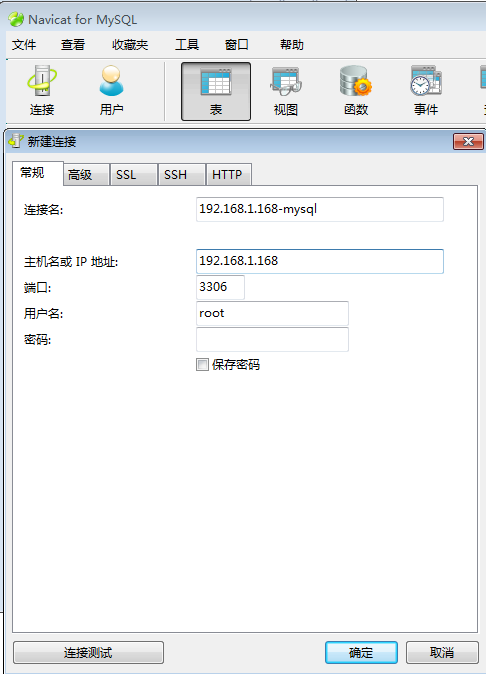
连接

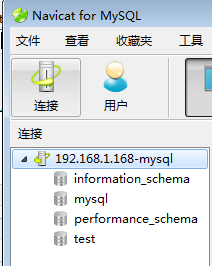
至此,CentOS 7下安装 MySQL-5.5.62 完毕。
CentOS 7 下编译安装lnmp之MySQL篇详解的更多相关文章
- CentOS 7 下编译安装lnmp之PHP篇详解
一.安装环境 宿主机=> win7,虚拟机 centos => 系统版本:centos-release-7-5.1804.el7.centos.x86_64 二.PHP下载 官网 http ...
- CentOS 7 下编译安装lnmp之nginx篇详解
一.安装环境 宿主机=> win7,虚拟机 centos => 系统版本:CentOS Linux release 7.5.1804 (Core),ip地址 192.168.1.168 ...
- 在CentOS 7下编译安装Nginx+PHP+MySQL环境
本文转载自:http://www.softeng.cn/?p=156,本文已获得作者授权,未经作者同意,不可转载. 1.前言 本文适合于已经对Linux操作系统具有基本操作经验,并且能够在Linux或 ...
- centos下编译安装lnmp
centos下编译安装lnmp 本文以centos为背景在其中编译安装nginx搭建lnmp环境. 编译安装nginx时,需要事先安装 开发包组"Development Tools" ...
- Centos 6.8编译安装LNMP环境
Centos 6.8编译安装LNMP环境 参考资料: http://www.jb51.net/article/107429.htm https://phperzh.com/articles/1360 ...
- CentOS7编译安装php7.1配置教程详解
这篇文章主要介绍CentOS7编译安装php7.1的过程和配置详解,亲测 ,需要的朋友可以参考. 1.首先安装依赖包: yum install libxml2 libxml2-devel openss ...
- CentOS 6.4 linux下编译安装 LNMP环境
1.nginx编译安装 2.PHP编译安装 3.mysql编译安装 4.NGINX配置模板 5.CentOS 6.4 php-fpm 添加service 添加平滑启动/重启
- centos6.7下编译安装lnmp
很多步骤不说明了,请参照本人的centos6.7下编译安装lamp,这次的架构是nginx+php-fpm一台服务器,mysql一台服务器 (1)首先编译安装nginx: 操作命令: yum -y g ...
- CentOS 6下编译安装MySQL 5.6
一:卸载旧版本 使用下面的命令检查是否安装有MySQL Server rpm -qa | grep mysql 有的话通过下面的命令来卸载掉 rpm -e mysql //普通删除模式 rpm -e ...
随机推荐
- python网络编程--线程递归锁RLock
一:死锁 所谓死锁:是指两个或两个以上的进程或线程在执行过程中,因争夺资源而造成的一种互相等待的现象,若无外力作用,它们都将无法推进下去.此时称系统处于死锁状态或系统产生了死锁,这些永远在互相等待的进 ...
- [java笔记]动态数组
private int count;//计数器 private int ary[] = new int [3]; if(count >= ary.length){ //数组动态扩展 int ne ...
- sql server 2005/2008R2 报“红叉”错,即“不允许所请求的注册表访问权”的错误
一.使用报错展示: 1.红叉错: 2.报错文字信息: 解决办法:可以鼠标右键,以管理员的身份运行即可,但这治标不治本,按如下方法可以彻底解决:把“以管理员身份运行此程序”勾上,即可
- 20165203 2017-2018-2 《Java程序设计》课程总结
20165203 2017-2018-2 <Java程序设计>课程总结 一.每周作业及实验报告链接汇总 我期望的师生关系(预备作业一):浅谈一下对师生关系的看法和对自己未来学习和生活的期望 ...
- Elasticsearch 6.x 的分页查询数据
{ , "query": { "match" : { "person_name" : "张老师" }}, , ], &q ...
- poj 2187 N个点中输出2点的最大距离的平方
旋转卡壳 Sample Input 40 00 11 11 0Sample Output 2 # include <iostream> # include <cstdio> # ...
- jquery跨域请求事例
//js发送跨域请求部分var requesturl = 'url'; $.ajax({ type:'GET', url:requesturl, data:{'qNum':num}, dataType ...
- Asp.net MVC4 +EF6开发的个人网站源码和介绍(仅供新手学习)
本项目是我去年利用业余时间开发的,采用的是asp.net mvc 4 +EF6+三层架构,适合新手进行学习,高手就没有什么价值了,可以直接跳过. 源码和数据库下载(已上传到git):https://g ...
- 【POJ】1067.取石子游戏
题解 这道题让我对SG函数有了更深刻的理解,这是道打表找规律题 我们打出来SG函数似乎是 1 2必败 3 5必败 4 7必败 6 10必败 8 13必败 哇我找到规律了-- 然而,我显然不会通项 后来 ...
- 认识loadrunner及相关性能参数
认识loadrunner及相关性能参数 LoadRunner,是一种预测系统行为和性能的负载测试工具.通过以模拟上千万用户实施并发负载及实时性能监测的方式来确认和查找问题,LoadRunner能够对整 ...