
How to Run Syncthing 24/7 as a Windows Service with AlwaysUp
http://www.coretechnologies.com/products/AlwaysUp/Apps/RunSyncthingAsAWindowsService.html
Automatically start Syncthing in the background when your PC boots, without having to log on. Survive accidental shutdowns when you log off and other potential problems.
Syncthing keeps files synchronized between two or more machines. It is ideally suited for running "headless" in the background as the GUI is accessible from any web browser.
To configure Syncthing as a Windows Service with AlwaysUp:
Download and install AlwaysUp, if necessary.
If you don't have Syncthing installed, download the latest zip file from GitHub and expand it to a new folder on your hard drive. We have installed version 0.10.11 in C:\Syncthing for this tutorial and that folder will show up throughout this tutorial.
Next, start AlwaysUp.
Select Application > Add to open the Add Application window:
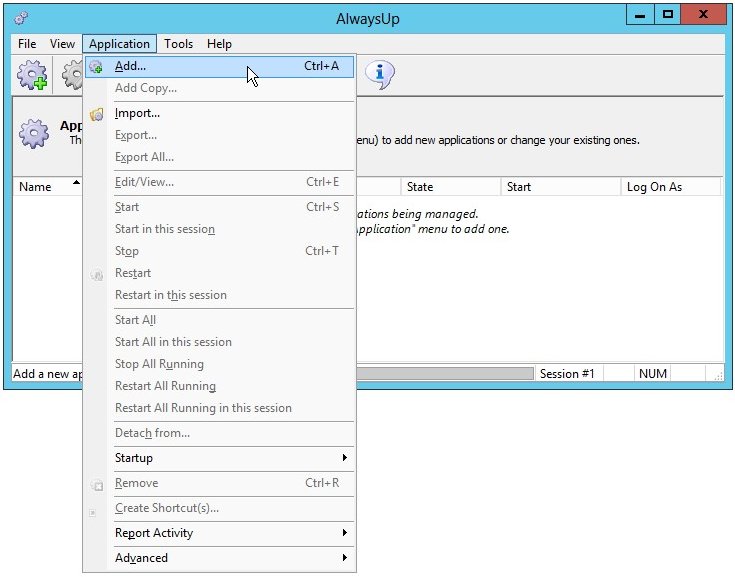
On the General tab:
In the Application field, enter the full path to the Syncthing executable,syncthing.exe. Since we placed Syncthing in C:\Syncthing, this isC:\Syncthing\syncthing.exe. Your path may be different.
In the Name field, enter the name that you will call the application in AlwaysUp. We have used Syncthing (the default) but you can specify another name you like.
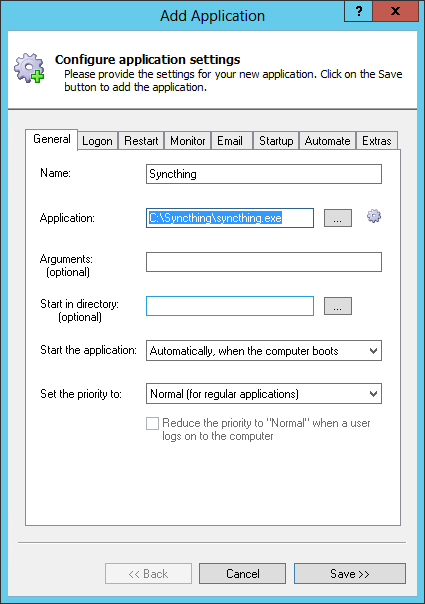
Click over to the Logon tab and enter the user name and password of the account in which you have configured and run Syncthing. By default, Syncthing stores its settings in the user-specific %AppData% folder and running it in the same account will ensure that Syncthing will find its configuration.
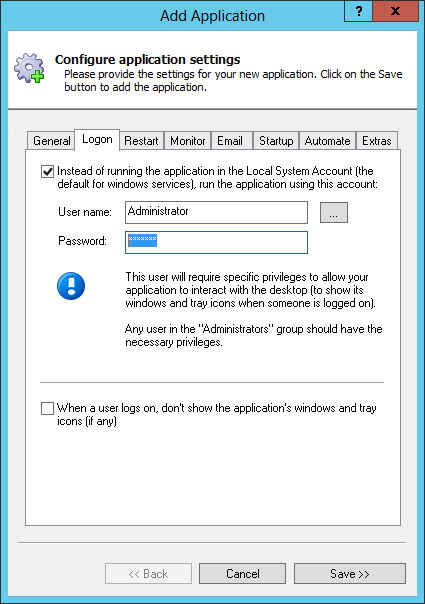
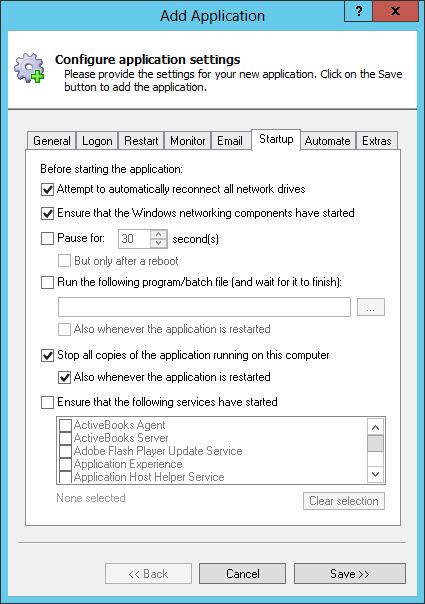
Click over to the Startup tab:
Check the Ensure that the Windows Networking components have started box. This tells AlwaysUp that Syncthing needs the TCP/IP networking stack to do its work.
Because only a single copy of Syncthing can run at any time (due to the use of a single network port), check the Stop all copies of the application running on this computer box, and the Also whenever the application is restarted setting below. This will ensure that other instances of Syncthing don't prevent the copy launched by AlwaysUp (as a windows service) from starting properly.
Since Syncthing will no longer be visible on your desktop, you may want to capture the messages from the console to a file. To do so, switch to theExtras tab, check the Capture output to this log file box and enter the full path to a text file.
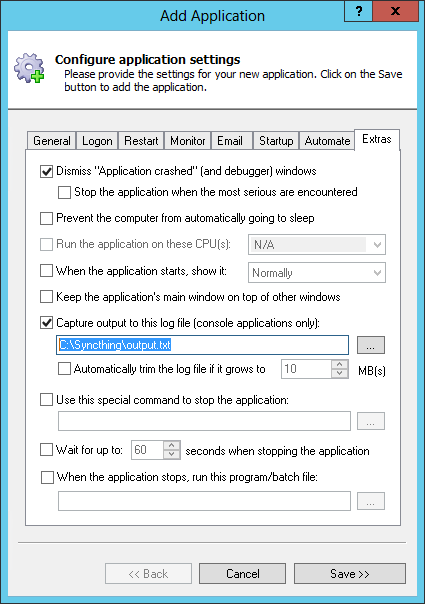
Click the Save >> button. In a couple of seconds, an entry calledSyncthing will show up in the AlwaysUp window. It is not yet running though.
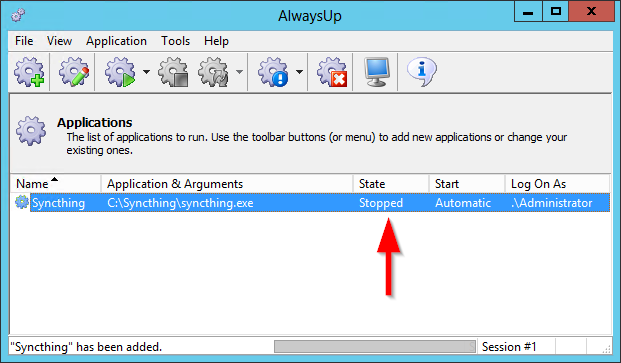
And now that we are ready to start Syncthing as a windows service, let's configure the software to avoid launching the browser when it starts (since you won't be able to see it any more). To do so:
Start Syncthing
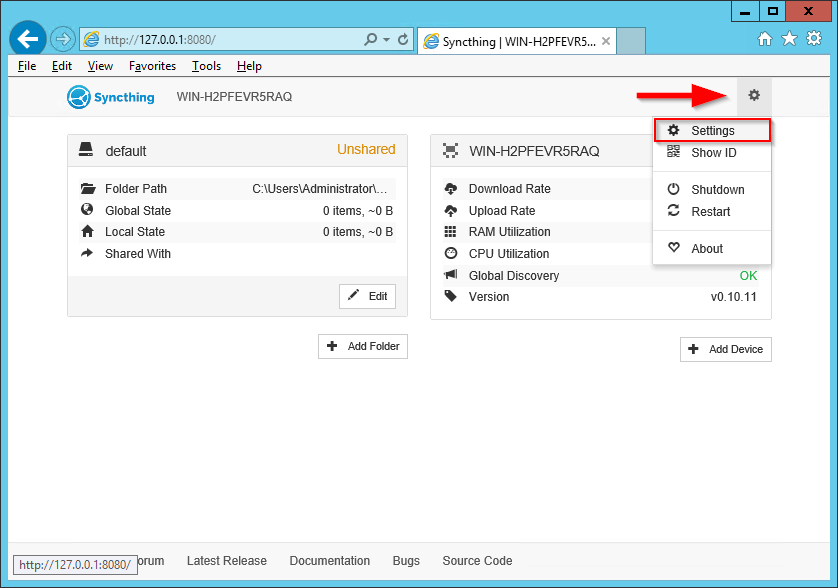
Open the web GUI in your browser (probably athttp://127.0.0.1:8080/)
Click the gear at the top right and select Settings from the menu that appears:
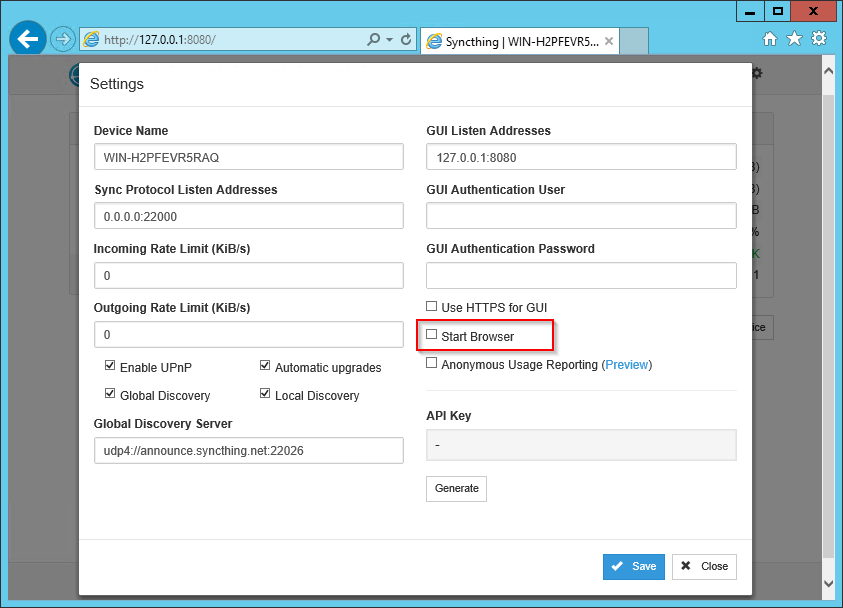
Uncheck the Start Browser box:
Save your settings
To start Syncthing from AlwaysUp, choose Application > Start "Syncthing". After a few seconds, the state should transition to Running and Syncthing will be working in the background. Open your browser and confirm that things work as expected:
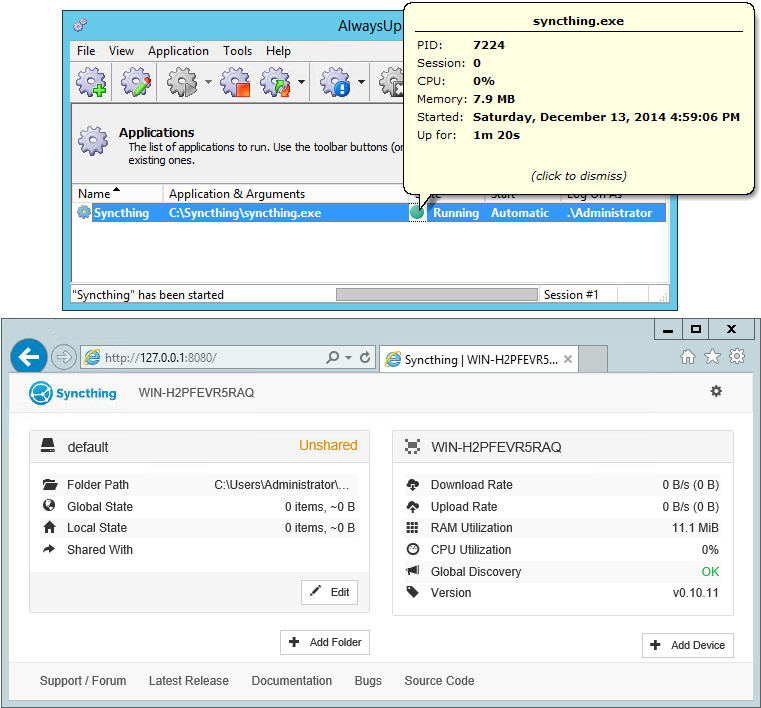
That's it! Next time your computer boots, Syncthing will start up immediately, before anyone logs on. We encourage you to edit Syncthing in AlwaysUp and check out the many other settings that may be appropriate for your environment.
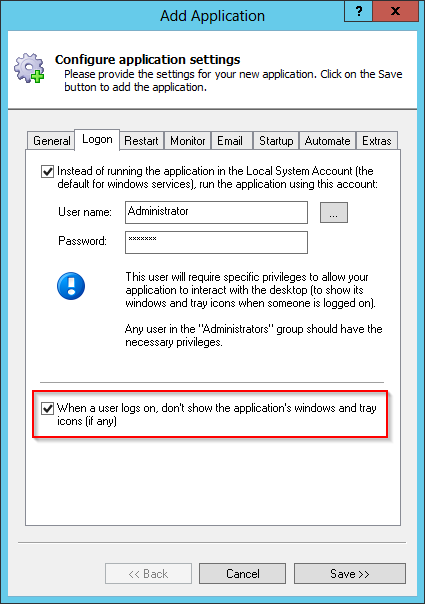
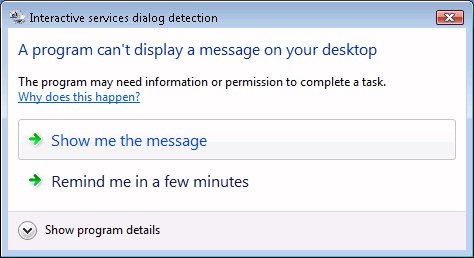
For example, to completely hide Syncthing's console (and prevent the annoying Interactive Services Detection window from winking at you constantly), return to the Logon tab and check the When the user logs on, don't show the application's windows and tray icons box at the bottom.
Syncthing not working properly as a Windows Service?
- Consult the AlwaysUp Troubleshooter - our online tool that can help you resolve the most common problems encountered when running an application as a windows service.
- From AlwaysUp, select Application > Report Activity > Today... to bring up a HTML report detailing the interaction between AlwaysUp and your application. The AlwaysUp Event Log Messages page explains the more obscure messages.
- Browse the AlwaysUp FAQ for answers to commonly asked questions and troubleshooting tips.
- Contact us and we will be happy to help!
How to Run Syncthing 24/7 as a Windows Service with AlwaysUp的更多相关文章
- SyncThingWin -- Run syncthing as a windows service
SyncThingWin Auto restart and minor bug fixes bloones released this on 23 Dec 2014 There is now an a ...
- ThinkPHP 5.0.24 反序列化RCE (Windows下EXP)
直接上exp吧,Windows下. <?php namespace think\process\pipes; class Windows { private $files = []; publi ...
- C# 程序默认使用管理员权限(转载)
1.从A程序启动B程序,当B程序需要管理员权限的时候代码如下 A程序里面启动B程序的代码如下 ProcessStartInfo startInfo = new ProcessStartInfo(); ...
- Java Service Wrapper--来自官网文件
-----------------------------------------------------------------------------Java Service Wrapper Pr ...
- 本地搭建MongoDB Server
https://docs.mongodb.com/manual/tutorial/install-mongodb-on-windows/ Overview Requirements Get Mongo ...
- 【Java基础】【24多线程(上)】
24.01_多线程(多线程的引入)(了解) 1.什么是线程 线程是程序执行的一条路径, 一个进程中可以包含多条线程 多线程并发执行可以提高程序的效率, 可以同时完成多项工作 2.多线程的应用场景 红蜘 ...
- 【转】Syncthing – 数据同步利器---自己的网盘,详细安装配置指南,内网使用,发现服务器配置
Syncthing – 数据同步利器---自己的网盘,详细安装配置指南,内网使用,发现服务器配置 原贴:https://www.cnblogs.com/jackadam/p/8568833.html ...
- Syncthing – 数据同步利器---自己的网盘,详细安装配置指南,内网使用,发现服务器配置
简介: 无论办公.文件共享.团队协作还是家庭照片.视频.音乐.高清电影的存储,我们常常都有文件同步和存储的需求.但随着国内各大网盘的花式阵亡或限速,早已没什么好选择了.好吧,我已经转战使用onedri ...
- How to run a (Tomcat)Java application server on a Azure virtual machine
http://www.windowsazure.com/en-us/documentation/articles/virtual-machines-java-run-tomcat-applicatio ...
随机推荐
- 【Android开发日记】之入门篇(九)——Android四大组件之ContentProvider
数据源组件ContentProvider与其他组件不同,数据源组件并不包括特定的功能逻辑.它只是负责为应用提供数据访问的接口.Android内置的许多数据都是使用ContentProvider形式,供 ...
- Bootstrap FileInput中文API文档
Bootstrap FileInput中文API整理 这段时间做项目用到bootstrap fileinput插件上传文件,在用的过程中,网上能查到的api都不是很全,所以想着整理一份比较详细的文档, ...
- makefile特殊符号介绍
http://blog.chinaunix.net/uid-20564848-id-217918.html makefile下$(wildcard $^),$^,$@,$?,$<,$(@D),$ ...
- 开启nginx目录文件列表功能
ngx_http_autoindex_module 此模块用于自动生成目录列表,ngx_http_autoindex_module只在 ngx_http_index_module模块未找到索引文件时 ...
- 生成Insert语句的存储过程
) drop procedure [dbo].[spGenInsertSQL] GO SET QUOTED_IDENTIFIER OFF GO SET ANSI_NULLS ON GO )) as b ...
- hdu 5475 模拟计算器乘除 (2015上海网赛H题 线段树)
给出有多少次操作 和MOD 初始值为1 操作1 y 表示乘上y操作2 y 表示除以第 y次操作乘的那个数 线段树的叶子结点i 表示 第i次操作乘的数 将1替换成y遇到操作2 就把第i个结点的值 替换成 ...
- 部署 LAMP
部署 LAMP https://help.aliyun.com/document_detail/50774.html?spm=a2c4g.11186623.6.773.Em8xVc 文档提供方:上海驻 ...
- JFinal框架使用
表单直接提交页面,不用ajax 后台; /** * 修改 */ public void edit() { String id=getPara("id"); String job=g ...
- 命令:which、whereis、who和w
开始 命令搜索的顺序 在shell function中查找,有则调用,无则下一步: 判断命令是否为bash内置命令,有则调用,无则下一步: 在$PATH中搜索该命令,有则调用,无则报错. 判断命令类型 ...
- Android与GPL、BSD和Apache之间的关系
参考资料 Android ,在争议中逃离 Linux 内核的 GPL 约束 | 爱范儿 简介 众所周知,Linux内核基于GPL v2发行.GPL规定,基于GPL的软件产品的衍生产品,也必须使用GPL ...