
tomcat源码解读(1)–tomcat热部署实现原理
tomcat的热部署实现原理:tomcat启动的时候会有启动一个线程每隔一段时间会去判断应用中加载的类是否发生变法(类总数的变化,类的修改),如果发生了变化就会把应用的启动的线程停止掉,清除引用,并且把加载该应用的WebappClassLoader设为null,然后创建一个新的WebappClassLoader来重新加载应用。 tomcat中热部署发现类变法之后要做的一系列停止工作的时序图如下:
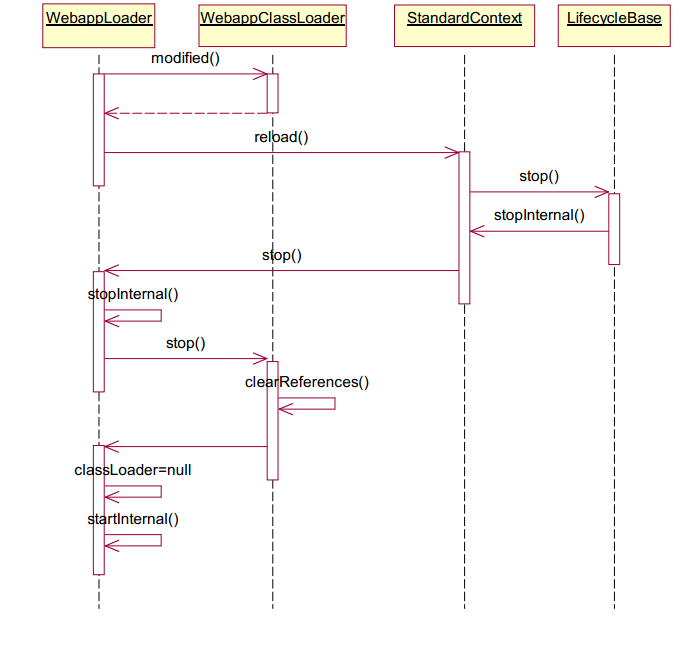
上面时序图中只把关键的流转步骤画出来了,还有一些细节的处理没有完全画出来,这部分代码的继承的结构还是比较复杂的,debug上面的流程的时候,各种跳转。先解释一下上面的时序图,这个时序图是从WebappLoader的backgroundProcess()方法开始的,backgroundProcess()就是随tomcat启动的时候启动的线程中其中的一方法,是tomcat热部署代码的入口。 其中最关键的两步。就是WebappLoader的stopInternal()方法和WebappClassLoader的stop()方法。 在WebappLoader的stopInternal()中
protected void stopInternal() throws LifecycleException {

…..

// Throw away our current class loader

((Lifecycle) classLoader).stop();

……..

classLoader = null;

}
在 ((Lifecycle) classLoader).stop(); 中classLoader是WebappClassLoader的实例。也就是调用了WebappClassLoader的stop()方法。如下:
public void stop() throws LifecycleException {

    // Clearing references should be done before setting started to

    // false, due to possible side effects

    clearReferences();

    started = false;

    int length = files.length;

    for (int i = 0; i < length; i++) {

        files[i] = null;

    }

    length = jarFiles.length;

    for (int i = 0; i < length; i++) {

        try {

            if (jarFiles[i] != null) {

                jarFiles[i].close();

            }

        } catch (IOException e) {

        // Ignore

        }

        jarFiles[i] = null;

    }

    notFoundResources.clear();

    resourceEntries.clear();

    resources = null;

    repositories = null;

    repositoryURLs = null;

    files = null;

    jarFiles = null;

    jarRealFiles = null;

    jarPath = null;

    jarNames = null;

    lastModifiedDates = null;

    paths = null;

    hasExternalRepositories = false;

    parent = null;

    permissionList.clear();

    loaderPC.clear();

    if (loaderDir != null) {

        deleteDir(loaderDir);

    }

}
可以看到stop()方法做了很多清除引用的工作。其中 clearReferences() 中
  protected void clearReferences() {

// De-register any remaining JDBC drivers

        clearReferencesJdbc();

// Stop any threads the web application started

        clearReferencesThreads();

// Check for leaks triggered by ThreadLocals loaded by this class loader

        checkThreadLocalsForLeaks();

// Clear RMI Targets loaded by this class loader

        clearReferencesRmiTargets();

// Null out any static or final fields from loaded classes,

// as a workaround for apparent garbage collection bugs

        if (clearReferencesStatic) {

            clearReferencesStaticFinal();

        }

// Clear the IntrospectionUtils cache.

        IntrospectionUtils.clear();

// Clear the classloader reference in common-logging

        if (clearReferencesLogFactoryRelease) {

            org.apache.juli.logging.LogFactory.release(this);

        }

// Clear the resource bundle cache

// This shouldn’t be necessary, the cache uses weak references but

// it has caused leaks. Oddly, using the leak detection code in

// standard host allows the class loader to be GC’d. This has been seen

// on Sun but not IBM JREs. Maybe a bug in Sun’s GC impl?

        clearReferencesResourceBundles();

// Clear the classloader reference in the VM’s bean introspector

        java.beans.Introspector.flushCaches();

    }
还进行了清除应用线程等工作。最后在WebappClassLoader的stopInternal()方法中执行了 classLoader = null; 那这个类加载器的实例就没有被引用了。 最后调用WebappLoader中的startInternal()方法,创建新的WebappClassLoader实例,然后开始重新加载应用。到此tomcat的热部署流程就完成了。
tomcat源码解读(1)–tomcat热部署实现原理的更多相关文章
- 【Tomcat 源码系列】Tomcat 整体结构
一,前言 在开始看源码细节之前,首先要想好要看的问题.想好问题之后,我们该如何寻找要看的代码呢? 其实,这就好像去爬山的时候,突然想去上厕所,如果有一副地图,那么我们可以很快就找到厕所的位置.带着问题 ...
- tomcat源码--springboot整合tomcat源码分析
1.测试代码,一个简单的springboot web项目:地址:https://gitee.com/yangxioahui/demo_mybatis.git 一:tomcat的主要架构:1.如果我们下 ...
- Vue 源码解读(3)—— 响应式原理
前言 上一篇文章 Vue 源码解读(2)-- Vue 初始化过程 详细讲解了 Vue 的初始化过程,明白了 new Vue(options) 都做了什么,其中关于 数据响应式 的实现用一句话简单的带过 ...
- Tomcat源码解读系列(一)——server.xml文件的配置
Tomcat是J2EE开发人员最常用到的开发工具,在Java Web应用的调试开发和实际部署中,我们都可以看到Tomcat的影子.大多数时候,我们可以将Tomcat当做一个黑盒来看待,只需要将编写的J ...
- Tomcat源码解读:ClassLoader的设计
Tomcat是一个经典的web server,学习tomcat的源码对于我们是有很大的帮助的.前一段时间了解了tomcat的工作的大致流程,对我的新工作有了很大的帮助.刚学习了ClassLoader( ...
- SpringBoot启动tomcat源码解读
一.SpringBoot自动拉起Tomcat 原文链接:http://www.studyshare.cn/blog-front/blog/details/1136 SpringBoot框架是当前比较流 ...
- SpringBoot启动嵌入式tomcat源码解读
一.SpringBoot自动拉起Tomcat SpringBoot框架是当前比较流行的java后端开发框架,与maven结合大大简化了开发人员项目搭建的步骤,我们知道SpringBoot的启动类启动后 ...
- tomcat源码分析(一)- tomcat源码导入IDEA并正常启动
项目导入 代码下载 打开GitHub网站:https://github.com/apache/tomcat 下载对应的zip包 解压对应的压缩包(当然你也可以用工具对其进行解压) unzip tomc ...
- 源码解读SLF4J绑定日志实现的原理
一.导读 我们使用log4j框架时,经常会用slf4j-api.在运行时,经常会遇到如下的错误提示: SLF4J: Class path contains multiple SLF4J binding ...
随机推荐
- oracle 基本操作
1. 开启oralce和监听#su - oracle$sqlplus / as sysdba>startup>exit$lsnrctl start$ps -ef|grep oracle 一 ...
- 面试常备题---二叉树总结篇(zt)
人生就像是一场长跑,有很多机会,但也得看我们是否能够及时抓牢,就像下面这样的代码: while(isRunning) { if(...){...} else if(...){...} ... else ...
- 深入理解 GCD
前言 首先提出一些问题: dispatch_async 函数如何实现,分发到主队列和全局队列有什么区别,一定会新建线程执行任务么? dispatch_sync 函数如何实现,为什么说 GCD 死锁是队 ...
- DataBase 之 表操作
1:向表中添加字段 Alter table [表名] add [列名] 类型 2: 删除字段 Alter table [表名] drop column [列名] 3: 修改表中字段类型 (可以修改列的 ...
- Matrix 二维树状数组的第二类应用
Matrix Time Limit: 3000MS Memory Limit: 65536K Total Submissions: 17976 Accepted: 6737 Descripti ...
- Samba服务详解
Samba文件服务器 本章结构 服务简介 SMB协议 Server Message Block,服务消息块 CIFS协议 Common Internet File System,通用互联网文件系统 S ...
- 【概率】Uva 10900 - So you want to be a 2n-aire?
写完这题赶紧开新题... 话说这题让我重新翻了概率论课本,果然突击完了接着还给老师了,毫无卵用. 很多人拿这位大神的题解作引,在这我也分享给大家~ 对于其中的公式在这里做一点简要的说明.因为自己也是理 ...
- poj 1185 炮兵阵地 状态压缩dp
思路:定义一个三维数组dp[x][i][j]其中x为now和pre两种状态,now表示当前两行最优解,pre表示出了本行外,前两行的最优解.那么状态转移方程为 dp[now][j][k]=max(dp ...
- Linux时间函数
一.时间编程 1.核心理论 (1).时间类型 2.函数学习 (1).获取日历时间 函数名:time 函数原型:time_t time(time_t *t) 函数功能:获取当前日历时间 所属头文件:&l ...
- 第四十五篇、UITableViewCell高度计算
由于tableView:heightForRowAtIndexPath:方法的调用频率非常高,如果将cell高度的计算过程放在此方法中,那么效率将会非常的低,快速tableview就会出现卡顿 1.通 ...