
laravel5.6 QQ 第三方登录
https://socialiteproviders.github.io/providers/qq.html
1. Installation
// This assumes that you have composer installed globally

composer require socialiteproviders/qq
# 2. Service Provider
Remove
Laravel\Socialite\SocialiteServiceProviderfrom yourproviders[]array inconfig\app.phpif you have added it already.Add
\SocialiteProviders\Manager\ServiceProvider::classto yourproviders[]array inconfig\app.php.
For example:
'providers' => [

    // a whole bunch of providers

    // remove 'Laravel\Socialite\SocialiteServiceProvider',

    \SocialiteProviders\Manager\ServiceProvider::class, // add

];
- Note: If you would like to use the Socialite Facade, you need to install it.
# 3. Event Listener
Add
SocialiteProviders\Manager\SocialiteWasCalledevent to yourlisten[]array inapp/Providers/EventServiceProvider.Add your listeners (i.e. the ones from the providers) to the
SocialiteProviders\Manager\SocialiteWasCalled[]that you just created.The listener that you add for this provider is
'SocialiteProviders\\QQ\\QqExtendSocialite@handle',.Note: You do not need to add anything for the built-in socialite providers unless you override them with your own providers.
For example:
/**

 * The event handler mappings for the application.

 *

 * @var array

 */

protected $listen = [

    \SocialiteProviders\Manager\SocialiteWasCalled::class => [

        // add your listeners (aka providers) here

        'SocialiteProviders\\QQ\\QqExtendSocialite@handle',

    ],

];
# Reference
# 4. Configuration setup
You will need to add an entry to the services configuration file so that after config files are cached for usage in production environment (Laravel command artisan config:cache) all config is still available.
# Add to config/services.php.
'qq' => [

    'client_id' => env('QQ_KEY'),

    'client_secret' => env('QQ_SECRET'),

    'redirect' => env('QQ_REDIRECT_URI')

],
# 5. Usage
You should now be able to use it like you would regularly use Socialite (assuming you have the facade installed):
return Socialite::with('QQ')->redirect();
# Lumen Support
You can use Socialite providers with Lumen. Just make sure that you have facade support turned on and that you follow the setup directions properly.
Note: If you are using this with Lumen, all providers will automatically be stateless since Lumen does not keep track of state.
Also, configs cannot be parsed from the services[] in Lumen. You can only set the values in the .env file as shown exactly in this document. If needed, you can also override a config (shown below).
# Stateless
- You can set whether or not you want to use the provider as stateless. Remember that the OAuth provider (Twitter, Tumblr, etc) must support whatever option you choose.
Note: If you are using this with Lumen, all providers will automatically be stateless since Lumen does not keep track of state.
// to turn off stateless

return Socialite::with('QQ')->stateless(false)->redirect();

// to use stateless

return Socialite::with('QQ')->stateless()->redirect();
# Overriding a config
If you need to override the provider's environment or config variables dynamically anywhere in your application, you may use the following:
$clientId = "secret";

$clientSecret = "secret";

$redirectUrl = "http://yourdomain.com/api/redirect";

$additionalProviderConfig = ['site' => 'meta.stackoverflow.com'];

$config = new \SocialiteProviders\Manager\Config($clientId, $clientSecret, $redirectUrl, $additionalProviderConfig);

return Socialite::with('QQ')->setConfig($config)->redirect();
# Retrieving the Access Token Response Body
Laravel Socialite by default only allows access to the access_token. Which can be accessed via the \Laravel\Socialite\User->token public property. Sometimes you need access to the whole response body which may contain items such as a refresh_token.
You can get the access token response body, after you called the user() method in Socialite, by accessing the property $user->accessTokenResponseBody;
$user = Socialite::driver('QQ')->user();

$accessTokenResponseBody = $user->accessTokenResponseBody;
# Reference
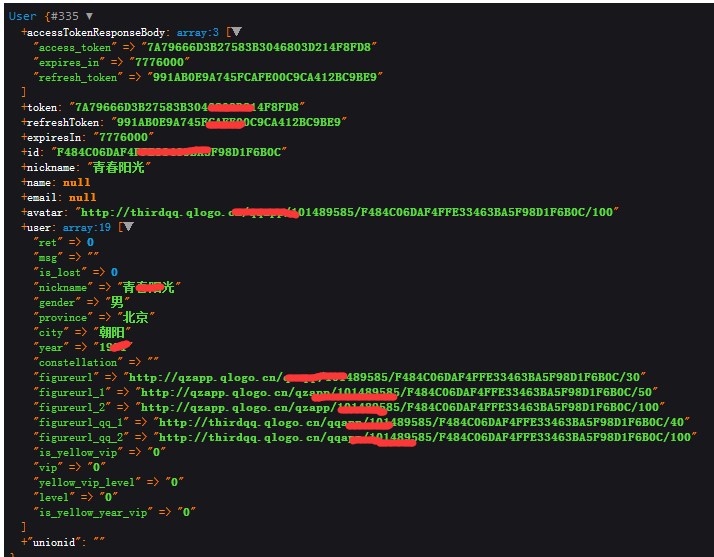
参考地址:https://laravel-china.org/docs/laravel/5.6/socialite/1418
https://socialiteproviders.github.io/providers/qq.html
laravel5.6 QQ 第三方登录的更多相关文章
- 使用QQ第三方登录时,手机应用和网站应用对同一个QQ号,获取到的openid不一样
使用QQ第三方登录时,手机应用和网站应用对同一个QQ号,获取到的openid不一样openid生成是根据应用的appid和QQ号的一些信息加密生成,对于一个appid和QQ号来说,openid是唯一的 ...
- 【第三方登录】之QQ第三方登录
最近公司做了个网站,需要用到第三方登录的东西.有QQ第三方登录,微信第三方登录.先把QQ第三方登录的代码列一下吧. public partial class QQBack : System.Web.U ...
- QQ第三方登录
QQ第三方登录 在Android应用程序的开发过程中,很多时候需要加入用户登录/注册模块.除了自己动手设计登录界面并实现相应功能外,现在还可以借助百度.腾讯等开发者平台提供的第三方账号登录模块.最近研 ...
- PHP实现QQ第三方登录
PHP实现QQ第三方登录 学习之前,请大家先看一下oAuth协议. 首先呢,我们进入QQ互联的官方网站 http://connect.qq.com登入我们自己的QQ号,没有QQ号的小伙伴可以忽略本篇博 ...
- 利用JS_SDK实现QQ第三方登录
前言 现如今,第三方登录已成为大部分网站必备的一项基础技能,引入时髦的第三方登录不仅能帮你吸引更多的用户,也让你的网站可以充分利用其他大型网站的用户资源.本次教程将让你的网站最快捷便利地引入QQ登录. ...
- web实现QQ第三方登录
开放平台-web实现QQ第三方登录 应用场景 web应用通过QQ登录授权实现第三方登录. 操作步骤 1 注册成为QQ互联平台开发者,http://connect.qq.com ...
- Android 实现QQ第三方登录
Android 实现QQ第三方登录 在项目中需要实现QQ第三方登录,经过一番努力算是写出来了,现在总结以下,以防以后遗忘,能帮到其他童鞋就更好了. 首先肯定是去下载SDK和DEMO http://wi ...
- Android应用之——最新版本号SDK V2.4实现QQ第三方登录
为什么要写这篇博客呢?由于.我在做这个第三方登录的时候,找了非常多资料,发现要么就是过时了.要么就是说的非常不清楚.非常罗嗦.并且非常多都是一些小demo,不是什么实例.甚至连腾讯官方的文档都有这个问 ...
- Django项目中使用qq第三方登录。
使用qq登录的前提是已经在qq互联官网创建网站应用并获取到QQ互联中网站应用的APP ID和APP KEY 1,建路由 # qq登录 path('loginQq/',qq.loginQq,name=' ...
随机推荐
- SpringBooot-基础<1>-构建项目
SpringBooot-基础<1>-构建项目 使用Springboot创建web工程,我使用的工具:STS,JDK1.8 1. File -> New -> Maven Pro ...
- Vue2.0史上最全入坑教程(下)—— 实战案例
书接上文 前言:经过前两节的学习,我们已经可以创建一个vue工程了.下面我们将一起来学习制作一个简单的实战案例. 说明:默认我们已经用vue-cli(vue脚手架或称前端自动化构建工具)创建好项目了 ...
- Jquery选择器分类:基本选择器,层次选择器,过滤选择器,表单选择器。
基本选择器 说明:通过元素id.class和标签名等来查找DOM元素 1.id选择器:$("#test");//选取id为test的元素 2.类选择器:$(".test& ...
- vue制作幻灯片-左右移动
组件中: <template> <div class="slide-show" @mouseover="clearInv" @mouseout ...
- vue路由history模式刷新页面出现404问题
vue hash模式下,URL中存在'#',用'history'模式就能解决这个问题.但是history模式会出现刷新页面后,页面出现404.解决的办法是用nginx配置一下.在nginx的配置文件中 ...
- linux系统 (实验二)实验楼的课程笔记
who am i 打印用户名和终端 终端的启动时间 whoami 打印用户名 who 命令其它常用参数 参数 说明 -a 打印能打印的全部 -d 打印死掉的进程 -m 同am i,mom li ...
- 洛谷 P1858 多人背包 DP
目录 题面 题目链接 题目描述 输入输出格式 输入格式 输出格式 输入输出样例 输入样例 输出样例 说明 思路 AC代码 题面 题目链接 洛谷 P1858 多人背包 题目描述 求01背包前k优解的价值 ...
- 推荐一个好用的git图形化工具
之前一直用的是SmartGit,虽然贼好用,但是是收费的. 现在看到了一款免费也非常炫酷的工具,忍不住强烈推荐一下GitKraken rebase,cherry pick啥的用挺好用
- kubernetes1.4新特性:支持sysctl命令
背景介绍 sysctl是一个允许改变正在运行中的Linux系统内核参数的接口.可以通过sysctl修改Linux系统内核中的TCP/IP 堆栈和虚拟内存系统的高级选项,而且不需要重新启动Linux系统 ...
- Directx11教程(13) D3D11管线(1)
原文:Directx11教程(13) D3D11管线(1) 从本篇教程开始,我们暂停代码的学习,先来了解一下D3D11的管线,这些管线不涉及具体的硬件,而是着重于理解能够支持D3D11的管 ...