
Selenium FF WebDriver 遍历所有链接(另类爬虫)
请看这个页面,我想要找到某个公告的内容,必须一个一个打开链接,尼玛好多啊。
于是,我机智的使用selenium打开每一个链接,然后把公告内容写入txt
那需要做一下步奏
1.依次打开一个公告
2.切换focus到新窗口,找到公告内容,写到txt
3.关闭该窗口
4.切换到主窗口
5.当前页面遍历完,点击下一页
6.重复步奏1
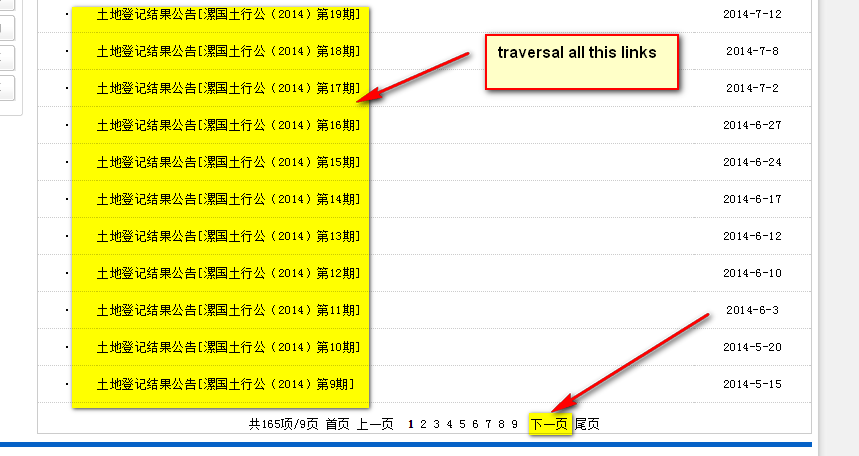
由于下一页是一个很好用的flag,就可以当做循环条件,因为最后一页没有下一页的element
接下来要找到相关的的xpath
列表数目: count(//tr/td/a[starts-with(@href,'article_show.asp?ID=') and @title!='' ])
列表: //tr/td/a[starts-with(@href,'article_show.asp?ID=') and @title!='' ]
下一页: //div/a[text()='下一页']
selenium WebDriver测试网页时,点击target=”_blank”的链接,在打开新页面,切换到新窗口的
这要使用
String currentWindow = driver.getWindowHandle();//获取当前窗口句柄
Set<String> handles = driver.getWindowHandles();//获取所有窗口句
WebDriver window = driver.switchTo().window(it.next());//切换到新窗口
driver.switchTo().window(currentWindow);//回到原来页面
driver=driver.switchTo().window(driver.getWindowHandle()); //把下一页变成当前driver
currentWindow = driver.getWindowHandle();

            //get all windows

            Set<String> handles= driver.getWindowHandles();

            for (String s : handles)

            {

                //current page is don't close

                if (s.equals(currentWindow))

                    continue;

                else

                {

                    window =driver.switchTo().window(s);

                                }

                             window .close() ;

                        }

driver.switchTo().window(currentWindow);
具体代码
package com.packt.webdriver.chapter3;

import java.io.BufferedWriter;

import java.io.FileWriter;

import java.io.IOException;

import java.util.List;

import java.util.Set;

import java.util.concurrent.TimeUnit;

import org.openqa.selenium.By;

import org.openqa.selenium.WebDriver;

import org.openqa.selenium.WebElement;

public class TraversalAllLinks {

    private static String currentWindow;

    public static void main(String[] args) {

        WebDriver driver=DriverFactory.getFirefoxDriver();

        driver.get("http://www.lhgtj.gov.cn/article.asp?ClassID=86&page=1");

        driver.manage().window().maximize();

        driver.manage().timeouts().implicitlyWait(60, TimeUnit.SECONDS);

        driver.manage().timeouts().pageLoadTimeout(60, TimeUnit.SECONDS);

        WebElement nextPage=driver.findElement(By.xpath("//tr/td/a[@title='下一页']"));

        while(nextPage.isDisplayed())

        {

        List<WebElement> links=driver.findElements(By.xpath("//tr/td/a[starts-with(@href,'article_show.asp?ID=') and @title!='' ]"));

        for(WebElement link:links)

        {

            WebDriver window;

            System.out.println(link.getText());

            try {

                writeToTXT(link.getText());

            } catch (IOException e1) {

                // TODO Auto-generated catch block

                e1.printStackTrace();

            }

            link.click();

            currentWindow = driver.getWindowHandle();

            //get all windows

            Set<String> handles= driver.getWindowHandles();

            for (String s : handles)

            {

                //current page is don't close

                if (s.equals(currentWindow))

                    continue;

                else

                {

                    window =driver.switchTo().window(s);

                    window.manage().window().maximize();

                    window.manage().timeouts().implicitlyWait(60, TimeUnit.SECONDS);

                    window.manage().timeouts().pageLoadTimeout(60, TimeUnit.SECONDS);

                    //get all tables

                    List<WebElement> tbs=window.findElements(By.xpath("//tbody/tr/td/p"));

                    for(WebElement tb:tbs)

                    {

                        System.out.println(tb.getText());

                        try {

                            writeToTXT(tb.getText()+"\n");

                        } catch (IOException e) {

                            // TODO Auto-generated catch block

                            e.printStackTrace();

                        }

                    }

                    //close the table window

                    window .close() ;

                }

            //swich to current window

            driver.switchTo().window(currentWindow);

          }

        }

        // click next page

        nextPage.click();

        //set next page to current page

        driver=driver.switchTo().window(driver.getWindowHandle());

        driver.manage().window().maximize();

        driver.manage().timeouts().implicitlyWait(60, TimeUnit.SECONDS);

        driver.manage().timeouts().pageLoadTimeout(60, TimeUnit.SECONDS);

        nextPage=driver.findElement(By.xpath("//tr/td/a[@title='下一页']"));

        }

    }

    //write logs

    public static void  writeToTXT(String message) throws IOException

    {

        BufferedWriter bf = null;

        try {

            //set true ,avoid

            bf = new BufferedWriter(new FileWriter("report.txt", true));

            bf.write(message);

            bf.flush();

        } catch (IOException e) {

            // TODO Auto-generated catch block

            e.printStackTrace();

        }

        finally

        {

             bf.close();

        }

    }

}
DriverFactory
public static WebDriver getFirefoxDriver()

    {

        try

        {

            WindowsUtils.tryToKillByName("firefox.exe");

        }

        catch(Exception e)

        {

            System.out.println("can not find firefox process");

        }

        File file=new File("d:\\firebug-2.0.4-fx.xpi");

        FirefoxProfile profile = new FirefoxProfile();

        try {

            profile.addExtension(file);

            profile.setPreference("extensions.firebug.currentVersion", "2.0.4");

            profile.setPreference("extensions.firebug.allPagesActivation", "on");

        } catch (IOException e3) {

            // TODO Auto-generated catch block

            e3.printStackTrace();

        }

        WebDriver driver = new FirefoxDriver(profile);

        return driver;

    }
Selenium FF WebDriver 遍历所有链接(另类爬虫)的更多相关文章
- Selenium FF WebDriver运行时开启firebug的2种方式
上一次我实测FF webdriver 加载firefoxhttp://www.cnblogs.com/tobecrazy/p/3997375.html 那么问题就来了,既然能加载firebug能否在运 ...
- Selenium FF WebDriver 加载firebug 和设置代理
首先这次使用的webDriver for Firefox的 由于项目的原因,需要在测试的时候加载Firebug和使用vpn,加载代理 Firefox 加载代理,可以从FF菜单上看,代理分为好几种 我这 ...
- python selenium自动化点击页面链接测试
python selenium自动化点击页面链接测试 需求:现在有一个网站的页面,我希望用python自动化的测试点击这个页面上所有的在本窗口跳转,并且是本站内的链接,前往到链接页面之后在通过后退返回 ...
- Selenium的WebDriver API元素定位中的XPath和CSS
元素的定位和操作是自动化测试的核心部分,其中操作又是建立在定位的基础上的. 浏览器的常规操作 import time from selenium import webdriver # 打开浏览器 dr ...
- python使用selenium,webdriver自动下载百度网盘内容
想实现一个自动下载微信公众号分享百度网盘图片链接的爬虫,使用selenium和火狐的webdriver进行完成 1.首先根据自己的浏览器下载相应的webdriver驱动器,python中导入selen ...
- Selenium+PhantomJS实现简易有道翻译爬虫
Selenium一款自动化测试工具,当然用来写爬虫也是没有问题的.它支持Chrome.Safari.Firefox等主流界面式浏览器,另外它也支持多种语言开发,比如 Java,C,Ruby,Pytho ...
- Selenium:WebDriver简介及元素定位
参考内容:官方API文档,下载链接:http://download.csdn.net/detail/kwgkwg001/4004500 虫师:<selenium2自动化测试实战-基于python ...
- How to set Selenium Python WebDriver default timeout?
Trying to find a good way to set a maximum time limit for command execution latency in Selenium Pyth ...
- Selenium VS Webdriver
Selenium 是 ThroughtWorks 一个强大的基于浏览器的开源自动化测试工具,它通常用来编写 Web 应用的自动化测试.随着 Selenium 团队发布 Selenium 2(又名 We ...
随机推荐
- vim如何在多个文件中切换
如果我们一次打开多个文件 看一下当前目录里面的文件: wangkongming@Vostro /data/webroot/testRoot/application/modules/Admin/view ...
- Myeclipse右键新建项目突然变的很少
额,很是焦躁,最后在界面的右上方点Myeclipse Java enterprise变回原来模样
- 有利于SEO优化的DIV+CSS的命名规则小结
可以先去这里温习一下CSS和HTML的知识!DIV+CSS规范命名大全集合 CSS开发技巧整理 一.CSS文件及样式命名 1.CSS文件命名规范 全局样式:global.css/master.css ...
- AngularJS 使用$sce控制代码安全检查
由于浏览器都有同源加载策略,不能加载不同域下的文件.也不能使用不合要求的协议比如file进行访问. 在angularJs中为了避免安全漏洞,一些ng-src或者ng-include都会进行安全校验,因 ...
- IOC和bean容器
- tc 147 2 PeopleCircle(再见约瑟夫环)
SRM 147 2 600PeopleCircle Problem Statement There are numMales males and numFemales females arranged ...
- 大数据之nutch
一.nutch简介 nutch是大名鼎鼎的Doug Cutting发起的爬虫项目,nutch孵化了现在大数据处理框架Hadoop.在nutch V 0.8.0 版本之前,Hadoop是nutch的一部 ...
- HDU 5687 字典树插入查找删除
题目:http://acm.hdu.edu.cn/showproblem.php?pid=5687 2016百度之星资格赛C题,直接套用字典树,顺便巩固了一下自己对字典树的理解 #include< ...
- java自定义标签 权限
<?xml version="1.0" encoding="UTF-8" ?> <taglib xmlns="http://java ...
- Java设计模式 之 命令模式
1 从属模式分类 行为性模式 2 命令模式意图 命令模式可将动作的请求者和动作的执行者对象中解耦. 该模式将一个行为操作发起者的请求封装到对象中,该请求由另外一个对象执行. 将动作 ...