
十、Spring Boot集成Spring Security之HTTP请求授权
前言
本文介绍HTTP请求授权工作原理、配置及适用场景,配合以下内容观看效果更佳!!!
- 什么是授权,授权有哪些流程,Spring Security的授权配置有几种?请查看九、Spring Boot集成Spring Security之授权概述
- HTTP请求授权的实现原理是什么,如何配置HTTP请求授权?请查看十、Spring Boot集成Spring Security之HTTP请求授权
- 方法授权的实现原理是什么,如何配置方法授权?请查看十一、Spring Boot集成Spring Security之方法授权
- 如何实现基于RBAC模型的授权方式?请查看十二、Spring Boot集成Spring Security之基于RBAC模型的授权
一、HTTP请求授权工作原理
基于Spring Security最新的Http请求授权讲解,不再使用旧版的请求授权
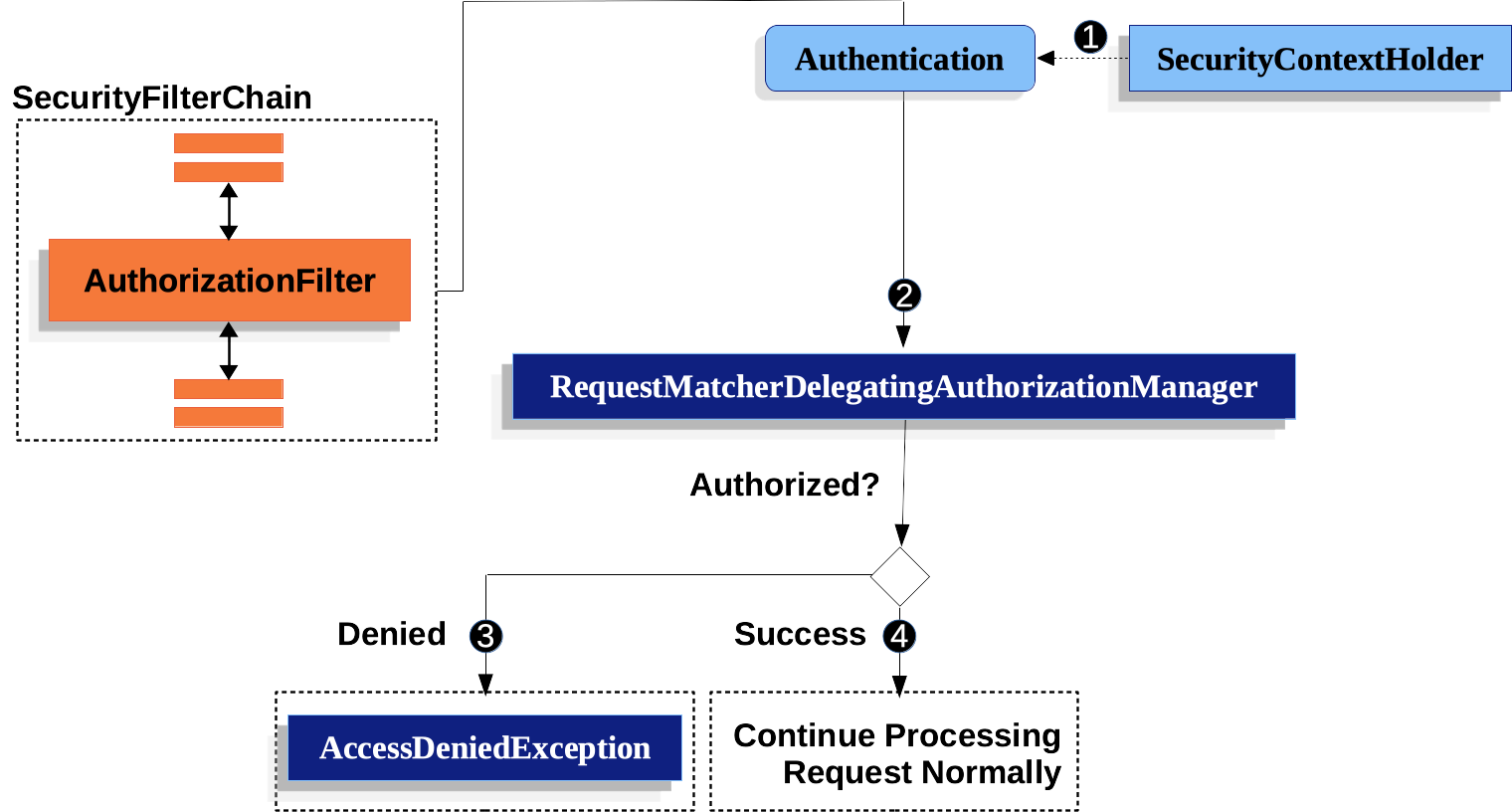
- 授权过滤器AuthorizationFilter获取认证信息
- 调用RequestMatcherDelegatingAuthorizationManager的check方法验证该用户是否具有该请求的授权
- RequestMatcherDelegatingAuthorizationManager根据配置的请求和授权关系校验用户是否具有当前请求的授权并返回授权结果
- AuthorizationFilter处理授权结果,授权成功则继续调用过滤器链,否则抛出AccessDeniedException异常
- 认证失败时,ExceptionTranslationFilter处理AccessDeniedException异常,如果是当前认证是匿名认证或者RememberMe认证则调用AuthenticationEntryPoint的commence方法,否则调用AccessDeniedHandler的handler方法
- 工作原理图如下
二、HTTP请求授权配置
1、添加用户权限
package com.yu.demo.spring.impl;

import com.yu.demo.entity.UserDetailsImpl;

import org.springframework.security.core.GrantedAuthority;

import org.springframework.security.core.authority.SimpleGrantedAuthority;

import org.springframework.security.core.userdetails.UserDetails;

import org.springframework.security.core.userdetails.UserDetailsService;

import org.springframework.security.core.userdetails.UsernameNotFoundException;

import org.springframework.stereotype.Service;

import java.util.ArrayList;

import java.util.List;

import java.util.UUID;

@Service

public class UserDetailsServiceImpl implements UserDetailsService {

    //@Autowired

    //private UserService userService;

    // @Autowired

    //private UserRoleService userRoleService;

    @Override

    public UserDetails loadUserByUsername(String username) throws UsernameNotFoundException {

        //TODO 通过username从数据库中获取用户,将用户转UserDetails

        //User user = userService.getByUsername(username);

        //TODO 从数据库实现查询权限并转化为List<GrantedAuthority>

        //List<String> roleIds = userRoleService.listRoleIdByUsername(username);

        //List<GrantedAuthority> grantedAuthorities = new ArrayList<>(roleIds.size());

        //roleIds.forEach(roleId -> grantedAuthorities.add(new SimpleGrantedAuthority(roleId)));

        //return new User(username, user.getPassword(), user.getEnable(), user.getAccountNonExpired(), user.getCredentialsNonExpired(), user.getAccountNonLocked(), user.getAuthorities());

        //测试使用,指定权限

        List<GrantedAuthority> grantedAuthorities = new ArrayList<>();

        //与hasXxxRole匹配时添加ROLE_前缀

        grantedAuthorities.add(new SimpleGrantedAuthority("ROLE_ADMIN"));

        //与hasXxxAuthority匹配时原始值

        grantedAuthorities.add(new SimpleGrantedAuthority("OPERATE"));

        //{noop}不使用密码加密器,密码123的都可以验证成功

        UserDetailsImpl userDetails = new UserDetailsImpl(username, "{noop}123", true, true, true, true, grantedAuthorities);

        //userDetails中设置token,该token只是实现认证流程,未使用jwt

        userDetails.setToken(UUID.randomUUID().toString());

        return userDetails;

    }

}
2、配置ExceptionTranslationFilter自定义异常处理器
因AuthorizationFilter授权失败时会抛出异常,该异常由ExceptionTranslationFilter处理,所以要配置自定义的异常处理器。
自定义AccessDeniedHandler和AuthenticationEntryPoint异常处理器(可以用一个类实现认证授权相关的所有接口,也可以使用多个类分别实现)。
package com.yu.demo.spring.impl;

import com.yu.demo.entity.ApiResp;

import com.yu.demo.entity.UserDetailsImpl;

import com.yu.demo.util.SpringUtil;

import org.springframework.security.access.AccessDeniedException;

import org.springframework.security.authentication.UsernamePasswordAuthenticationToken;

import org.springframework.security.core.Authentication;

import org.springframework.security.core.AuthenticationException;

import org.springframework.security.core.GrantedAuthority;

import org.springframework.security.core.authority.SimpleGrantedAuthority;

import org.springframework.security.web.AuthenticationEntryPoint;

import org.springframework.security.web.access.AccessDeniedHandler;

import org.springframework.security.web.authentication.AuthenticationFailureHandler;

import org.springframework.security.web.authentication.AuthenticationSuccessHandler;

import org.springframework.security.web.authentication.logout.LogoutSuccessHandler;

import org.springframework.stereotype.Component;

import javax.servlet.ServletException;

import javax.servlet.http.HttpServletRequest;

import javax.servlet.http.HttpServletResponse;

import java.io.IOException;

import java.util.HashSet;

import java.util.Set;

@Component

public class LoginResultHandler implements AuthenticationSuccessHandler, LogoutSuccessHandler, AuthenticationEntryPoint, AuthenticationFailureHandler, AccessDeniedHandler {

    /**

     * 登录成功

     */

    @Override

    public void onAuthenticationSuccess(HttpServletRequest request, HttpServletResponse response, Authentication authentication) throws IOException {

        UsernamePasswordAuthenticationToken usernamePasswordAuthenticationToken = (UsernamePasswordAuthenticationToken) authentication;

        UserDetailsImpl userDetailsImpl = (UserDetailsImpl) usernamePasswordAuthenticationToken.getPrincipal();

        //token返回到前端

        SpringUtil.respJson(response, ApiResp.success(userDetailsImpl.getToken()));

    }

    /**

     * 登录失败

     */

    @Override

    public void onAuthenticationFailure(HttpServletRequest request, HttpServletResponse response, AuthenticationException exception) throws IOException, ServletException {

        SpringUtil.respJson(response, ApiResp.loginFailure());

    }

    /**

     * 登出成功

     */

    @Override

    public void onLogoutSuccess(HttpServletRequest request, HttpServletResponse response, Authentication authentication) throws IOException, ServletException {

        SpringUtil.respJson(response, ApiResp.success());

    }

    /**

     * 未登录调用需要登录的接口时

     */

    @Override

    public void commence(HttpServletRequest request, HttpServletResponse response, AuthenticationException authException) throws IOException, ServletException {

        SpringUtil.respJson(response, ApiResp.notLogin());

    }

    /**

     * 已登录调用未授权的接口时

     */

    @Override

    public void handle(HttpServletRequest request, HttpServletResponse response, AccessDeniedException accessDeniedException) throws IOException, ServletException {

        SpringUtil.respJson(response, ApiResp.forbidden());

    }

}
- 配置异常处理:
                //异常处理配置

                .exceptionHandling(exceptionHandlingCustomizer -> exceptionHandlingCustomizer

                        //授权失败处理器(登录账号访问未授权的资源时)

                        .accessDeniedHandler(loginResultHandler)

                        //登录失败处理器(匿账号访问需要未授权的资源时)

                        .authenticationEntryPoint(loginResultHandler))
3、HTTP请求授权配置
- 本文使用最新的authorizeHttpRequests(AuthorizationFilter+AuthorizationManager)配置,不在使用authorizeRequests(FilterSecurityInterceptor+AccessDecisionManager+AccessDecisionVoter)
- 请求和授权配置成对出现,配置在前的优先级更高
- 请求种类
- antMatchers:Ant风格的路径模式,
?(匹配一个字符)、*(匹配零个或多个字符,但不包括目录分隔符)、**(匹配零个或多个目录) - mvcMatchers:Spring MVC的路径模式,支持路径变量和请求参数
- regexMatchers:正则表达式路径模式
- requestMatchers:实现RequestMatcher自定义匹配逻辑
- anyRequest:未匹配的其他请求,只能有一个且只能放在最后
- antMatchers:Ant风格的路径模式,
- 授权种类
- permitAll:匿名或登录用户都允许访问
- denyAll:匿名和登录用户都不允许访问
- hasAuthority:有配置的权限允许访问,AuthorityAuthorizationManager校验
- hasRole:有配置的角色允许访问,ROLE_{配置角色}与用户权限匹配,AuthorityAuthorizationManager校验
- hasAnyAuthority:有配置的任意一个权限的允许访问,AuthorityAuthorizationManager校验
- hasAnyRole:有配置的任意一个角色允许访问,ROLE_{配置角色}与用户权限匹配,AuthorityAuthorizationManager校验
- authenticated:已认证(不包括匿名)的允许访问,AuthenticatedAuthorizationManager校验
- access:自定义授权处理
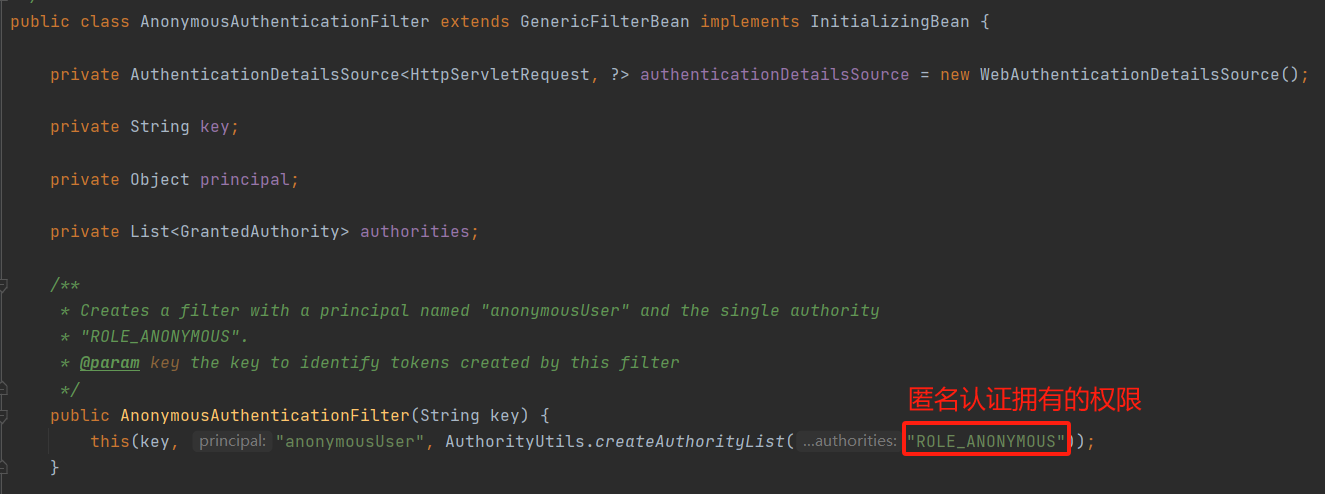
- 因authorizeHttpRequests不支持使用anonymous()的方式配置匿名访问,未自定义匿名角色时可以通过hasRole("ANONYMOUS")或者hasAuthority("ROLE_ANONYMOUS")或其他类似的方式实现允许匿名请求的设置
- http请求授权配置
                //http请求授权

                .authorizeHttpRequests(authorizeHttpRequestsCustomizer -> authorizeHttpRequestsCustomizer

                        //不允许访问

                        .antMatchers("/test/deny")

                        .denyAll()

                        //允许匿名访问

                        .antMatchers("/test/anonymous")

                        .hasRole("ANONYMOUS")

                        //允许访问

                        .antMatchers("/test/permit")

                        .permitAll()

                        //测试使用:拥有ADMIN角色

                        .antMatchers("/test/admin")

                        //拥有ROLE_ADMIN权限,配置的角色不能以ROLE_作为前缀

                        .hasRole("ADMIN")

                        //测试使用:拥有OPERATE权限

                        .antMatchers("/test/operate")

                        //拥有OPERATE权限

                        .hasAuthority("OPERATE")

                        //其他的任何请求

                        .anyRequest()

                        //需要认证,且不能是匿名

                        .authenticated())
- 完整过滤器链配置
package com.yu.demo.config;

import com.yu.demo.spring.filter.RestfulLoginConfigurer;

import com.yu.demo.spring.filter.RestfulUsernamePasswordAuthenticationFilter;

import com.yu.demo.spring.impl.LoginResultHandler;

import org.springframework.beans.factory.annotation.Autowired;

import org.springframework.context.annotation.Bean;

import org.springframework.context.annotation.Configuration;

import org.springframework.http.HttpMethod;

import org.springframework.security.config.annotation.web.builders.HttpSecurity;

import org.springframework.security.config.annotation.web.configuration.EnableWebSecurity;

import org.springframework.security.config.annotation.web.configurers.CsrfConfigurer;

import org.springframework.security.config.annotation.web.configurers.FormLoginConfigurer;

import org.springframework.security.config.annotation.web.configurers.HttpBasicConfigurer;

import org.springframework.security.config.annotation.web.configurers.SessionManagementConfigurer;

import org.springframework.security.web.SecurityFilterChain;

import org.springframework.security.web.context.SecurityContextRepository;

@Configuration

@EnableWebSecurity

public class SecurityConfig {

    //登录参数用户名

    private static final String LOGIN_ARG_USERNAME = "username";

    //登录参数密码

    private static final String LOGIN_ARG_PASSWORD = "password";

    //登录请求类型

    private static final String LOGIN_HTTP_METHOD = HttpMethod.POST.name();

    //登录请求地址

    private static final String LOGIN_URL = "/login";

    //登出请求地址

    private static final String LOGOUT_URL = "/logout";

    @Autowired

    private LoginResultHandler loginResultHandler;

    @Autowired

    private SecurityContextRepository securityContextRepository;

    @Bean

    public SecurityFilterChain securityFilterChain(HttpSecurity httpSecurity) throws Exception {

        httpSecurity

                //禁用UsernamePasswordAuthenticationFilter、DefaultLoginPageGeneratingFilter、DefaultLogoutPageGeneratingFilter

                .formLogin(FormLoginConfigurer::disable)

                //禁用BasicAuthenticationFilter

                .httpBasic(HttpBasicConfigurer::disable)

                //禁用CsrfFilter

                .csrf(CsrfConfigurer::disable)

                //禁用SessionManagementFilter

                .sessionManagement(SessionManagementConfigurer::disable)

                //异常处理配置

                .exceptionHandling(exceptionHandlingCustomizer -> exceptionHandlingCustomizer

                        //授权失败处理器(登录账号访问未授权的资源时)

                        .accessDeniedHandler(loginResultHandler)

                        //登录失败处理器(匿账号访问需要未授权的资源时)

                        .authenticationEntryPoint(loginResultHandler))

                //http请求授权

                .authorizeHttpRequests(authorizeHttpRequestsCustomizer -> authorizeHttpRequestsCustomizer

                        //不允许访问

                        .antMatchers("/test/deny")

                        .denyAll()

                        //允许匿名访问

                        .antMatchers("/test/anonymous")

                        .hasRole("ANONYMOUS")

                        //允许访问

                        .antMatchers("/test/permit")

                        .permitAll()

                        //测试使用:拥有ADMIN角色

                        .antMatchers("/test/admin")

                        //拥有ROLE_ADMIN权限,配置的角色不能以ROLE_作为前缀

                        .hasRole("ADMIN")

                        //测试使用:拥有OPERATE权限

                        .antMatchers("/test/operate")

                        //拥有OPERATE权限

                        .hasAuthority("OPERATE")

                        //其他的任何请求

                        .anyRequest()

                        //需要认证,且不能是匿名

                        .authenticated())

                //安全上下文配置

                .securityContext(securityContextCustomizer -> securityContextCustomizer

                        //设置自定义securityContext仓库

                        .securityContextRepository(securityContextRepository)

                        //显示保存SecurityContext,官方推荐

                        .requireExplicitSave(true))

                //登出配置

                .logout(logoutCustomizer -> logoutCustomizer

                        //登出地址

                        .logoutUrl(LOGOUT_URL)

                        //登出成功处理器

                        .logoutSuccessHandler(loginResultHandler)

                )

                //注册自定义登录过滤器的配置器:自动注册自定义登录过滤器;

                //需要重写FilterOrderRegistration的构造方法FilterOrderRegistration(){},在构造方法中添加自定义过滤器的序号,否则注册不成功

                .apply(new RestfulLoginConfigurer<>(new RestfulUsernamePasswordAuthenticationFilter(LOGIN_ARG_USERNAME, LOGIN_ARG_PASSWORD, LOGIN_URL, LOGIN_HTTP_METHOD), LOGIN_URL, LOGIN_HTTP_METHOD))

                //设置登录地址:未设置时系统默认生成登录页面,登录地址/login

                .loginPage(LOGIN_URL)

                //设置登录成功之后的处理器

                .successHandler(loginResultHandler)

                //设置登录失败之后的处理器

                .failureHandler(loginResultHandler);

        //创建过滤器链对象

        return httpSecurity.build();

    }

}
三、测试接口
1、测试类
package com.yu.demo.web;

import com.yu.demo.entity.ApiResp;

import org.springframework.web.bind.annotation.GetMapping;

import org.springframework.web.bind.annotation.RequestMapping;

import org.springframework.web.bind.annotation.RestController;

@RestController

@RequestMapping("/test")

public class TestController {

    @GetMapping("/hello")

    public ApiResp hello() {

        return ApiResp.success("hello");

    }

    /**

     * 匿名允许访问接口地址

     */

    @GetMapping("/anonymous")

    public ApiResp anonymous() {

        return ApiResp.success("anonymous");

    }

    /**

     * 禁止访问接口地址

     */

    @GetMapping("/deny")

    public ApiResp deny() {

        return ApiResp.success("deny");

    }

    /**

     * 允许访问接口地址

     */

    @GetMapping("/permit")

    public ApiResp permit() {

        return ApiResp.success("permit");

    }

    /**

     * 拥有ADMIN角色或ROLE_ADMIN权限允许访问接口地址

     */

    @GetMapping("/admin")

    public ApiResp admin() {

        return ApiResp.success("admin");

    }

    /**

     * 拥有OPERATE权限的允许访问接口地址

     */

    @GetMapping("/operate")

    public ApiResp operate() {

        return ApiResp.success("operate");

    }

}
2、测试
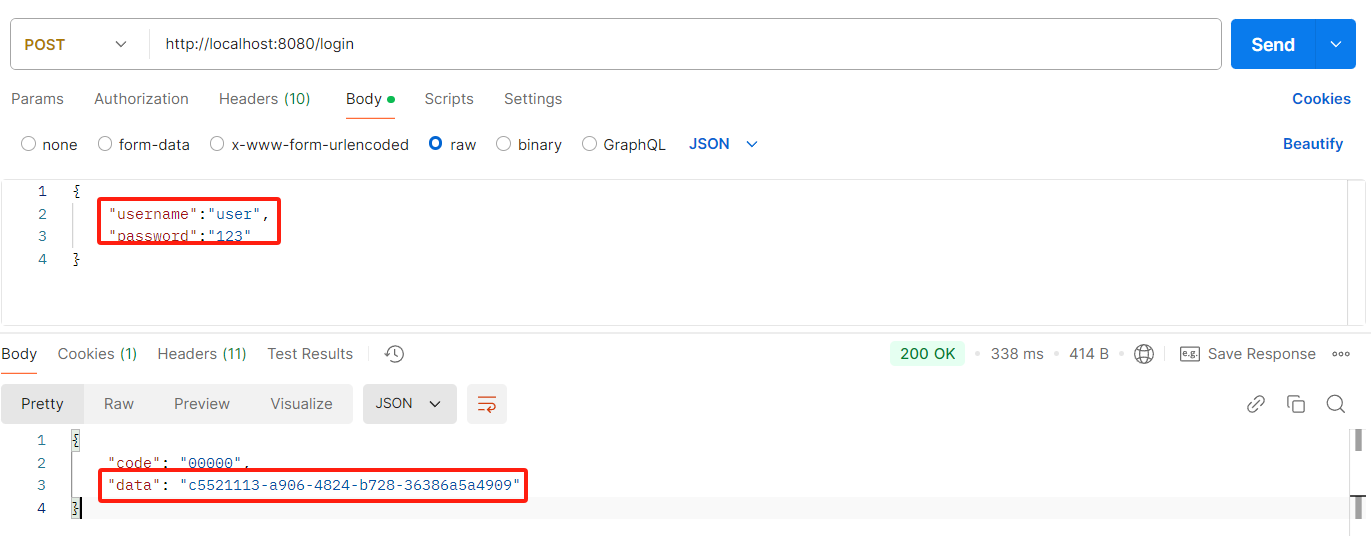
- 登录获取token
- admin接口测试
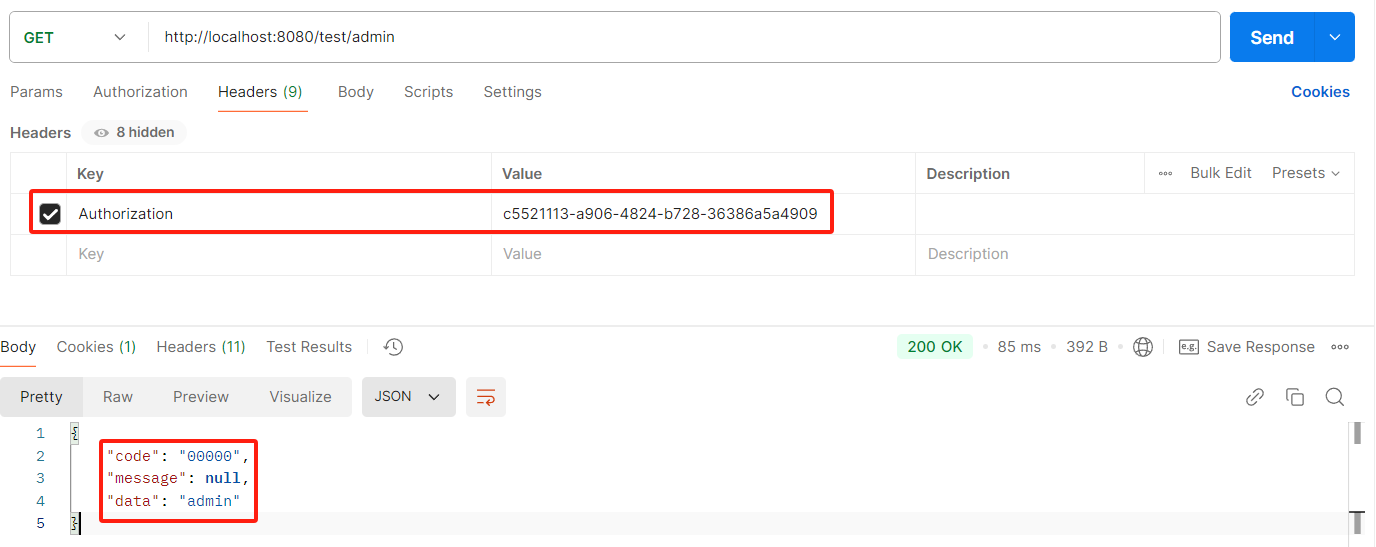
- 其他接口不在一一测试,有疑问或问题评论或私聊
四、总结
- 授权是拿用户的权限和可以访问接口的权限进行匹配,匹配成功时授权成功,匹配失败时授权失败
- 用户的权限对象是SimpleGrantedAuthority,字符串属性role
- 接口的role权限会通过ROLE_{role}转化为SimpleGrantedAuthority及其字符串属性role
- 接口的authority权限会直接转化为SimpleGrantedAuthority及其字符串属性role
- 拥有ROLE_ANONYMOUS权限或者ANONYMOUS角色可以访问匿名接口
- 后续会讲使用HTTP请求授权+自定义AuthorizationManager方式实现基于RBAC权限模型,欢迎持续关注
- 源码下载
十、Spring Boot集成Spring Security之HTTP请求授权的更多相关文章
- Spring Boot集成Spring Data Reids和Spring Session实现Session共享
首先,需要先集成Redis的支持,参考:http://www.cnblogs.com/EasonJim/p/7805665.html Spring Boot集成Spring Data Redis+Sp ...
- SpringBoot系列:Spring Boot集成Spring Cache,使用EhCache
前面的章节,讲解了Spring Boot集成Spring Cache,Spring Cache已经完成了多种Cache的实现,包括EhCache.RedisCache.ConcurrentMapCac ...
- SpringBoot系列:Spring Boot集成Spring Cache,使用RedisCache
前面的章节,讲解了Spring Boot集成Spring Cache,Spring Cache已经完成了多种Cache的实现,包括EhCache.RedisCache.ConcurrentMapCac ...
- Spring Boot 集成 Swagger2 与配置 OAuth2.0 授权
Spring Boot 集成 Swagger2 很简单,由于接口采用了OAuth2.0 & JWT 协议做了安全验证,使用过程中也遇到了很多小的问题,多次尝试下述配置可以正常使用. Maven ...
- Spring Boot 集成 Spring Security 实现权限认证模块
作者:王帅@CodeSheep 写在前面 关于 Spring Security Web系统的认证和权限模块也算是一个系统的基础设施了,几乎任何的互联网服务都会涉及到这方面的要求.在Java EE领 ...
- Spring boot 集成Spring Security
依赖jar <dependency> <groupId>org.springframework.cloud</groupId> <artifactId> ...
- Spring Boot 集成spring security4
项目GitHub地址 : https://github.com/FrameReserve/TrainingBoot Spring Boot (三)集成spring security,标记地址: htt ...
- Spring boot集成spring session实现session共享
最近使用spring boot开发一个系统,nginx做负载均衡分发请求到多个tomcat,此时访问页面会把请求分发到不同的服务器,session是存在服务器端,如果首次访问被分发到A服务器,那么se ...
- Spring Boot 集成 Spring Security
1.添加依赖 <dependency> <groupId>org.springframework.boot</groupId> <artifactId> ...
- Spring Boot 集成 Spring Security 入门案例教程
前言 本文作为入门级的DEMO,完全按照官网实例演示: 项目目录结构 Maven 依赖 <parent> <groupId>org.springframework.boot&l ...
随机推荐
- 前端使用 Konva 实现可视化设计器(22)- 绘制图形(矩形、直线、折线)
本章分享一下如何使用 Konva 绘制基础图形:矩形.直线.折线,希望大家继续关注和支持哈! 请大家动动小手,给我一个免费的 Star 吧~ 大家如果发现了 Bug,欢迎来提 Issue 哟~ git ...
- ZEGO 即构科技首发适配鸿蒙系统的 Express SDK 1.0 版本
2019年8月,华为在开发者大会上正式发布鸿蒙系统. HarmonyOS 鸿蒙系统是一款"面向未来".面向全场景(移动办公.运动健康.社交通信.媒体娱乐等)的分布式操作系统.在 ...
- Redis入门 - C#|.NET Core封装Nuget包
经过前面章节的学习,可以说大家已经算Redis开发入门了.已经可以去到项目上磨砺了. 但是今天我还想和大家分享一章:封装自己的Redis C#库,然后打包成Nuget包. 首先要说明的是:不是要自己开 ...
- MDC – Text field
前言 Angular Material 只有 Form field, 但 Material Design 有份 Text field 和 Form field, Form field 是给 check ...
- ASP.NET Core – Web API Versioning
前言 项目持续维护, API 就需要版本控制. ASP.NET Core 有官方的插件专门处理 API 版本控制. 主要参考 Your Guide to REST API Versioning in ...
- RDK X5首发上手体验!真的太帅啦!!!
RDK X5首发上手体验!真的太帅啦!!! 本Blog同步发表于: 地瓜机器人开发者论坛: CSDN: 一年多以前无意中了解到了RDK X3,之后我便迅速的被地平线机器人开发者论坛(现在改名为了地瓜机 ...
- T2 的莫反式子
正在实现,不知道对不对,但是先放这,哪个大佬发现问题了和我说下 设 \[f(l)=\sum\cdots\sum[\gcd=1,\text{lcm}=l] \] \[g(l)=\sum\cdots\su ...
- USB分析仪USB3.2日志分析
1.简介 USB2.0总线采用轮询模式,即总线事务开始时,都要先发送IN或者OUT令牌包,以通知端点或者查询端点是否准备好.而USB3.2采用了异步通知模式,若端点没有准备好,则主机无需轮询,端点准备 ...
- argmax经过sigmoid和不经过sigmoid区别
起因 今天和同组讨论了一下网络输出时,在torch.argmax之前经过torch.sigmoid和不经过sigmoid的区别. 主要起因是实验结果图像不同 图1 不经过sigmoid 图2 经过si ...
- document.designMode 设计模式
document.designMode 的默认值是 off 关闭: 在控制台输入 document.designMode = 'on' 就可以编辑页面内容: