
scrapy爬虫学习系列五:图片的抓取和下载
系列文章列表:
scrapy爬虫学习系列一:scrapy爬虫环境的准备: http://www.cnblogs.com/zhaojiedi1992/p/zhaojiedi_python_007_scrapy01.html
scrapy爬虫学习系列二:scrapy简单爬虫样例学习: http://www.cnblogs.com/zhaojiedi1992/p/zhaojiedi_python_007_scrapy02.html
scrapy爬虫学习系列三:scrapy部署到scrapyhub上: http://www.cnblogs.com/zhaojiedi1992/p/zhaojiedi_python_004_scrapyhub.html
scrapy爬虫学习系列四:portia的学习入门: http://www.cnblogs.com/zhaojiedi1992/p/zhaojiedi_python_010_scrapy04.html
scrapy爬虫学习系列五:图片的抓取和下载: http://www.cnblogs.com/zhaojiedi1992/p/zhaojiedi_python_011_scrapy05.html
scrapy爬虫学习系列六:官方文档的学习: https://github.com/zhaojiedi1992/My_Study_Scrapy
注意: 我自己新建的一个QQ群(新建的),欢迎大家加入一起学习一起进步 ,群号646187336
这篇文章主要对一个车标网(http://car.bitauto.com/qichepinpai)的图片进行抓取,并按照图片的alt属性值去设置输出图片命名。
本文的最终源码下载地址(github):https://github.com/zhaojiedi1992/caricon
1.创建工程和爬虫
C:\Users\Administrator>e:

E:\>cd scrapytest

E:\scrapytest>scrapy startproject caricon

New Scrapy project 'caricon', using template directory 'C:\\Program Files\\Anaconda3\\lib\\site-packages\\scrapy\\templa

tes\\project', created in:

    E:\scrapytest\caricon

You can start your first spider with:

    cd caricon

    scrapy genspider example example.com

E:\scrapytest>cd caricon

E:\scrapytest\caricon>scrapy genspider car car.bitauto.com/qichepinpai

Created spider 'car' using template 'basic' in module:

  caricon.spiders.car
4.修改item
添加字段,修改后为如下内容:
# -*- coding: utf-8 -*-

# Define here the models for your scraped items

#

# See documentation in:

# http://doc.scrapy.org/en/latest/topics/items.html

import scrapy

class CariconItem(scrapy.Item):

    # define the fields for your item here like:

    # name = scrapy.Field()

    image_urls = scrapy.Field()

    images = scrapy.Field()

    alt = scrapy.Field()
- image_urls : 作为项目的图片网址(需要我们指定url)。
- images :下载的影像信息(这个字段不是我们填充的)。
注意: 上面的alt字段是我自己加的,image_urls ,images这2个字段是请求图片的默认字段,必须要有的,建议使用默认字段。你要是喜欢折腾可以参考这个网址:https://docs.scrapy.org/en/latest/topics/media-pipeline.html#usage-example
3.修改爬虫
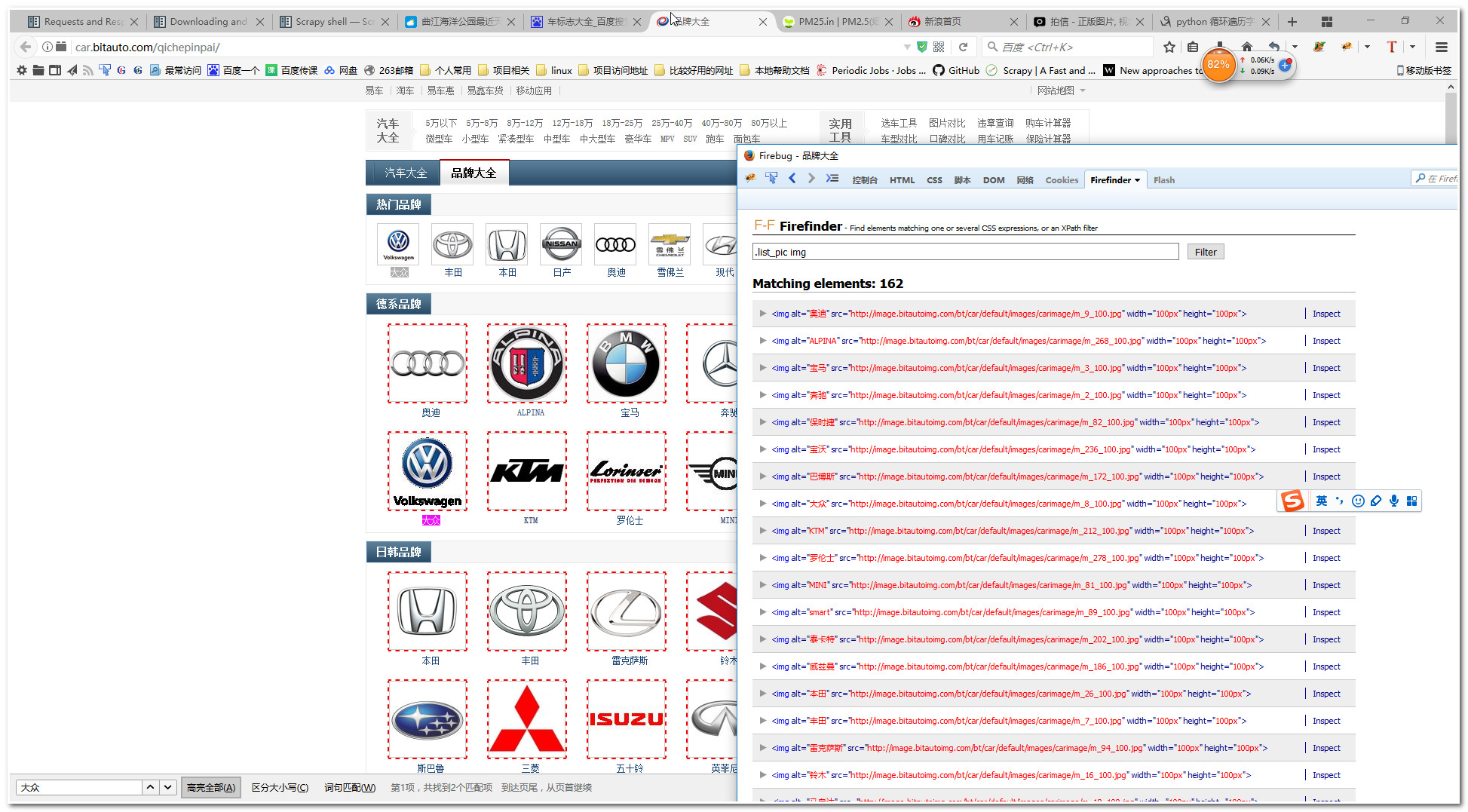
这里我们先使用火狐浏览器的Firefinder插件找找我们需要提取的图片,图片如下:
# -*- coding: utf-8 -*-

# Define your item pipelines here

#

# Don't forget to add your pipeline to the ITEM_PIPELINES setting

# See: http://doc.scrapy.org/en/latest/topics/item-pipeline.html

class CariconPipeline(object):

    def process_item(self, item, spider):

        return item

from scrapy.contrib.pipeline.images import ImagesPipeline

from scrapy.http import Request

from scrapy.exceptions import DropItem

import os

class MyImagesPipeline(ImagesPipeline):

    def file_path(self, request, response=None, info=None):

        #url_file_name= request.url.split('/')[-1]

        #image_guid = hashlib.sha1(to_bytes(url)).hexdigest()

        alt_name=request.meta["alt"]

        return 'full/%s%s' % (alt_name, os.path.splitext(request.url)[-1])

    def get_media_requests(self, item, info):

        yield Request(item["image_urls"][0], meta={'alt':item["alt"]})
代码简介:通常我们使用官方的那个imagepipeline导出的文件是SHA1 hash 你的url作为文件名,很难区别啊,这里使用到了request方法的meta参数,把我们的图片的alt属性传递过去,这样我们返回文件名的时候就可以使用这个alt的名字来区别了。(但是如果alt重复又替换了原来的图片的)
注意,firefinder这个插件依赖与firebug的,你可以在你的浏览器找类似firefinder的工具。
6.修改setttings.py文件
修改下面片段为如下内容:
ITEM_PIPELINES = {

    'caricon.pipelines.MyImagesPipeline': 300,

}
IMAGES_STORE = r'e:\test\pic\'
当然我们这里可以使用官方的imagepipeline(scrapy.pipelines.images.ImagesPipeline)
6.运行爬虫
E:\scrapytest\caricon>scrapy crawl car
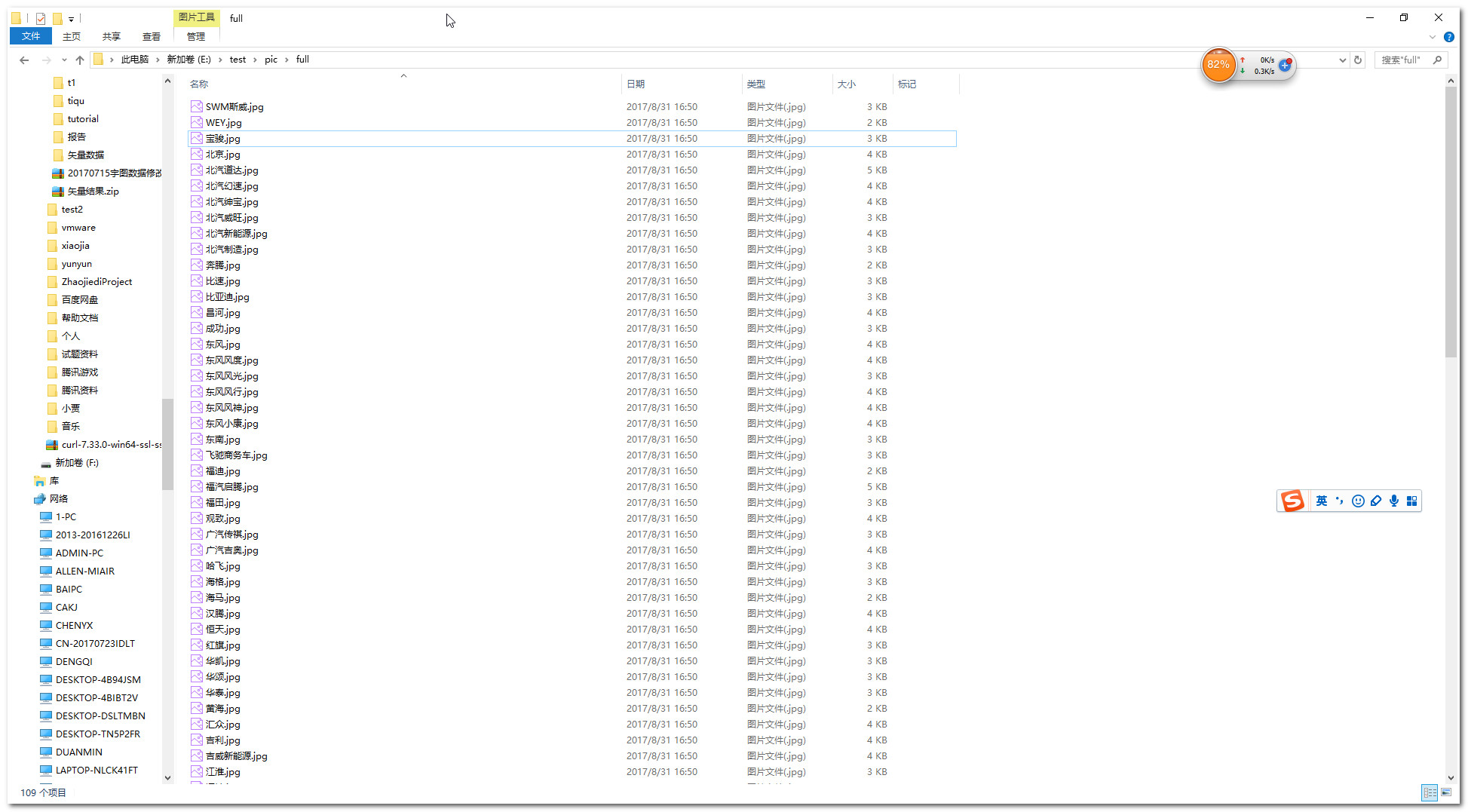
7.查看结果
scrapy爬虫学习系列五:图片的抓取和下载的更多相关文章
- scrapy爬虫学习系列四:portia的学习入门
系列文章列表: scrapy爬虫学习系列一:scrapy爬虫环境的准备: http://www.cnblogs.com/zhaojiedi1992/p/zhaojiedi_python_00 ...
- scrapy爬虫学习系列二:scrapy简单爬虫样例学习
系列文章列表: scrapy爬虫学习系列一:scrapy爬虫环境的准备: http://www.cnblogs.com/zhaojiedi1992/p/zhaojiedi_python_00 ...
- scrapy爬虫学习系列一:scrapy爬虫环境的准备
系列文章列表: scrapy爬虫学习系列一:scrapy爬虫环境的准备: http://www.cnblogs.com/zhaojiedi1992/p/zhaojiedi_python_00 ...
- scrapy爬虫学习系列三:scrapy部署到scrapyhub上
系列文章列表: scrapy爬虫学习系列一:scrapy爬虫环境的准备: http://www.cnblogs.com/zhaojiedi1992/p/zhaojiedi_python_00 ...
- scrapy爬虫学习系列七:scrapy常见问题解决方案
1 常见错误 1.1 错误: ImportError: No module named win32api 官方参考:https://doc.scrapy.org/en/latest/faq.html# ...
- Scrapy爬虫框架教程(四)-- 抓取AJAX异步加载网页
欢迎关注博主主页,学习python视频资源,还有大量免费python经典文章 sklearn实战-乳腺癌细胞数据挖掘 https://study.163.com/course/introduction ...
- 《Python爬虫学习系列教程》学习笔记
http://cuiqingcai.com/1052.html 大家好哈,我呢最近在学习Python爬虫,感觉非常有意思,真的让生活可以方便很多.学习过程中我把一些学习的笔记总结下来,还记录了一些自己 ...
- [转]《Python爬虫学习系列教程》
<Python爬虫学习系列教程>学习笔记 http://cuiqingcai.com/1052.html 大家好哈,我呢最近在学习Python爬虫,感觉非常有意思,真的让生活可以方便很多. ...
- python3.4学习笔记(十三) 网络爬虫实例代码,使用pyspider抓取多牛投资吧里面的文章信息,抓取政府网新闻内容
python3.4学习笔记(十三) 网络爬虫实例代码,使用pyspider抓取多牛投资吧里面的文章信息PySpider:一个国人编写的强大的网络爬虫系统并带有强大的WebUI,采用Python语言编写 ...
随机推荐
- acl权限命令
1.查看acl命令 getfacl 文件名 #查看acl权限 2.设定acl权限命令 setfacl 选项 文件名 选项: -m 设置ACL权限 -x 删除指定的ACL权限 -b 删除所有的ACL设定 ...
- HTML入门12
开始了解响应式图片 响应式,根据屏幕尺寸和分辨率的设备上都能良好工作以及其他特性的图片,接下来考虑怎样创建自适应得图片,专注于img元素,完成自适应. 分辨率切换,不同的尺寸 <img srcs ...
- h5直接分享的实现方案
首先得知道,h5是无法直接通过js跳转到微信或QQ等软件进行分享, 参照新浪的分享方式,在uc浏览器和QQ浏览器等主流浏览器中是可以直接分享的, 原因是uc浏览器和QQ浏览器这样的主流浏览器是自带分享 ...
- Prometheus — Process-exporter进程监控
由于我们常用的node_exporter并不能覆盖所有监控项,这里我们使用Process-exporter 对进程进行监控. 安装process-exporter wget https://githu ...
- SQL server SELECT 语句的基本结构
SELECT select_list [INTO new_table] [FROM table_source] [WHERE search_condition] [GROUP BY GROUP_BY_ ...
- laravel之url跳转
1.先写一下路由 2.在写a标签跳转
- Maven工程无异常 启动没有出现Starting ProtocolHandler的原因
这个情况可能的原因 一般来说有3种1.数据库没连接上2.注册中心没连接上3.逆向工程生成的mapper 有问题解决:哪个Maven工程出问题,就那个工程的src/main/resource目录下面添加 ...
- ubuntu显卡驱动安装
1.确定显卡型号 网上有些使用lspci | grep -i nvidia可以查看显卡型号,但是我的好像查不到具体型号,如下图. 但是后来我知道了安装的是1080Ti,所以也就明确了型号.驱动在(ht ...
- BUAA-OO-第二单元总结
OO第二单元总结 一.第五次作业 1.1 设计策略与架构 第五次作业要求的是完成设计支持一架傻瓜电梯的电梯系统.考虑到需要数据结构存放所有的请求,因此构建了FloorRequests类用来存放所有的请 ...
- mysql里的数据库引擎, 编码格式
针对数据库里即使设置了varchar类型的字段, 值输入中文报错的情况,是因为数据库的默认编码类型不支持汉字输入. utf-8 可以编译全球通用的所有语言符号. 由1-6个可变字节组成,有非常严格的排 ...