
Unity经典游戏教程之:雪人兄弟
版权声明:
- 本文原创发布于博客园"优梦创客"的博客空间(网址:
http://www.cnblogs.com/raymondking123/)以及微信公众号"优梦创客"(微信号:unitymaker) - 您可以自由转载,但必须加入完整的版权声明!
雪人兄弟游戏开发过程:
场景搭建:
1.将Map地图拖入场景,
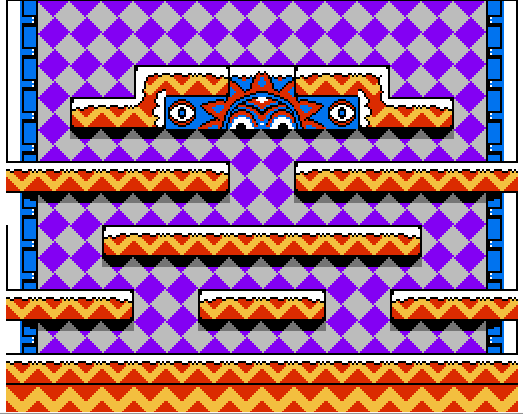
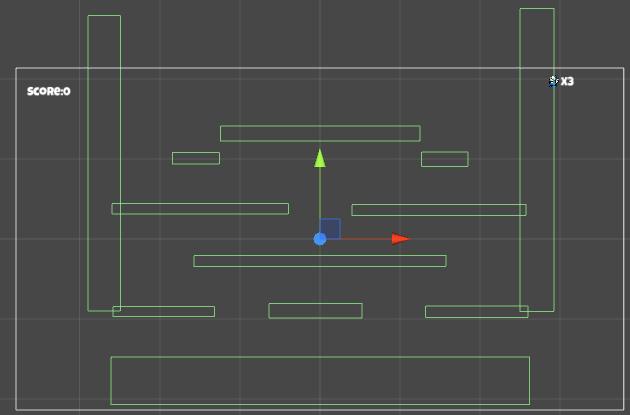
2.创建一个ground空对象给这个对象添加一些Collider 2D 组件,把这些Collide2D覆盖到地图可以行走的地方,创建以个wall空对象给这个对象添加两个Collider 2D组件,把这两个 Collide2D 覆盖到地图的两侧。
创建主角:
1.创建hero对象给其一张主角的图片精灵,给hero对象添加Rigidbody2D和Collider 2D组件使其可以进行物理运动和碰撞行为;

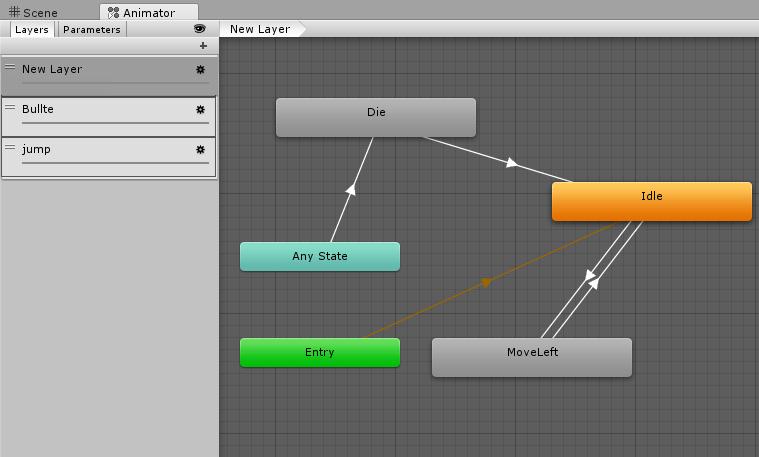
2. 创建动画控制器,编辑一些主角行为的的动画,再用动画控制器进行控制;
3. 添加HeroMove脚本,通过编辑代码使主角可以移动和跳跃;
//Update时通过射线检测判断是否可以跳跃:

RaycastHit2D hit = Physics2D.Linecast(this.transform.position, t.position, 1 << LayerMask.NameToLayer("ground"));

        //Debug.DrawLine(this.transform.position, t.position);// t.position

        //print((bool)hit);

        if (Input.GetButtonDown("Jump") && hit)

        {

            jump = true;

        }

···

//FixedUpdate

        bool speed = false; //触发动画的布尔变量

        float h = Input.GetAxis("Horizontal");

        if (h != 0)

        {

            speed = true;

        }

        Vector2 force = new Vector2(h * moveForce, 0);

        //限制移动速度

        if (Mathf.Abs(rb.velocity.x) < maxSpeed)

        {

            GetComponent<Animator>().SetBool("Speed", speed);

            rb.AddForce(force);

        }

        if (Mathf.Abs(rb.velocity.x) >= maxSpeed)

        {

            rb.velocity = new Vector2(Mathf.Sign(rb.velocity.x) * maxSpeed, rb.velocity.y);

        }

        //动画方向转变

        if (h < 0)

        {

            var s = this.transform.localScale;

            s.x = Mathf.Abs(-s.x);

            this.transform.localScale = s;

        }

        else if (h > 0)

        {

            var s = this.transform.localScale;

            s.x = -Mathf.Abs(-s.x);

            this.transform.localScale = s;

        }

        //跳跃

        if (jump)

        {

            GetComponent<Animator>().SetTrigger("jump");

            rb.AddForce(Vector2.up * jumpForce);

            jump = false;

        }
4.让主角可以发射子弹:
1. 制作子弹预制体 ,

2.给hero添加一个子节点Gun作为生成子弹的点,并添加脚本控制子弹的发射和行为。
void Update () {

		if (Input.GetButtonDown("Fire1"))

		{

			this.transform.parent.gameObject.GetComponent<Animator>().SetTrigger("Shoot");

			var rocket = Instantiate(rocketPrefab);

			rocket.transform.position = this.transform.position;

			if (this.transform.parent.localScale.x > 0)

			{

				rocket.transform.rotation = Quaternion.Euler(0, 0, 0);

				rocket.GetComponent<Rigidbody2D>().velocity = new Vector2(speed, 0);

			}

			else

			{

				rocket.transform.rotation = Quaternion.Euler(0, 0, 180);

				rocket.GetComponent<Rigidbody2D>().velocity = new Vector2(-speed, 0);

			}

		}

	}
创建敌人:
1.创建一个monsters空对象为了确定敌人生成的位置:
2. 创建monster对象给其一张敌人的图片精灵,给monster对象添加Rigidbody2D和Collider2D组件使其可以进行物理运动和碰撞行为,并把它做成预制体。

3. 添加Monster脚本,通过编辑代码使敌人可以移动和跳跃;
public class Monster : MonoBehaviour

{

    // public float speed = 3;

    private float MonsterMoveForce = 0.8f;  //速度

    //private float MonsterMaxSpeed = 0.5f;     //限制速度

    public float monsterJumpForce = 600f; //= 2.8f;

    private bool monsterJump = false;

    private Transform topCheck;

    private Transform frontCheck;

    private Transform downCheck;

    int h;

    private int hp = 1;

    public GameObject snowball;

    public void Start()

    {

        topCheck = transform.Find("topCheck");

        frontCheck = transform.Find("frontCheck");

        downCheck = transform.Find("DownCheck");

    }

    public void Update()

    {

        if (hp <= 0)

        {

            Vector2 s = this.transform.position;

            hp = 0;

            Destroy(this.gameObject);

            GameObject g = Instantiate(snowball);

            g.transform.position = s;

            return;

        }

    }

    public void FixedUpdate()

    {

        // 跳跃

        RaycastHit2D hit1 = Physics2D.Linecast(topCheck.position, this.transform.position, 1 << LayerMask.NameToLayer("ground"));

        RaycastHit2D hit2 = Physics2D.Linecast(downCheck.position, this.transform.position, 1 << LayerMask.NameToLayer("ground"));

        RaycastHit2D hit = Physics2D.Linecast(frontCheck.position, this.transform.position);

        h = Random.Range(0, 100);

        Rigidbody2D rb = this.transform.gameObject.GetComponent<Rigidbody2D>();

        Debug.DrawLine(this.transform.position, topCheck.position);

        Debug.DrawLine(this.transform.position, downCheck.position);

        Debug.DrawLine(this.transform.position, frontCheck.position);

        if (hit && hit.transform.gameObject.tag == "wall" || hit.transform.gameObject.tag == "destroyer")

        {

            Vector3 s = this.transform.localScale;//

            s.x = -s.x;

            this.transform.localScale = s;

        }

        else if (hit2 && hit && hit.transform.gameObject.tag == "ground")

        {

            monsterJump = true;

        }

        else

        {    //随机方向

            if (h == 2)

            {

                Vector3 s = this.transform.localScale;

                s.x = -s.x;

                this.transform.localScale = s;

            }

        }

        //移动

        Vector2 x = new Vector2(-this.transform.localScale.x * MonsterMoveForce, rb.velocity.y);

        rb.velocity = x;

        this.gameObject.GetComponent<Animator>().SetTrigger("move");

        //跳跃

        if (hit1 && hit2 && h == 3)

        {

            monsterJump = true;

        }

        if (monsterJump)

        {

            rb.AddForce(Vector2.up * monsterJumpForce);

            monsterJump = false;

        }

    }

    public void OnCollisionEnter2D(Collision2D collision)

    {

        if (collision.gameObject.tag == "ground")

        {

            this.gameObject.GetComponent<Animator>().SetTrigger("ground");

        }

        if (collision.gameObject.tag == "bullet")

        {

            hp--;

        }

    }

    public void OnCollisionExit2D(Collision2D collision)

    {

        if (collision.gameObject.tag == "ground")

        {

            this.gameObject.GetComponent<Rigidbody2D>().velocity = new Vector2(0, 0);

            this.gameObject.GetComponent<Animator>().SetTrigger("groundl");

        }

    }

}
创建雪球:
1. 创建snowball对象给其一张默认的图片精灵,给snowball对象添加Rigidbody2D和lColider2D组件使其可以进行物理运动和碰撞行,并把它做成预制体。



2.给snowball对象添加脚本通过编辑代码,添加状态机使雪球状态可以切换。
public class Snowball : MonoBehaviour

{

    StateMachine<Snowball> stateMachine = new StateMachine<Snowball>();

    public Sprite snowball1;

    public Sprite snowball2;

    public Sprite snowball3;

    public GameObject monster;

    public Transform frontCheck;

    public GameObject[] props;

    public GameObject balldestory;

    // Use this for initialization

    //雪球状态

    public class SnowballStateB : State<Snowball>

    {

        public float explodeTime = 0;

        public bool gun = false;

        public float gunForce = 3f;

        float dir;

        public override void Enter(Snowball e)

        {

            e.gameObject.GetComponent<SpriteRenderer>().sprite = e.snowball1; //获的图片

            e.gameObject.GetComponent<Animator>().SetTrigger("snowball1");

            e.frontCheck = e.transform.Find("frontCheck");

            e.gameObject.layer = LayerMask.NameToLayer("snowball");

        }

        public override void Update(Snowball e)

        {

            //雪球没滚时隔 6 个时间点恢复成版雪球

            if (gun == false)

            {

                explodeTime += Time.deltaTime;

                if (explodeTime > 6)

                {

                    explodeTime = 0;

                    e.stateMachine.ChangeState(new SnowballStateA());

                    return;

                }

            }

            else if (gun)

            {

                Rigidbody2D rb = e.gameObject.GetComponent<Rigidbody2D>();

                rb.freezeRotation = false;

                Vector2 v = new Vector2(dir * gunForce, rb.velocity.y);

                // rb.AddForce(v);

                rb.velocity = v;

                Collider2D[] enemies = Physics2D.OverlapCircleAll(e.transform.position, 0.05f, 1 << LayerMask.NameToLayer("monster"));

                foreach (Collider2D a in enemies)

                {

                    Vector2 s = a.gameObject.transform.position;

                    Destroy(a.gameObject);

                    GameObject prop = Instantiate(e.props[Random.Range(0, e.props.Length)]);

                    prop.transform.position = s;

                }

            }

        }

        public override void OnCollisionStay2D(Snowball e, Collision2D collision)

        {

            ContactPoint2D[] a = collision.contacts;

            if (gun == false)

            {

                if (collision.gameObject.tag == "player" && collision.gameObject.transform.FindChild("Gun").GetComponent<Gun>().isFire)

                {

                    //  dir = -GameObject.Find("hero").transform.localScale.x;

                    gun = true;

                    dir = -collision.transform.localScale.x;

                }

            }

        }

        public override void OnCollisionEnter2D(Snowball e, Collision2D collision)

        {

            if (gun == false)

            {

                if (collision.gameObject.tag == "snowball")

                {

                    gun = true;

                    dir = -collision.transform.localScale.x;

                }

            }

            if (gun)

            {

                if (collision.gameObject.tag == "wall" || collision.gameObject.tag == "snowball")

                {

                    dir = -dir;

                }

                if (collision.gameObject.tag == "player")

                {

                    //TODO

                    //雪球带着主角走

                    //transform.SetParent//设置父节点

                    //collision.transform.SetParent(e.transform);

                    //collision.transform.position = e.transform.position;

                    //torque //旋转

                }

            }

            if (collision.gameObject.tag == "destroyer")

            {

                e.gameObject.GetComponent<Animator>().SetTrigger("destrayer");

            }

        }

        public override void Exit(Snowball e)

        {

        }

    }

    //半雪球状态

    public class SnowballStateA : State<Snowball>

    {

        public float explodeTime = 0;

        int hp = 0;

        public override void Enter(Snowball e)

        {

            e.gameObject.GetComponent<SpriteRenderer>().sprite = e.snowball2;

            e.gameObject.GetComponent<Animator>().SetTrigger("snowball2");

            e.gameObject.layer = LayerMask.NameToLayer("monster");

            hp = 2;

        }

        public override void Update(Snowball e)

        {

            print(hp);

            if (hp <= 0)

            {

                e.stateMachine.ChangeState(new SnowballStateB());

                return;

            }

            explodeTime += Time.deltaTime;

            if (explodeTime > 5 && hp > 0)

            {

                explodeTime = 0;

                e.stateMachine.ChangeState(new SnowballState());

                return;

            }

        }

        public override void Exit(Snowball e)

        {

        }

        public override void OnCollisionEnter2D(Snowball e, Collision2D collision)

        {

            if (collision.gameObject.tag == "bullet")

            {

                hp--;

            }

        }

    }

    //monster被攻击状态;

    public class SnowballState : State<Snowball>

    {

        public float explodeTime = 0;

        Vector3 s;

        public int hp = 0;

        public override void Enter(Snowball e)

        {

            //取得图片精灵

            e.gameObject.GetComponent<SpriteRenderer>().sprite = e.snowball3;

            e.gameObject.GetComponent<Animator>().SetTrigger("snowball3");

            e.gameObject.layer = LayerMask.NameToLayer("monster");

            hp = 3;

        }

        public override void Update(Snowball e)

        {

            print(hp);

            if (hp <= 0)

            {

                e.stateMachine.ChangeState(new SnowballStateA());

                hp = 0;

                return;

            }

            explodeTime += Time.deltaTime;

            print(explodeTime);

            //经过多少时

            if (explodeTime > 4 && hp > 0)

            {

                explodeTime = 0;

                hp = 0;

                s = e.gameObject.transform.position;

                GameObject g = Instantiate(e.monster);

                g.transform.position = s;

                Destroy(e.gameObject);

                return;

            }

        }

        public override void OnCollisionEnter2D(Snowball e, Collision2D collision)

        {

            if (collision.gameObject.tag == "bullet")

            {

                hp--;

            }

        }

    }

    void Start()

    {

        stateMachine.Init(this, new SnowballState());

    }

    // Update is called once per frame

    void Update()

    {

    }

    public void FixedUpdate()

    {

        stateMachine.Update();

    }

    public void OnCollisionEnter2D(Collision2D collision)

    {

        stateMachine.OnCollisionEnter2D(this, collision);

    }

    public void OnCollisionStay2D(Collision2D collision)

    {

        stateMachine.OnCollisionStay2D(this, collision);

    }

    public void Destory()

    {

        Instantiate(balldestory);

        Destroy(this.gameObject);

    }

}
创建道具
1.添加道具预制体.
2.雪球撞到敌人时敌人死亡,在敌人死亡的地方随机生成一种道具。
3.主角吃到道具增加属性或者加分。
过关判定
- 判断场景中没有敌人并且没有雪球并且没有道具就过关了。
Unity经典游戏教程之:雪人兄弟的更多相关文章
- Unity经典游戏教程之:贪吃蛇
版权声明: 本文原创发布于博客园"优梦创客"的博客空间(网址:http://www.cnblogs.com/raymondking123/)以及微信公众号"优梦创客&qu ...
- Unity经典游戏教程之:是男人就下100层
版权声明: 本文原创发布于博客园"优梦创客"的博客空间(网址:http://www.cnblogs.com/raymondking123/)以及微信公众号"优梦创客&qu ...
- Unity经典游戏教程之:冒险岛
版权声明: 本文原创发布于博客园"优梦创客"的博客空间(网址:http://www.cnblogs.com/raymondking123/)以及微信公众号"优梦创客&qu ...
- Unity经典游戏教程之:合金弹头
版权声明: 本文原创发布于博客园"优梦创客"的博客空间(网址:http://www.cnblogs.com/raymondking123/)以及微信公众号"优梦创客&qu ...
- Unity经典游戏教程之:弓之骑士
版权声明: 本文原创发布于博客园"优梦创客"的博客空间(网址:http://www.cnblogs.com/raymondking123/)以及微信公众号"优梦创客&qu ...
- Unity经典游戏编程之:球球大作战
版权声明: 本文原创发布于博客园"优梦创客"的博客空间(网址:http://www.cnblogs.com/raymondking123/)以及微信公众号"优梦创客&qu ...
- C#开发Unity游戏教程之Unity中方法的参数
C#开发Unity游戏教程之Unity中方法的参数 Unity的方法的参数 出现在脚本中的方法,无论是在定义的时候,还是使用的时候,后面都跟着一对括号“( )”,有意义吗?看起来最多也就是起个快速识别 ...
- C#开发Unity游戏教程之Scene视图与脚本的使用
C#开发Unity游戏教程之Scene视图与脚本的使用 Unity中Scene视图的快捷操作 Scene视图是开发者开发游戏时,操作最频繁的视图.因为一旦一个游戏对象被添加到游戏的场景中,就需要首先使 ...
- Unity实战案例教程之:不免费的PacMan(初级→中级)
课程内容介绍: 本套课程适合以下人士: - 免费资料没教会你游戏开发的: - 学了Unity基础不知道怎么用在游戏项目里的: - 想快速开发一款好玩的游戏的: - 想学游戏不知道如何入门的: - 对游 ...
随机推荐
- 在CentOS 7上安装Python3
源码包安装 Python官方没有对Linux打包, 需要下载源码包进行编译. 可以自己下载最新版本的Python, 在Python下载页面, 点击Python3.x.x版本对应的Download, 在 ...
- asp.net core 2.2 生产环境直接更新View页面并立即生效
有的时候我们会直接在生产环境上更新页面文件,比如更改了JS代码,CSS代码或页面的文案,布局等.这种没有改到后台代码的情况一般就是直接发布页面文件了,在asp.net core 2.2以前的版本(没有 ...
- code forces 1173 C. Nauuo and Cards
本文链接:https://www.cnblogs.com/blowhail/p/10990833.html Nauuo and Cards 原题链接:http://codeforces.com/con ...
- asp.net core系列 67 Web压力测试工具WCAT
一.介绍 最近搭建了一套CQRS框架,需要在投入开发前,进行必要的压力测试.Web Capacity Analysis Tool (Wcat)是一种轻量级HTTP负载生成工具,主要用于衡量受控环境中 ...
- 走近Java之包装器类Integer
前几天,有个同事问了我一个关于Integer类赋值的问题,很有意思,我们一起来看一下(如果有说的不正确的地方,欢迎大家指正). 如上图,同样是赋值,但是两次比较的结果完全不同.我们走近了解一下. 在I ...
- 走近Java之幕后的String
前几天,有个同事问了我一个表面看起来显而易见的问题,是关于String的,我们一起来看一下(如果有说的不正确的地方,欢迎大家指正). java中,字面量在编译期计算,并且String字面量作为常量,存 ...
- python 多个装饰器的调用顺序
python 多个装饰器的调用顺序 一般情况下,在函数中可以使用一个装饰器,但是有时也会有两个或两个以上的装饰器.多个装饰器装饰的顺序是从里到外(就近原则),而调用的顺序是从外到里(就远原则). 原代 ...
- Skyline WEB端开发5——添加标签后移动
针对于标签或者模型,在skyline上可以进行移动.可以让一个模型可以像无人机似的飞行,或者描述从一个点到另一个点的飞行轨迹. 话不多说,直接上干货. 第一步 添加标签 参考网址:https://ww ...
- android_activity_研究(二)
这次开始玩玩活动的生命周期.废话不说,先搞个小应用,大体思路是:主界面有两个按钮,一个按钮按下后,出现第二个界面:另一个按钮按下后,出现第三个界面,真他妈简单. 一.主界面: 1. 主界面布局xml文 ...
- 关于红黑树(R-B tree)原理,看这篇如何
学过数据数据结构都知道二叉树的概念,而又有多种比较常见的二叉树类型,比如完全二叉树.满二叉树.二叉搜索树.均衡二叉树.完美二叉树等:今天我们要说的红黑树就是就是一颗非严格均衡的二叉树,均衡二叉树又是在 ...