
Css3案例
<!DOCTYPE html>

<html>

<meta charset=utf->

    <head>

        <style>

            body{

                backgound:#f9f9f9;

            }

            .img{

                position: absolute;

                width: 300px;

                height: 200px;

                border:10px solid #ccc;

                overflow:hidden;

            }

            .img img{

                width:%;

                height:%;

                transition:all .3s ease;

            }

            .img:hover img{

                -webkit-transform:scale(1.5);

            }

            .back{

                z-index:;

                background-color: rgba(,,, );

                position: absolute;

                top: ;

                left: ;

                height:%;

                text-align: center;

                color: #;

                -webkit-transition:all .5s  ease;

            }

            .back h2{

                text-align:center;

                color:#;

                -webkit-transition:all .5s  ease;

                background-color: rgba(,,, 0.5);

                height:30px;

                position: relative;

                top: -55px;

            }

            .back p{

                position: relative;

                bottom: -130px;

                -webkit-transition:all .5s  ease;

            }

            .back:hover h2{

                text-align:center;

                color:#fff;

                top:;

            }

            .back:hover p{

                text-align:center;

                color:#fff;

                bottom:;

            }

            .info{

                background-color: rgba(,,,.);

                padding:5px;

                color:#fff;

                text-decoration: none;

                -ms-filter: "progid: DXImageTransform.Microsoft.Alpha(Opacity=0)";

               filter: alpha(opacity=);

               opacity: ;

               -webkit-transition: all .2s ease-in-out;

               -moz-transition: all .2s ease-in-out;

               -o-transition: all .2s ease-in-out;

               -ms-transition: all .2s ease-in-out;

               transition: all .2s ease-in-out;

            }

            .back:hover a{

                -ms-filter: "progid: DXImageTransform.Microsoft.Alpha(Opacity=100)";

               filter: alpha(opacity=);

               opacity: ;

               -webkit-transform: translateY(0px);

               -moz-transform: translateY(0px);

               -o-transform: translateY(0px);

               -ms-transform: translateY(0px);

               transform: translateY(0px);

            }

            .back:hover{

                background-color: rgba(,,,.);

            }

        </style>

    </head>

<body>

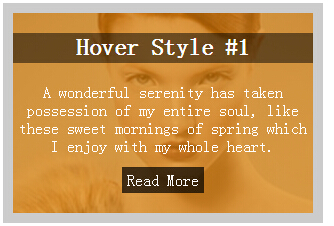
<div class="img">

    <img src="1.jpg">

    <div class="back">

        <h2>Hover Style #</h2>

        <p>A wonderful serenity has taken possession of my entire soul, like these sweet mornings of spring which I enjoy with my whole heart.</p>

        <a href="#" class="info">Read More</a>

    </div>

</div>

</body>

</html>

<!DOCTYPE html>

<html>

<meta charset=utf->

    <head>

        <style>

            body{

                backgound:#f9f9f9;

            }

            .view {

                width: 300px;

                height: 200px;

                margin: 10px;

                float: left;

                border: 10px solid #fff;

                overflow: hidden;

                position: relative;

                text-align: center;

                -webkit-box-shadow: 2px 1px 5px #ccc;

                -moz-box-shadow: 2px 1px 5px #ccc;

                box-shadow: 2px 1px 5px #ccc;

                cursor: default;

                background: #fff;

            }

            .mask{

                width: 360px;

                height: 470px;

                background: rgba(,,, 0.7);

                position: absolute;

                top: 0px;

                left: 0px;

                -webkit-transition: all .2s ease-in-out;

                -moz-transition: all .2s ease-in-out;

                -o-transition: all .2s ease-in-out;

                -ms-transition: all .2s ease-in-out;

                transition: all .2s ease-in-out;

                transform: translate(265px, 145px) rotate(45deg);

            }

            .view:hover .mask{

                left: -249px;

                top: -313px;

            }

            .content{

                position:absolute;

                top:;

                left:;

                width:%;

                height:%;

                z-index:;

            }

            .content h2{

                position: absolute;

                top: -80px;

                width: %;

                right: -310px;

                color:#fff;

                transition: all .2s ease-in-out;

            }

            .content:hover h2{

                top:;

                left:;

            }

            .content p{

                position: absolute;

                width: %;

                bottom: -100px;

                color:#fff;

                right: -319px;

                transition: all .5s ease-in-out;

            }

            .content:hover p{

                bottom:;

                left:;

            }

            .info{

                text-decoration: none;

                color:#fff;

                background: rgba(, , , 0.8);

                padding:10px;

                position: relative;

                top: -40px;

                transition: all .9s ease-in-out;

            }

            .vide:hover a{

                top:60px;

            }

        </style>

    </head>

<body>

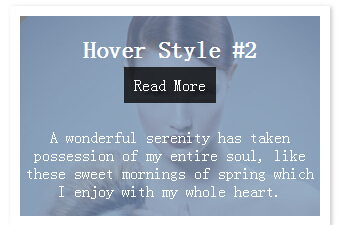
<div class="view view-second">

    <img src="1.jpg">

    <div class="mask"></div>

    <div class="content vide">

        <h2>Hover Style #</h2>

        <p>A wonderful serenity has taken possession of my entire soul, like these sweet mornings of spring which I enjoy with my whole heart.</p>

        <a href="#" class="info">Read More</a>

    </div>

</div>

</body>

</html>
Css3案例的更多相关文章
- 15款HTML5/CSS3案例展示,导航,日历,钟表。
对于前端开发者来说,分享一些优秀的HTML5应用可以直接拿来用,更重要的是可以激发创作的灵感.今天我们要分享9款精挑细选的HTML5应用,个个都是干货. 1.HTML5/CSS3滑块动画菜单 图标动画 ...
- CSS3实战开发 表单发光特效实战开发
首先,我们先准备好html代码: <!doctype html> <html> <head> <meta charset="utf-8"& ...
- css3 鼠标悬浮动画效果
CSS3案例 <!DOCTYPE html> <html> <head> <meta charset="UTF-8"> <ti ...
- 纯CSS仿windows系统loading效果
今天分享的css3案例模仿了window系统下的loading效果里面最关键的地方使用了css3 animation的delay属性以及贝塞尔曲线(cubic-bezier)的过渡效果,如下所示 sp ...
- Web前端业界氛围极好的群——鬼懿IT
鬼群简介 鬼懿IT主群号:,鬼懿IT-成长群:181368696 , 创建于2005年12月 ,聚集的业内人事包括:阿当,大漠,辣妈,崔凯,Rei,周裕波,司徒正美,丸子,鬼森林,寒冬,franky, ...
- JS 经验总结
1.IE中div的高度是content+padding+border之和,其它的是content的高度 2.一个标签里面只有一个属性,class='cls1 cls2' 3.同一页面不能出现相同的id ...
- 国外优秀的UI设计资源库收集
国外优秀的UI设计资源库 网站设计或者说UI设计对于Web上的运用是非常的关键,一个站做得好不好,能不能吸引人的眼球,设计占了不低的地位,但话又说回来,Web前端人员又有多少人是设计专业毕业,具有这方 ...
- CSS3选择器的研究,案例
在上一篇CSS3选择器的研究中列出了几乎所有的CSS3选择器,和伪类选择器,当是并没有做案例的研究,本想在那篇文章里面写,但想想如果把案例都写在那篇文章里面,对于查找来说就不是很方便,所有另开一篇来讲 ...
- 12个学习 CSS3 网站布局设计的优秀案例
网络上有很多的 CSS 画廊站点供大家对各类网站作品进行打分和评论,每天有数以百计的优秀网站被推荐上面,这对于网页设计师来说是很好的灵感来源.今天,我们选择了15赢得 CSS 设计大奖的优秀作品,帮助 ...
随机推荐
- POJ1328 Radar Installation(贪心)
题目链接. 题意: 给定一坐标系,要求将所有 x轴 上面的所有点,用圆心在 x轴, 半径为 d 的圆盖住.求最少使用圆的数量. 分析: 贪心. 首先把所有点 x 坐标排序, 对于每一个点,求出能够满足 ...
- POJ 2699 战斗小王子
题目大意:一场联赛可以表示成一个完全图,点表示参赛选手,任意两点u, v之间有且仅有一条有向边(u, v)或(v, u),表示u打败v或v打败u.一个选手的得分等于被他打败的选手总数.一个选手被称为“ ...
- 四种方法解析JSON数据
(1)使用TouchJSon解析方法:(需导入包:#import "TouchJson/JSON/CJSONDeserializer.h") //使用TouchJson来解析北京的 ...
- 转:有关Java泛型的类型擦除(type erasing)
转载自:拈花微笑 自从Java 5引入泛型之后,Java与C++对于泛型不同的实现的优劣便一直是饭后的谈资.在我之前的很多training中,当讲到Java泛型时总是会和C++的实现比较,一般得出的结 ...
- maven 项目调试本地代码
我们新建的maven项目,一开始调试的时候是不进断点的 怎么解决呢 点击add 选择project 选择要添加的项目
- hdu3724Encoded Barcodes(Trie tree)
题目请戳这里 题目大意:给n个字符串,给m个询问,每个询问给k个条形码.每个条形码由8个小码组成,每个小码有相应的宽度,已知一个条形码的宽度只有2种,宽的表示1,窄的表示0.并且宽的宽度是窄的宽度的2 ...
- 第一章 工欲善其事 必先利其器—Android SDK工具(3)
1.3没有真机一样开发--Android模拟器 有些时候,我们手头上可能并没有符合要求的Android设备.那么这时候我们是不是对调试或者开发就一筹莫展了呢?当然不是.由于我们有Android模拟器. ...
- Android开发/源代码资源汇总
全网最全的Android游戏源代码汇总 mod=viewthread&tid=5080&fromuid=5" target="_blank">htt ...
- 【剑指offer】链表倒数第k个节点
转载请注明出处:http://blog.csdn.net/ns_code/article/details/25662121 在Cracking the Code Interview上做过了一次,这次在 ...
- 【移动开发】Android中WIFI开发总结(一)
WIFI就是一种无线联网技术,常见的是使用无线路由器.那么在这个无线路由器的信号覆盖的范围内都可以采用WIFI连接的方式进行联网.如果无线路由器连接了一个ADSL线路或其他的联网线路,则又被称为“热 ...