
nim_duilib(20)之即刻(1)
note
一个基于nim_duilib仿wechat的IM。
主界面
样式
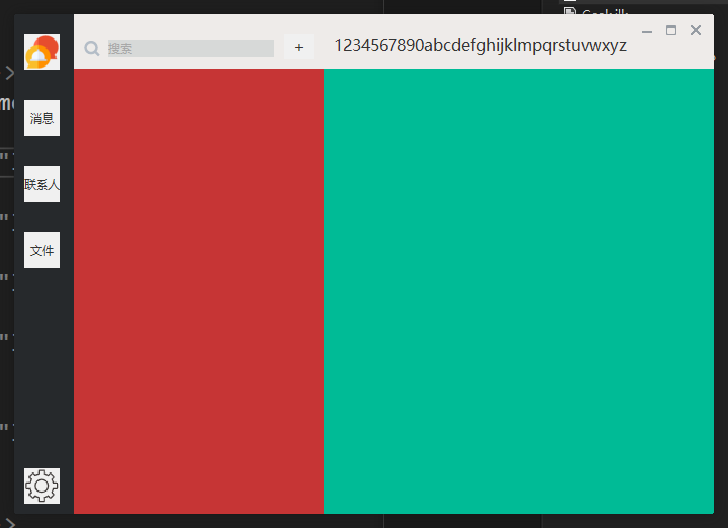
美工差了。
布局
整体为水平布局,左边的深灰色区域(frame_left),右侧的light white区域(frame_right)。
右侧的区域(frame_right)分为垂直布局,其中,左侧红色用于显示好友列表,右侧绿色用于显示聊天对话框
global xml中定义
定义了一些控件的样式
    <!--左侧窗口控件-->

    <Class name="left_btn_portrait" tooltiptext="头像"  height="36" width="36" margin="10,20,10,10" bkcolor="color_light_white1" normalimage="file='../left_frame/portrait_32X32.png'" />

    <Class name="left_opt_msg" tooltiptext="消息" text="消息" height="36" width="36" margin="10,20,10,10" bkcolor="color_light_white1"

                      selectednormalimage="file='../public/button/btn_global_red_80x30_normal.png'"

                      selecteddisabledimage="file='../public/button/btn_global_red_80x30_normal.png' fade='30'"/>

    <Class name="left_opt_contact" tooltiptext="联系人" text="联系人" height="36" width="36" margin="10,20,10,10" bkcolor="color_light_white1"

                      selectednormalimage="file='../public/button/btn_global_red_80x30_normal.png'"

                      selecteddisabledimage="file='../public/button/btn_global_red_80x30_normal.png' fade='30'"/>

    <Class name="left_opt_file" tooltiptext="文件" text="文件" height="36" width="36" margin="10,20,10,10" bkcolor="color_light_white1"

                      selectednormalimage="file='../public/button/btn_global_red_80x30_normal.png'"

                      selecteddisabledimage="file='../public/button/btn_global_red_80x30_normal.png' fade='30'"/>

    <Class name="left_btn_setting" tooltiptext="设置" height="36" width="36" margin="10,20,10,10" bkcolor="color_light_white1" normalimage="file='../left_frame/setting.png'" />

    <!--中间窗体控件-->

    <TextColor name="edit_tip" value="#ffa8a8a8"/>

    <TextColor name="edit_bk_color" value="#ffd7d9d8"/>

    <Class name="middle_rich_edit_search" bkcolor="edit_bk_color" font="system_14" multiline="false" promptmode="true" prompttext="搜索" promptcolor="edit_tip"/>

    <Class name="middle_btn_add" font="system_16" bkcolor="color_light_white1"/>
frame_left
frame_left为垂直布局。 xml文件如下
    <!--左侧的frame-->

    <VBox class="frame_left" height ="stretch" width="60" >

      <!--头像-->

      <Button class="left_btn_portrait"  />

      <!--消息-->

      <Option class = "left_opt_msg" group = "left_frame" />

      <!--通讯录-->

      <Option class = "left_opt_contact" group = "left_frame" />

      <!--文件-->

      <Option class = "left_opt_file" group = "left_frame" />

      <Control />

      <!--设置-->

      <Button class = "left_btn_setting" />

    </VBox>
frame_right
xml内容
    <!--右侧的frame-->

    <VBox class="frame_middle_vbox" height="stretch" width="stretch">

      <!---->

      <HBox width="stretch" height="55" >

        <!--搜索-->

        <HBox width="250" height="30" margin="0,20,0,20">

          <Control name="search_icon" width="auto" height="auto" valign="center" margin="10,0,0,0" alpha="192"

                   bkimage="file='../frame_middle/icon_search_gray.png' "/>

          <RichEdit class="middle_rich_edit_search" name="search_edit" height="auto" margin="8,0,10,0" valign="center" font="system_12" />

          <Button class="middle_btn_top_del" name="clear_input" visible="false" valign="center" margin="0,0,10,0" />

          <Button class="middle_btn_top_add" text="+" height="25" width="30" margin="0,0,10,10"/>

        </HBox>

        <!--标题-->

        <Label text="1234567890abcdefghijklmpqrstuvwxyz" font="system_16" margin="10,20,0,0"/>

        <Control />

        <!--右上角3个按钮-->

        <Button class="btn_wnd_min" name="minbtn" margin="4,6,0,0" />

        <Box width="21" margin="4,6,0,0">

          <Button class="btn_wnd_max" name="maxbtn" />

          <Button class="btn_wnd_restore" name="restorebtn" visible="false"/>

        </Box>

        <Button class="btn_wnd_close" name="closebtn" margin="4,6,8,0"/>

      </HBox>

      <!--右侧:联系人列表和聊天框-->

      <HBox>

        <!--联系人列表-->

        <VBox bkcolor="red" width="250" height="stretch">

        </VBox>

        <!--聊天对话框-->

        <VBox bkcolor="green" width="stretch" height="stretch">

        </VBox>

      </HBox>

    </VBox>
xml完整
<?xml version="1.0" encoding="UTF-8"?>

<Window mininfo="700, 500" size="700,500" caption="0,0,0,500" shadowattached="true" sizebox="4,5,5,5"  >

  <HBox bkcolor="color_light_white1" height="stretch" width="stretch">

    <!--左侧的frame-->

    <VBox class="frame_left_vbox" height ="stretch" width="60" >

      <!--头像-->

      <Button class="left_btn_portrait"  />

      <!--消息-->

      <Option class="left_opt_msg" group = "left_frame" />

      <!--通讯录-->

      <Option class="left_opt_contact" group = "left_frame" />

      <!--文件-->

      <Option class="left_opt_file" group = "left_frame" />

      <Control />

      <!--设置-->

      <Button class="left_btn_setting" />

    </VBox>

    <!--右侧的frame-->

    <VBox class="frame_middle_vbox" height="stretch" width="stretch">

      <!---->

      <HBox width="stretch" height="55" >

        <!--搜索-->

        <HBox width="250" height="30" margin="0,20,0,20">

          <Control name="search_icon" width="auto" height="auto" valign="center" margin="10,0,0,0" alpha="192"

                   bkimage="file='../frame_middle/icon_search_gray.png' "/>

          <RichEdit class="middle_rich_edit_search" name="search_edit" height="auto" margin="8,0,10,0" valign="center" font="system_12" />

          <Button class="middle_btn_top_del" name="clear_input" visible="false" valign="center" margin="0,0,10,0" />

          <Button class="middle_btn_top_add" text="+" height="25" width="30" margin="0,0,10,10"/>

        </HBox>

        <!--标题-->

        <Label text="1234567890abcdefghijklmpqrstuvwxyz" font="system_16" margin="10,20,0,0"/>

        <Control />

        <!--右上角3个按钮-->

        <Button class="btn_wnd_min" name="minbtn" margin="4,6,0,0" />

        <Box width="21" margin="4,6,0,0">

          <Button class="btn_wnd_max" name="maxbtn" />

          <Button class="btn_wnd_restore" name="restorebtn" visible="false"/>

        </Box>

        <Button class="btn_wnd_close" name="closebtn" margin="4,6,8,0"/>

      </HBox>

      <!--右侧:联系人列表和聊天框-->

      <HBox>

        <!--联系人列表-->

        <VBox bkcolor="red" width="250" height="stretch">

        </VBox>

        <!--聊天对话框-->

        <VBox bkcolor="green" width="stretch" height="stretch">

        </VBox>

      </HBox>

    </VBox>

  </HBox>

</Window>
nim_duilib(20)之即刻(1)的更多相关文章
- IntelliJ IDEA 的 20 个代码自动完成的特性
http://www.oschina.net/question/12_70799 在这篇文章中,我想向您展示 IntelliJ IDEA 中最棒的 20 个代码自动完成的特性,可让 Java 编码变得 ...
- 总结swift语言常见的20个问题和回答
1.假设我是个刚入门的iOS开发人员,选swift学习呢,还是选objective-c学习,还是两个都学? 这个能够依据两种情况来决定:1.我想进入公司担任iOS开发的职位 2.我仅仅想做个独立 ...
- 【IDEA&&Eclipse】3、IntelliJ IDEA 的 20 个代码自动完成的特性
在这篇文章中,我想向您展示 IntelliJ IDEA 中最棒的 20 个代码自动完成的特性,可让 Java 编码变得更加高效.对任何集成开发环境来说,代码的自动完成都是最最重要的一项功能,它根据你输 ...
- 20个实用的javascript技巧及实践(一)
在本篇文章中,我们将会向大家分享JavaScript开发中的小技巧.最佳实践和实用内容,不管你是前端开发者还是服务端开发者,都应该来看看这些编程的技巧总结,绝对会让你受益匪浅的. 文中所提供的代码片段 ...
- 仿即刻app"猜你喜欢"切换控件
最近在即刻里看到即刻的"猜你喜欢"的板块,觉得效果很赞. 当点击"换一换"时,上面三个条目程序切换效果,并且三个条目的切换以不同的速度进行. 于是开始想办法撸出 ...
- C++代码优化之nim_duilib控件关联
前言 使用nim_duilib关联控件,优化后.的确减少了代码量,那么,执行效率呢? 时间执行的长短与硬件.软件有关,以下内容仅为参考. 测试代码 下面的代码,分为两部分, 循环使用for,非循环则直 ...
- nim_duilib(13)之添加fmt库
introduction 习惯使用fmt库做字符串的格式化操作.尽管nim_duilib提供了类似的函数. 故项目demo_xml引入了外部库fmt framework.h中添加下面的以便使用fmt库 ...
- nim_duilib(1)之第一个dui executable(including configure setting in vs2017)
before starting clone nim_duilib: https://github.com/netease-im/NIM_Duilib_Framework 迁出github的源码即可. ...
- CSharpGL(20)用unProject和Project实现鼠标拖拽图元
CSharpGL(20)用unProject和Project实现鼠标拖拽图元 效果图 例如,你可以把Big Dipper这个模型拽成下面这个样子. 配合旋转,还可以继续拖拽成这样. 当然,能拖拽的不只 ...
随机推荐
- 问题记录:SNP 标记 phasing
GATK4 检测的SNP标记,有些位点会在检测过程中完成 phasing,在后续做基因型填充的时候有坑. GATK4 phasing 结果的缺失位点不是 ./. 也不是 .|. 而是直接变成一个单独 ...
- perl FileHandle 模块使用
打开多个文件时必备啊 1 use FileHandle; 2 3 my (%index,%fh); 4 # 创建句柄,这里利用gzip 压缩下 5 foreach my $k(keys %index) ...
- centOS6和7单用户修改密码
CentOS6 1. 进入启动系统倒计时的时候,按esc 之后进入一下界面: 2. 按a 键进入修改内核参数页面 3. 在quiet后面加入空格和1 ,如下:回车进 ...
- ubuntu常见错误--Could not get lock /var/lib/dpkg/lock
ubuntu常见错误--Could not get lock /var/lib/dpkg/lock 通过终端安装程序sudo apt-get install xxx时出错: E: Could ...
- SQL-Union、Union ALL合并两个或多个 SELECT 语句的结果集
UNION 操作符用于合并两个或多个 SELECT 语句的结果集. 请注意,UNION 内部的 SELECT 语句必须拥有相同数量的列.列也必须拥有相似的数据类型.同时,每条 SELECT 语句中的列 ...
- MySQL深层理解,执行流程
MySQL是一个关系型数据库,关联的数据保存在不同的表中,增加了数据操作的灵活性. 执行流程 MySQL是一个单进程服务,每一个请求用线程来响应, 流程: 1,客户请求,服务器开辟一个线程响应用户. ...
- Centos7服务器上RabbitMQ单机安装
一.背景 最近项目中用到了RabbitMQ,但是发现自己本地没有安装,此文记录一下本地RabbitMQ的安装过程.注意不同的系统安装方式略有不同,此处我们记录的是Centos7的安装方式. 二.安装方 ...
- Shell 格式化输出printf、awk
目录 Shell 文件的格式化与相关处理 printf.awk 格式化打印printf 案例.格式化输出文件内容 输出命令echo 案例 awk数据处理工具 语法格式 处理流程 AWK内置变量 条件 ...
- 利用unordered_map维护关联数据
在leetcode上刷339题Evaluate Division(https://leetcode.com/problems/evaluate-division/#/description)时在脑中过 ...
- java代码定时备份mysql数据库及注意事项——基于 springboot
源码地址: https://gitee.com/kevin9401/BackUpDataBase git 拉取: https://gitee.com/kevin9401/BackUpDataBase. ...