
CSS3 绘制360安仔小精灵[原创]
Css3图形通常由矩形,圆形,椭圆,三角形,梯形等组合而成。
矩形,为display:block的块级元素设定宽高,便能实现, 圆角矩形,椭圆,圆形,则通过border-radius 属性来得到。
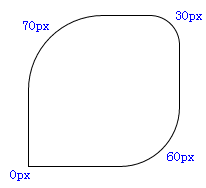
圆角矩形,几种写法:
1, border-radius: 70px 30px 60px 0px;
按顺时针方向, 上左,上右,下右,下左, 分别定义了矩形4个角的弧度。
如图:
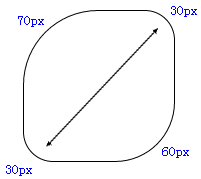
2、border-radius: 70px 30px 60px ;
不写第4个(下左角)的值,那么值默认与它的对角(上右角)相等,等同于 border-radius: 75px 30px 60px 30px;
如图:
3、border-radius: 70px 30px;
是border-radius: 70px 30px 70px 30px; 的缩写形式,对角的弧度相同。
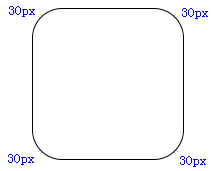
4. border-radius:30px
是border-radius: 30px 30px 30px 30px; 的缩写形式。
如图:
椭圆
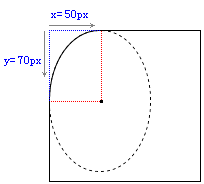
border-xxx-xxx-radius:x y; x, y两个值分别代表着椭圆长轴和短轴长度的一半,第1个值x,是以某角为原点,在横轴方向上取值,第2个值y,是以某角为原点,在竖轴方向上取值,例如: border-top-left-radius:50px 70px;
此时,原点为上左角,在横轴方向取值50px,竖轴方向取值70px,两点间画一条弧线,弧线为所在椭圆的1/4边。
如图:
同样, border-bottom-right-radius:50px 70px;
此时,原点则为下右角,在横轴方向取值50px,竖轴方向取值70px,两点间画一条弧线。
而要想让当前矩形变成椭圆,则要让xxx两个值,分别等于矩形长宽的一半,用百分比就是50%。
border-top-left-radius: % %;

border-top-right-radius: % %;

border-bottom-left-radius: % %;

border-bottom-right-radius: % %;
代码缩写为 border-radius: 50% ; 即可,得到的椭圆圆点正好是矩形的中心。
如果矩形长宽相等,则画出来的就是圆了。
三角形的绘制,需要border属性来实现。
border: 20px solid;

border-top-color:red;

border-right-color:green;

border-bottom-color:blue;

border-left-color:yellow;

width:100px;

height: 100px;

background: black; // 背景色为黑。
如图:
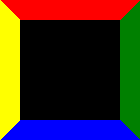
为了更清楚的看清border所形成的三角形状, 我们将width 和 height的值均设置为0;

一目了然,产生4个不同颜色的三角形。
要形成三角,需要两个相邻边border的配合,只一个边是无法实现的。
如果只定义了红色的上边框,如下代码
border-top: 20px solid red;

width:100px;

height: 100px;

background: black;
那么看图,三角无法形成。

接下来,假如我们想得到红色三角形,就要让左右边框透明,下边框去掉(或根本不去定义下边框)。
border-top: 20px solid red;

border-left: 20px solid transparent;

border-right: 20px solid transparent;

width:0px;

height: 0px;
如图:

当然,你可以试着将左边框或右边框去掉 border-left:none,或(border-right:none) 看看会得到什么三角效果,
通过调整border的宽度,可以将这两个直角三角形拼接成任意形状的三角形。
  border-top: 40px solid red;

  border-left: 10px solid transparent;

  border-right: 30px solid transparent;

  width: 0px;

  height: 0px;
如图:

a 是 border-left:10px;
b 是 border-right:30px;
c 是 border-top:40px;
根据以上技术点的介绍,我们开始绘制安仔, O(∩_∩)O
基本框架的绘制,选择使用绝对位置position:absolute;来布局各个元素,它们需要有一个相同的父级元素position: relative; 来作为参照。
如图:
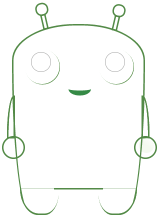
眼框
画边框弧线。
border-radius: 35px;
背景色径向渐变,从圆形的左上角开始。
background: -webkit-radial-gradient(left top, #fffffa, #d5d8df);
包括眼睛里的亮光,也是通过背景渐变的方式,这里采用的是线性渐变。
background: -webkit-gradient(linear, left top, 43% 70%, from(#fff), to(#000));
linear 线性
左上角开始(left,top),横向43%,纵向70%处截止渐变。
触角
Transform该属性允许我们对元素进行旋转、缩放、移动或倾斜,
transform-origin属性,设定中心点,整个图形绕着这个点进行角度变化, 例如:transform-origin:bottom left, 使用左下角作为原点。
rotate(angle) 定义 2D 旋转,规定角度。
-webkit-transform-origin: bottom left;

-webkit-transform: rotate(-13deg);
对基本线条着色的过程可以帮助我们调整z-index,也就是各个元素的重叠层次,多余的线条和边角要遮掉。
利用overflow:hidden的属性来截取所要的部分,绘制复杂图形的时候常用的方法就是切割和拼接,将图形切割成一个个简单的小块,通过层叠和旋转变化进行组合。
安仔的身体和双腿,就是拼接而成, 身体部分的弧线,通过border-top-left-radius 等属性来进行微调实现。
最终的结果:

demo源代码:
<!DOCTYPE html>

<html xmlns="http://www.w3.org/1999/xhtml">

  <head>

    <meta http-equiv="Content-Type" content="text/html; charset=gb2312" />

    <title>demo</title>

    <style type="text/css">

        .wapper {

            position: relative;

            width: 260px;

            height: 373px;

            left: 100px;

            margin-top: 100px;

        }

        .bodyMain {

            width: 260px;

            height: 373px;

            border: 3px solid #538a47;

            border-bottom: 3px solid  transparent;

            border-top-left-radius: % %;

            border-top-right-radius: % %;

            border-bottom-right-radius: % %;

            border-bottom-left-radius: % %;

            position: absolute;

            z-index: ;

            background: -webkit-radial-gradient(bottom, rgba(,,,), #73c443);

        }

        .footer {

            width: 75px;

            height: 50px;

            border-top: 1px dotted #538a47;

            border-bottom: 3px solid #538a47;

            position: absolute;

            bottom: -9px;

            z-index: ;

            background: -webkit-radial-gradient(bottom, rgba(,,,), #73c443);

        }

        .footerLeft {

            left: 16px;

            border-bottom-left-radius: % %;

            border-bottom-right-radius: % %;

            border-left: 2px solid #538a47;

        }

        .footerRight {

            right: 10px;

            border-bottom-right-radius: % %;

            border-bottom-left-radius: % %;

            border-right: 2px solid #538a47;

        }

        .chassis{

            border-top: 3px solid #538a47;

            position: absolute;

            bottom: 42px;

            width: 98px;

            left: 84px;

            z-index: ;

            background-color: black;

        }

        .eyes{

            width: 70px;

            height: 70px;

            border-radius: 35px;

            position: absolute;

            z-index: ;

            background: -webkit-radial-gradient(left top, #fffffa, #d5d8df);

            box-shadow: 1px 1px #4f893c;

        }

        .eyesLeft {

            left: 25px;

            top: 50px;

        }

        .eyesRight {

            right: 17px;

            top: 50px;

        }

        .pupil{

            position: absolute;

            top: 6px;

            left: 13px;

            width: 38px;

            height: 38px;

            border: 1px solid #aaa;

            border-radius: %;

            background-color: #;

        }

        .pupil i {

            display:block;

            width: 25px;

            height: 25px;

            border-radius: 25px;

            background: -webkit-gradient(linear, left top, % %, from(#fff), to(#));

            position: absolute;

            left: 5px;

            top: 3px;

            z-index: ;

        }

        .pupil cite {

            display:block;

            width: 25px;

            height: 25px;

            border-radius: 25px;

            background: -webkit-gradient(linear, right bottom, % %, from(#fff), to(#));

            position: absolute;

            left: 10px;

            top: 10px;

        }

        .mouth{

            position: absolute;

            left: 110px;

            top: 120px;

            border-bottom: 10px solid #358a46;

            width: 45px;

            height: 10px;

            border-bottom-right-radius: 50px 30px;

            border-bottom-left-radius: 50px 30px;

        }

        .arm {

            position: absolute;

            width: 40px;

            height: 40px;

            border: 3px solid #538a47;

            border-radius: %;

            top: %;

            background: -webkit-radial-gradient(bottom, rgba(,,,), #73c443);

            z-index: ;

        }

        .arm_l {

            left: -20px;

        }

        .arm_r {

            right: -30px;

        }

        .arm i {

            position: absolute;

            display: block;

            width: 30px;

            height: 30px;

            border-radius: 30px;

        }

        .arm_r i {

            background: -webkit-gradient(linear, right top, % %, from(#fff), to(rgba(,,,0.1)));

            left: 7px;

            top: 1px;

        }

        i.armLeft{

            left: -10px;

            border-top-left-radius: 14px 80px;

            position: absolute;

            top: 143px;

            display: block;

            width: 10px;

            height: 80px;

            border: 3px solid #538a47;

            background: -webkit-linear-gradient(bottom, rgba(,,,), #73c443);

        }

        i.armRight{

            position: absolute;

            top: 143px;

            display: block;

            width: 10px;

            height: 80px;

            border: 3px solid #538a47;

            background: -webkit-linear-gradient(bottom, rgba(,,,), #73c443);

            left: 259px;

            border-top-right-radius: 14px 80px;

        }

        .corner {

            width: 25px;

            height: 25px;

            border: 3px solid #538a47;

            position: absolute;

            height: 25px;

            width: 5px;

            top: -19px;

            z-index: ;

            background: -webkit-linear-gradient(bottom, rgba(,,,), #73c443);

        }

        .cornerLeft {

            left: 63px;

            -webkit-transform-origin: bottom left;

            -webkit-transform: rotate(-13deg);

            -moz-transform-origin: bottom left;

            -moz-transform: rotate(-13deg);

            -o-transform-origin: bottom left;

            -o-transform: rotate(-13deg);

            transform-origin: bottom left;

            transform: rotate(-13deg);

        }

        .cornerRight{

            left: 199px;

            -webkit-transform-origin: bottom left;

            -webkit-transform: rotate(13deg);

            -moz-transform-origin: bottom left;

            -moz-transform: rotate(13deg);

            -o-transform-origin: bottom left;

            -o-transform: rotate(13deg);

            transform-origin: bottom left;

            transform: rotate(13deg);

        }

        .corner i {

            width: 20px;

            height: 20px;

            border: 3px solid #538a47;

            display: block;

            border-radius: 20px;

            position: absolute;

            top: -26px;

            left: -10px;

            background: -webkit-radial-gradient(bottom, rgba(,,,), #73c443);

            z-index: ;

        }

        .corner cite{

            display:block;

            width: 17px;

            height: 17px;

            border-radius: 17px;

            background: -webkit-gradient(linear, left top, % %, from(#fff), to(rgba(,,,0.2)));

            position: absolute;

            left: -6px;

            top: -22px;

            z-index: ;

        }

        .footerShadow {

            background-color: #;

            width: 240px;

            height: 30px;

            position: absolute;

            bottom: -10px;

            left: 10px;

            border-radius: %;

            z-index: ;

        }

        .white {

            height: 50px;

            width: 100px;

            position: absolute;

            bottom: -5px;

            width: 265px;

            background-color: #fff;

        }

    </style>

  </head>

<body>

<div style="width:0px;height:0px;overflow:hidden;" id="aaaa">

    <img src=" http://p0.qhimg.com/d/inn/4e1ae987/icon/apple-touch-icon-120x120.png" alt="" />

</div>

    <!-- <img src="log.jpg"> -->

    <div class="wapper">

        <div class="corner cornerLeft">

            <i></i>

            <cite></cite>

        </div>

        <div class="corner cornerRight">

            <i></i>

            <cite></cite>

        </div>

        <div class="arm arm_l"></div>

        <i class="armLeft"></i>

        <div class="arm arm_r"><i></i></div>

        <i class="armRight"></i>

        <div class="bodyMain">

            <div class="mouth"></div>

            <div class="white"></div>

        </div>

        <div class="eyes eyesLeft"><div class="pupil"><i></i><cite></cite></div></div>

        <div class="eyes eyesRight"><div class="pupil"><i></i><cite></cite></div></div>

        <div class="footer footerLeft"></div>

        <div class="footer footerRight"></div>

        <div class="chassis"></div>

    </div>

</body>

</html>
View all Code
CSS3 绘制360安仔小精灵[原创]的更多相关文章
- css3绘制几何图形
用css3绘制你需要的几何图形 1.圆形 示例: 思路:给任何正方形元素设置一个足够大的 border-radius ,就可以把它变成一个圆形.代码如下: html: <div class=&q ...
- CSS3绘制六边形
因为很简单,所以先总结一下:使用CSS3绘制六边形主要使用伪类:before和:after在源元素之前和之后再绘制两个元素,并利用css3的边框样式,将这两个元素变成三角形放置在源元素的两端即可. ( ...
- CSS3绘制旋转的太极图案(一)
实现步骤: 基础HTML: <div class="box-taiji"> <div class="circle-01">< ...
- 用纯CSS3绘制萌系漫画人物动态头像
大家已经见惯了用CSS3画的图标.LOGO.头像,这次台湾同学Rei给我们带来了用纯CSS3绘制的日本动漫<轻音少女>女主角秋山澪的动态头像.看到动图我震惊了!!!CSS3的强大再次霸气测 ...
- css3绘制腾讯logo
CSS3绘制的腾讯LOGO,下边是对比图. 演示地址
- 【项目1-1】使用HTML5+CSS3绘制HTML5的logo
作为一个WEB小萌新,自学了有一段时间,总是感觉停滞不前.最近反思中,想到前贤一句话:书读百遍其义自见.说到底,还是项目做的少,如果做多了,想必自然会得心应手. 利用HTML5+CSS3绘制HTML5 ...
- CSS3绘制砖墙-没实用不论什么图片
<!DOCTYPE html PUBLIC "-//W3C//DTD XHTML 1.0 Transitional//EN" "http://www.w3.org/ ...
- 用CSS3绘制图形
参考资料:http://blog.csdn.net/fense_520/article/details/37892507 本文非转载,为个人原创,转载请先联系博主,谢谢~ 准备: <!DOCTY ...
- 使用 CSS3 绘制 Hello Kitty
偶然间看到了 SegmentFault 上的一篇文章,感觉这个 Hello Kitty 画的还不错,心血来潮也用 CSS3 画了个 Hello Kitty,现在在这里记录一下详细的绘制过程.想要源码. ...
随机推荐
- 搭建高性能计算环境(七)、应用软件的安装之MS
1,上传软件包MaterialsStudio70.tgz.msi_7.lic到服务器上. 2,安装ms一般会创建一个普通用户msi,软件安装在msi账号下. 创建用户msi: useradd msi ...
- c#高效比对大量图片
比较图片的方法 以前传统的比较方式是遍历图片中的每一个像素,然后进行比对.这样的比对在少量图片的比对上虽然效率低一点,但是也没有什么不好.但是在大量图片比对的时候,过长的反应时间和对服务器比较高的消耗 ...
- Python-2.7.11+Django-1.9.4安装配置
1.去python官网下载2.7的最新版本 https://www.python.org/downloads 1.1 解压Python-2.7.11.tgz tar xvf Python-2.7.11 ...
- Windows Server 2003搭建FTP服务器 实现盘符之间切换
Serv-U中设置虚拟目录的方法 如果在E盘下有一个名为LoveHina的目录,在F盘下也有一个名为LoveHina的目录.那么,如何让使用同一个账号的用户可以同时访问这两个目录呢? 我们可以使用S ...
- 关于MongoDb Replica Set的故障转移集群——理论篇
自从10 gen用Replica Set取代Master/Slave方案后生活其实已经容易多了,但是真正实施起来还是会发现各种各样的小问题,如果不小心一样会栽跟头. 在跟Replica Set血拼几天 ...
- dedecms 根据key取得联动类型(enum)值
---恢复内容开始--- //$key:如城市的ID,$enum_file data/enums中的文件 function get_enum_data($key, $enum_file) { ...
- Java实现九九乘法表的输出
九九乘法表一般为三角形,每个数分别和从1到自身的数相乘然后把结果列出来,即要用到两层循环,外层是从1到9for(i=1;i<=9;i++),内层是当前数和从1到自身相乘for(j=1;j< ...
- 将Tab栏居中的方法
原始tab: 居中后的tab(边缘效果是截图的问题): 改变方法如下: 找到Android SlidingTabLayout源代码,在Android SlidingTabLayout源代码中有一个方法 ...
- IOS学习4
---恢复内容开始--- UIScrollView 屏幕展示有限,超出一个屏时用户可滚动查看过多部分.UIView不具备滚动功能. -取消autolayout -设置CGSize contentSiz ...
- Delphi的基本函数
Delphi的基本函数 函数由一句或多句代码组成,可以实现某个特定的功能.使用函数可以使代码更加易读.易懂,加快编程速度及减少重复代码.过程与函数类似,过程与函数最重要的区别在于,过程没有返回值,而函 ...