
ASP.NET Core分布式项目实战(业务介绍,架构设计,oAuth2,IdentityServer4)--学习笔记
任务4:第一章计划与目录
- 敏捷产品开发流程
- 原型预览与业务介绍
- 整体架构设计
- API 接口设计 / swagger
- Identity Server 4 搭建登录
- 账号 API 实现
- 配置中心
任务5:业务介绍
项目背景:基于人脉关系的金融行业项目
用户:
1、账号:
- 基本资料维护
- 登录
2、管理自己的项目
- 创建
- 分享(可见权限范围)
- 置顶
- 查看项目进展
3、引入别人的项目
- 查看好友的项目
- 查看二度人脉的项目
- 查看系统推荐的项目
- 查看别人的项目
- 参与别人的项目
4、消息:
- 聊天消息
- 系统消息
5、好友:
- 添加好友(导入通信录,手机号搜索好友)
任务6:架构设计
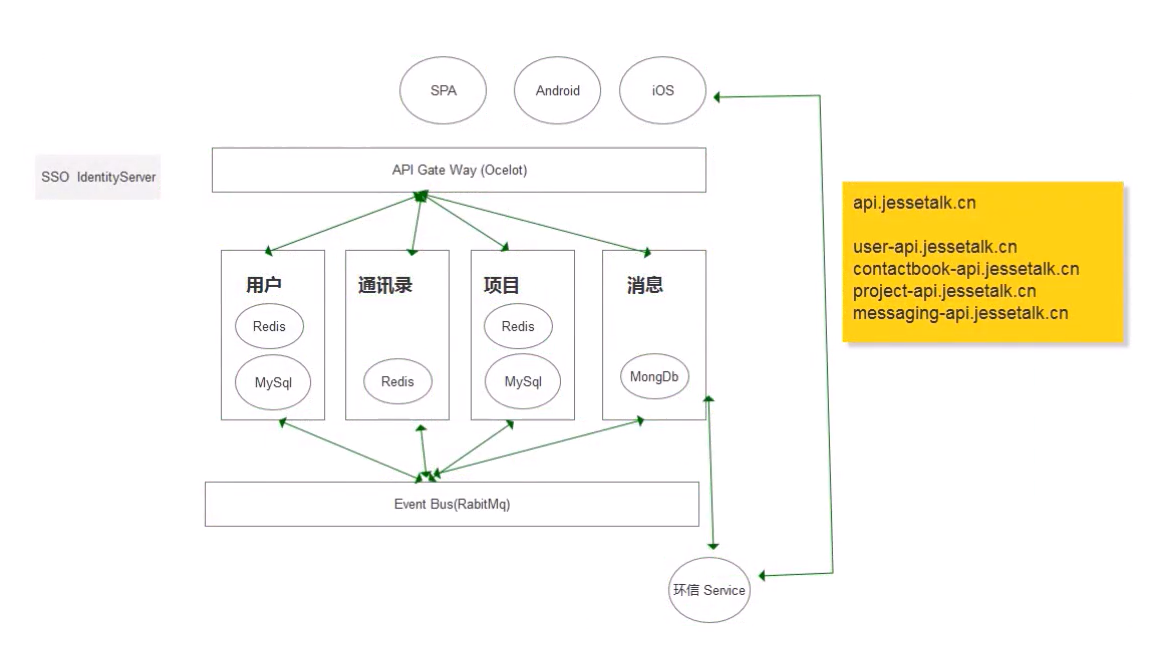
任务7:oAuth2介绍
OAuth是一个关于授权(authorization)的开放网络标准
四种授权方式:
- 授权码模式
- 简化模式
- 密码模式
- 客户端模式
理解OAuth 2.0:
https://www.ruanyifeng.com/blog/2014/05/oauth_2_0.html
任务8:IdentityServer4登录中心
新建项目
dotnet new webapi --name IdentityServerCenter
添加 Nuget 包:IdentityServer4
VS Code 如何安装 nuget:
https://blog.csdn.net/qq_36051316/article/details/84106418
安装失败原因及解决方案:
vscode解决nuget插件不能使用的问题:
https://www.cnblogs.com/lori/p/11651079.html
Visual Studio 连接不上NuGet 官方程序包源的解决办法:
https://blog.csdn.net/weixin_34161083/article/details/85764761
配置 Startup 配置
添加引用
using IdentityServer4;
注册服务
services.AddIdentityServer()

        .AddDeveloperSigningCredential();
使用服务
app.UseIdentityServer();
在 Program.cs 中配置启动端口
webBuilder.UseUrls("http://localhost:5000");
添加配置类 Config.cs,初始化 IdentityServer4
using System.Collections;

using System.Collections.Generic;

using IdentityServer4.Models;

namespace IdentityServerCenter

{

    public class Config

    {

        public static IEnumerable<ApiResource> GetResource()

        {

            return new List<ApiResource>

            {

                new ApiResource("api", "My Api")

            };

        }

        public static IEnumerable<Client> GetClients()

        {

            return new List<Client>

            {

                new Client()

                {

                    ClientId = "client",

                    AllowedGrantTypes = GrantTypes.ClientCredentials,

                    ClientSecrets =

                    {

                        new Secret("secret".Sha256())

                    },

                    AllowedScopes = {"api"},

                }

            };

        }

    }

}
更改 IdentityServer4 配置
services.AddIdentityServer()

        .AddDeveloperSigningCredential()

        .AddInMemoryApiResources(Config.GetResource())

        .AddInMemoryClients(Config.GetClients());
启动程序
dotnet run
访问地址
http://localhost:5000/.well-known/openid-configuration
结果如下( json 格式化)
{

    "issuer": "http://localhost:5000",

    "jwks_uri": "http://localhost:5000/.well-known/openid-configuration/jwks",

    "authorization_endpoint": "http://localhost:5000/connect/authorize",

    "token_endpoint": "http://localhost:5000/connect/token",

    "userinfo_endpoint": "http://localhost:5000/connect/userinfo",

    "end_session_endpoint": "http://localhost:5000/connect/endsession",

    "check_session_iframe": "http://localhost:5000/connect/checksession",

    "revocation_endpoint": "http://localhost:5000/connect/revocation",

    "introspection_endpoint": "http://localhost:5000/connect/introspect",

    "device_authorization_endpoint": "http://localhost:5000/connect/deviceauthorization",

    "frontchannel_logout_supported": true,

    "frontchannel_logout_session_supported": true,

    "backchannel_logout_supported": true,

    "backchannel_logout_session_supported": true,

    "scopes_supported": [

        "api",

        "offline_access"

    ],

    "claims_supported": [],

    "grant_types_supported": [

        "authorization_code",

        "client_credentials",

        "refresh_token",

        "implicit",

        "urn:ietf:params:oauth:grant-type:device_code"

    ],

    "response_types_supported": [

        "code",

        "token",

        "id_token",

        "id_token token",

        "code id_token",

        "code token",

        "code id_token token"

    ],

    "response_modes_supported": [

        "form_post",

        "query",

        "fragment"

    ],

    "token_endpoint_auth_methods_supported": [

        "client_secret_basic",

        "client_secret_post"

    ],

    "id_token_signing_alg_values_supported": [

        "RS256"

    ],

    "subject_types_supported": [

        "public"

    ],

    "code_challenge_methods_supported": [

        "plain",

        "S256"

    ],

    "request_parameter_supported": true

}
可以看到四种授权方式:
"grant_types_supported": [

        "authorization_code",

        "client_credentials",

        "refresh_token",

        "implicit",

        "urn:ietf:params:oauth:grant-type:device_code"

    ],
课程链接
http://video.jessetalk.cn/course/explore


本作品采用知识共享署名-非商业性使用-相同方式共享 4.0 国际许可协议进行许可。
欢迎转载、使用、重新发布,但务必保留文章署名 郑子铭 (包含链接: http://www.cnblogs.com/MingsonZheng/ ),不得用于商业目的,基于本文修改后的作品务必以相同的许可发布。
如有任何疑问,请与我联系 (MingsonZheng@outlook.com) 。
ASP.NET Core分布式项目实战(业务介绍,架构设计,oAuth2,IdentityServer4)--学习笔记的更多相关文章
- 【ASP.NET Core分布式项目实战】(三)整理IdentityServer4 MVC授权、Consent功能实现
本博客根据http://video.jessetalk.cn/my/course/5视频整理(内容可能会有部分,推荐看源视频学习) 前言 由于之前的博客都是基于其他的博客进行开发,现在重新整理一下方便 ...
- 【ASP.NET Core分布式项目实战】(二)oauth2 + oidc 实现 server部分
本博客根据http://video.jessetalk.cn/my/course/5视频整理(内容可能会有部分,推荐看源视频学习) 资料 我们基于之前的MvcCookieAuthSample来做开发 ...
- ASP.NET Core分布式项目实战
ASP.NET Core开发者成长路线图 asp.net core 官方文档 https://docs.microsoft.com/zh-cn/aspnet/core/getting-started/ ...
- 【笔记目录2】ASP.NET Core分布式项目实战
当前标签: ASP.NET Core分布式项目实战 共2页: 上一页 1 2 11.ClientCredential模式总结 GASA 2019-03-11 12:59 阅读:26 评论:0 10. ...
- 【笔记目录1】ASP.NET Core分布式项目实战
当前标签: ASP.NET Core分布式项目实战 共2页: 1 2 下一页 35.Docker安装Mysql挂载Host Volume GASA 2019-06-20 22:02 阅读:51 评论 ...
- ASP.NET Core分布式项目实战-目录
前言 今年是2018年,发现已经有4年没有写博客了,在这4年的时光里,接触了很多的.NET技术,自己的技术也得到很大的进步.在这段时光里面很感谢张队长以及其他开发者一直对.NET Core开源社区做出 ...
- 【ASP.NET Core分布式项目实战】(一)IdentityServer4登录中心、oauth密码模式identity server4实现
本博客根据http://video.jessetalk.cn/my/course/5视频整理 资料 OAuth2 流程:http://www.ruanyifeng.com/blog/2014/05/o ...
- 【ASP.NET Core分布式项目实战】(五)Docker制作dotnet core控制台程序镜像
Docker制作dotnet core控制台程序镜像 基于dotnet SDK 新建控制台程序 mkdir /home/console cd /home/console dotnet new cons ...
- 【ASP.NET Core分布式项目实战】(六)Gitlab安装
Gitlab GitLab是由GitLabInc.开发,使用MIT许可证的基于网络的Git仓库管理工具,且具有wiki和issue跟踪功能.使用Git作为代码管理工具,并在此基础上搭建起来的web服务 ...
- 【ASP.NET Core分布式项目实战】(四)使用mysql/mysql-server安装mysql
Docker安装Mysql 拉取镜像 docker pull mysql/mysql-server 运行mysql docker run -d -p : --name mysql01 mysql/my ...
随机推荐
- .NET CORE实战项目之CMS 部署篇 思维导图
.NET Core实战项目之CMS 第十七章 CMS网站系统的部署 如何优雅的利用Windows服务来部署ASP.NET Core程序
- citespace 文献计量工具初探
先放几个教程: 知乎 - CiteSpace 使用教程 - 312 赞同 知乎 - CiteSpace 入门教程 - 949 赞同 简书 - 研究方法 | 用 CiteSpace 进行科学文献可视化分 ...
- Cortex-M3 MCU的技术特点
1.Cortex-M3 MCU的技术特点 MCU简单来说就是一个可编程的中央处理器(CPU)加上一些必要的外设.不管是中央处理器还是整个MCU都是复杂的时序数字电路,根据程序或者指令来完成特定的任务. ...
- idea 修改 jsp文件之后不生效问题
- Laravel - 使用ajax
一,前台模板文件 index.blade.php <!DOCTYPE html> <meta name="_token" content="{{ cs ...
- [转帖]什么是内存屏障? Why Memory Barriers ?
要了解如何使用memory barrier,最好的方法是明白它为什么存在.CPU硬件设计为了提高指令的执行速度,增设了两个缓冲区(store buffer, invalidate queue).这个两 ...
- [转帖]FIO磁盘性能测试工具
https://www.cnblogs.com/lyhabc/p/16708771.html 简介 一般我们测试硬盘或者存储的性能的时候,会用Linux系统自带的dd命令,因为是自带命令,简单易使用, ...
- [转帖]jumpserver (Linux资产管理快速入门)
准备工作 准备三台虚拟机,一台作为jumpserver的服务端,两台作为测试端. 一.安装好jump server后,输入IP地址登录 [192.168.2.111为本机测试地址] 二.创建用户组 这 ...
- 一个Redis dump文件的简要分析过程
摘要 遇到一个老大难的问题. 让帮忙分析一下一个Redis的dump文件. 虽然之前写过了rdb和rdr的文档 但是感觉大家都喜欢拿来主义. 没办法. 今天继续进行深入一点的分析. 原理其实还是基于r ...
- 插件时间格式处理moment如何使用
第1步下载插件 cnpm i moment -S 第2步 在main.js中去使用 在main.js中 注册全局过滤器 fmtdata是等会你用的 可以自定义 fmtdata直接可以调用.是一个过滤器 ...