
C# 二维码生成、识别,去除白边、任意颜色
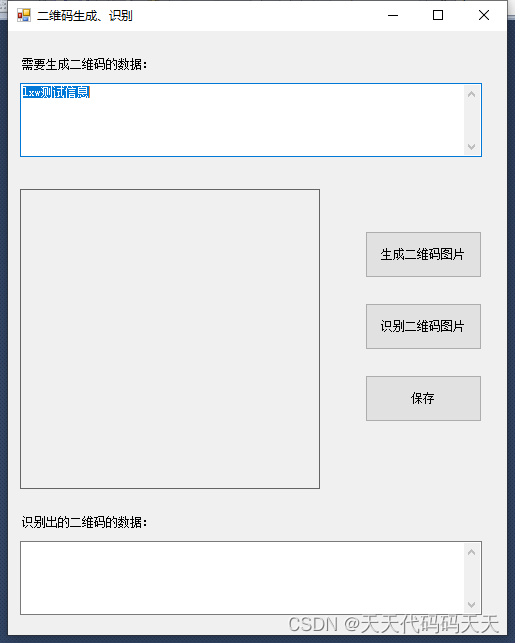
using System;

using System.Collections.Generic;

using System.ComponentModel;

using System.Data;

using System.Drawing;

using System.Linq;

using System.Text;

using System.Windows.Forms;

using ZXing;

namespace QRCode

{

    public partial class frmMain : Form

    {

        public frmMain()

        {

            InitializeComponent();

        }

        private void btnQRCode_Click(object sender, EventArgs e)

        {

            string content = txtInputForQR.Text;

            Dictionary<EncodeHintType, Object> hints = new Dictionary<EncodeHintType, object>();

            hints.Add(EncodeHintType.ERROR_CORRECTION, ZXing.QrCode.Internal.ErrorCorrectionLevel.H);

            hints.Add(EncodeHintType.CHARACTER_SET, "UTF-8"); //编码

            MultiFormatWriter writer = new MultiFormatWriter();

            ZXing.Common.BitMatrix bm = writer.encode(content, ZXing.BarcodeFormat.QR_CODE, 300, 300, hints);

            BarcodeWriter barcodeWriter = new BarcodeWriter();

            //barcodeWriter.Renderer = new ZXing.Rendering.BitmapRenderer

            //{

            //    Background = Color.FromArgb(242, 241, 250),

            //    Foreground = Color.FromArgb(46, 51, 57)

            //};

            barcodeWriter.Renderer = new ZXing.Rendering.BitmapRenderer

            {

                Background = Color.White,

                Foreground = Color.Green

            };

            System.Drawing.Bitmap bmp = RemoveWhiteMargin(bm, barcodeWriter.Write(bm));//去除边

            pictureBox1.Image = bmp;

        }

        private static Bitmap RemoveWhiteMargin(ZXing.Common.BitMatrix bitMatrix, Bitmap bitmap)

        {

            //获取参数

            int[] rec = bitMatrix.getEnclosingRectangle();

            int left = rec[0];

            int top = rec[1];

            int width = rec[2];

            int height = rec[3];

            Bitmap newImg = new Bitmap(width, height);

            Graphics g = Graphics.FromImage(newImg);

            //截取

            g.DrawImage(bitmap, 0, 0, new Rectangle(left, top, newImg.Width, newImg.Height), GraphicsUnit.Pixel);

            return newImg;

        }

        private void btnQRDeCode_Click(object sender, EventArgs e)

        {

            OpenFileDialog openFileDialog1 = new OpenFileDialog();

            openFileDialog1.Filter = "图像文件(*.jpg;*.jpeg;*.gif;*.bmp;*.png)|*.jpg;*.jpeg;*.gif;*.bmp;*.png";

            if (openFileDialog1.ShowDialog() != DialogResult.OK)

            {

                return;

            }

            Image img = null;

            try

            {

                img = Image.FromFile(openFileDialog1.FileName);

                pictureBox1.Image = img;

            }

            catch (Exception ex)

            {

                MessageBox.Show("文件格式不正确" + ex.Message);

            }

            BarcodeReader reader = new BarcodeReader();

            reader.Options.CharacterSet = "UTF-8";

            Result result = null;

            try

            {

                result = reader.Decode(new Bitmap(img));

            }

            catch (Exception ex)

            {

                txtInputForQR.Text = "识别异常" + ex.Message;

            }

            if (result != null)

            {

                txtOutputForQR.Text = result.Text;

            }

            else

            {

                txtOutputForQR.Text = "未识别出信息!";

            }

        }

        private void btnSave_Click(object sender, EventArgs e)

        {

            SaveFileDialog sFD = new SaveFileDialog();

            sFD.Filter = "保存图片(*.png) |*.png|所有文件(*.*) |*.*";

            sFD.DefaultExt = "*.png|*.png";

            sFD.AddExtension = true;

            if (sFD.ShowDialog() == DialogResult.OK)

            {

                if (sFD.FileName != "")

                {

                    Bitmap bitmap = (Bitmap)pictureBox1.Image;

                    bitmap.Save(sFD.FileName, System.Drawing.Imaging.ImageFormat.Png);

                }

            }

        }

    }

}
C# 二维码生成、识别,去除白边、任意颜色的更多相关文章
- C# ZXing.Net生成二维码、识别二维码、生成带Logo的二维码(二)
1.使用ZXint.Net生成带logo的二维码 /// <summary> /// 生成带Logo的二维码 /// </summary> /// <param name ...
- Android 二维码 生成和识别(附Demo源码)
今天讲一下目前移动领域很常用的技术——二维码.现在大街小巷.各大网站都有二维码的踪迹,不管是IOS. Android.WP都有相关支持的软件.之前我就想了解二维码是如何工作,最近因为工作需要使用相关技 ...
- Android 二维码 生成和识别(转)
原博客地址 :http://www.cnblogs.com/weixing/archive/2013/08/28/3287120.html 还有几个写的也可以参考一下:http://www.itnos ...
- 玩转Android之二维码生成与识别
二维码,我们也称作QRCode,QR表示quick response即快速响应,在很多App中我们都能见到二维码的身影,最常见的莫过于微信了.那么今天我们就来看看怎么样在我们自己的App中集成二维码的 ...
- 【转】Android 二维码 生成和识别(附Demo源码)--不错
原文网址:http://www.cnblogs.com/mythou/p/3280023.html 今天讲一下目前移动领域很常用的技术——二维码.现在大街小巷.各大网站都有二维码的踪迹,不管是IOS. ...
- Python 实现二维码生成和识别
今天突然想给自己自己做个头像,然后还是二维码的形式,这样只要扫一扫就可以访问我的主页.然后就开始自己的苦逼之路... 其实实现二维码java,c#,C++等都可以实现:由于自己正在学python,所以 ...
- python qrcode二维码生成与识别
二维码 二维码生成 1.用法 https://github.com/lincolnloop/python-qrcode 2.使用 简单实用 import qrcode # 二维码内容 data = & ...
- C# - VS2019调用ZXing.NET实现条码、二维码和带有Logo的二维码生成
前言 C# WinFrm程序调用ZXing.NET实现条码.二维码和带有Logo的二维码生成. ZXing.NET导入 GitHub开源库 ZXing.NET开源库githib下载地址:https:/ ...
- QRCode二维码生成方案及其在带LOGO型二维码中的应用(1)
原文:QRCode二维码生成方案及其在带LOGO型二维码中的应用(1) 提要:很多公司为商业宣传之需,常将企业LOGO加入二维码中,但如果LOGO遮挡区域足够地大,二维码就变得无法识别.那么,有没有一 ...
- JAVA实现二维码生成加背景图
pom.xml依赖 <!-- 二维码生成 --> <!-- https://mvnrepository.com/artifact/com.google.zxing/c ...
随机推荐
- Js中Proxy对象
Js中Proxy对象 Proxy对象用于定义基本操作的自定义行为,例如属性查找.赋值.枚举.函数调用等. 语法 const proxy = new Proxy(target, handler); ta ...
- Python之初级RPG小游戏
在国外网站上找到一个练习Python的小游戏感觉不错,自己实现了一下. 通过该练习你能学到: 元组 字典 简单定义函数和封装 条件控制语句 游戏说明 以下是3个房间和1个花园: Hall 客厅 有一把 ...
- win32 - GDI+ 高斯模糊的使用
虽然标题中标有GDI+,但其实真正实施的时候并没有用到. 不过GDI+的相关文档有一些关于高斯模糊的api说明,见下面链接: Blur class (gdipluseffects.h) 使用Bl ...
- win32 - GetMenuBarInfo的使用
MSDN文档介绍GetMenuBarInfo是用来检索有关指定菜单栏的信息. 假如有个需求是要找到菜单下拉菜单的矩形大小,该怎么做呢? 最简单的方法就是获取菜单栏的句柄,然后将句柄作为参数传给GetM ...
- win32-使用EnumWindows比较两个窗口的Z轴
通过使用EnumWindows()和枚举窗口来手动确定EnumChildWindows()来直接确定哪个窗口在z轴上比另一个窗口高. struct myEnumInfo { HWND hwnd1; H ...
- linux和unix中的IO模型总结
高性能网络IO编程模型 一.I/O模型简介 在一个 linux 操作系统中,一般分为用户空间和内核空间. 用户空间一般就是我们进行应用程序编程的地方. 内核空间就是 linux 操作系统自己运行的一些 ...
- error: RPC failed; curl 92 HTTP/2 stream 0 was not closed cleanly: PROTOCOL_ERROR (err 1)
起因:自己顶不住好奇心,升级了Mac系统.界面看起来,真香!然鹅用起来其实也挺香,就是有些开发常用的竟然挂掉了,挂掉了. 最直观的就是Parallels Desktop , xcode , git,完 ...
- 【Azure 事件中心】China Azure上是否有Kafka服务简答
问题描述 China Azure 上是否有Kakfa服务可以使用呢? 问题回答 China Azure并没有专门的Kafka服务,但是可以使用Azure Event Hub. 创建标准版及以上的Eve ...
- Nebula Graph 源码解读系列|客户端的通信秘密——fbthrift
概述 Nebula Clients 给用户提供了多种编程语言的 API 用于和 Nebula Graph 交互,并且对服务端返回的数据结构进行了重新封装,便于用户使用. 目前 Nebula Clien ...
- 结构化思维助力Prompt创作:专业化技术讲解和实践案例
结构化思维助力Prompt创作:专业化技术讲解和实践案例 最早接触 Prompt engineering 时, 学到的 Prompt 技巧都是: 你是一个 XX 角色- 你是一个有着 X 年经验的 X ...