
手动写Entity Framework 数据库上下文和Model实体
1、引用EF对应的程序集
使用命令安装EntityFramework包
Install-Package EntityFramework

Entity Framework简单目录:
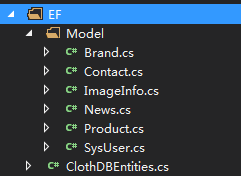
1.context数据库上下文class:
using System;

using System.Collections.Generic;

using System.Data.Entity;

using System.Data.Entity.Infrastructure;

using System.Linq;

using System.Web;

namespace ClothMvcApp.EF

{

    public class ClothDBContext: DbContext, IDisposable

    {

        public ClothDBContext()

            : base("name=ClothDBContext")

        {

        }

        protected override void OnModelCreating(DbModelBuilder modelBuilder)

        {

            base.OnModelCreating(modelBuilder);

        }

        public DbSet<News> News { get; set; }

        public DbSet<Product> Product { get; set; }

        public DbSet<SysUser> SysUser { get; set; }

        public DbSet<Brand> Brand { get; set; }

        public DbSet<ImageInfo> ImageInfo { get; set; }

        public DbSet<Contact> Contact { get; set; }

    }

}
2.Model实体类:
添加所需程序集:
Install-Package System.ComponentModel.Annotations
如下图:

using System;

using System.Collections.Generic;

using System.ComponentModel.DataAnnotations.Schema;

using System.Linq;

using System.Web;

namespace ClothMvcApp.EF

{

    [Table("Brand")]

    public class Brand

    {

        [Column("Id")]

        public Guid Id { get; set; }

        [Column("Content")]

        public string Content { get; set; }

        [Column("Picture")]

        public string Picture { get; set; }

        [Column("CreateTime")]

        public DateTime CreateTime { get; set; }

    }

}
有外键字段Model:
using System;

using System.ComponentModel.DataAnnotations;

using System.ComponentModel.DataAnnotations.Schema;

namespace Lemon.Media.Entities

{

    /// <summary>

    /// 渠道应用

    /// </summary>

     [Table("Channel_Apps")]

   public  class ChannelApp

    {

         [Key, Column("Id")]

        public Guid Id { get; set; }

         /// <summary>

         /// 渠道ID(主要指物业)

         /// </summary>

         [Column("ChannelId")]

        public int ChannelId { get; set; }

         /// <summary>

         /// 是否由H5承载实现

         /// </summary>

         [Column("IsH5")]

         public bool IsH5 { get; set; }

         /// <summary>

         /// App应用唯一标识

         /// </summary>

         [Column("AppKey")]

        public string AppKey { get; set; }

         /// <summary>

         /// 添加时间

         /// </summary>

         [Column("AddTime")]

        public DateTime AddTime { get; set; }

         /// <summary>

         /// 是否删除

         /// </summary>

         [Column("IsDel")]

        public bool IsDel { get; set; }

         /// <summary>

         /// 是否需要PPTV

         /// </summary>

         [Column("HasPPTV")]

         public bool HasPPTV { get; set; }

         /// <summary>

         /// 渠道

         /// </summary>

         [ForeignKey("ChannelId")]

         public virtual Channel Channel { get; set; }

    }

}
3.web.config 数据库连接字符串:
<connectionStrings>

    <add name="ClothDBContext" connectionString="Data Source=.;Initial Catalog=ClothDB;User ID=sa;Password=123456;Pooling=true;" providerName="System.Data.SqlClient" />

  </connectionStrings>
4.简单的调用方式:
using (var context = new ClothDBEntities())

            {

                context.ImageInfo.Where(c => c.Cate == "banner").OrderByDescending(c => c.CreateTime).Take().ToList();

            }
ps:卸载nuget包:
Uninstall-Package System.ComponentModel.Annotations
手动写Entity Framework 数据库上下文和Model实体的更多相关文章
- Entity Framework 数据库初始化四种策略
策略一:数据库不存在时重新创建数据库 Database.SetInitializer<testContext>(new CreateDatabaseIfNotExists<testC ...
- Entity Framework数据库初始化四种策略
策略一:数据库不存在时重新创建数据库 程序代码 Database.SetInitializer<testContext>(new CreateDatabaseIfNotExists< ...
- [Programming Entity Framework] 第3章 查询实体数据模型(EDM)(一)
http://www.cnblogs.com/sansi/archive/2012/10/18/2729337.html Programming Entity Framework 第二版翻译索引 你可 ...
- Entity Framework 数据库先行、模型先行、代码先行
数据库先行(Database First):基于已存在的数据库,利用某些工具(如Vs提供的EF设计器)创建实体类,数据库对象与实体类的匹配关系等,你也可以手动修改这些自动生成的代码及匹配文件. 模型先 ...
- Entity Framework入门教程:创建实体数据模型
下图为一个已经创建好的数据库表关系 实体数据模型的创建过程 在Visual Studio项目中,右键程序集菜单,选择[添加]->[新建项],在[添加新项窗口]中选择[ADO.NET实体数据模型] ...
- Visual Studio2017中如何让Entity Framework工具【ADO.NET实体数据模型】支持MYSQL数据源
熟悉Entity Framework应该对以下图片不陌生,他就是ADO.NET实体数据模型向导:可以将数据库的表自动生成模型类,或者创建Code First的模型文件. 但是这个模型向导默认只显示微软 ...
- Entity framework 加载多层相关实体数据
Entity framework有3种加载数据的方式:懒汉式(Lazy loading),饿汉式(Eager loading),显示加载(Explicit loading).3种加载方式有各自的优缺点 ...
- Mysql 该如何 Entity Framework 数据库迁移 和 如何更好的支持EntityFramework.Extended
问题 1.在使用EntityFramework访问Mysql的时候,使用迁移来生成数据库或者更新数据库时候会遇到一些问题 2.EntityFramework.Extended对Mysql的支持不是很完 ...
- Entity FrameWork Code First 之Model分离
之前一直用DB First新建类库进行使用,最近开始研究Code First.Code First也可以将Model新建在类库里面,然后通过数据迁移等操作生成数据库. 现在说下主要步骤: 1.新建类库 ...
随机推荐
- 【洛谷P1403】约数研究
题目大意:求\[\sum\limits_{i=1}^n\sum\limits_{d|i}1\] 题解:交换求和顺序即可. \[\sum\limits_{i=1}^n\sum\limits_{d|i}1 ...
- django orm 重点大全
1.最简单的跨表,查询外键表中符合主表条件的记录列表 #用户类型表 class User_typ(models.Model): name=models.CharField(max_length=32) ...
- 第三十三篇-TabLayout的使用
效果图: 最上方是一个TabLayout,有三个部分,新闻.财经.娱乐,下方是一个ViewPaper,里面包含三个fragment,分别对应三个xml和java class. 第一个Fragment里 ...
- Educational Codeforces Round 53 (Rated for Div. 2)
http://codeforces.com/contest/1073 A. Diverse Substring #include <bits/stdc++.h> using namespa ...
- OmniPlan,一款让你无法自拔的项目管理工具(仅适用于MAC系统)
OmniPlan 大家都知道Windows系统可以使用project来方便的管理跟踪项目的各项任务,那么Mac系统有没有这样专业级的项目管理软件了?答案是有,今天给大家推荐的Mac系统下的项目管理 ...
- ElasticSearch6.5.0 【Rejecting mapping update to [posts] as the final mapping would have more than 1 type】
今天想在一个Index上增加一个type,结果报错 java.lang.IllegalArgumentException: Rejecting mapping update to [posts] as ...
- 为什么fork()2次会避免产生僵尸进程
什么是僵尸进程:用fork()创建子进程后,子进程已终止但父进程没有对它进行善后处理,那么子进程的进程描述符就一直保存在内存中,子进程就是僵尸进程. 怎么产生僵尸进程: 1.父进程没有SIGCHLD信 ...
- GD32 ------ 使用外部中断,中断函数需要延时才能读到真正电平
MCU:GD32F103RCT6 中断引脚没有外界上拉电阻 中断配置如下: RCC_APB2PeriphClockCmd(RCC_APB2Periph_GPIOC|RCC_APB2Periph_AFI ...
- ps: 图层样式;
图层样式是ps的一项图层处理能力,功能强大,能够简单快捷的制作处立体投影,各种质感以及光影效果. 10种图层样式: (1)投影:将为图层上的对象.文本或形状后面添加阴影效果.投影参数由“混合模式”.“ ...
- 基础教程:Mac 电脑小白应该了解哪些东西?
文章素材来源:知乎 文章收录于:风云社区(www.scoee.com),提供1700多款mac软件下载. 本文提供给那些从 PC 阵营初入 Mac 的同学而准备的,我们希望从硬件和软件.设计风格和使用 ...