
zabbix3.0.4利用iostat工具监控centos主机磁盘IO
该监控基于iostat,然后iostat 命令用来监视系统输入/输出设备负载
1.安装IOSTAT工具
# yum install sysstat -y
测试iostat 查看所有硬盘io
# iostat

Linux 2.6.-431.11..el6.ucloud.x86_64 (test8_hadoop_kaf) // _x86_64_    ( CPU)

avg-cpu: %user %nice %system %iowait %steal %idle

0.04 0.00 0.04 0.00 0.00 99.92

Device: tps Blk_read/s Blk_wrtn/s Blk_read Blk_wrtn

vda 0.10 0.23 0.92

vdb 0.00 0.00 0.15
2.部署脚本
# mkdir -p /usr/local/zabbix-agent/scripts/

# vim /usr/local/zabbix-agent/scripts/zabbix-iostat.sh
#!/bin/bash

ZBX_DEV="$1"

ZBX_METRIC="$2"

IOSTAT_LOG=/tmp/iostat.log

# Check iostat util

if ! which iostat >&>/dev/null; then

  >& echo "Can't find 'iostat' binary in \$PATH"

  >& echo "Make sure that you've installed 'sysstat' package"

  exit

fi

# Check args

[[ $# -lt  ]] && { echo "Give some more arguments, please :)"; exit ; }

# Discovering devices and spits out JSON

if [ "$ZBX_DEV" = 'discovery' ]; then

  iostat -d | \

  tail -n + |

  awk 'BEGIN {

    ORS="";

    print "{\"data\":["}

    /\d/ {printf "%s{\"%s\":\"%s\"}", separator, "{#DEVICENAME}", $, separator = ","}

    END {print "]}" }'

  exit

fi

# Test iostat log

[[ ! -f "${IOSTAT_LOG}" ]] && echo "[m|ZBX_NOTSUPPORTED] [No such file ${IOSTAT_LOG}]" && exit

# Parse iostat file

function parse_iostat() {

  grep ${ZBX_DEV} ${IOSTAT_LOG} | \

  tr ',' '.' | \

  awk -v field="$1" '

  {sum+=$field; n++;}

  END {if (n > ) print sum/n;

  else {print "[m|ZBX_NOTSUPPORTED] [Nodata.]" > "/dev/stderr"; exit };}'

}

# Exec parse funcion with number of column

case ${ZBX_METRIC} in

  rrqm/s    ) parse_iostat '';;

  wrqm/s    ) parse_iostat '';;

  r/r       ) parse_iostat '';;

  w/r       ) parse_iostat '';;

  rkb/s     ) parse_iostat '';;

  wkb/s     ) parse_iostat '';;

  avgrq-sz  ) parse_iostat '';;

  avgqu-sz  ) parse_iostat '';;

  await     ) parse_iostat '';;

  r_await   ) parse_iostat '';;

  w_await   ) parse_iostat '';;

  svctm     ) parse_iostat '';;

  util      ) parse_iostat '';;

  *         ) echo "[m|ZBX_NOTSUPPORTED] [Unsupported item key.]" && exit ;;

esac
添加脚本执行权限
# chmod +x /usr/local/zabbix-agent/scripts/zabbix-iostat.sh
# 设置参数
# echo 'UserParameter=iostat[*],/usr/local/zabbix-agent/scripts/zabbix-iostat.sh "$1" "$2"' > /etc/zabbix/zabbix_agentd.d/iostat.conf
#重启zabbix_agentd
service zabbix-agent restart
# 测试自动发现
zabbix_agentd -t iostat[discovery]
3.加入crontab
# crontab -e

* * * * * ( sleep  && iostat -dxk   > /tmp/iostat.tmp && mv /tmp/iostat.tmp /tmp/iostat.log )

* * * * * ( sleep  && iostat -dxk   > /tmp/iostat.tmp && mv /tmp/iostat.tmp /tmp/iostat.log )
# 重启计划任务
/etc/init.d/crond restart
测试监控项
# zabbix_agentd -t iostat[vda,rkb/s]
iostat[vda,rkb/s] [t|0.007]
图像展示
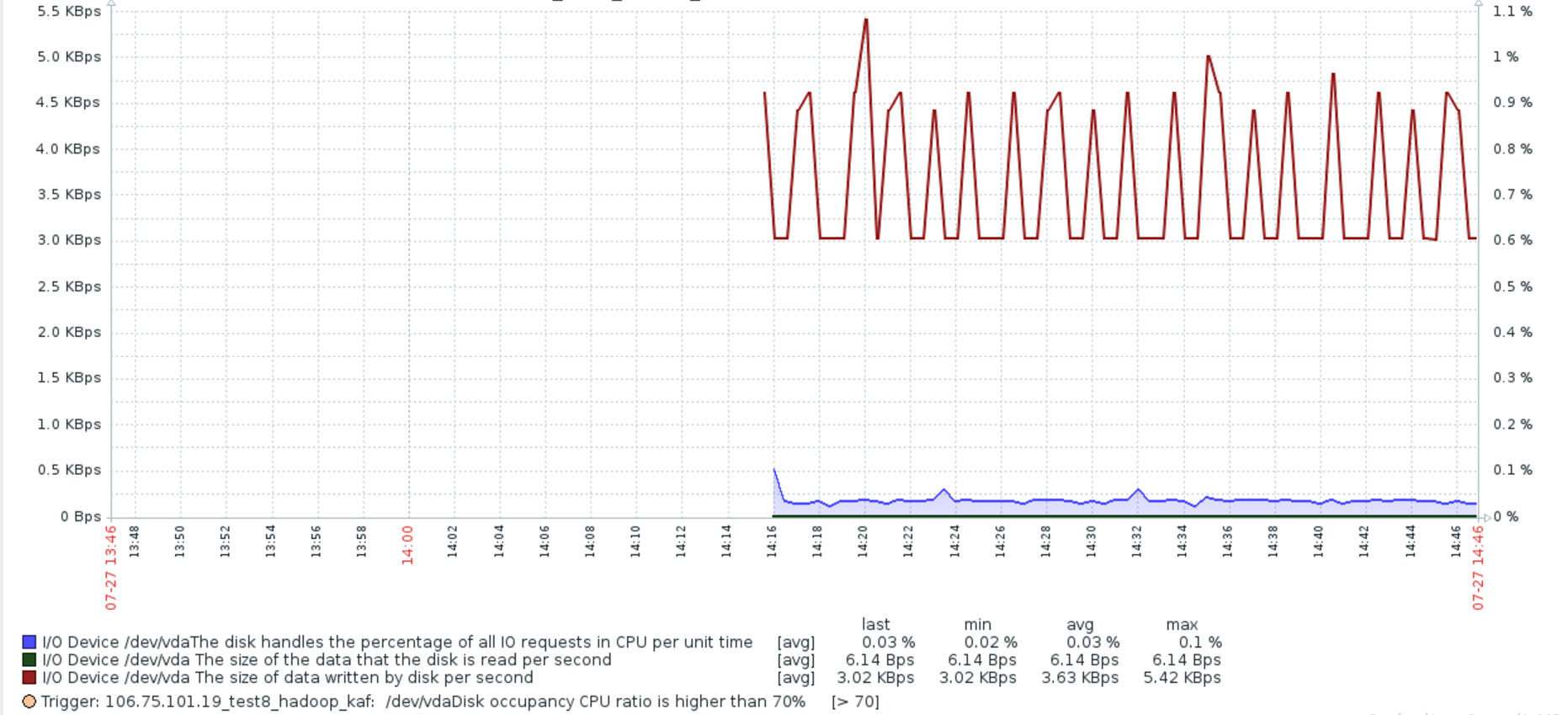
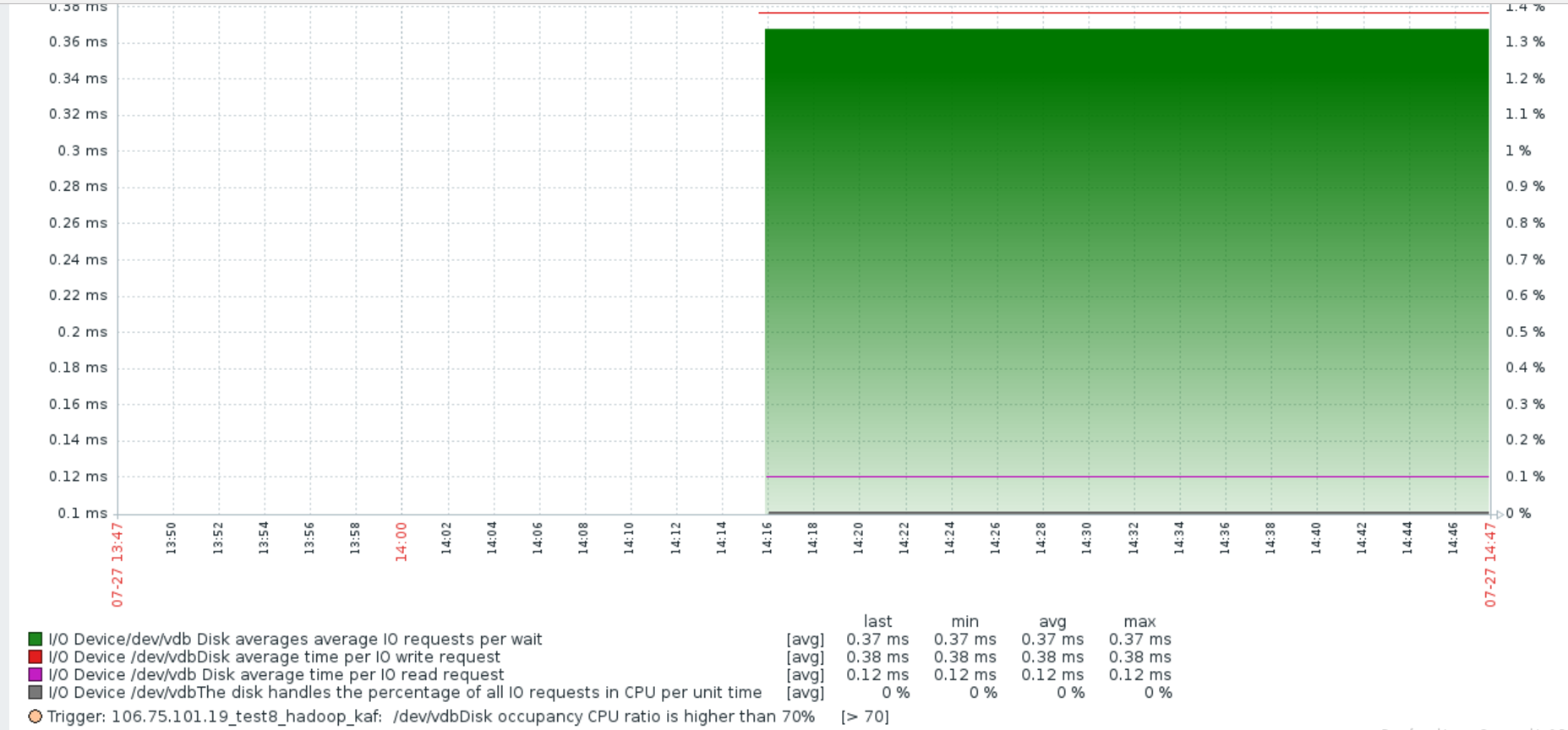
模板:
Template_Linux_DISK_IO_Discovery_English.xml
<?xml version="1.0" encoding="UTF-8"?>
<zabbix_export>
<version>3.0</version>
<date>2017-07-27T06:45:24Z</date>
<groups>
<group>
<name>Templates</name>
</group>
</groups>
<templates>
<template>
<template>Template_Linux_DISK_IO_Discovery_English</template>
<name>Template_Linux_DISK_IO_Discovery_English</name>
<description>Low-Level Discovery disk devices and I/O Performance monitoring</description>
<groups>
<group>
<name>Templates</name>
</group>
</groups>
<applications>
<application>
<name>DISK/IO</name>
</application>
</applications>
<items/>
<discovery_rules>
<discovery_rule>
<name>Disk devices discovery</name>
<type>0</type>
<snmp_community/>
<snmp_oid/>
<key>iostat[discovery]</key>
<delay>300</delay>
<status>0</status>
<allowed_hosts/>
<snmpv3_contextname/>
<snmpv3_securityname/>
<snmpv3_securitylevel>0</snmpv3_securitylevel>
<snmpv3_authprotocol>0</snmpv3_authprotocol>
<snmpv3_authpassphrase/>
<snmpv3_privprotocol>0</snmpv3_privprotocol>
<snmpv3_privpassphrase/>
<delay_flex/>
<params/>
<ipmi_sensor/>
<authtype>0</authtype>
<username/>
<password/>
<publickey/>
<privatekey/>
<port/>
<filter>
<evaltype>0</evaltype>
<formula/>
<conditions>
<condition>
<macro>{#DEVICENAME}</macro>
<value>^(sd|hd|vd|xvd)[a-z]$</value>
<operator>8</operator>
<formulaid>A</formulaid>
</condition>
</conditions>
</filter>
<lifetime>30</lifetime>
<description>Disk devices discovery and IO Performance monitoring</description>
<item_prototypes>
<item_prototype>
<name>I/O Device /dev/$1 The average size (sector) of the disk each IO operation</name>
<type>0</type>
<snmp_community/>
<multiplier>0</multiplier>
<snmp_oid/>
<key>iostat[{#DEVICENAME},avgrq-sz]</key>
<delay>30</delay>
<history>7</history>
<trends>365</trends>
<status>0</status>
<value_type>0</value_type>
<allowed_hosts/>
<units>sectors</units>
<delta>0</delta>
<snmpv3_contextname/>
<snmpv3_securityname/>
<snmpv3_securitylevel>0</snmpv3_securitylevel>
<snmpv3_authprotocol>0</snmpv3_authprotocol>
<snmpv3_authpassphrase/>
<snmpv3_privprotocol>0</snmpv3_privprotocol>
<snmpv3_privpassphrase/>
<formula>1</formula>
<delay_flex/>
<params/>
<ipmi_sensor/>
<data_type>0</data_type>
<authtype>0</authtype>
<username/>
<password/>
<publickey/>
<privatekey/>
<port/>
<description>The average size (in sectors) of the requests that were issued to the device.
向设备发出的请求的平均大小(扇区)。</description>
<inventory_link>0</inventory_link>
<applications>
<application>
<name>DISK/IO</name>
</application>
</applications>
<valuemap/>
<logtimefmt/>
<application_prototypes/>
</item_prototype>
<item_prototype>
<name>I/O Device/dev/$1 Disk averages average IO requests per wait</name>
<type>0</type>
<snmp_community/>
<multiplier>0</multiplier>
<snmp_oid/>
<key>iostat[{#DEVICENAME},await]</key>
<delay>30</delay>
<history>7</history>
<trends>365</trends>
<status>0</status>
<value_type>0</value_type>
<allowed_hosts/>
<units>ms</units>
<delta>0</delta>
<snmpv3_contextname/>
<snmpv3_securityname/>
<snmpv3_securitylevel>0</snmpv3_securitylevel>
<snmpv3_authprotocol>0</snmpv3_authprotocol>
<snmpv3_authpassphrase/>
<snmpv3_privprotocol>0</snmpv3_privprotocol>
<snmpv3_privpassphrase/>
<formula>1</formula>
<delay_flex/>
<params/>
<ipmi_sensor/>
<data_type>0</data_type>
<authtype>0</authtype>
<username/>
<password/>
<publickey/>
<privatekey/>
<port/>
<description>await: 平均每次IO请求等待时间(包括等待时间和处理时间,毫秒为单位)</description>
<inventory_link>0</inventory_link>
<applications>
<application>
<name>DISK/IO</name>
</application>
</applications>
<valuemap/>
<logtimefmt/>
<application_prototypes/>
</item_prototype>
<item_prototype>
<name>I/O Device /dev/$1 The number of sectors that the disk successfully reads per second</name>
<type>0</type>
<snmp_community/>
<multiplier>0</multiplier>
<snmp_oid/>
<key>iostat[{#DEVICENAME},r/r]</key>
<delay>30</delay>
<history>7</history>
<trends>365</trends>
<status>0</status>
<value_type>0</value_type>
<allowed_hosts/>
<units>Rps</units>
<delta>0</delta>
<snmpv3_contextname/>
<snmpv3_securityname/>
<snmpv3_securitylevel>0</snmpv3_securitylevel>
<snmpv3_authprotocol>0</snmpv3_authprotocol>
<snmpv3_authpassphrase/>
<snmpv3_privprotocol>0</snmpv3_privprotocol>
<snmpv3_privpassphrase/>
<formula>1</formula>
<delay_flex/>
<params/>
<ipmi_sensor/>
<data_type>0</data_type>
<authtype>0</authtype>
<username/>
<password/>
<publickey/>
<privatekey/>
<port/>
<description>The number (after merges) of read requests completed per second for the device.</description>
<inventory_link>0</inventory_link>
<applications>
<application>
<name>DISK/IO</name>
</application>
</applications>
<valuemap/>
<logtimefmt/>
<application_prototypes/>
</item_prototype>
<item_prototype>
<name>I/O Device /dev/$1 The size of the data that the disk is read per second</name>
<type>0</type>
<snmp_community/>
<multiplier>1</multiplier>
<snmp_oid/>
<key>iostat[{#DEVICENAME},rkb/s]</key>
<delay>30</delay>
<history>7</history>
<trends>365</trends>
<status>0</status>
<value_type>0</value_type>
<allowed_hosts/>
<units>Bps</units>
<delta>0</delta>
<snmpv3_contextname/>
<snmpv3_securityname/>
<snmpv3_securitylevel>0</snmpv3_securitylevel>
<snmpv3_authprotocol>0</snmpv3_authprotocol>
<snmpv3_authpassphrase/>
<snmpv3_privprotocol>0</snmpv3_privprotocol>
<snmpv3_privpassphrase/>
<formula>1024</formula>
<delay_flex/>
<params/>
<ipmi_sensor/>
<data_type>0</data_type>
<authtype>0</authtype>
<username/>
<password/>
<publickey/>
<privatekey/>
<port/>
<description>The number of bytes read from the device per second
每秒从设备读取的字节数</description>
<inventory_link>0</inventory_link>
<applications>
<application>
<name>DISK/IO</name>
</application>
</applications>
<valuemap/>
<logtimefmt/>
<application_prototypes/>
</item_prototype>
<item_prototype>
<name>I/O Device /dev/$1 The number of read requests merged per second that were queued to the device</name>
<type>0</type>
<snmp_community/>
<multiplier>0</multiplier>
<snmp_oid/>
<key>iostat[{#DEVICENAME},rrqm/s]</key>
<delay>30</delay>
<history>7</history>
<trends>365</trends>
<status>0</status>
<value_type>0</value_type>
<allowed_hosts/>
<units>rrqm/s</units>
<delta>0</delta>
<snmpv3_contextname/>
<snmpv3_securityname/>
<snmpv3_securitylevel>0</snmpv3_securitylevel>
<snmpv3_authprotocol>0</snmpv3_authprotocol>
<snmpv3_authpassphrase/>
<snmpv3_privprotocol>0</snmpv3_privprotocol>
<snmpv3_privpassphrase/>
<formula>1</formula>
<delay_flex/>
<params/>
<ipmi_sensor/>
<data_type>0</data_type>
<authtype>0</authtype>
<username/>
<password/>
<publickey/>
<privatekey/>
<port/>
<description>The number of read requests merged per second that were queued to the device
每秒排队到设备上的合并请求数</description>
<inventory_link>0</inventory_link>
<applications>
<application>
<name>DISK/IO</name>
</application>
</applications>
<valuemap/>
<logtimefmt/>
<application_prototypes/>
</item_prototype>
<item_prototype>
<name>I/O Device /dev/$1 Disk average time per IO read request</name>
<type>0</type>
<snmp_community/>
<multiplier>0</multiplier>
<snmp_oid/>
<key>iostat[{#DEVICENAME},r_await]</key>
<delay>30</delay>
<history>7</history>
<trends>365</trends>
<status>0</status>
<value_type>0</value_type>
<allowed_hosts/>
<units>ms</units>
<delta>0</delta>
<snmpv3_contextname/>
<snmpv3_securityname/>
<snmpv3_securitylevel>0</snmpv3_securitylevel>
<snmpv3_authprotocol>0</snmpv3_authprotocol>
<snmpv3_authpassphrase/>
<snmpv3_privprotocol>0</snmpv3_privprotocol>
<snmpv3_privpassphrase/>
<formula>1</formula>
<delay_flex/>
<params/>
<ipmi_sensor/>
<data_type>0</data_type>
<authtype>0</authtype>
<username/>
<password/>
<publickey/>
<privatekey/>
<port/>
<description>The average time (in milliseconds) for read requests issued to the device to be served. This includes the time spent by the requests in queue and the time spent servicing them.
向设备发出的读取请求的平均时间(毫秒)。这包括队列中请求的时间和为它们服务的时间。</description>
<inventory_link>0</inventory_link>
<applications>
<application>
<name>DISK/IO</name>
</application>
</applications>
<valuemap/>
<logtimefmt/>
<application_prototypes/>
</item_prototype>
<item_prototype>
<name>I/O Device /dev/$1The disk handles the percentage of all IO requests in CPU per unit time</name>
<type>0</type>
<snmp_community/>
<multiplier>0</multiplier>
<snmp_oid/>
<key>iostat[{#DEVICENAME},util]</key>
<delay>30</delay>
<history>7</history>
<trends>365</trends>
<status>0</status>
<value_type>0</value_type>
<allowed_hosts/>
<units>%</units>
<delta>0</delta>
<snmpv3_contextname/>
<snmpv3_securityname/>
<snmpv3_securitylevel>0</snmpv3_securitylevel>
<snmpv3_authprotocol>0</snmpv3_authprotocol>
<snmpv3_authpassphrase/>
<snmpv3_privprotocol>0</snmpv3_privprotocol>
<snmpv3_privpassphrase/>
<formula>1</formula>
<delay_flex/>
<params/>
<ipmi_sensor/>
<data_type>0</data_type>
<authtype>0</authtype>
<username/>
<password/>
<publickey/>
<privatekey/>
<port/>
<description>Percentage of elapsed time during which I/O requests were issued to the device (bandwidth utilization for the device). Device saturation occurs when this value is close to 100% for devices serving requests serially. But for devices serving requests in parallel, such as RAID arrays and modern SSDs, this number does not reflect their performance limits.
对设备发出I/O请求的时间的百分比(设备带宽利用率)。设备饱和发生时,这个值是接近100%的设备服务请求连续。但在平行的服务请求的设备,如磁盘阵列和现代固态硬盘,这个数字并不反映其性能极限。</description>
<inventory_link>0</inventory_link>
<applications>
<application>
<name>DISK/IO</name>
</application>
</applications>
<valuemap/>
<logtimefmt/>
<application_prototypes/>
</item_prototype>
<item_prototype>
<name>I/O Device /dev/$1 The number of sectors per disk successfully written per second</name>
<type>0</type>
<snmp_community/>
<multiplier>0</multiplier>
<snmp_oid/>
<key>iostat[{#DEVICENAME},w/r]</key>
<delay>30</delay>
<history>7</history>
<trends>365</trends>
<status>0</status>
<value_type>0</value_type>
<allowed_hosts/>
<units>Rps</units>
<delta>0</delta>
<snmpv3_contextname/>
<snmpv3_securityname/>
<snmpv3_securitylevel>0</snmpv3_securitylevel>
<snmpv3_authprotocol>0</snmpv3_authprotocol>
<snmpv3_authpassphrase/>
<snmpv3_privprotocol>0</snmpv3_privprotocol>
<snmpv3_privpassphrase/>
<formula>1</formula>
<delay_flex/>
<params/>
<ipmi_sensor/>
<data_type>0</data_type>
<authtype>0</authtype>
<username/>
<password/>
<publickey/>
<privatekey/>
<port/>
<description>The number (after merges) of write requests completed per second for the device
每秒为设备完成的写入请求的数目(合并后)</description>
<inventory_link>0</inventory_link>
<applications>
<application>
<name>DISK/IO</name>
</application>
</applications>
<valuemap/>
<logtimefmt/>
<application_prototypes/>
</item_prototype>
<item_prototype>
<name>I/O Device /dev/$1 The size of data written by disk per second</name>
<type>0</type>
<snmp_community/>
<multiplier>1</multiplier>
<snmp_oid/>
<key>iostat[{#DEVICENAME},wkb/s]</key>
<delay>30</delay>
<history>7</history>
<trends>365</trends>
<status>0</status>
<value_type>0</value_type>
<allowed_hosts/>
<units>Bps</units>
<delta>0</delta>
<snmpv3_contextname/>
<snmpv3_securityname/>
<snmpv3_securitylevel>0</snmpv3_securitylevel>
<snmpv3_authprotocol>0</snmpv3_authprotocol>
<snmpv3_authpassphrase/>
<snmpv3_privprotocol>0</snmpv3_privprotocol>
<snmpv3_privpassphrase/>
<formula>1024</formula>
<delay_flex/>
<params/>
<ipmi_sensor/>
<data_type>0</data_type>
<authtype>0</authtype>
<username/>
<password/>
<publickey/>
<privatekey/>
<port/>
<description>The number of bytes written to the device per second.
每秒写入设备的字节数</description>
<inventory_link>0</inventory_link>
<applications>
<application>
<name>DISK/IO</name>
</application>
</applications>
<valuemap/>
<logtimefmt/>
<application_prototypes/>
</item_prototype>
<item_prototype>
<name>I/O Device /dev/$1 The number of times a disk writes per second</name>
<type>0</type>
<snmp_community/>
<multiplier>0</multiplier>
<snmp_oid/>
<key>iostat[{#DEVICENAME},wrqm/s]</key>
<delay>30</delay>
<history>7</history>
<trends>365</trends>
<status>0</status>
<value_type>0</value_type>
<allowed_hosts/>
<units>wrqm/s</units>
<delta>0</delta>
<snmpv3_contextname/>
<snmpv3_securityname/>
<snmpv3_securitylevel>0</snmpv3_securitylevel>
<snmpv3_authprotocol>0</snmpv3_authprotocol>
<snmpv3_authpassphrase/>
<snmpv3_privprotocol>0</snmpv3_privprotocol>
<snmpv3_privpassphrase/>
<formula>1</formula>
<delay_flex/>
<params/>
<ipmi_sensor/>
<data_type>0</data_type>
<authtype>0</authtype>
<username/>
<password/>
<publickey/>
<privatekey/>
<port/>
<description>The number of write requests merged per second that were queued to the device.
每秒排队到设备的写入请求数。</description>
<inventory_link>0</inventory_link>
<applications>
<application>
<name>DISK/IO</name>
</application>
</applications>
<valuemap/>
<logtimefmt/>
<application_prototypes/>
</item_prototype>
<item_prototype>
<name>I/O Device /dev/$1Disk average time per IO write request</name>
<type>0</type>
<snmp_community/>
<multiplier>0</multiplier>
<snmp_oid/>
<key>iostat[{#DEVICENAME},w_await]</key>
<delay>30</delay>
<history>7</history>
<trends>365</trends>
<status>0</status>
<value_type>0</value_type>
<allowed_hosts/>
<units>ms</units>
<delta>0</delta>
<snmpv3_contextname/>
<snmpv3_securityname/>
<snmpv3_securitylevel>0</snmpv3_securitylevel>
<snmpv3_authprotocol>0</snmpv3_authprotocol>
<snmpv3_authpassphrase/>
<snmpv3_privprotocol>0</snmpv3_privprotocol>
<snmpv3_privpassphrase/>
<formula>1</formula>
<delay_flex/>
<params/>
<ipmi_sensor/>
<data_type>0</data_type>
<authtype>0</authtype>
<username/>
<password/>
<publickey/>
<privatekey/>
<port/>
<description>The average time (in milliseconds) for write requests issued to the device to be served. This includes the time spent by the requests in queue and the time spentservicing them.
向设备发出的写入请求的平均时间(以毫秒为单位)。这包括时间,在队列中的请求和时间spentservicing他们度过。</description>
<inventory_link>0</inventory_link>
<applications>
<application>
<name>DISK/IO</name>
</application>
</applications>
<valuemap/>
<logtimefmt/>
<application_prototypes/>
</item_prototype>
</item_prototypes>
<trigger_prototypes>
<trigger_prototype>
<expression>{Template_Linux_DISK _IO _Discovery_Chinese:iostat[{#DEVICENAME},util].last(#5)}>70</expression>
<name>{HOST.NAME}: /dev/{#DEVICENAME}Disk occupancy CPU ratio is higher than 70%</name>
<url/>
<status>0</status>
<priority>3</priority>
<description>{HOST.NAME}: High I/O Utilization on /dev/{#DEVICENAME}</description>
<type>0</type>
<dependencies/>
</trigger_prototype>
</trigger_prototypes>
<graph_prototypes>
<graph_prototype>
<name>Disk I/O /dev/{#DEVICENAME} Disk read / write data size</name>
<width>1800</width>
<height>400</height>
<yaxismin>0.0000</yaxismin>
<yaxismax>100.0000</yaxismax>
<show_work_period>1</show_work_period>
<show_triggers>1</show_triggers>
<type>0</type>
<show_legend>1</show_legend>
<show_3d>0</show_3d>
<percent_left>0.0000</percent_left>
<percent_right>0.0000</percent_right>
<ymin_type_1>0</ymin_type_1>
<ymax_type_1>0</ymax_type_1>
<ymin_item_1>0</ymin_item_1>
<ymax_item_1>0</ymax_item_1>
<graph_items>
<graph_item>
<sortorder>0</sortorder>
<drawtype>5</drawtype>
<color>3333FF</color>
<yaxisside>1</yaxisside>
<calc_fnc>2</calc_fnc>
<type>0</type>
<item>
<host>Template_Linux_DISK _IO _Discovery_Chinese</host>
<key>iostat[{#DEVICENAME},util]</key>
</item>
</graph_item>
<graph_item>
<sortorder>1</sortorder>
<drawtype>2</drawtype>
<color>003300</color>
<yaxisside>0</yaxisside>
<calc_fnc>2</calc_fnc>
<type>0</type>
<item>
<host>Template_Linux_DISK _IO _Discovery_Chinese</host>
<key>iostat[{#DEVICENAME},rkb/s]</key>
</item>
</graph_item>
<graph_item>
<sortorder>2</sortorder>
<drawtype>2</drawtype>
<color>880000</color>
<yaxisside>0</yaxisside>
<calc_fnc>2</calc_fnc>
<type>0</type>
<item>
<host>Template_Linux_DISK _IO _Discovery_Chinese</host>
<key>iostat[{#DEVICENAME},wkb/s]</key>
</item>
</graph_item>
</graph_items>
</graph_prototype>
<graph_prototype>
<name>Disk I/O /dev/{#DEVICENAME} IO request time status</name>
<width>1800</width>
<height>400</height>
<yaxismin>0.0000</yaxismin>
<yaxismax>100.0000</yaxismax>
<show_work_period>1</show_work_period>
<show_triggers>1</show_triggers>
<type>0</type>
<show_legend>1</show_legend>
<show_3d>0</show_3d>
<percent_left>0.0000</percent_left>
<percent_right>0.0000</percent_right>
<ymin_type_1>0</ymin_type_1>
<ymax_type_1>0</ymax_type_1>
<ymin_item_1>0</ymin_item_1>
<ymax_item_1>0</ymax_item_1>
<graph_items>
<graph_item>
<sortorder>0</sortorder>
<drawtype>5</drawtype>
<color>007700</color>
<yaxisside>0</yaxisside>
<calc_fnc>2</calc_fnc>
<type>0</type>
<item>
<host>Template_Linux_DISK _IO _Discovery_Chinese</host>
<key>iostat[{#DEVICENAME},await]</key>
</item>
</graph_item>
<graph_item>
<sortorder>1</sortorder>
<drawtype>0</drawtype>
<color>DD0000</color>
<yaxisside>0</yaxisside>
<calc_fnc>2</calc_fnc>
<type>0</type>
<item>
<host>Template_Linux_DISK _IO _Discovery_Chinese</host>
<key>iostat[{#DEVICENAME},w_await]</key>
</item>
</graph_item>
<graph_item>
<sortorder>2</sortorder>
<drawtype>0</drawtype>
<color>BB00BB</color>
<yaxisside>0</yaxisside>
<calc_fnc>2</calc_fnc>
<type>0</type>
<item>
<host>Template_Linux_DISK _IO _Discovery_Chinese</host>
<key>iostat[{#DEVICENAME},r_await]</key>
</item>
</graph_item>
<graph_item>
<sortorder>3</sortorder>
<drawtype>2</drawtype>
<color>666666</color>
<yaxisside>1</yaxisside>
<calc_fnc>2</calc_fnc>
<type>0</type>
<item>
<host>Template_Linux_DISK _IO _Discovery_Chinese</host>
<key>iostat[{#DEVICENAME},util]</key>
</item>
</graph_item>
</graph_items>
</graph_prototype>
<graph_prototype>
<name>Disk I/O /dev/{#DEVICENAME} The number of sectors in which the disk has been successfully read / written</name>
<width>1800</width>
<height>400</height>
<yaxismin>0.0000</yaxismin>
<yaxismax>100.0000</yaxismax>
<show_work_period>1</show_work_period>
<show_triggers>1</show_triggers>
<type>0</type>
<show_legend>1</show_legend>
<show_3d>0</show_3d>
<percent_left>0.0000</percent_left>
<percent_right>0.0000</percent_right>
<ymin_type_1>0</ymin_type_1>
<ymax_type_1>0</ymax_type_1>
<ymin_item_1>0</ymin_item_1>
<ymax_item_1>0</ymax_item_1>
<graph_items>
<graph_item>
<sortorder>0</sortorder>
<drawtype>5</drawtype>
<color>3333FF</color>
<yaxisside>1</yaxisside>
<calc_fnc>2</calc_fnc>
<type>0</type>
<item>
<host>Template_Linux_DISK _IO _Discovery_Chinese</host>
<key>iostat[{#DEVICENAME},util]</key>
</item>
</graph_item>
<graph_item>
<sortorder>1</sortorder>
<drawtype>2</drawtype>
<color>009900</color>
<yaxisside>0</yaxisside>
<calc_fnc>2</calc_fnc>
<type>0</type>
<item>
<host>Template_Linux_DISK _IO _Discovery_Chinese</host>
<key>iostat[{#DEVICENAME},r/r]</key>
</item>
</graph_item>
<graph_item>
<sortorder>2</sortorder>
<drawtype>2</drawtype>
<color>880000</color>
<yaxisside>0</yaxisside>
<calc_fnc>2</calc_fnc>
<type>0</type>
<item>
<host>Template_Linux_DISK _IO _Discovery_Chinese</host>
<key>iostat[{#DEVICENAME},w/r]</key>
</item>
</graph_item>
</graph_items>
</graph_prototype>
</graph_prototypes>
<host_prototypes/>
</discovery_rule>
</discovery_rules>
<macros/>
<templates/>
<screens/>
</template>
</templates>
</zabbix_export>
zabbix3.0.4利用iostat工具监控centos主机磁盘IO的更多相关文章
- zabbix利用percona-toolkit工具监控Mysql主从同步状态
一.下载percona-toolkit工具包 percona-toolkit是一组高级命令行工具的集合,可以查看当前服务的摘要信息,磁盘检测,分析慢查询日志,查找重复索引,实现表同步等等. [root ...
- zabbix3.0.4安装grapha实现多台主机相同监控项集中展示
zabbix3.0.4安装grapha图形展示系统 操作系统 # cat /etc/redhat-release CentOS Linux release 7.2.1511 (Core) 1.安装g ...
- 【第一章】zabbix3.4监控WindowsCPU使用率磁盘IO磁盘事件日志监控阈值邮件报警详细配置
Windows安装zabbix-agent 监控Windows-CPU使用率 监控Windows-磁盘IO性能监控 监控Windows/Linux-磁盘触发器阈值更改 监控Windows-网卡自动发现 ...
- Ubuntu系统监控cpu memery 磁盘Io次数 IO速率 网卡 运行时间等信息的采集
实验室最近在做的项目要做ubuntu系统监控,要获得系统的一些信息并返回给web服务器. web服务器与ubuntu主机的通信我写的程序用的是socket,至于为什么不用java程序ssh到对应的主机 ...
- Linux系统性能测试工具(六)——磁盘io性能工具之dd
本文介绍关于Linux系统(适用于centos/ubuntu等)的磁盘io性能测试工具-dd.磁盘io性能测试工具包括: fio: dd
- Linux系统性能测试工具(五)——磁盘io性能工具之fio
本文介绍关于Linux系统(适用于centos/ubuntu等)的磁盘io性能测试工具-fio.磁盘io性能测试工具包括: fio: dd
- 利用btrace工具监控在线运行java程序
一.作用 可以用于对运行中java程序进行诊断监控分析,也可以用于开发阶段查看一些异常信息或者调用过程(如有些第三方代码没有源代码,不便于debug调试). 注:如果用于对在线运行系统的诊断,需 ...
- 利用JConsole工具监控java程序内存和JVM
一.找到java应用程序对应的进程PI 性能测试应用程序访问地址:http://192.168.29.218:7070/training/ 部署的应用服务器为tomcat6.028 启动tomcat服 ...
- (转)利用JConsole工具监控java程序内存和JVM
转自:http://www.cnblogs.com/luihengk/p/5446279.html 一.找到java应用程序对应的进程PI 性能测试应用程序访问地址:http://192.168.29 ...
随机推荐
- 解决pycharm启动慢
xms -xmx相关参数设置 打开pycharm的安装目录 D:\PyCharm\PyCharm 2018.2.3\bin下文件pycharm.exe.vmoptions修改默认(版本2016.2)的 ...
- MySQL 字符集问题
MySQL 支持许多字符集及其编码方案, 甚至是不同编码之间的转换. 在使用 MySQL 进行应用程序编程时, 常常会出现乱码现象, 这通常是由于客户端没有声明与 MySQL 服务器通信的字符串编码造 ...
- ASP.NET Web API 2 媒体类型格式化程序
Ø 简介 在之前的ASP.NET Web API 2 消息处理管道文章中有提到,在 Web API 的生命周期中,还包含比较中要的一部分,就是媒体类型格式化程序,该程序主要用于处理 Web API ...
- 关于JSON CSRF的一些思考
CSRF作为常见漏洞,一直受到关注和研究,JSON是一种应用广泛的轻量级数据交换格式,当CSRF去POST一段JSON,情况可能会变得有些不一样:此次就一种特殊情况下的CSRF进行分析,权当抛砖引玉. ...
- 【python小练】0005
第 0005 题:你有一个目录,装了很多照片,把它们的尺寸变成都不大于 iPhone5 分辨率的大小. 首先,iphone5的分辨率是1136x640. if条件句判断横(纵)向是否大于对应的ipho ...
- JVM学习(一)简介
一.java程序编译到运行大概流程 1.Source Code Files为.java文件 2.通过编译产生可执行的字节码. 3.通过jvm得到机器可以执行的机器码 4.操作系统运行机器码,并与硬件进 ...
- Docker 空间大小设置 - 十
一.容器启动 默认存储大小: 1.一种在启动项 docker.service 中配置. 2.在启动项配置调用的 docker-storage 配置文件中配置: 二.Docker 容器默认启动文件: / ...
- python-文件读写操作
打开文件: f=open('test.txt',mode='r',encoding='utf-8') 参数1 文件名,若非当前路径,需指出具体路径 参数2 mode: 文件打开模式 r ...
- js去掉某一属性
将某一属性赋值为空就行了. 例如: document.getElementById('second').style.color = '';
- CF920E Connected Components?
CF luogu 先讲两个靠谱的做法 1.首先因为有n个点,m条不存在的边,所以至少存在一个点,和m/n个点之间没边,所以把这个点找出来,连一下其他相连的点,这样还剩m/n个点没确定在哪个联通块,而这 ...