
使用正态分布变换(Normal Distributions Transform)进行点云配准
正态分布变换算法是一个配准算法,它应用于三维点的统计模型,使用标准优化技术来确定两个点云间的最优的匹配,因为其在配准过程中不利用对应点的特征计算和匹配,所以时间比其他方法快。下面是PCL官网上的一个例子,使用NDT配准算法将两块激光扫描数据点云匹配到一起。
先下载激光扫描数据集room_scan1.pcd 和 room_scan2.pcd. 这两块点云从不同的角度对同一个房间进行360°扫描得到。可以用CloudCompare(3D point cloud and mesh processing software)软件导入PCD文件,查看两块点云:
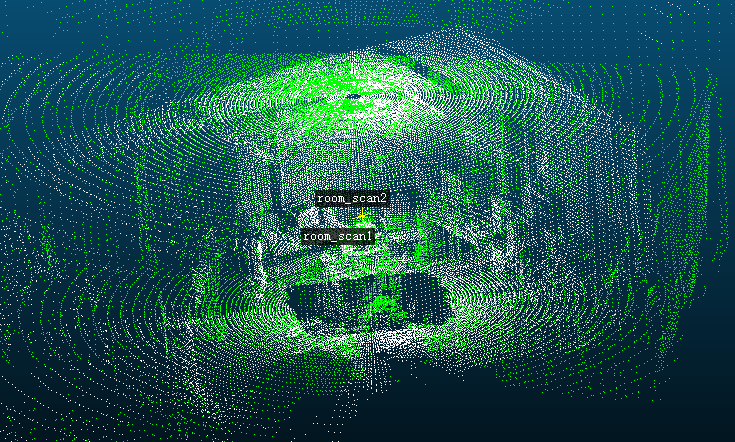
PCL官方例程normal_distributions_transform.cpp代码如下:
#include <iostream>

#include <pcl/io/pcd_io.h>

#include <pcl/point_types.h>

#include <pcl/registration/ndt.h>

#include <pcl/filters/approximate_voxel_grid.h>

#include <pcl/visualization/pcl_visualizer.h>

#include <boost/thread/thread.hpp>

int main (int argc, char** argv)

{

  // Loading first scan of room.

  pcl::PointCloud<pcl::PointXYZ>::Ptr target_cloud (new pcl::PointCloud<pcl::PointXYZ>);

  if (pcl::io::loadPCDFile<pcl::PointXYZ> ("room_scan1.pcd", *target_cloud) == -)

  {

    PCL_ERROR ("Couldn't read file room_scan1.pcd \n");

    return (-);

  }

  std::cout << "Loaded " << target_cloud->size () << " data points from room_scan1.pcd" << std::endl;

  // Loading second scan of room from new perspective.

  pcl::PointCloud<pcl::PointXYZ>::Ptr input_cloud (new pcl::PointCloud<pcl::PointXYZ>);

  if (pcl::io::loadPCDFile<pcl::PointXYZ> ("room_scan2.pcd", *input_cloud) == -)

  {

    PCL_ERROR ("Couldn't read file room_scan2.pcd \n");

    return (-);

  }

  std::cout << "Loaded " << input_cloud->size () << " data points from room_scan2.pcd" << std::endl;

  // Filtering input scan to roughly 10% of original size to increase speed of registration.

  pcl::PointCloud<pcl::PointXYZ>::Ptr filtered_cloud (new pcl::PointCloud<pcl::PointXYZ>);

  pcl::ApproximateVoxelGrid<pcl::PointXYZ> approximate_voxel_filter;

  approximate_voxel_filter.setLeafSize (0.2, 0.2, 0.2);

  approximate_voxel_filter.setInputCloud (input_cloud);

  approximate_voxel_filter.filter (*filtered_cloud);

  std::cout << "Filtered cloud contains " << filtered_cloud->size ()

            << " data points from room_scan2.pcd" << std::endl;

  // Initializing Normal Distributions Transform (NDT).

  pcl::NormalDistributionsTransform<pcl::PointXYZ, pcl::PointXYZ> ndt;

  // Setting scale dependent NDT parameters

  // Setting minimum transformation difference for termination condition.

  ndt.setTransformationEpsilon (0.01);

  // Setting maximum step size for More-Thuente line search.

  ndt.setStepSize (0.1);

  //Setting Resolution of NDT grid structure (VoxelGridCovariance).

  ndt.setResolution (1.0);

  // Setting max number of registration iterations.

  ndt.setMaximumIterations ();

  // Setting point cloud to be aligned.

  ndt.setInputSource (filtered_cloud);

  // Setting point cloud to be aligned to.

  ndt.setInputTarget (target_cloud);

  // Set initial alignment estimate found using robot odometry.

  Eigen::AngleAxisf init_rotation (0.6931, Eigen::Vector3f::UnitZ ());

  Eigen::Translation3f init_translation (1.79387, 0.720047, );

  Eigen::Matrix4f init_guess = (init_translation * init_rotation).matrix ();

  // Calculating required rigid transform to align the input cloud to the target cloud.

  pcl::PointCloud<pcl::PointXYZ>::Ptr output_cloud (new pcl::PointCloud<pcl::PointXYZ>);

  ndt.align (*output_cloud, init_guess);

  std::cout << "Normal Distributions Transform has converged:" << ndt.hasConverged ()

            << " score: " << ndt.getFitnessScore () << std::endl;

  // Transforming unfiltered, input cloud using found transform.

  pcl::transformPointCloud (*input_cloud, *output_cloud, ndt.getFinalTransformation ());

  // Saving transformed input cloud.

  pcl::io::savePCDFileASCII ("room_scan2_transformed.pcd", *output_cloud);

  // Initializing point cloud visualizer

  boost::shared_ptr<pcl::visualization::PCLVisualizer>

  viewer_final (new pcl::visualization::PCLVisualizer ("3D Viewer"));

  viewer_final->setBackgroundColor (, , );

  // Coloring and visualizing target cloud (red).

  pcl::visualization::PointCloudColorHandlerCustom<pcl::PointXYZ>

  target_color (target_cloud, , , );

  viewer_final->addPointCloud<pcl::PointXYZ> (target_cloud, target_color, "target cloud");

  viewer_final->setPointCloudRenderingProperties (pcl::visualization::PCL_VISUALIZER_POINT_SIZE,

                                                  , "target cloud");

  // Coloring and visualizing transformed input cloud (green).

  pcl::visualization::PointCloudColorHandlerCustom<pcl::PointXYZ>

  output_color (output_cloud, , , );

  viewer_final->addPointCloud<pcl::PointXYZ> (output_cloud, output_color, "output cloud");

  viewer_final->setPointCloudRenderingProperties (pcl::visualization::PCL_VISUALIZER_POINT_SIZE,

                                                  , "output cloud");

  // Starting visualizer

  viewer_final->addCoordinateSystem (1.0);

  viewer_final->initCameraParameters ();

  // Wait until visualizer window is closed.

  while (!viewer_final->wasStopped ())

  {

    viewer_final->spinOnce ();

    boost::this_thread::sleep (boost::posix_time::microseconds ());

  }

  return ();

}
代码解释:
#include <pcl/registration/ndt.h>

#include <pcl/filters/approximate_voxel_grid.h>
上面两行是使用NDT算法和用来缩减采样点数目的filter对应的头文件。The filter can be exchanged for other filters but I have found the approximate voxel filter to produce the best results.
  // Loading first scan of room.

  pcl::PointCloud<pcl::PointXYZ>::Ptr target_cloud (new pcl::PointCloud<pcl::PointXYZ>);

  if (pcl::io::loadPCDFile<pcl::PointXYZ> ("room_scan1.pcd", *target_cloud) == -)

  {

    PCL_ERROR ("Couldn't read file room_scan1.pcd \n");

    return (-);

  }

  std::cout << "Loaded " << target_cloud->size () << " data points from room_scan1.pcd" << std::endl;

  // Loading second scan of room from new perspective.

  pcl::PointCloud<pcl::PointXYZ>::Ptr input_cloud (new pcl::PointCloud<pcl::PointXYZ>);

  if (pcl::io::loadPCDFile<pcl::PointXYZ> ("room_scan2.pcd", *input_cloud) == -)

  {

    PCL_ERROR ("Couldn't read file room_scan2.pcd \n");

    return (-);

  }

  std::cout << "Loaded " << input_cloud->size () << " data points from room_scan2.pcd" << std::endl;
上面的代码加载pcd文件,将点云存储在pcl::PointCloud<pcl::PointXYZ>::Ptr指针指向的内存中。接下来会以target cloud为参考标准,对input cloud进行变换,使两片点云重合。
 // Filtering input scan to roughly 10% of original size to increase speed of registration.

  pcl::PointCloud<pcl::PointXYZ>::Ptr filtered_cloud (new pcl::PointCloud<pcl::PointXYZ>);

  pcl::ApproximateVoxelGrid<pcl::PointXYZ> approximate_voxel_filter;

  approximate_voxel_filter.setLeafSize (0.2, 0.2, 0.2);

  approximate_voxel_filter.setInputCloud (input_cloud);

  approximate_voxel_filter.filter (*filtered_cloud);

  std::cout << "Filtered cloud contains " << filtered_cloud->size () << " data points from room_scan2.pcd" << std::endl;
上面代码对input cloud进行过滤是为了缩短配准的计算时间 (Any filter that downsamples the data uniformly can work for this section)。这里只对input cloud进行了滤波处理,减少其数据量到10%左右,而target cloud不需要滤波处理。The target cloud does not need be filtered because voxel grid data structure used by the NDT algorithm does not use individual points, but instead uses the statistical data of the points contained in each of its data structures voxel cells.
  // Initializing Normal Distributions Transform (NDT).

  pcl::NormalDistributionsTransform<pcl::PointXYZ, pcl::PointXYZ> ndt;
这一行创建了带默认参数的NDT算法对象。
  // Setting scale dependent NDT parameters

  // Setting minimum transformation difference for termination condition.

  ndt.setTransformationEpsilon (0.01);

  // Setting maximum step size for More-Thuente line search.

  ndt.setStepSize (0.1);

  //Setting Resolution of NDT grid structure (VoxelGridCovariance).

  ndt.setResolution (1.0);
Next we need to modify some of the scale dependent parameters. Because the NDT algorithm uses a voxelized data structure and More-Thuente line search, some parameters need to be scaled to fit the data set. The above parameters seem to work well on the scale we are working with, size of a room, but they would need to be significantly decreased to handle smaller objects, such as scans of a coffee mug.
The Transformation Epsilon parameter defines minimum, allowable, incremental change of the transformation vector, [x, y, z, roll, pitch, yaw] in meters and radians respectively. Once the incremental change dips below this threshold, the alignment terminates. The Step Size parameter defines the maximum step length allowed by the More-Thuente line search. This line search algorithm determines the best step length below this maximum value, shrinking the step length as you near the optimal solution. Larger maximum step lengths will be able to clear greater distances in fewer iterations but run the risk of overshooting and ending up in an undesirable local minimum. Finally, the Resolution parameter defines the voxel resolution of the internal NDT grid structure. This structure is easily searchable and each voxel contain the statistical data, mean, covariance, etc., associated with the points it contains. The statistical data is used to model the cloud as a set of multivariate Gaussian distributions and allows us to calculate and optimize the probability of the existence of points at any position within the voxel. This parameter is the most scale dependent. It needs to be large enough for each voxel to contain at least 6 points but small enough to uniquely describe the environment.
  // Setting max number of registration iterations.

  ndt.setMaximumIterations ();
这个参数控制了优化过程的最大迭代次数。一般来说,在达到最大迭代次数之前程序就会先达到epsilon阈值而终止。添加最大迭代次数的限制能够增加程序鲁棒性,阻止了它在错误的方向运行过长时间( For the most part, the optimizer will terminate on the Transformation Epsilon before hitting this limit but this helps prevent it from running for too long in the wrong direction)。
  // Setting point cloud to be aligned.

  ndt.setInputSource (filtered_cloud);

  // Setting point cloud to be aligned to.

  ndt.setInputTarget (target_cloud);
Here, we pass the point clouds to the NDT registration program. The input cloud is the cloud that will be transformed and the target cloud is the reference frame to which the input cloud will be aligned. When the target cloud is added, the NDT algorithm’s internal data structure is initialized using the target cloud data.
  // Set initial alignment estimate found using robot odometry.

  Eigen::AngleAxisf init_rotation (0.6931, Eigen::Vector3f::UnitZ ());

  Eigen::Translation3f init_translation (1.79387, 0.720047, );

  Eigen::Matrix4f init_guess = (init_translation * init_rotation).matrix ();
在这部分代码块中,我们提供了点云配准变换的初始估计值。虽然算法不指定初值也可以运行,但是有了它,易于得到更好的结果,尤其是当两块点云差异较大时。Though the algorithm can be run without such an initial transformation, you tend to get better results with one, particularly if there is a large discrepancy between reference frames. In robotic applications, such as the ones used to generate this data set, the initial transformation is usually generated using odometry data.
  // Calculating required rigid transform to align the input cloud to the target cloud.

  pcl::PointCloud<pcl::PointXYZ>::Ptr output_cloud (new pcl::PointCloud<pcl::PointXYZ>);

  ndt.align (*output_cloud, init_guess);

  std::cout << "Normal Distributions Transform has converged:" << ndt.hasConverged ()

            << " score: " << ndt.getFitnessScore () << std::endl;
最后我们进行点云配准,变换后的点云保存在output cloud里,之后打印出配准分数。分数通过计算output cloud与target cloud对应的最近点欧式距离的平方和得到,得分越小说明匹配效果越好。getFitnessScore:Obtain the Euclidean fitness score (e.g., sum of squared distances from the source to the target)
  // Transforming unfiltered, input cloud using found transform.

  pcl::transformPointCloud (*input_cloud, *output_cloud, ndt.getFinalTransformation ());

  // Saving transformed input cloud.

  pcl::io::savePCDFileASCII ("room_scan2_transformed.pcd", *output_cloud);
配准完成之后,output cloud中包含的数据将由滤波后的input cloud变换而来,因为我们传递给算法的输入是滤波后的input cloud,而非原始的输入点云。为了获得原始点云的配准版本,我们从NDT算法的结果中提取最终变换矩阵,并变换我们的原始输入点云。将这个点云保存到文件room_scan2_transformed.pcd中以便将来使用。
  // Initializing point cloud visualizer

  boost::shared_ptr<pcl::visualization::PCLVisualizer>  viewer_final (new pcl::visualization::PCLVisualizer ("3D Viewer"));

  viewer_final->setBackgroundColor (, , );

  // Coloring and visualizing target cloud (red).

  pcl::visualization::PointCloudColorHandlerCustom<pcl::PointXYZ>

  target_color (target_cloud, , , );

  viewer_final->addPointCloud<pcl::PointXYZ> (target_cloud, target_color, "target cloud");

  viewer_final->setPointCloudRenderingProperties (pcl::visualization::PCL_VISUALIZER_POINT_SIZE, , "target cloud");

  // Coloring and visualizing transformed input cloud (green).

  pcl::visualization::PointCloudColorHandlerCustom<pcl::PointXYZ>

  output_color (output_cloud, , , );

  viewer_final->addPointCloud<pcl::PointXYZ> (output_cloud, output_color, "output cloud");

  viewer_final->setPointCloudRenderingProperties (pcl::visualization::PCL_VISUALIZER_POINT_SIZE, , "output cloud");

  // Starting visualizer

  viewer_final->addCoordinateSystem (1.0);

  viewer_final->initCameraParameters ();

  // Wait until visualizer window is closed.

  while (!viewer_final->wasStopped ())

  {

    viewer_final->spinOnce ();

    boost::this_thread::sleep (boost::posix_time::microseconds ());

  }
接下来的这部分不是必需的,但是若想看到最终程序的可视化结果,使用点云库的可视化类,可以轻松地完成此部分。首先我们用黑色背景创建一个可视化对象,并加载需要显示的点云到对象中。最后启动可视化对象,等待直到可视化对象的窗口关闭。
CMakeLists.txt文件如下:
cmake_minimum_required(VERSION 2.8 FATAL_ERROR)

project(normal_distributions_transform)

FIND_PACKAGE(PCL 1.5 REQUIRED)

include_directories(${PCL_INCLUDE_DIRS})

link_directories(${PCL_LIBRARY_DIRS})

add_definitions(${PCL_DEFINITIONS})

add_executable(normal_distributions_transform normal_distributions_transform.cpp )

target_link_libraries (normal_distributions_transform ${PCL_LIBRARIES})
使用cmake生成makefile,然后用make生成可执行程序 :
cmake .

make
运行程序:
$ ./normal_distributions_transform
输出
匹配后的点云

参考:
多元正态分布(Multivariate normal distribution)
How to use Normal Distributions Transform
激光数据匹配(MATLAB Robotics System Toolbox)
NDT(Normal Distributions Transform)算法原理与公式推导
如何使用正态分布变换(Normal Distributions Transform)进行配准
CloudCompare - 3D point cloud and mesh processing software
The Normal Distributions Transform: A New Approach to Laser Scan Matching
使用正态分布变换(Normal Distributions Transform)进行点云配准的更多相关文章
- NDT(Normal Distributions Transform)算法原理与公式推导
正态分布变换(NDT)算法是一个配准算法,它应用于三维点的统计模型,使用标准最优化技术来确定两个点云间的最优的匹配,因为其在配准过程中不利用对应点的特征计算和匹配,所以时间比其他方法快.下面的公式推导 ...
- 【概率论】5-6:正态分布(The Normal Distributions Part I)
title: [概率论]5-6:正态分布(The Normal Distributions Part I) categories: - Mathematic - Probability keyword ...
- 论文阅读 Characterization of Multiple 3D LiDARs for Localization and Mapping using Normal Distributions Transform
Abstract 在这个文章里, 我们细致的比较了10种不同的3D LiDAR传感器, 用了一般的 Normal Distributions Transform (NDT) 算法. 我们按以下几个任务 ...
- 【概率论】5-6:正态分布(The Normal Distributions Part III)
title: [概率论]5-6:正态分布(The Normal Distributions Part III) categories: - Mathematic - Probability keywo ...
- 【概率论】5-6:正态分布(The Normal Distributions Part II)
title: [概率论]5-6:正态分布(The Normal Distributions Part II) categories: - Mathematic - Probability keywor ...
- NDT匹配: The Normal Distributions Transform: A New Approach to Laser Scan
介绍 大多数激光匹配算法都是基于点或者线的特征匹配,该论文提出一种2D激光扫描匹配算法,方法类似于占据栅格,将2D平面分为一个个cell,对于每个cell,设定其一个正态分布,表示该网格测量到每个点的 ...
- 【概率论】5-10:二维正态分布(The Bivariate Normal Distributions)
title: [概率论]5-10:二维正态分布(The Bivariate Normal Distributions) categories: - Mathematic - Probability k ...
- 正态分布(Normal distribution)又名高斯分布(Gaussian distribution)
正态分布(Normal distribution)又名高斯分布(Gaussian distribution),是一个在数学.物理及project等领域都很重要的概率分布,在统计学的很多方面有着重大的影 ...
- NDT(Normal Distribution Transform) 算法(与ICP对比)和一些常见配准算法
原文地址:http://ghx0x0.github.io/2014/12/30/NDT-match/ By GH 发表于 12月 30 2014 目前三维配准中用的较多的是ICP迭代算法,需要提供一个 ...
随机推荐
- Asp.Net Core Web相对路径、绝对路径整理
一.相对路径 1.关于Asp.Net Core中的相对路径主要包括两个部分:一.Web根目录,即当前网站的目录为基础:二.内容目录wwwroot文件夹,对于静态文件都放在这个目录. 2.获取控制器,A ...
- 机器学习的MLE和MAP:最大似然估计和最大后验估计
https://zhuanlan.zhihu.com/p/32480810 TLDR (or the take away) 频率学派 - Frequentist - Maximum Likelihoo ...
- python读取yaml配置文件
支持多种语言:python.js.golang.java.c.c++ YAML 语言(发音 /ˈjæməl/ )的设计目标,就是方便人类读写.它实质上是一种通用的数据串行化格式. 它的基本语法规则如下 ...
- CF 329A(Purification-贪心-非DLX)
A. Purification time limit per test 1 second memory limit per test 256 megabytes input standard inpu ...
- 企业级搜索引擎Solr 第三章 索引数据(Indexing Data)[1] (转)
Index Data Author: David Smiley Eric Pugh 译者:Koala++ / 屈伟 在这一章中我们将了解如何将数据传入Solr.这个传入的过程称之为索引,尽管中间还包含 ...
- LeetCode 114| Flatten Binary Tree to Linked List(二叉树转化成链表)
题目 给定一个二叉树,原地将它展开为链表. 例如,给定二叉树 1 / \ 2 5 / \ \ 3 4 6 将其展开为: 1 \ 2 \ 3 \ 4 \ 5 \ 6 解析 通过递归实现:可以用先序遍历, ...
- LeakCanary 内存泄漏 监测 性能优化 简介 原理 MD
Markdown版本笔记 我的GitHub首页 我的博客 我的微信 我的邮箱 MyAndroidBlogs baiqiantao baiqiantao bqt20094 baiqiantao@sina ...
- 两个List合并去重
今天遇到一个合并去重问题,从网上搜索一样总结出来两个比较简单的方法,这里去重是只能取出地址相同的数据,例如:如果两个字符串的值相同但都是单独new出来的这样去不了 @Test public void ...
- android 巧用动画使您app风骚起来
巧用Android的自定义动画,使你更加的有动感,是大多数Android开发人员的目标,那怎么做到这点.请听下文分解: 3.0以前,android支持两种动画模式,tween animation(幅间 ...
- 【Java】Java-ShutDownHook-优雅关闭系统资源
Java-ShutDownHook-优雅关闭系统资源 java shuadownhook_百度搜索 Java应用中使用ShutdownHook友好地清理现场 - 残雪余香 - 博客园 java kil ...