
MySQL权限和用户管理
Mysql权限系统(由mysql权限表进行控制user和db)通过下面两个方面进行认证:
1)对于连接的用户进行身份验证,合法的通过验证,不合法的拒绝连接。
2)对于通过连接认证的用户,可以在合法的范围内对数据库进行操作。
Mysql的权限表在数据库启动时就被载入内存,当用户通过身份认证后,就可以在内存中进行相应的权限存取,对数据库进行相应的操作。在权限存取的过程中,mysql数据库会用到其内部“mysql”数据库的user、db、host权限表。其中最重要的是user权限表,其内容主要分为:用户列、权限列、安全列和资源控制列。
当用户进行连接时,mysql数据库进行了以下两个过程:
1)先从user表中的host、user、password三个字段中判断连接的ip、用户和密码是否存在于表中,如果存在则通过验证,否则验证失败。
2)对于通过验证的用户,则通过以下权限表获取用户对数据库的操作权限:
user-->db-->tables_priv-->columns_priv。这几个权限表中,权限范围依次递减,全局权限覆盖局部权限。
一、MySQL用户账号管理
1、创建账号:
两种方法,grant语法创建用户账号或直接修改授权表,生产中更倾向于使用第一种方法进行账号创建,这里也只介绍grant语法方式进行账号的创建方法。
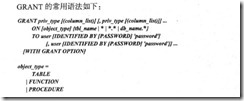
例1:
mysql> grant all privileges on *.* to u1@localhost identified by 'mysql' with grant option;
Query OK, 0 rows affected (0.00 sec)
mysql> select * from user where user='u1' and host='localhost'\G;
*************************** 1. row ***************************
Host: localhost
User: u1
Password: *E74858DB86EBA20BC33D0AECAE8A8108C56B17FA
Select_priv: Y
Insert_priv: Y
Update_priv: Y
Delete_priv: Y
Create_priv: Y
Drop_priv: Y
Reload_priv: Y
Shutdown_priv: Y
Process_priv: Y
File_priv: Y
Grant_priv: Y
References_priv: Y
Index_priv: Y
Alter_priv: Y
Show_db_priv: Y
Super_priv: Y
Create_tmp_table_priv: Y
Lock_tables_priv: Y
Execute_priv: Y
Repl_slave_priv: Y
Repl_client_priv: Y
Create_view_priv: Y
Show_view_priv: Y
Create_routine_priv: Y
Alter_routine_priv: Y
Create_user_priv: Y
Event_priv: Y
Trigger_priv: Y
Create_tablespace_priv: Y
例2:
mysql> grant select,insert,delete,update on test1.* to u2@'%' identified by 'mysql' with grant option;
Query OK, 0 rows affected (0.00 sec)
例3:
mysql> grant usage,super,process,file on *.* to 'u3'@'%';
Query OK, 0 rows affected (0.00 sec)
2、查看账号权限
MySQL查看账号权限使用:show grants for ‘user’@’host’;
mysql> show grants for u2@'%';
+---------------------------------------------------------------------------------------------------+
| Grants for u2@% |
+---------------------------------------------------------------------------------------------------+
| GRANT USAGE ON *.* TO 'u2'@'%' IDENTIFIED BY PASSWORD '*E74858DB86EBA20BC33D0AECAE8A8108C56B17FA' |
| GRANT SELECT, INSERT, UPDATE, DELETE ON `test1`.* TO 'u2'@'%' WITH GRANT OPTION |
+---------------------------------------------------------------------------------------------------+
2 rows in set (0.00 sec)
对于MySQL5.0以后的版本,也可以使用information_schema数据库进行查看:
mysql> use information_schema;
Database changed
mysql> select * from schema_privileges where grantee="'u2'@'%'";
+----------+---------------+--------------+----------------+--------------+
| GRANTEE | TABLE_CATALOG | TABLE_SCHEMA | PRIVILEGE_TYPE | IS_GRANTABLE |
+----------+---------------+--------------+----------------+--------------+
| 'u2'@'%' | def | test1 | SELECT | YES |
| 'u2'@'%' | def | test1 | INSERT | YES |
| 'u2'@'%' | def | test1 | UPDATE | YES |
| 'u2'@'%' | def | test1 | DELETE | YES |
+----------+---------------+--------------+----------------+--------------+
4 rows in set (0.00 sec)
3、更改账号权限
增加和回收账号权限的方法有两种,grant和revoke语句或直接修改权限表。其中grant语句增加权限与创建用户方法一致。这里介绍revoke语法:

增加用户权限:
mysql> grant usage on *.* to 'u5'@'%';
Query OK, 0 rows affected (0.00 sec)
mysql> show grants for 'u5'@'%';
+--------------------------------+
| Grants for u5@% |
+--------------------------------+
| GRANT USAGE ON *.* TO 'u5'@'%' |
+--------------------------------+
1 row in set (0.00 sec)
mysql> grant select on *.* to 'u5'@'%';
Query OK, 0 rows affected (0.00 sec)
mysql> show grants for 'u5'@'%';
+---------------------------------+
| Grants for u5@% |
+---------------------------------+
| GRANT SELECT ON *.* TO 'u5'@'%' |
+---------------------------------+
1 row in set (0.00 sec)
mysql> grant insert,delete on *.* to 'u5'@'%';
Query OK, 0 rows affected (0.01 sec)
mysql> show grants for 'u5'@'%';
+-------------------------------------------------+
| Grants for u5@% |
+-------------------------------------------------+
| GRANT SELECT, INSERT, DELETE ON *.* TO 'u5'@'%' |
+-------------------------------------------------+
1 row in set (0.00 sec)
回收用户权限:
mysql> revoke delete on *.* from 'u5'@'%';
Query OK, 0 rows affected (0.00 sec)
mysql> show grants for 'u5'@'%';
+-----------------------------------------+
| Grants for u5@% |
+-----------------------------------------+
| GRANT SELECT, INSERT ON *.* TO 'u5'@'%' |
+-----------------------------------------+
1 row in set (0.00 sec)
mysql> revoke select,insert on *.* from 'u5'@'%';
Query OK, 0 rows affected (0.00 sec)
mysql> show grants for 'u5'@'%';
+--------------------------------+
| Grants for u5@% |
+--------------------------------+
| GRANT USAGE ON *.* TO 'u5'@'%' |
+--------------------------------+
1 row in set (0.00 sec)
mysql> revoke usage on *.* from 'u5'@'%';
Query OK, 0 rows affected (0.00 sec)
mysql> show grants for 'u5'@'%';
+--------------------------------+
| Grants for u5@% |
+--------------------------------+
| GRANT USAGE ON *.* TO 'u5'@'%' |
+--------------------------------+
1 row in set (0.00 sec)
注意:revoke无法回收usage登录权限,也就是说revoke不能删除mysql用户。
4、修改账号密码
1)方法一:mysqladmin在命令行执行密码:用户需要有super权限。
[root@faspdev bin]# ./mysqladmin -uroot -hlocalhost -P3306 password 'mysql'
Warning: Using a password on the command line interface can be insecure.
[root@faspdev bin]# ./mysql -uroot
ERROR 1045 (28000): Access denied for user 'root'@'localhost' (using password: NO)
[root@faspdev bin]# ./mysql -uroot -p
Enter password:
Welcome to the MySQL monitor. Commands end with ; or \g.
Your MySQL connection id is 28
Server version: 5.6.31 Source distribution
Copyright (c) 2000, 2016, Oracle and/or its affiliates. All rights reserved.
Oracle is a registered trademark of Oracle Corporation and/or its
affiliates. Other names may be trademarks of their respective
owners.
Type 'help;' or '\h' for help. Type '\c' to clear the current input statement.
mysql>
2)方法二:set password语句更改用户密码:
mysql> set password for 'u1'@'localhost'=password('oracle');
Query OK, 0 rows affected (0.00 sec)
[root@faspdev bin]# ./mysql -uu1 -hlocalhost -p
Enter password:
Welcome to the MySQL monitor. Commands end with ; or \g.
Your MySQL connection id is 42
Server version: 5.6.31 Source distribution
Copyright (c) 2000, 2016, Oracle and/or its affiliates. All rights reserved.
Oracle is a registered trademark of Oracle Corporation and/or its
affiliates. Other names may be trademarks of their respective
owners.
Type 'help;' or '\h' for help. Type '\c' to clear the current input statement.
mysql>
修改自己密码可以省略for:
mysql> set password=password('mysql');
Query OK, 0 rows affected (0.00 sec)
3)方法三:grant的identified by子句直接指定用户密码:
mysql> grant usage on *.* to 'u1'@'localhost' identified by 'oracle';
Query OK, 0 rows affected (0.00 sec)
4)直接更改mysql数据库的user表,在更改密码时也可以直接使用md5加密后的密文:注意password函数的使用时机。
略
5、删除mysql账户方法
删除mysql用户有两种方法,drop user和直接修改user表:
mysql> drop user 't1'@'localhost';
Query OK, 0 rows affected (0.00 sec)
6、账号资源限制
MySQL的资源限制包括以下内容:
1)单个账户每小时执行查询次数;
2)单个账户每小时执行更新次数;
3)单个账户每小时连接数据库次数;
4)单个账户每小时并发连接数据库次数。
设置资源限制的语法如下:
grant ... with option;
其中option可以是以下几个:
1)max_queries_per_hour count;每小时最大查询次数;
2)Max_updates_per_hour count;每小时最多更新次数;
3)Max_connections_per_hour count;每小时最大连接次数;
4)Max_User_connections count;最大用户并发连接数(mysql系统全局Max_User_connections参数)。
例:
mysql> grant select on test.* to chavin@localhost
-> with max_queries_per_hour 5
-> max_user_connections 5;
Query OK, 0 rows affected (0.00 sec)
mysql> select user,max_questions,max_updates,max_connections,max_user_connections from mysql.user where user='chavin';
+--------+---------------+-------------+-----------------+----------------------+
| user | max_questions | max_updates | max_connections | max_user_connections |
+--------+---------------+-------------+-----------------+----------------------+
| chavin | 5 | 0 | 0 | 5 |
+--------+---------------+-------------+-----------------+----------------------+
1 row in set (0.00 sec)
[root@faspdev bin]# ./mysql -uchavin -hlocalhost
Welcome to the MySQL monitor. Commands end with ; or \g.
Your MySQL connection id is 66
Server version: 5.6.31 Source distribution
Copyright (c) 2000, 2016, Oracle and/or its affiliates. All rights reserved.
Oracle is a registered trademark of Oracle Corporation and/or its
affiliates. Other names may be trademarks of their respective
owners.
Type 'help;' or '\h' for help. Type '\c' to clear the current input statement.
mysql> use test;
Reading table information for completion of table and column names
You can turn off this feature to get a quicker startup with -A
Database changed
mysql> select * from t1;
+------+
| id |
+------+
| 1 |
| 2 |
+------+
2 rows in set (0.00 sec)
mysql> select * from t1;
ERROR 1226 (42000): User 'chavin' has exceeded the 'max_questions' resource (current value: 5)
mysql>
清除账号资源限制方法:root用户执行flush user_resources/flush privileges/mysqladmin reload这三个命令中的任何一个进行清除。
mysql> flush privileges;
Query OK, 0 rows affected (0.00 sec)
修改或删除用户的资源限制可以将相应的资源限制项设置为0。
mysql> grant usage on *.* to chavin@localhost
-> with max_queries_per_hour 0;
Query OK, 0 rows affected (0.00 sec)
MySQL权限和用户管理的更多相关文章
- mysql命令大全用户管理相关命令
1.登陆 mysql>mysql -uJDev -p 2.用户管理 mysql>use mysql; 3.查看有哪些登陆用户 mysql> select host,user, ...
- MySQL学习之用户管理
用户权限管理 用户权限管理:在不同的项目中给不同的角色(开发者)不同的操作权限,为了保证数据库数据的安全. 简单点说:有的用户可以访问并修改这个数据,而有些用户只能去查看数据,而不能修改数据.就如同博 ...
- 【MySQL笔记】用户管理
1.账户管理 1.1登录和退出MySQL服务器 MySQL –hhostname|hostIP –P port –u username –p[password] databaseName –e &qu ...
- mysql数据库: 用户管理、pymysql使用、navicat插件使用
一.用户管理 二.pymysql增删改查 三.sql注入攻击 一.用户管理 数据安全非常重要 不可能随便分配root账户 应该按照不同开发岗位分配不同的账户和权限 mysql中 将于用户相关的数据放在 ...
- Linux文件权限及用户管理
/etc/passwd文件与 /etc/shadow文件/etc/passwd文件/etc/passwd文件主要存放登录名.UID等用户相关信息,用户登录密码存放在/etc/shadow文件中.例子: ...
- MySQL 基础八 用户管理
SELECT * FROM student INSERT INTO student(NAME,sex,createuser,createtime) VALUES('jack','男','ligenyu ...
- MVC基于角色权限控制--用户管理
用户管理模块包括 新增用户.修改用户.展示用户列表.删除用户.用户角色分配.用户角色删除.用户权限分配 这里只介绍关于权限有关的 用户角色分配.用户角色删除.用户权限分配 新建控制器 UserInfo ...
- mysql权限及用户
一:Flush table tables_name MySQL的FLUSH句法(清除或者重新加载内部缓存) FLUSH flush_option [,flush_option],如果你想要清除一些My ...
- mysql数据库之用户管理和权限
mysql服务器进程在启动的时候会读取这6张表,并在内存中生成授权表,所以这几个文件是直接加载进内存的. 以后后续的任何用户登录及其访问权限的检查都通过检查这6张表来实现的.通过访问内存上所生成的结构 ...
随机推荐
- lua 注释
1. 单行注释 -- 功能等同于C++中的// 2. 多行注释 --[[ 注释的内容 ]] 功能等同于C++中的 /**/ 3. 多行注释 --[====[ 注释和内容 ]=== ...
- mysql中concat 和 group_concat()的用法
一.CONCAT()函数CONCAT()函数用于将多个字符串连接成一个字符串.使用数据表Info作为示例,其中SELECT id,name FROM info LIMIT 1;的返回结果为+----+ ...
- apt-get/dpkg常用指令备查
apt-get install <package> Downloads <package> and all of its dependencies, and installs ...
- JavaWeb学习总结(十七)EL表达式
语法格式: ${expression} 1. 表达式支持算术运算符合逻辑运算符 <%@ page language="java" contentType="text ...
- 详解SQL中的GROUP BY语句
下面为您介绍SQL语句中GROUP BY 语句,GROUP BY 语句用于结合合计函数,根据一个或多个列对结果集进行分组. 希望对您学习SQL语句有所帮助. SQL GROUP BY 语法 SELEC ...
- windows内核情景分析之—— KeRaiseIrql函数与KeLowerIrql()函数
windows内核情景分析之—— KeRaiseIrql函数与KeLowerIrql()函数 1.KeRaiseIrql函数 这个 KeRaiseIrql() 只是简单地调用 hal 模块的 KfRa ...
- JS - 查找同辈中的对象
今天在使用parent().find(".a:first")的时候,发现查找结果非正常按照顺序来的.有点递归的感觉,从底层往上. 因为需要的是同级的对象,所以去查了一下jquery ...
- Qt下libusb-win32的使用(一)打印设备描述符
主要是在前一篇的基础上,学习libusb-win32的API使用.程序很简单,就是打印指定USB设备的设备描述符(当然其他描述符也是可以的). #include "testlibusb.h& ...
- 【node.js】Error: CERT_UNTRUSTED
背景 : 在linux centos7 上 进行npm 命令是报错: Error: CERT_UNTRUSTED 解决办法: 关掉HTTPS就好了 npm config set strict-ssl ...
- WEB-DICT词库计划
欢迎大家支持晓阳童鞋的词库计划,建立一个庞大的中文词库 地址如下:http://webdict.info/ 什么是WEB-DICT词库计划? WEB-DICT词表计划目标是通过机器学习算法以及人工标注 ...