
[Canvas]英雄可以射箭了
点此下载源码并用浏览器观看。
图例:
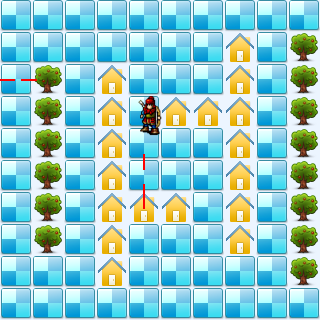
代码:
<!DOCTYPE html>
<html lang="utf-8">
<meta http-equiv="Content-Type" content="text/html; charset=utf-8"/>
<head>
     <title>地图加载 英雄可以射箭了 19.3.6 15:37 by:逆火狂飙 horn19782016@163.com</title>

     <style>
     #canvas{
        background:#ffffff;
        cursor:pointer;
        margin-left:10px;
        margin-top:10px;
        -webkit-box-shadow:3px 3px 6px rgba(0,0,0,0.5);
        -moz-box-shadow:3px 3px 6px rgba(0,0,0,0.5);
        box-shadow:3px 3px 6px rgba(0,0,0,0.5);
     }

     #controls{
        margin-top:10px;
        margin-left:15px;
     }
     </style>

    </head>

     <body onload="init()">
        <div id="controls">
            <input id='animateBtn' type='button' value='开始'/>
        </div>

        <canvas id="canvas" width="160px" height="160px" >
            出现文字表示你的浏览器不支持HTML5
        </canvas>
     </body>
</html>
<script type="text/javascript">
<!--
var paused=true;
animateBtn.onclick=function(e){
    paused=! paused;

    if(paused){
        animateBtn.value="开始";

    }else{
        animateBtn.value="停止";

        window.requestAnimationFrame(animate);
    }
}

var ctx;// 绘图环境
var r;// 表盘半径
var terrain;
var hero;
var arrows;
function init(){
    // init Canvas
    var canvas=document.getElementById('canvas');
    r=160;
    canvas.width =2*r;
    canvas.height=2*r;
    ctx=canvas.getContext('2d');

    terrain=new Terrain();
    hero=new Hero();

    arrows=new Array();

    // 响应键盘事件
    canvas.addEventListener('keydown', doKeyDown, true);
    canvas.focus();
    window.addEventListener('keydown', doKeyDown, true);
};

function draw(){
    // Clear Canvas
    ctx.clearRect(0,0,ctx.canvas.width,ctx.canvas.height);
    ctx.fillStyle="#ECF5FF";
    ctx.fillRect(0,0,ctx.canvas.width,ctx.canvas.height);

    terrain.paint(ctx);
    hero.paint(ctx);

    for(var i=0;i<arrows.length;i++){
        var arrow=arrows[i];
        arrow.paint(ctx);
    }
}

function animate(){
    if(!paused){
        draw();
        window.requestAnimationFrame(animate); /// 让浏览器自行决定帧速率
    }
}

function doKeyDown(e) {
    var keyID = e.keyCode ? e.keyCode :e.which;
    if(keyID === 38 || keyID === 87)  { // up arrow and W
        hero.move('up');
        e.preventDefault();
    }
    if(keyID === 39 || keyID === 68)  { // right arrow and D
        hero.move('right');
        e.preventDefault();
    }
    if(keyID === 40 || keyID === 83)  { // down arrow and S
        hero.move('down');
        e.preventDefault();
    }
    if(keyID === 37 || keyID === 65)  { // left arrow and A
        hero.move('left');
        e.preventDefault();
    }
    //alert('keyID='+keyID);
    if(keyID === 32 )  { // SpaceBar
        //alert(1);
        var a=new Arrow(hero.x+16,hero.y+16,hero.direction);
        arrows.push(a);

        e.preventDefault();
    }
}

//---------------------------------------------------地形类定义开始------------------------------------------------------------------->>
Terrain=function(){
    this.files=["road.png","tree.png","home.png",];

    this.maps=new Array(
        [0,0,0,0,0,0,0,0,0,0],
        [0,0,1,1,1,1,1,1,0,0],
        [0,0,0,0,0,0,0,0,0,0],
        [0,0,2,2,2,2,2,2,2,0],
        [0,0,0,0,0,0,2,0,0,0],
        [0,0,0,2,0,0,2,0,0,0],
        [0,0,0,2,0,0,0,0,0,0],
        [0,2,2,2,2,2,2,2,0,0],
        [0,0,0,0,0,0,0,0,0,0],
        [0,1,1,1,1,1,1,1,1,0],
    );
}
Terrain.prototype={
    files:[],
    // Property
    maps:0,

    // method
    paint:function(ctx){
        for(var i=0;i<this.maps.length;i++){
            var arr=this.maps[i];

            for(var j=0;j<arr.length;j++){
                var value=arr[j];

                var img=new Image();
                img.src=this.files[value];

                ctx.drawImage(img,i*32,j*32);
            }
        }
    },

    getValue:function(i,j){
        if(i<0 || i>=this.maps.length){
            return undefined;
        }
        var arr=this.maps[i];
        if(j<0 || j>=arr.length){
            return undefined;
        }
        var value=arr[j];
        return value;
    },
}
//---------------------------------------------------地形类定义结束-------------------------------------------------------------------<<

//---------------------------------------------------英雄类定义开始------------------------------------------------------------------->>
Hero=function(){
    this.files=["arrow_left.png","arrow_right.png","arrow_up.png","arrow_down.png",];

    this.pngs=[
        {left:0,top:10,width:40,height:40},
        {left:0,top:66,width:40,height:40},
        {left:0,top:120,width:40,height:40},
        {left:0,top:180,width:40,height:40},
    ];
}
Hero.prototype={
    files:[],
    pngs:[],
    x:160,
    y:160,
    xTo:160,
    yTo:160,
    step:32,
    direction:'up',

    // method
    paint:function(ctx){
        var img=new Image();
        img.src='bowman.png';

        var index=0;
        if(this.direction=='up'){
            index=3;
        }
        if(this.direction=='down'){
            index=0;
        }
        if(this.direction=='left'){
            index=1;
        }
        if(this.direction=='right'){
            index=2;
        }
        var pos=this.pngs[index];
        ctx.drawImage(img,pos.left,pos.top,pos.width,pos.height,this.x,this.y,pos.width,pos.height);
        //ctx.drawImage(img,this.x,this.y);
    },

    move:function(direction){
        this.direction=direction;

        if(this.direction=='up'){
            this.yTo-=this.step;
        }
        if(this.direction=='down'){
            this.yTo+=this.step;
        }
        if(this.direction=='left'){
            this.xTo-=this.step;
        }
        if(this.direction=='right'){
            this.xTo+=this.step;
        }

        if(terrain.getValue(this.xTo/this.step,this.yTo/this.step)==0){
            this.x=this.xTo;
            this.y=this.yTo;
        }else{
            this.xTo=this.x;
            this.yTo=this.y;
        }
    }
}
//---------------------------------------------------英雄类定义结束-------------------------------------------------------------------<<

//---------------------------------------------------箭矢类定义开始------------------------------------------------------------------->>
Arrow=function(x,y,direction){
    this.x=x;
    this.y=y;
    this.direction=direction;
}
Arrow.prototype={
    x:0,
    y:0,
    velocity:1,// 飞行速度
    len:16,// 箭杆长
    direction:'',

    // method
    paint:function(ctx){
        var x1=this.x,y1=this.y;

        if(this.direction=='up'){
            this.y-=this.velocity;
            y1=this.y-this.len;
            x1=this.x;
        }
        if(this.direction=='down'){
            this.y+=this.velocity;
            y1=this.y+this.len;
            x1=this.x;
        }
        if(this.direction=='left'){
            this.x-=this.velocity;
            x1=this.x-this.len;
            y1=this.y;
        }
        if(this.direction=='right'){
            this.x+=this.velocity;
            x1=this.x+this.len;
            y1=this.y;
        }

        //alert("this.x="+this.x);
        //alert("this.y="+this.y);
        //alert("x1="+x1);
        //alert("y1="+y1);

        ctx.beginPath();
        ctx.lineWidth = 2;
        ctx.strokeStyle = "#ff0000";
        ctx.moveTo(this.x,this.y);
        ctx.lineTo(x1,y1);
        ctx.stroke();
        ctx.closePath();
        //alert(2);
    },
}
//---------------------------------------------------箭矢类定义结束-------------------------------------------------------------------<<
//-->
</script>
2019年3月6日16点46分
[Canvas]英雄可以射箭了的更多相关文章
- [Canvas]游戏增加怪物爆炸效果,改善箭头形状
请点此下载代码并用浏览器打开试玩. 图例: 代码: <!DOCTYPE html> <html lang="utf-8"> <meta http-eq ...
- [Canvas]首个小游戏告成
英雄在地图上射箭杀怪兽,杀完了就胜利了. 点此下载程序试玩. 图例: 代码: <!DOCTYPE html> <html lang="utf-8"> < ...
- [Canvas]人物型英雄出现(前作仅为箭头)
源码点此下载,用浏览器打开index.html观看. 代码: <!DOCTYPE html> <html lang="utf-8"> <meta ht ...
- [Canvas]RPG游戏雏形 (地图加载,英雄出现并移动)
源码请点此下载并用浏览器打开index.html观看 图例: 代码: <!DOCTYPE html> <html lang="utf-8"> <met ...
- 使用canvas通过js制作一个小型英雄抓怪兽的2D小游戏
首先,这是一个HTML: <!DOCTYPE html> <html lang="en"> <head> <meta charset=&q ...
- [Canvas]Bowman
试玩请点此下载并用浏览器打开index.html 这个游戏是弓箭射击敌人,用方向键移动人物,空格键发射箭枝. 图例: 代码: <!DOCTYPE html> <html lang=& ...
- 如何开发一个简单的HTML5 Canvas 小游戏
原文:How to make a simple HTML5 Canvas game 想要快速上手HTML5 Canvas小游戏开发?下面通过一个例子来进行手把手教学.(如果你怀疑我的资历, A Wiz ...
- 怎样用HTML5 Canvas制作一个简单的游戏
原文连接: How To Make A Simple HTML5 Canvas Game 自从我制作了一些HTML5游戏(例如Crypt Run)后,我收到了很多建议,要求我写一篇关于怎样利用HTML ...
- [Canvas]Bombman v1.04
Bombman是我仿造红白机上经典游戏爆破小人,用Canvas制作的一款网页版单机游戏, 自我感觉还是有一定的可玩性. 本游戏的胜利条件是用雷消灭所有怪物,但被怪物即使是擦边碰到或是炸弹火焰炸到就算失 ...
随机推荐
- DMA : Timer Trigger Memory-to-memory mode,
The DMA channels can also work without being triggered by a request from a peripheral. This mode is ...
- 阅读Linux内核源码时建立tags索引
比如在阅读arm架构的Linux内核代码时想建立arm架构相关的索引,可以使用下面的命令: make ARCH=arm tags
- JQuery日期插件
JQuery是一款非常优秀的脚本框架,其丰富的控件使用起来也非常简单,配置非常灵活.下面做一个使用日期插件datapicker的例子. 1.下载jQuery核心文件就不用说了吧,datepicker是 ...
- cocos2d-x绑lua的开发环境
2013年是手游开发井喷的一年,也是手游市场竞争最为激烈的一年,ios市场除了刷榜.刷榜,还是刷榜,而android有点像黑市的感觉,水太深(很多渠道商已经从上游控制了流量的入口).而cocos2d- ...
- 对于多个button要在同一个监听器中实现自己的单击事件的方法小诀窍。
在网上的一些教程中往往是把一个button加入多个监听器,却非常少有人会把多个button在同一个监听器中去实现他们的单击事件,并且这杨的事实上是非常有用的,比方说在制作一个简单的计算器是就须要0-9 ...
- 启明星会议室系统与Office365集成说明
在本文,我们将介绍如何配置Office365,以便改系统能够支持启明星会议室预定系统. In this article, we will introduct how to config microso ...
- DBS-Tally book(记账本)
ylbtech-dbs:DBS-Tally book(记账本) -- =============================================-- 记账本-- 模仿小程序“记账e”业 ...
- QT中文乱码与国际化支持
QT国际化支持 Qt内部采用的全Unicode编码,这从根本上保证了多国语界面实现的正确性和便捷性.Qt本身提供的linguist工具,用来实现翻译过程十分方便.MFC中利用资源DLL切换资源,或 ...
- Python Configparser模块读取、写入配置文件
写代码中需要用到读取配置,最近在写python,记录一下. 如下,假设有这样的配置. [db] db_host=127.0.0.1 db_port=3306 db_user=root db_pass= ...
- go语言之进阶篇创建goroutine协程
1.goroutine是什么 goroutine是Go并行设计的核心.goroutine说到底其实就是协程,但是它比线程更小,十几个goroutine可能体现在底层就是五六个线程,Go语言内部帮你实现 ...