
Direct2D教程VII——变换几何(TransformedGeometry)对象
目前博客园中成系列的Direct2D的教程有
1、万一的 Direct2D 系列,用的是Delphi 2009
2、zdd的 Direct2D 系列,用的是VS中的C++
3、本文所在的 Direct2D教程 系列,用的是VS2010的Visual Basic语言(可以很方便的转为C#),基于Windows API Code Pack 1.1。
还有官方的说明文档 Direct2D ,用的是C++。
本系列的前几篇文章:
Direct2D教程II——绘制基本图形和线型(StrokeStyle)的设置详解
Direct2D教程V——位图(Bitmap)和位图笔刷(BitmapBrush)
变换几何(TransformedGeometry)的运用
在一些精度要求不高的场景下,为了提高效率,重视元件重用(即一个元件,多次使用)。变换几何(TransformedGeometry)就应运而生,它是把一个源元件通过转换(Transform)得到一个新元件,而不需要重新用大量的代码增加新元件(可以省去很多的关于点的计算)。
和其他的几何对象一样,变换几何(TransformedGeometry)也得通过D2DFactory对象的CreateTransformedGeometry方法来创建,来看看该方法的原型定义
Public Function CreateTransformedGeometry(sourceGeometry As Direct2D1.Geometry, transform As Direct2D1.Matrix3x2F) As Direct2D1.TransformedGeometry
从该函数的原型定义来看,只有两个参数:sourceGeometry,源几何对象,类型是Geometry类;transform,对源几何对象进行的转换,类型是结构Matrix3x2F。
通过该方法获得一个新的几何对象
接下来,我们用一个例子来说明变换几何(TransformedGeometry)的用法
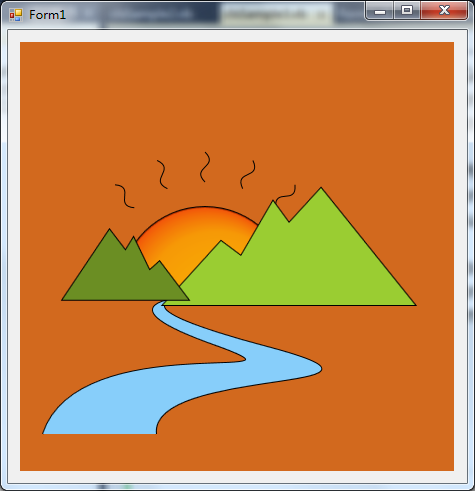
上图是一个简单的图形,分为左山、右山、小河、太阳、太阳光芒这几部分。
我们先用路径几何(PathGeometry)对象创建右山,然后利用CreateTransformedGeometry方法创建了左山,并对它进行了缩放转换(SacleTransform)。
太阳光芒的部分,先用路径几何(PathGeometry)对象创建基本的光芒,然后利用CreateTransformedGeometry方法创建光芒数组,并依次对数组中的光芒进行了旋转转换(RotateTransform)。
下面是示例代码
Public Class clsDirect2DSample16
Inherits clsDirect2DSample
Public Shadows Sub Render()
If Not _renderTarget Is Nothing Then
Dim ColorBackground As New Direct2D1.ColorF(Color.Chocolate.ToArgb)
Dim ColorBorder As New Direct2D1.ColorF(0, 0, 0)
Dim ColorLeftMountain As New Direct2D1.ColorF(Color.OliveDrab.ToArgb)
Dim ColorRightMountain As New Direct2D1.ColorF(Color.YellowGreen.ToArgb)
Dim ColorRiver As New Direct2D1.ColorF(Color.LightSkyBlue.ToArgb)
'Create Sun Brush
Dim gradientStops(2) As Direct2D1.GradientStop
gradientStops(0).Color = New Direct2D1.ColorF(Color.Gold.ToArgb)
gradientStops(0).Position = 0
Dim TC As New Direct2D1.ColorF(Color.Orange.ToArgb)
TC.Alpha = 0.8
gradientStops(1).Color = TC
gradientStops(1).Position = 0.85
TC = New Direct2D1.ColorF(Color.OrangeRed.ToArgb)
TC.Alpha = 0.7
gradientStops(2).Color = TC
gradientStops(2).Position = 1
Dim GS As Direct2D1.GradientStopCollection = _renderTarget.CreateGradientStopCollection(gradientStops, Direct2D1.Gamma.Linear, Direct2D1.ExtendMode.Clamp)
Dim RBS As Direct2D1.RadialGradientBrushProperties
RBS.Center = New Direct2D1.Point2F(185, 250)
RBS.GradientOriginOffset = New Direct2D1.Point2F(80, 80)
RBS.RadiusX = 85
RBS.RadiusY = 85
Dim RB As Direct2D1.RadialGradientBrush = _renderTarget.CreateRadialGradientBrush(RBS, GS)
Dim BorderBrush As Direct2D1.SolidColorBrush = _renderTarget.CreateSolidColorBrush(ColorBorder)
Dim FillBrush As Direct2D1.SolidColorBrush = _renderTarget.CreateSolidColorBrush(ColorBorder)
'Create Right Mountain
Dim rightMountainGeometry As Direct2D1.PathGeometry = _d2DFactory.CreatePathGeometry()
Dim sink As Direct2D1.GeometrySink = rightMountainGeometry.Open
sink.SetFillMode(Direct2D1.FillMode.Winding)
sink.BeginFigure(New Direct2D1.Point2F(395, 263), Direct2D1.FigureBegin.Filled)
Dim points() As Direct2D1.Point2F = { _
New Direct2D1.Point2F(301, 146), _
New Direct2D1.Point2F(269, 181), _
New Direct2D1.Point2F(253, 159), _
New Direct2D1.Point2F(221, 214), _
New Direct2D1.Point2F(201, 199), _
New Direct2D1.Point2F(143, 263), _
New Direct2D1.Point2F(395, 263)
}
sink.AddLines(points)
sink.EndFigure(Direct2D1.FigureEnd.Closed)
sink.Close()
'Create Left Mountain
Dim leftMountainGeometry As Direct2D1.TransformedGeometry = _d2DFactory.CreateTransformedGeometry(rightMountainGeometry, Direct2D1.Matrix3x2F.Scale(-0.5, 0.6, New Direct2D1.Point2F(160, 250)))
'Create Sun
Dim sunGeometry As Direct2D1.PathGeometry = _d2DFactory.CreatePathGeometry
sink = sunGeometry.Open
sink.SetFillMode(Direct2D1.FillMode.Winding)
sink.BeginFigure(New Direct2D1.Point2F(100, 250), Direct2D1.FigureBegin.Filled)
sink.AddArc(New Direct2D1.ArcSegment(New Direct2D1.Point2F(270, 250), _
New Direct2D1.SizeF(85, 85), _
0, Direct2D1.SweepDirection.Clockwise, Direct2D1.ArcSize.Small))
sink.EndFigure(Direct2D1.FigureEnd.Closed)
sink.Close()
'Create Base Sun Light
Dim sunLightGeometry As Direct2D1.PathGeometry = _d2DFactory.CreatePathGeometry
sink = sunLightGeometry.Open
sink.BeginFigure(New Direct2D1.Point2F(185, 140), Direct2D1.FigureBegin.Hollow)
sink.AddBezier(New Direct2D1.BezierSegment(New Direct2D1.Point2F(170, 125), _
New Direct2D1.Point2F(200, 125), _
New Direct2D1.Point2F(185, 110)))
sink.EndFigure(Direct2D1.FigureEnd.Open)
sink.Close()
'Create some Sun Lights
Dim sunLights(4) As Direct2D1.TransformedGeometry
Dim I As Integer
For I = 0 To 4
sunLights(I) = _d2DFactory.CreateTransformedGeometry(sunLightGeometry, Direct2D1.Matrix3x2F.Rotation(I * 20 - 40, New Direct2D1.Point2F(185, 250)))
Next
'Create River
Dim riverGeometry As Direct2D1.PathGeometry = _d2DFactory.CreatePathGeometry
sink = riverGeometry.Open
sink.SetFillMode(Direct2D1.FillMode.Winding)
sink.BeginFigure(New Direct2D1.Point2F(23, 392), Direct2D1.FigureBegin.Filled)
sink.AddBezier(New Direct2D1.BezierSegment(New Direct2D1.Point2F(58, 284), _
New Direct2D1.Point2F(312, 345), _
New Direct2D1.Point2F(196, 303)))
sink.AddBezier(New Direct2D1.BezierSegment(New Direct2D1.Point2F(77, 261), _
New Direct2D1.Point2F(163, 256), _
New Direct2D1.Point2F(163, 256)))
sink.AddBezier(New Direct2D1.BezierSegment(New Direct2D1.Point2F(165, 257), _
New Direct2D1.Point2F(81, 261), _
New Direct2D1.Point2F(251, 306)))
sink.AddBezier(New Direct2D1.BezierSegment(New Direct2D1.Point2F(414, 350), _
New Direct2D1.Point2F(128, 324), _
New Direct2D1.Point2F(136, 392)))
sink.EndFigure(Direct2D1.FigureEnd.Open)
sink.Close()
With _renderTarget
.BeginDraw()
.Clear(ColorBackground)
.DrawGeometry(sunGeometry, BorderBrush, 2)
.FillGeometry(sunGeometry, RB)
For I = 0 To 4
.DrawGeometry(sunLights(I), BorderBrush, 1)
Next
.DrawGeometry(riverGeometry, BorderBrush, 2)
FillBrush.Color = ColorRiver
.FillGeometry(riverGeometry, FillBrush)
.DrawGeometry(rightMountainGeometry, BorderBrush, 2)
FillBrush.Color = ColorRightMountain
.FillGeometry(rightMountainGeometry, FillBrush)
.DrawGeometry(leftMountainGeometry, BorderBrush, 2)
FillBrush.Color = ColorLeftMountain
.FillGeometry(leftMountainGeometry, FillBrush)
.EndDraw()
End With
End If
End Sub
End Class
通过上面的示例代码说明了变换几何(TransformedGeometry)对象的用法。它实际上是一种元件复用的思路,利用已知的元件,通过转换(Transform)得到一个新的元件,简化绘图的难度。当然,变换几何(TransformedGeometry)对象要想用的好,得和转换(Transform)配合起来才行。
Direct2D教程VII——变换几何(TransformedGeometry)对象的更多相关文章
- Direct2D教程VIII——几何(Geometry)对象的运算,本系列的终结篇
目前博客园中成系列的Direct2D的教程有 1.万一的 Direct2D 系列,用的是Delphi 2009 2.zdd的 Direct2D 系列,用的是VS中的C++ 3.本文所在的 Direct ...
- Direct2D教程III——几何(Geometry)对象
目前博客园中成系列的Direct2D的教程有 1.万一的 Direct2D 系列,用的是Delphi 2009 2.zdd的 Direct2D 系列,用的是VS中的C++ 3.本文所在的 Direct ...
- Direct2D教程IV——笔刷(Brush)对象
目前博客园中成系列的Direct2D的教程有 1.万一的 Direct2D 系列,用的是Delphi 2009 2.zdd的 Direct2D 系列,用的是VS中的C++ 3.本文所在的 Direct ...
- Direct2D教程VI——转换(Transform)
目前博客园中成系列的Direct2D的教程有 1.万一的 Direct2D 系列,用的是Delphi 2009 2.zdd的 Direct2D 系列,用的是VS中的C++ 3.本文所在的 Direct ...
- SharpDX之Direct2D教程I——简单示例和Color(颜色)
研究Direct2D已经有一段时间了,也写了一个系列的文章 Direct2D ,是基于Windows API Code Pack 1.1.在前文 Direct2D教程VIII——几何(Geometry ...
- Direct2D教程V——位图(Bitmap)和位图笔刷(BitmapBrush)
目前博客园中成系列的Direct2D的教程有 1.万一的 Direct2D 系列,用的是Delphi 2009 2.zdd的 Direct2D 系列,用的是VS中的C++ 3.本文所在的 Direct ...
- iOS10 UI教程视图的几何形状
iOS10 UI教程视图的几何形状 视图属性中的一部分属性可以让定义的视图绘制在屏幕上.在讲解这些属性前,我们首先将讲解,定义视图的几何形状所涉及到的结构类型.这些结构类型如下: CGPoint:它表 ...
- SharpDX之Direct2D教程II——加载位图文件和保存位图文件
本系列文章目录: SharpDX之Direct2D教程I——简单示例和Color(颜色) 绘制位图是绘制操作的不可缺少的一部分.在Direct2D中绘制位图,必须先利用WIC组件将位图加载到内存中,再 ...
- Direct2D教程II——绘制基本图形和线型(StrokeStyle)的设置详解
目前,在博客园上,相对写得比较好的两个关于Direct2D的教程系列,分别是万一的Direct2D系列和zdd的Direct2D系列.有兴趣的网友可以去看看.本系列也是介绍Direct2D的教程,是基 ...
随机推荐
- MCU PWM DAC OP Voltage Output
- Mui --- app与服务器之间的交互原理、mui ajax使用
1.APP与服务器之间的交互原理 app端(客户端)与服务端的交互其实理解起来和容易,客户端想服务器端发送请求,服务器端进行数据运算后返回最终结果.结果可以是多种格式: 1.text 文本格式 2.x ...
- 在使用SQLServer时忘记sa账号密码解决办法
先以windows 身份验证方式登录SQLServer数据库,如下图所示: 打开查询分析器,运行如下代码: sp_password Null,'新密码','sa' 即可把原来的密码修改成新密码 例如: ...
- AngularJS自定义Directive初体验
通常我们这样定义个module并随之定义一个controller. var app = angular.module('myApp', []); app.controller('CustomersCo ...
- C#编程(十三)----------方法重载
C#支持方法的重载---方法的几个版本有不同的签名即可(即,方法名相同,但是参数个数和/或类型不同).为了冲在方法,只需要声明同名单参数个数或类型不同的方法即可. 注意:两个方法不能仅在返回类型上有区 ...
- Linux学习4-阿里云服务器(CentOS)下使用 Tomcat安装 Jenkins
前言 通常做自动化测试,需要用到jenkins来做持续集成,那么linux系统里面如何使用tomcat安装Jenkins环境呢? 前面一篇已经搭建好java和tomcat环境,接着直接下载jenkin ...
- Linux内核list/hlist解读
转自:http://blog.chinaunix.net/uid-20671208-id-3763131.html 目录 1. 前言 2 2. 通用宏 2 2.1. typeof 2 2.1.1. 定 ...
- Java里多个Map的性能比较(TreeMap、HashMap、ConcurrentSkipListMap)
比较Java原生的 3种Map的效率. 1. TreeMap 2. HashMap 3. ConcurrentSkipListMap 模拟150W以内海量数据的插入和查找,通过增加和查找两方面的 ...
- 关于Java中的equals方法
关于Java中的equals方法 欢迎转载,但是请填写本人的博客园原址https://www.cnblogs.com/JNovice/p/9347099.html 一.什么是equals方法 equa ...
- 启明星Helpdesk与微信配置说明
启明星Helpdesk支持微信版,本文将介绍启明星Helpdesk与微信配置的说明.