
CSS动画框架Loaders.css +animate.css
CSS加载动画框架Loaders.css
是一款非常出色的加载动画框架,Loaders.css利用纯CSS可以实现很多种样式的Loading加载动画,这些动画并不需要图片来辅助,而是仅仅需要CSS即可实现,因此运行效率比较不错。

Loaders.css的特点
- 基于纯CSS,不需JavaScript脚本,也不需要图片,很干净。
- 默认提供近30个不同的Loading动画效果,你也可以发挥自己的想象来实现不同的加载动画。
- Loaders.css比较轻巧,基本没什么臃肿的文件。
- 免费、开源,这是必须的。
下面是第一行第4个Loading动画的CSS代码,其他的大家可以在源代码中查看。
<span class="hljs-selector-class">.ball-clip-rotate-pulse { <span class="hljs-attribute">position: relative; <span class="hljs-attribute">-webkit-transform: <span class="hljs-built_in">translateY(-15px); <span class="hljs-attribute">-ms-transform: <span class="hljs-built_in">translateY(-15px); <span class="hljs-attribute">transform: <span class="hljs-built_in">translateY(-15px); }<span class="hljs-comment">/* line 262, stdin */<span class="hljs-selector-class">.ball-clip-rotate-pulse > <span class="hljs-selector-tag">div { <span class="hljs-attribute">-webkit-animation-fill-mode: both; <span class="hljs-attribute">animation-fill-mode: both; <span class="hljs-attribute">position: absolute; <span class="hljs-attribute">top: <span class="hljs-number">0px; <span class="hljs-attribute">left: <span class="hljs-number">0px; <span class="hljs-attribute">border-radius: <span class="hljs-number">100%; }<span class="hljs-comment">/* line 269, stdin */<span class="hljs-selector-class">.ball-clip-rotate-pulse > <span class="hljs-selector-tag">div<span class="hljs-selector-pseudo">:first-child { <span class="hljs-attribute">background: <span class="hljs-number">#fff; <span class="hljs-attribute">height: <span class="hljs-number">16px; <span class="hljs-attribute">width: <span class="hljs-number">16px; <span class="hljs-attribute">top: <span class="hljs-number">9px; <span class="hljs-attribute">left: <span class="hljs-number">9px; <span class="hljs-attribute">-webkit-animation: scale <span class="hljs-number">1s <span class="hljs-number">0s <span class="hljs-built_in">cubic-bezier(0.09, 0.57, 0.49, 0.9) infinite; <span class="hljs-attribute">animation: scale <span class="hljs-number">1s <span class="hljs-number">0s <span class="hljs-built_in">cubic-bezier(0.09, 0.57, 0.49, 0.9) infinite; }<span class="hljs-comment">/* line 277, stdin */<span class="hljs-selector-class">.ball-clip-rotate-pulse > <span class="hljs-selector-tag">div<span class="hljs-selector-pseudo">:last-child { <span class="hljs-attribute">position: absolute; <span class="hljs-attribute">border: <span class="hljs-number">2px solid <span class="hljs-number">#fff; <span class="hljs-attribute">width: <span class="hljs-number">30px; <span class="hljs-attribute">height: <span class="hljs-number">30px; <span class="hljs-attribute">background: transparent; <span class="hljs-attribute">border: <span class="hljs-number">2px solid; <span class="hljs-attribute">border-color: <span class="hljs-number">#fff transparent <span class="hljs-number">#fff transparent; <span class="hljs-attribute">-webkit-animation: rotate <span class="hljs-number">1s <span class="hljs-number">0s <span class="hljs-built_in">cubic-bezier(0.09, 0.57, 0.49, 0.9) infinite; <span class="hljs-attribute">animation: rotate <span class="hljs-number">1s <span class="hljs-number">0s <span class="hljs-built_in">cubic-bezier(0.09, 0.57, 0.49, 0.9) infinite; <span class="hljs-attribute">-webkit-animation-duration: <span class="hljs-number">1s; <span class="hljs-attribute">animation-duration: <span class="hljs-number">1s; }</span></span></span></span></span></span></span></span></span></span></span></span></span></span></span></span></span></span></span></span></span></span></span></span></span></span></span></span></span></span></span></span></span></span></span></span></span></span></span></span></span></span></span></span></span></span></span></span></span></span></span></span></span></span></span></span></span></span></span></span></span></span></span></span></span></span></span></span></span></span></span></span> |
在线演示地址:http://static.codeceo.com/demo/201505/loaders.css/index.html
GitHub地址:https://github.com/ConnorAtherton/loaders.css
软件首页:https://connoratherton.com/loaders
animate.css
animate.css是一个使用CSS3的animation制作的动画效果的CSS集合,里面预设了很多种常用的动画,且使用非常简单。本文将详细介绍animate.css的使用
引入
animate.css的最新版本是3.5.2,引入animate.css很容易,有以下几种方法
1、从官网下载
https://raw.github.com/daneden/animate.css/master/animate.css
2、通过npm安装
$ npm install animate.css
3、使用在线cdn
https://unpkg.com/animate.css@3.5.2/animate.min.css
效果演示
animate.css的使用非常简单,因为它是把不同的动画绑定到了不同的类里,所以想要使用哪种动画,只需要把通用类animated和相应的类添加到元素上就行了
下面来详细介绍animate.css里面的类,主要包括Attention(晃动效果)、bounce(弹性缓冲效果)、fade(透明度变化效果)、flip(翻转效果)、rotate(旋转效果)、slide(滑动效果)、zoom(变焦效果)、special(特殊效果)这8类
【Attention(晃动效果)】

bounce

flash

pulse

rubberBand

shake

headShake

swing

tada

wobble

jello
以在div上使用bounce为例
<div class="animated bounce"></div>
【bounce(弹性缓冲效果)】
bounceIn

bounceInDown

bounceInLeft

bounceInRight

bounceInUp

bounceOut

bounceOutDown

bounceOutLeft

bounceOutRight

bounceOutUp
【fade(透明度变化效果)】
fadeIn

fadeInDown

fadeInDownBig

fadeInLeft

fadeInLeftBig

fadeInRight

fadeInRightBig

fadeInUp

fadeInUpBig

fadeOut

fadeOutDown

fadeOutDownBig

fadeOutLeft

fadeOutLeftBig

fadeOutRight

fadeOutRightBig

fadeOutUp

fadeOutUpBig
【flip(翻转效果)】
flip

flipInX

flipInY

flipOutX

flipOutY
【rotate(旋转效果)】
rotateIn

rotateInDownLeft

rotateInDownRight

rotateInUpLeft

rotateInUpRight

rotateOut

rotateOutDownLeft

rotateOutDownRight

rotateOutUpLeft

rotateOutUpRight
【slide(滑动效果)】
slideInDown

slideInLeft

slideInRight

slideInUp

slideOutDown

slideOutLeft

slideOutRight

slideOutUp
【zoom(变焦效果)】
zoomIn

zoomInDown

zoomInLeft

zoomInRight

zoomInUp

zoomOut

zoomOutDown

zoomOutLeft

zoomOutRight

zoomOutUp
【special(特殊效果)】
hinge

rollIn

rollOut

lightSpeedIn

lightSpeedOut
实际应用
在一般的使用中,直接在元素上添加animated和对应的类名即可
<!DOCTYPE html>

<html lang="en">

<head>

<meta charset="UTF-8">

<title>Document</title>

<link rel="stylesheet" href="https://unpkg.com/animate.css@3.5.2/animate.min.css">

<style>

.box{height: 100px;width: 100px;background-color: lightblue}

</style>

</head>

<body>

<div class="box animated flash"></div>

</body>

</html>
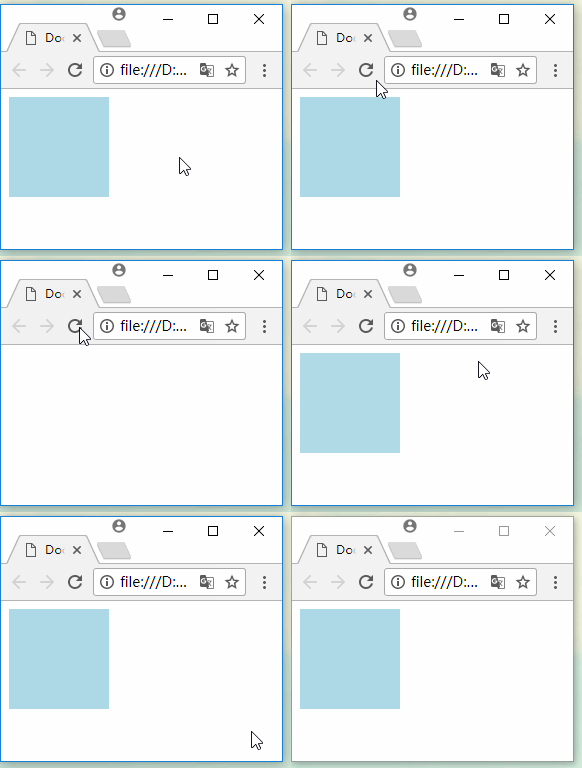
通过给JS添加或删除class,可以实现动态效果
<!DOCTYPE html>

<html lang="en">

<head>

<meta charset="UTF-8">

<title>Document</title>

<link rel="stylesheet" href="https://unpkg.com/animate.css@3.5.2/animate.min.css">

<style>

.box{height: 100px;width: 100px;background-color: lightblue}

</style>

</head>

<body>

<button id="btn1">添加</button>

<button id="btn2">移除</button>

<div id="box" class="box"></div>

<script>

var oBtn1 = document.getElementById('btn1');

var oBtn2 = document.getElementById('btn2');

var oBox = document.getElementById('box');

oBtn1.onclick = function(){

  oBox.classList.add('animated');

  oBox.classList.add('flash');

}

oBtn2.onclick = function(){

  oBox.classList.remove('flash');

}

</script>

</body>

</html>
至于动画的配置参数,比如动画持续时间,动画的执行次数等等,可以在元素上自行定义,覆盖掉animate.css里面所定义的就行了
<!DOCTYPE html>

<html lang="en">

<head>

<meta charset="UTF-8">

<title>Document</title>

<link rel="stylesheet" href="https://unpkg.com/animate.css@3.5.2/animate.min.css">

<style>

.box{height: 100px;width: 100px;background-color: lightblue}

.infinite{animation-iteration-count:infinite;}

</style>

</head>

<body>

<button id="btn1">添加循环的动画效果</button>

<button id="btn2">移除</button>

<div id="box" class="box"></div>

<script>

var oBtn1 = document.getElementById('btn1');

var oBtn2 = document.getElementById('btn2');

var oBox = document.getElementById('box');

oBtn1.onclick = function(){

  oBox.classList.add('animated');

  oBox.classList.add('flash');

  oBox.classList.add('infinite');

}

oBtn2.onclick = function(){

  oBox.classList.remove('flash');

}

</script>

</body>

</html>
CSS动画框架Loaders.css +animate.css的更多相关文章
- CSS3动画animation认识,animate.css的使用
CSS动画 可以取代js动画 在移动端会更加流畅! 下面是一个的绘制太阳系各大行星运行轨迹笔记,可以自学参考! -------------------------------------------- ...
- Web高性能动画及渲染原理(1)CSS动画和JS动画
目录 一. CSS动画 和 JS动画 1.1 CSS动画 1.2 JS动画 1.3 小结 二. 使用Velocity.js实现动画 示例代码托管在:http://www.github.com/dash ...
- 高性能Web动画和渲染原理系列(1)——CSS动画和JS动画
[摘要] 介绍CSS动画和JS动画的基本特点,以及轻量级动画库velocity.js的基本用法. 示例代码托管在:http://www.github.com/dashnowords/blogs 博客园 ...
- 【JavaScript框架封装】实现一个类似于JQuery的基础框架、事件框架、CSS框架、属性框架、内容框架、动画框架整体架构的搭建
/* * @Author: 我爱科技论坛 * @Time: 20180715 * @Desc: 实现一个类似于JQuery功能的框架 * V 1.0: 实现了基础框架.事件框架.CSS框架.属性框架. ...
- Ionic3学习笔记(五)动画之使用 animate.css
本文为原创文章,转载请标明出处 目录 前言 animate.css 的使用 animate.scss 的使用 1. 前言 animate.css 是一款强大的.跨浏览器的预设CSS3动画库,内置了很多 ...
- CSS--使用Animate.css制作动画效果
一 使用Animate.css动画 // 通过@import引入外部CSS资源; // 引入线上图片及JS文件; // 通过更改CSS类名生成不同类型的CSS3动画; <!DOCTYPE h ...
- animate.css的使用
前面的话 animate.css是一个使用CSS3的animation制作的动画效果的CSS集合,里面预设了很多种常用的动画,且使用非常简单.本文将详细介绍animate.css的使用 引入 anim ...
- Animate.css介绍
Animate.css简介 animate.css 动画库,预设了抖动(shake).闪烁(flash).弹跳(bounce).翻转(flip).旋转(rotateIn/rotateOut).淡入淡出 ...
- 强大的CSS3动画库animate.css
今天要给大家介绍一款强大的CSS3动画库animate.css,animate.css定义了大概50多种动画形式,包括淡入淡出,文字飞入.左右摇摆动画等等.使用animate.css也非常简单,你可以 ...
随机推荐
- Dos.ORM使用教程
Dos.C#.Net使用 Dos.ORM(原Hxj.Data)于2009年发布,并发布实体生成工具.在开发过程参考了多个ORM框架,特别是NBear,MySoft.EF.Dapper等.吸取了他们的一 ...
- Django(part2)
admin site:django自带了admin site,我们需要创建能访问site的用户 #以交互的方式创建超级用户 manage.py createsuperuser 如果要把model加到a ...
- sharding-jdbc,轻量级数据库分库分表中间件
Sharding-JDBC是当当应用框架ddframe中,从关系型数据库模块dd-rdb中分离出来的数据库水平分片框架,实现透明化数据库分库分表访问.Sharding-JDBC是继dubbox和ela ...
- SQL使用技巧-批量删除-批量更新-bcp导出-跨服务器sql
1.循环删除数据 while @@rowcount>0 begin delete top (1000) from T where OperateTime >=2014 ...
- HDU 1087 Super Jumping! Jumping! Jumping!【DP】
解题思路:题目的大意是给出一列数,求这列数里面最长递增数列的和 dp[i]表示到达地点i的最大值,那么是如何达到i的呢,则我们可以考虑没有限制条件时候的跳跃,即可以从第1,2,3,---,i-1个地点 ...
- yii2.0 利用Excel类做导入导出
1.在 common 目录下 创建一个 components 将 Classes目录(改名为PHPExcel)和PHPExcel.php 放在新创建的目录下.再在 components 下创建一个Co ...
- 不实例化一个 class 的时候使用它的property
class A: @property def name(self): " print(A.name) # <property object at 0x10d54cf98> cla ...
- DCDCBigBig's first blog @cnblogs~
其实初二末的时候我就在CSDN上开了博客(主要是为了存模板),但是无奈CSDN的页面真的太辣眼睛了…… 然后我就加入博客园欢快的大家庭啦!!!顺便膜拜巨佬学长%%%(我是蒟蒻不要喷我) 页面设置感谢x ...
- WPF内嵌WCF服务对外提供接口
要测试本帖子代码请记得管理员权限运行vs. 我写这个帖子的初衷是在我做surface小车的时候有类似的需求,感觉这个功能还挺有意思的,所以就分享给大家,网上有很多关于wcf的文章 我就不一一列举了.公 ...
- BZOJ 2565 最长双回文串(manacher)
565: 最长双回文串 Time Limit: 10 Sec Memory Limit: 128 MBSubmit: 3343 Solved: 1692[Submit][Status][Discu ...