
微信小程序_(组件)scroll-view可滚动视图
微信小程序scroll-view组件官方文档 传送门
提前准备:使用<view>组件制作五条撑满的横向区域
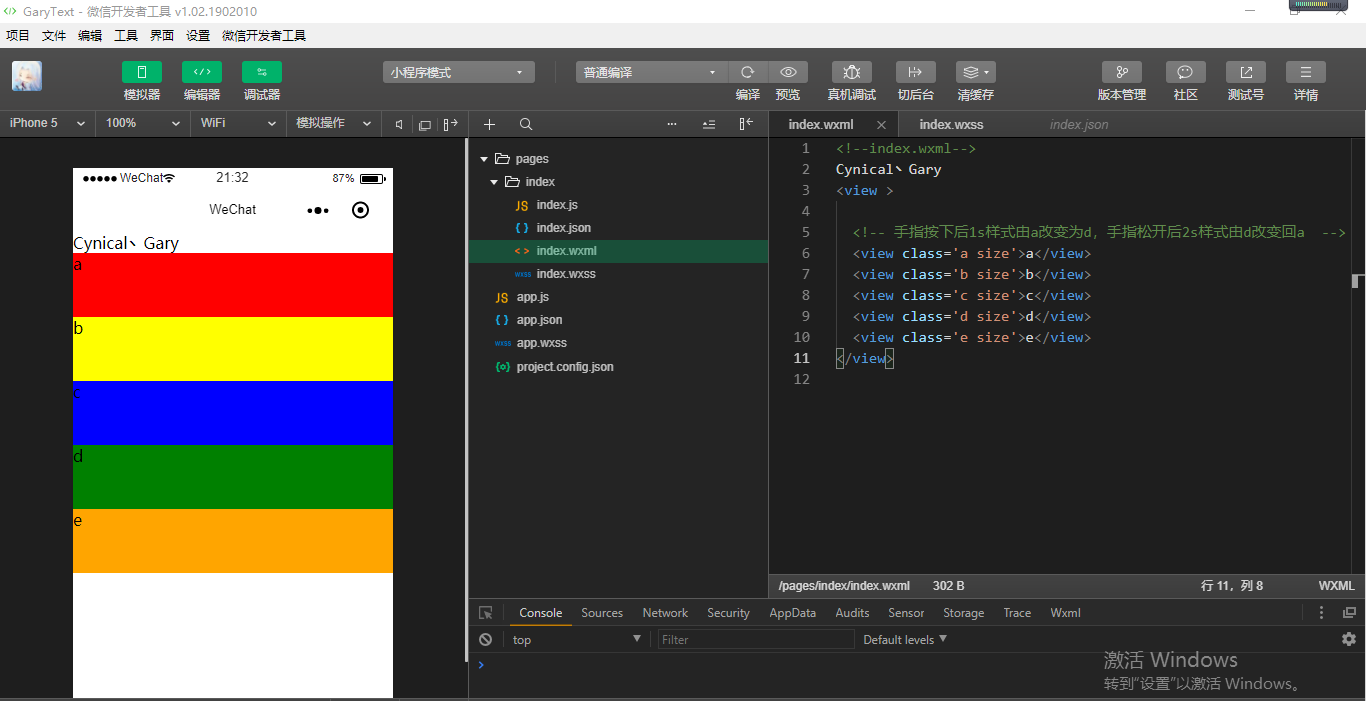
<!--index.wxml-->

Cynical丶Gary

<view >

  <!-- 手指按下后1s样式由a改变为d,手指松开后2s样式由d改变回a  -->

  <view class='a size'>a</view>

  <view class='b size'>b</view>

  <view class='c size'>c</view>

  <view class='d size'>d</view>

  <view class='e size'>e</view>

</view>
index.wxml
.container{

  display: flex;

}

.size{

  width: 100%;

  height: 150rpx;

}

.a{

  background: red;

  order:;

  flex:;

}

.b{

  background: yellow;

  order:;

  flex:;

}

.c{

  background: blue;

  order:;

  flex:;

}

.d{

  background: green;

  order:;

  flex:;

}

.e{

  background: orange;

  order:;

  flex:;

}
index.wxss
Learn
一、scroll-y属性
二、scroll-x属性
一、scroll-y属性
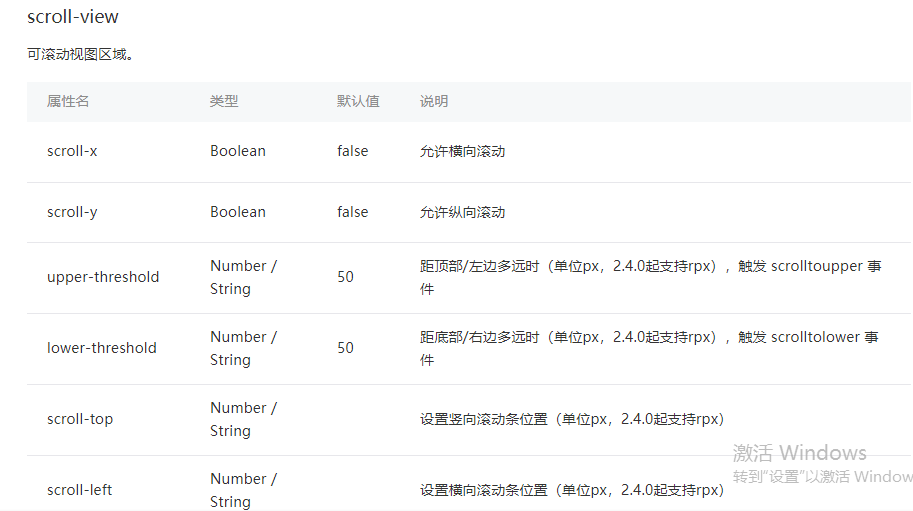
scroll-y:允许纵向滚动【默认值false】
使用<scroll-view>组件可以设置小程序中<view>组件纵向滚动,使用<scroll-view>组件时注意必须设置高度的样式如:style='height:300rpx'
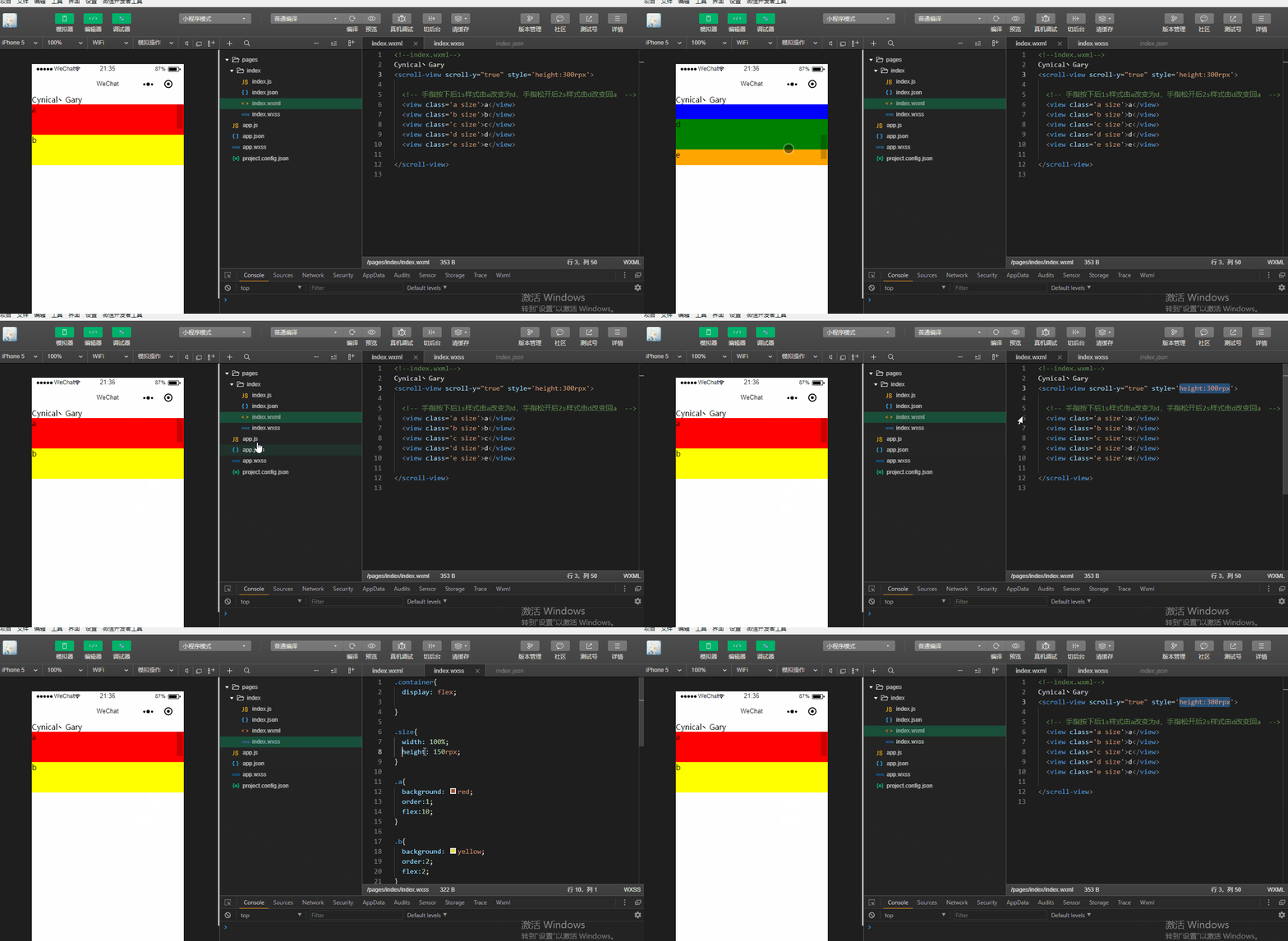
<!--index.wxml-->

Cynical丶Gary

<scroll-view scroll-y="true" style='height:300rpx'>

  <!-- 手指按下后1s样式由a改变为d,手指松开后2s样式由d改变回a  -->

  <view class='a size'>a</view>

  <view class='b size'>b</view>

  <view class='c size'>c</view>

  <view class='d size'>d</view>

  <view class='e size'>e</view>

</scroll-view>
index.wxml
.container{

  display: flex;

}

.size{

  width: 100%;

  height: 150rpx;

}

.a{

  background: red;

  order:;

  flex:;

}

.b{

  background: yellow;

  order:;

  flex:;

}

.c{

  background: blue;

  order:;

  flex:;

}

.d{

  background: green;

  order:;

  flex:;

}

.e{

  background: orange;

  order:;

  flex:;

}
index.wxss
upper-threshold:距顶部/左边多远时(单位px,2.4.0起支持rpx),触发 scrolltoupper 事件【默认值50】
lower-threshold:距底部/右边多远时(单位px,2.4.0起支持rpx),触发 scrolltolower 事件【默认值50】
bindscrolltoupper:滚动到顶部/左边,会触发 scrolltoupper 事件
bindscrolltolower:滚动到底部/右边,会触发 scrolltolower 事件
给<scroller-view>组件添加滚动触发事件
<scroll-view scroll-y="true" style='height:300rpx;' bindscrolltoupper="scrolltoupper" bindscrolltolower="scrolltolower" >
并在index.js中添加scrolltoupper函数事件和scrolltolower函数事件
  scrolltoupper:function(){

      console.log("滚动到顶部");

  },

  scrolltolower:function(){

    console.log("滚动到底部");

  }
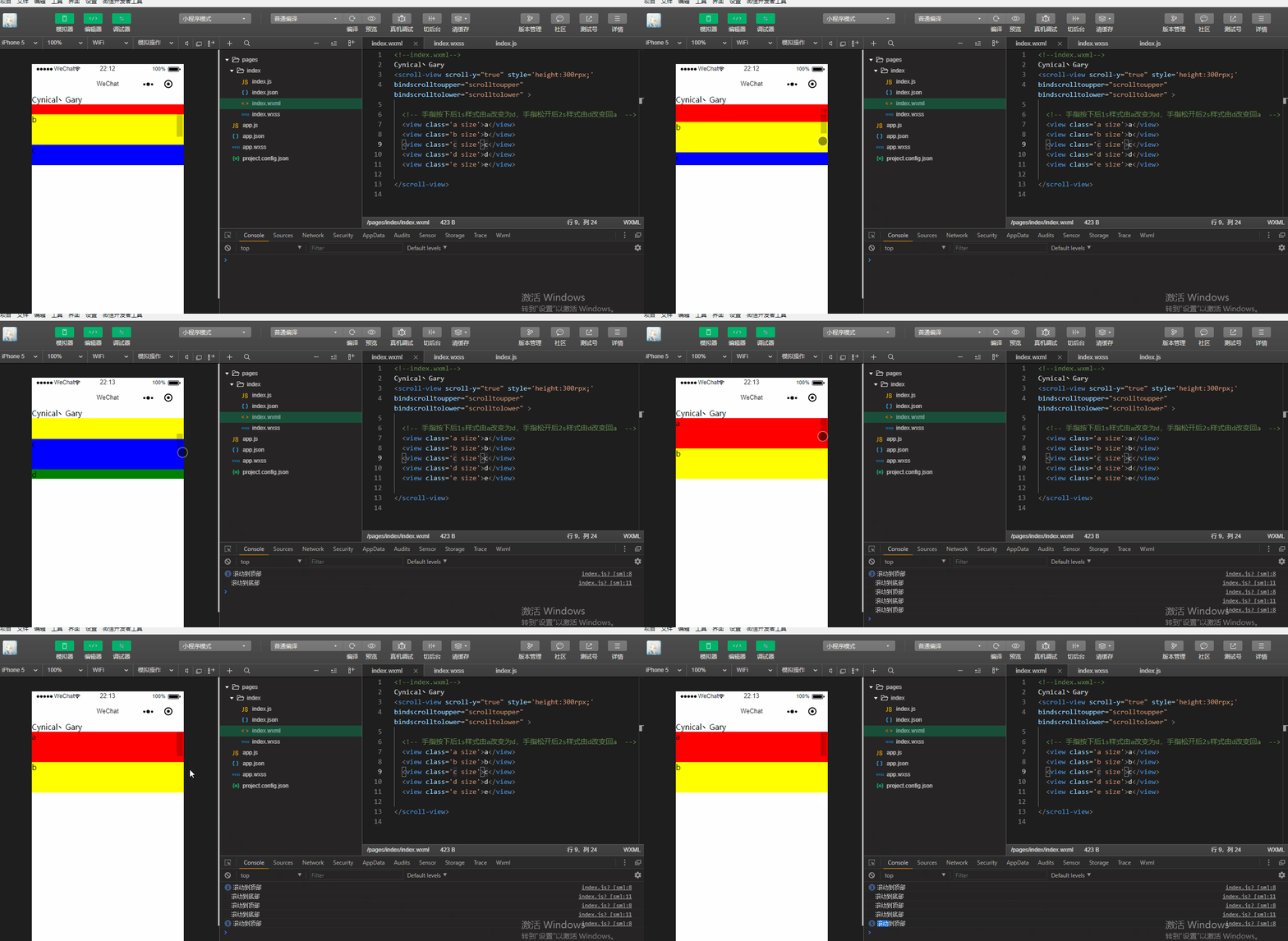
<!--index.wxml-->

Cynical丶Gary

<scroll-view scroll-y="true" style='height:300rpx;'

bindscrolltoupper="scrolltoupper" bindscrolltolower="scrolltolower" >

  <!-- 手指按下后1s样式由a改变为d,手指松开后2s样式由d改变回a  -->

  <view class='a size'>a</view>

  <view class='b size'>b</view>

  <view class='c size'>c</view>

  <view class='d size'>d</view>

  <view class='e size'>e</view>

</scroll-view>
index.wxml
.container{

  display: flex;

}

.size{

  width: 100%;

  height: 150rpx;

}

.a{

  background: red;

  order:;

  flex:;

}

.b{

  background: yellow;

  order:;

  flex:;

}

.c{

  background: blue;

  order:;

  flex:;

}

.d{

  background: green;

  order:;

  flex:;

}

.e{

  background: orange;

  order:;

  flex:;

}
index.wxss
Page({

  data:{

  },

  scrolltoupper:function(){

      console.log("滚动到顶部");

  },

  scrolltolower:function(){

    console.log("滚动到底部");

  }

})
index.js
当然我们也可以给<scroll-view>添加两个额外的属性upper-threshold和lower-threshold
upper-threshold:距顶部/左边多远时(单位px,2.4.0起支持rpx),触发 scrolltoupper 事件【默认值50】
lower-threshold:距底部/右边多远时(单位px,2.4.0起支持rpx),触发 scrolltolower 事件【默认值50】
使用方法
<scroll-view scroll-y="true" style='height:300rpx;'

bindscrolltoupper="scrolltoupper" bindscrolltolower="scrolltolower" upper-threshold="0" lower-threshold="0">
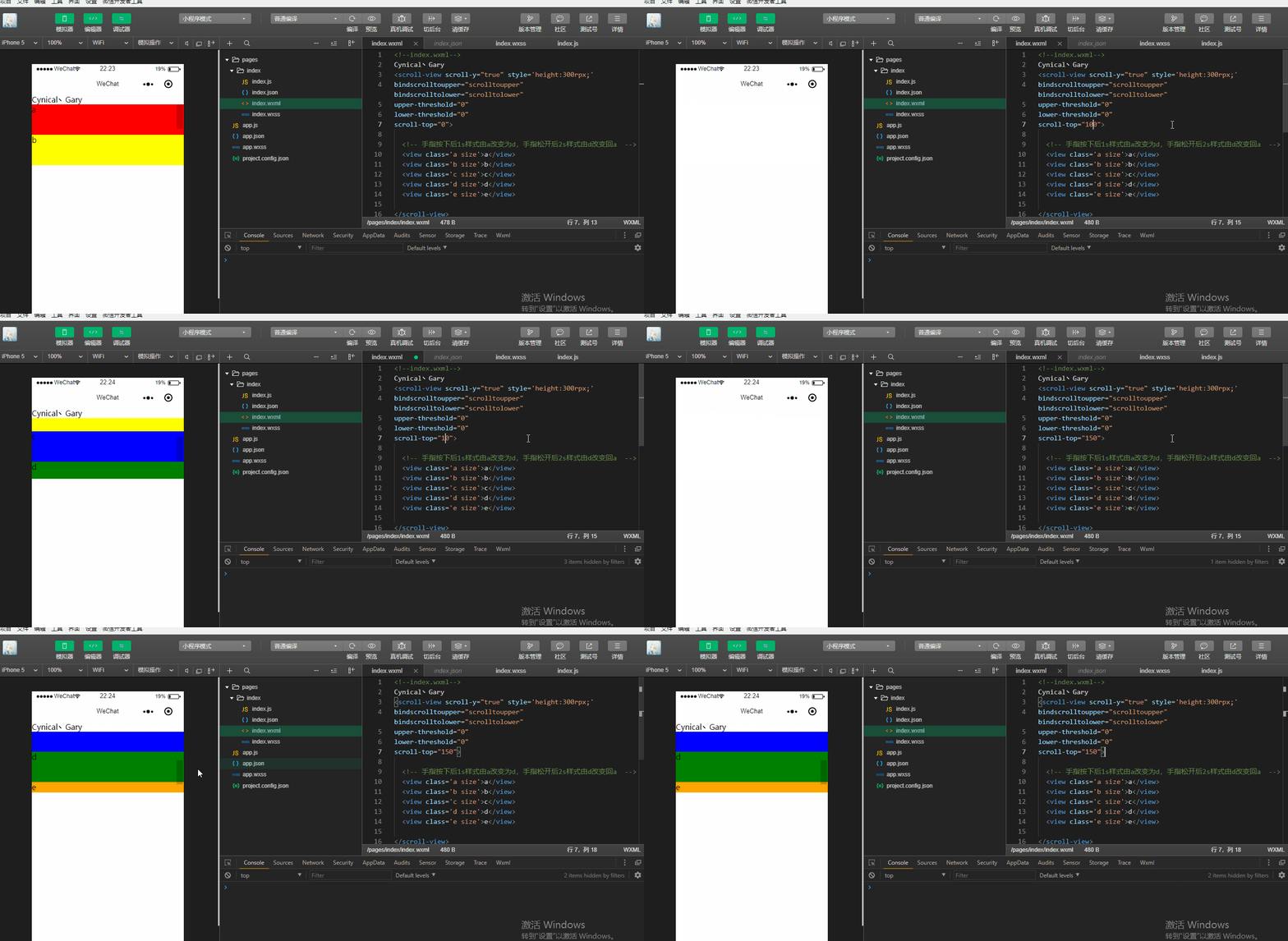
scroll-top:设置竖向滚动条位置(单位px,2.4.0起支持rpx)【无默认值】
可以看到,当我们设置scroll-top="100"时,滚动条默认出现在距离顶部100px位置的地方,当我们设置scroll-top="150"时,滚动条默认出现在距离顶部150px位置的地方
<!--index.wxml-->

Cynical丶Gary

<scroll-view scroll-y="true" style='height:300rpx;'

bindscrolltoupper="scrolltoupper" bindscrolltolower="scrolltolower"

upper-threshold="0"

lower-threshold="0"

scroll-top="150">

  <!-- 手指按下后1s样式由a改变为d,手指松开后2s样式由d改变回a  -->

  <view class='a size'>a</view>

  <view class='b size'>b</view>

  <view class='c size'>c</view>

  <view class='d size'>d</view>

  <view class='e size'>e</view>

</scroll-view>
index.wxml
.container{

  display: flex;

}

.size{

  width: 100%;

  height: 150rpx;

}

.a{

  background: red;

  order:1;

  flex:10;

}

.b{

  background: yellow;

  order:2;

  flex:2;

}

.c{

  background: blue;

  order:3;

  flex:1;

}

.d{

  background: green;

  order:4;

  flex:1;

}

.e{

  background: orange;

  order:5;

  flex:1;

}
index.wxss
Page({

  data:{

  },

  scrolltoupper:function(){

      console.log("滚动到顶部");

  },

  scrolltolower:function(){

    console.log("滚动到底部");

  }

})
index.js
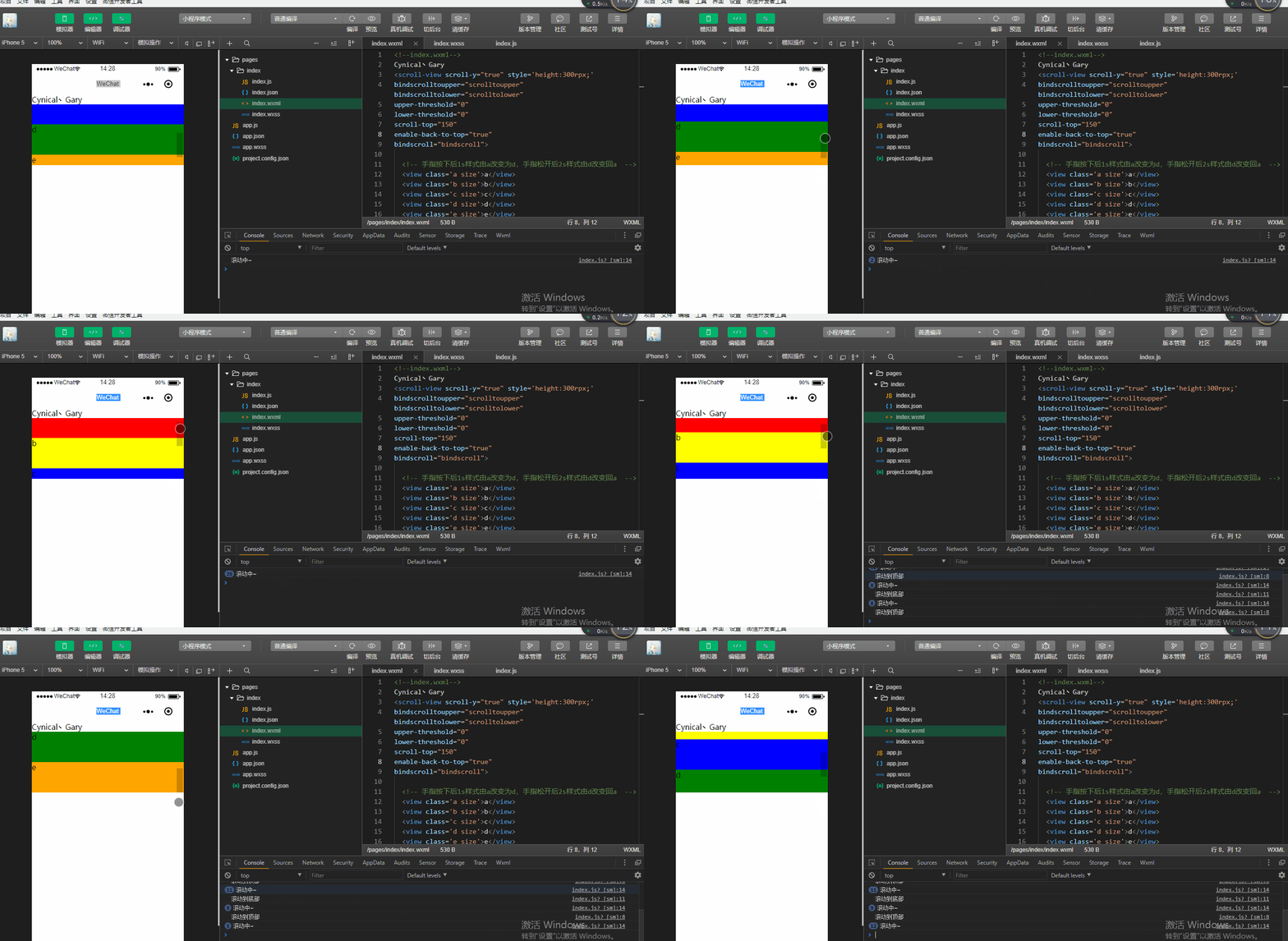
enable-back-to-top:iOS点击顶部状态栏、安卓双击标题栏时,滚动条返回顶部,只支持竖向【默认值false】
注意:微信小程序开发工具中默认在web环境中进行开发,而此属性需要在手机上运行~
bindscroll:滚动时触发,event.detail = {scrollLeft, scrollTop, scrollHeight, scrollWidth, deltaX, deltaY}
在index.js中添加滚动时触发的函数bindscroll()
  bindscroll:function(){

    console.log("滚动中~");

  }
在index.wxml中进行事件绑定bindscroll="bindscroll"
  <scroll-view scroll-y="true" style='height:300rpx;'

  bindscrolltoupper="scrolltoupper" bindscrolltolower="scrolltolower"

  upper-threshold="0"

  lower-threshold="0"

  scroll-top="150"

  enable-back-to-top="true"

  bindscroll="bindscroll">
<!--index.wxml-->

Cynical丶Gary

<scroll-view scroll-y="true" style='height:300rpx;'

bindscrolltoupper="scrolltoupper" bindscrolltolower="scrolltolower"

upper-threshold="0"

lower-threshold="0"

scroll-top="150"

enable-back-to-top="true"

bindscroll="bindscroll">

  <!-- 手指按下后1s样式由a改变为d,手指松开后2s样式由d改变回a  -->

  <view class='a size'>a</view>

  <view class='b size'>b</view>

  <view class='c size'>c</view>

  <view class='d size'>d</view>

  <view class='e size'>e</view>

</scroll-view>
index.wxml
Page({

  data:{

  },

  scrolltoupper:function(){

      console.log("滚动到顶部");

  },

  scrolltolower:function(){

    console.log("滚动到底部");

  },

  bindscroll:function(){

    console.log("滚动中~");

  }

})
index.js
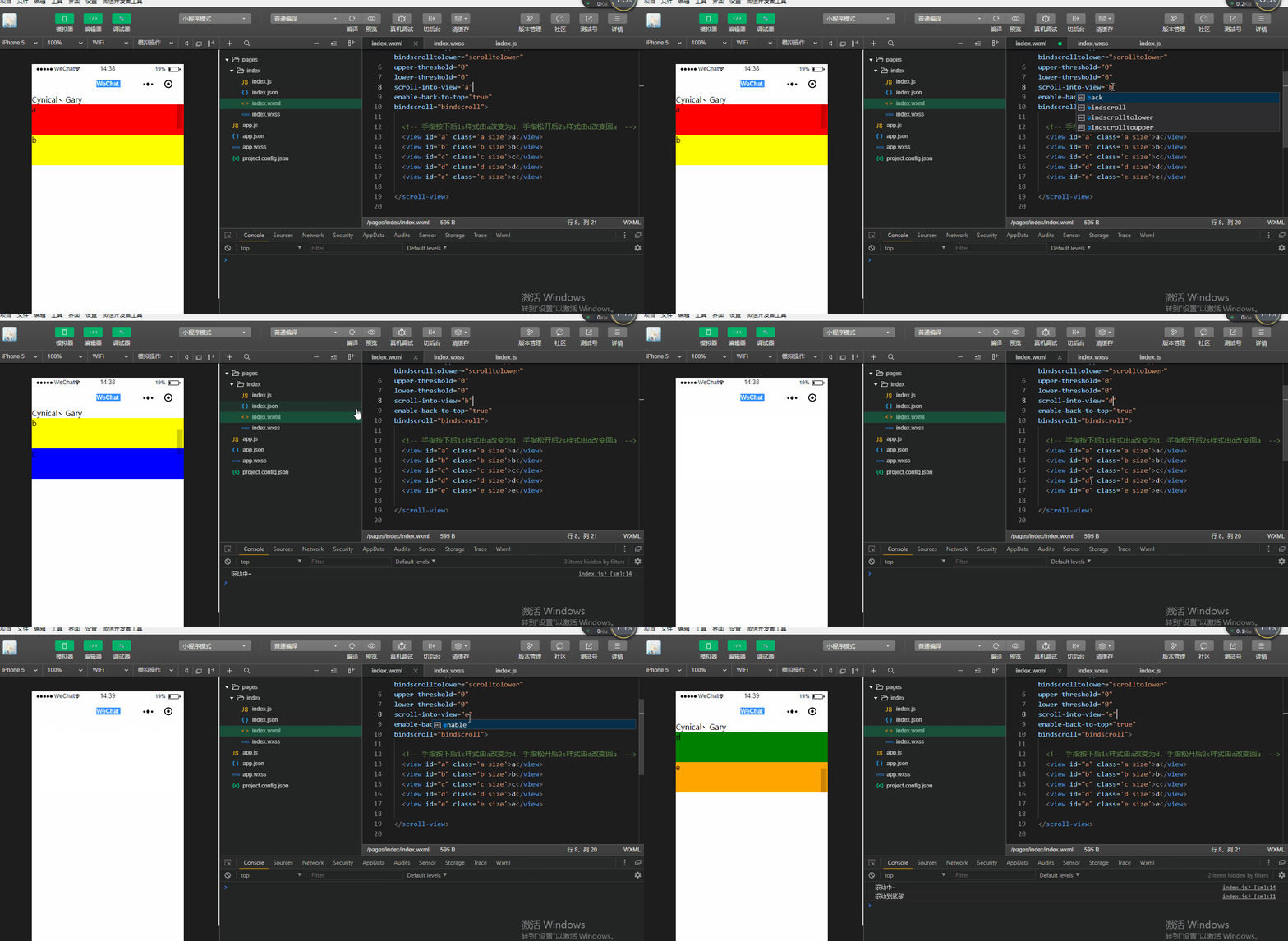
scroll-into-view:值应为某子元素id(id不能以数字开头)。设置哪个方向可滚动,则在哪个方向滚动到该元素
index.wxml中给五个<view>组件添加id元素
  <view id="a" class='a size'>a</view>

  <view id="b" class='b size'>b</view>

  <view id="c" class='c size'>c</view>

  <view id="d" class='d size'>d</view>

  <view id="e" class='e size'>e</view>
通过scroll-into-view给<scroll-view>组件添加属性
  <scroll-view scroll-y="true" style='height:300rpx;'

  bindscrolltoupper="scrolltoupper" bindscrolltolower="scrolltolower"

  upper-threshold="0"

  lower-threshold="0"

  scroll-into-view="e"

  enable-back-to-top="true"

  bindscroll="bindscroll">
<!--index.wxml-->

Cynical丶Gary

<!-- scroll-top="150" -->

<scroll-view scroll-y="true" style='height:300rpx;'

bindscrolltoupper="scrolltoupper" bindscrolltolower="scrolltolower"

upper-threshold="0"

lower-threshold="0"

scroll-into-view="e"

enable-back-to-top="true"

bindscroll="bindscroll">

  <!-- 手指按下后1s样式由a改变为d,手指松开后2s样式由d改变回a  -->

  <view id="a" class='a size'>a</view>

  <view id="b" class='b size'>b</view>

  <view id="c" class='c size'>c</view>

  <view id="d" class='d size'>d</view>

  <view id="e" class='e size'>e</view>

</scroll-view>
index.wxml
Page({

  data:{

  },

  scrolltoupper:function(){

      console.log("滚动到顶部");

  },

  scrolltolower:function(){

    console.log("滚动到底部");

  },

  bindscroll:function(){

    console.log("滚动中~");

  }

})
index.js
二、scroll-x属性
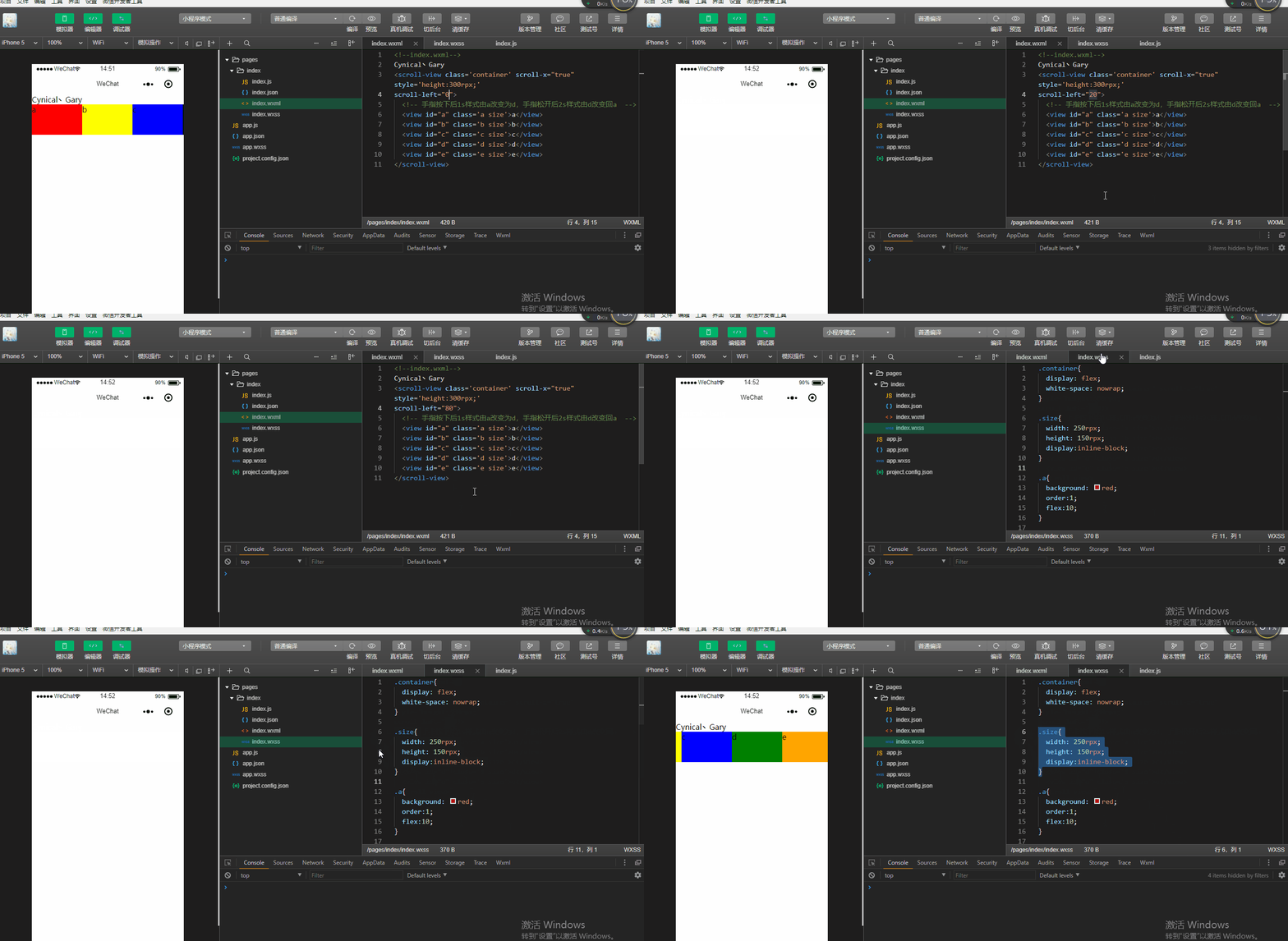
scroll-x:允许横向滚动【默认值为false】
scroll-left:设置横向滚动条位置(单位px,2.4.0起支持rpx)
<!--index.wxml-->

Cynical丶Gary

<scroll-view class='container' scroll-x="true" style='height:300rpx;'

scroll-left="200">

  <!-- 手指按下后1s样式由a改变为d,手指松开后2s样式由d改变回a  -->

  <view id="a" class='a size'>a</view>

  <view id="b" class='b size'>b</view>

  <view id="c" class='c size'>c</view>

  <view id="d" class='d size'>d</view>

  <view id="e" class='e size'>e</view>

</scroll-view>
index.wxml
.container{

  display: flex;

  white-space: nowrap;

}

.size{

  width: 250rpx;

  height: 150rpx;

  display:inline-block;

}

.a{

  background: red;

  order:;

  flex:;

}

.b{

  background: yellow;

  order:;

  flex:;

}

.c{

  background: blue;

  order:;

  flex:;

}

.d{

  background: green;

  order:;

  flex:;

}

.e{

  background: orange;

  order:;

  flex:;

}
index.wxss
Page({

  data:{

  },

  scrolltoupper:function(){

      console.log("滚动到顶部");

  },

  scrolltolower:function(){

    console.log("滚动到底部");

  },

  bindscroll:function(){

    console.log("滚动中~");

  }

})
index.js
微信小程序_(组件)scroll-view可滚动视图的更多相关文章
- 微信小程序_(组件)icon、text、rich-text、progress四大基础组件
微信小程序基础组件官方文档 传送门 Learn 一.icon图标组件 二.rich-text富文本组件 三.text文本组件 四.progress进度条组件 一.icon图标组件 type:icon的 ...
- 微信小程序_(组件)可拖动movable-view
微信小程序movable-view组件官方文档 传送门 Learn 一.moveable-view组件 一.movable-view组件 direction:movable-view的移动方向,属性值 ...
- 微信小程序_(组件)view视图容器
微信小程序view组件官方文档 传送门 Learn 一.hover-class属性 二.hover-start-time与hover-stay-time属性 三.hover-stop-propagat ...
- 微信小程序_(组件)picker
picker组件效果 官方文档:传送门 Page({ data: { array: ['美国', '中国', '巴西', '日本'], objectArray: [ { id: 0, name: '美 ...
- 微信小程序_(组件)组件基础
(progress.text.block) 组件基础效果 官方文档:传送门 Page({ /** * 页面的初始数据 */ data: { text:"Gary 微信小程序\n", ...
- 微信小程序_(组件)canvas画布
canvas画布效果 官方文档:传送门 Page({ canvasIdErrorCallback: function (e) { console.error(e.detail.errMsg) }, o ...
- 微信小程序_(组件)swiper轮播图
微信小程序swiper轮播图组件官方文档 传送门 Learn: swiper组件 一.swiper组件 indicator-dots:是否显示面板指示点[默认值false] autoplay:是否自动 ...
- 微信小程序_(组件)flex布局
小程序建议使用flex布局进行排版 flex是一个盒装弹性布局 flex是一个容器,所有子元素都是他的成员 定义布局:display:flex flex容器的属性: 一.flex-direction: ...
- 微信小程序_(组件)form表单
Form表单.switch开关.数值选择器效果 官方文档:传送门 点击提交表单(按钮,提交开关,数值选择器,输入文本中)的值,显示在控制台上,点击重置,重置表单中的值. 实现过程 form表单,添加f ...
随机推荐
- VS2019 快捷键
工欲善其事,必先利其器,整理了下VS最常用的快捷键,查看了不少资料,汇总了下,没有的自己补充,可以打印,用Excel编辑的. 可编辑版本下载:Excel文件下载 你可能需要查询其他的快捷键,MSDN介 ...
- vue中移动端滚动事件,点击一次触发了事件两次(better-scroll)
解决办法一: 将button标签换成a标签 问题代码: <span class="submitBtn" @click.stop="replyReport()&quo ...
- 第二卷 第一章 伪IOC容器--羊墅
写在前面: Spring自诞生起,就被人称作“万能胶”,核心服务就是解耦 ,随着Spring5的出现,已经形成一个生态,被人称作spring全家桶,而且逐步在去serlvet化,去tomcat化,大有 ...
- java_day09_GUI事件
第九章:GUI事件 1.AWT事件模型概述 使用AWT或者Swing中的容器.组件和布局管理器就可以构建出图形界面,但是这时候该界面还并不能和用户进行交换,因为图形界面中的组件还没有添加事件监听器,所 ...
- linux wireless 基础知识 MAC80211 CFG80211
转:http://blog.csdn.net/liuxd3000/article/details/23761663 1. 基本概念 • cfg80211: 用于对无线设备进行配置管理.与Full ...
- python函数:函数参数、对象、嵌套、闭包与名称空间、作用域
今天的内容整理共有5部分 一.命名关键字参数 二.函数对象 三.函数的嵌套 四.名称空间与作用域 五.闭包函数 一.命名关键字参数 # 命名关键字参数: 在定义函数时,*与**之间参数称之为命名关键字 ...
- linux基础—课堂随笔08_进程(转)
进程优先级 命令 pstree -p 显示各个子线程 ps 进程状态(process state) UNIX风格:ps -ef BSD风格:ps aux 还有用到o参数,选项显示定制的信息: pid. ...
- PAT Basic 1056 组合数的和 (15 分)
给定 N 个非 0 的个位数字,用其中任意 2 个数字都可以组合成 1 个 2 位的数字.要求所有可能组合出来的 2 位数字的和.例如给定 2.5.8,则可以组合出:25.28.52.58.82.85 ...
- D - A or...or B Problem
题意:给定A,B,问[A,B]里取任意个数按位或,结果有多少种. 思路:这题需要找出一个分界点,即找到最高位的B是1,A是0的位置x(最低位从0开始),那么对于所有OR的结果,x处要么是1要么是0,x ...
- unittest 报告——HTMLTestRunner/BSTestRunner+代码覆盖率
1. HTMLTestRunner.py 代码(python3)如下: python2: https://github.com/tungwaiyip/HTMLTestRunner "&qu ...